
Pulumi Cloud 现已支持 Google Sign-In
Source: Pulumi Blog
许多开发者和平台工程师已经每天使用 Google 账户来收发邮件、访问云控制台以及进行协作。此前,登录 Pulumi Cloud 必须使用 GitHub、GitLab 或 Atlassian 账户,或使用邮箱/密码组合。今天,我们将 Google 作为一等身份提供商加入进来,这样你就可以使用已经用于其他所有服务的 Google 账户登录 Pulumi Cloud。
将 Google 作为身份提供商带来了多项好处:
- 使用已有的账户。如果你的团队已经在 Google Workspace 中,您只需一次点击即可登录 Pulumi Cloud,无需新凭据。
- 继承现有的安全策略。如果你已经在 Google Workspace 中配置了双因素认证、设备管理以及其他防护措施,这些会自动在 Pulumi Cloud 中生效。
工作原理
注册或登录
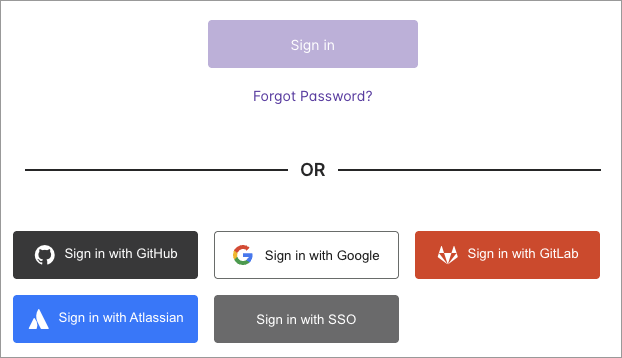
在 Pulumi Cloud 登录页面,你会看到一个新的 Sign in with Google(使用 Google 登录)按钮,位于现有的 GitHub、GitLab 和 Atlassian 选项旁边。如果你是新用户,点击它,用你的 Google 账户进行身份验证,即可进入。
如果你已经拥有 Pulumi Cloud 账户,请按照下一节的说明将其关联。
将 Google 连接到已有账户
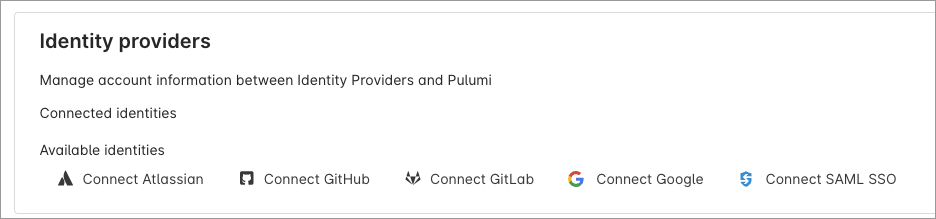
如果你已经有 Pulumi Cloud 账户,可以在账户设置中链接你的 Google 身份:
- 前往你的 Account Settings。
- 滚动至 Identity providers(身份提供商)部分。
- 在 Available identities(可用身份)下,选择 Connect Google(连接 Google)。
连接后,你即可使用 Google 登录已有的 Pulumi Cloud 账户。
Google 登录 vs. SAML SSO
Google 登录让你使用个人 Google 账户对 Pulumi Cloud 进行身份验证。它 不 将 Google 用作 Pulumi Cloud 组织的单点登录(SSO)身份提供商。
如果你的团队使用 Google Workspace 并需要对 Pulumi Cloud 实现集中化的成员治理,请改为配置 SAML SSO with Google Workspace。SAML SSO 仅在 Pulumi Enterprise 和 Business Critical 版本中提供。
开始使用
Google 登录现已对所有新老 Pulumi Cloud 用户开放:
- 新用户:在 Pulumi Cloud 注册页面上 Sign up with Google。
- 已有用户:在账户设置中 Connect your Google account。
更多细节,请参阅 Pulumi Cloud accounts documentation。
我们期待你的反馈。欢迎在 Pulumi Community Slack 中加入讨论,或在 GitHub 上提交 issue。