
使用 AWS Bedrock、Lambda 和 API Gateway 构建生产就绪的文本到文本 API
Source: Dev.to – Building a Production‑Ready Text‑to‑Text API with AWS Bedrock, Lambda & API Gateway
请提供您希望翻译的正文内容,我将按照要求保留源链接、格式和代码块进行简体中文翻译。
项目概述
本项目演示了如何使用 AWS Bedrock 和 Amazon Titan Text 设计并部署一个 可投入生产的文本到文本 AI API,通过 Amazon API Gateway 安全地对外提供,并由 AWS Lambda 提供动力。
目标是展示组织如何将生成式 AI 能力集成到真实的业务系统中,同时保持:
- 安全性
- 可扩展性
- 成本控制
- 可观测性
商业使用案例
许多组织希望利用生成式 AI 来实现:
- 内部协作助手
- 自动化内容生成
- 文本摘要
- 数据解释
- 客户支持自动化
直接将基础模型暴露给应用程序可能会带来安全、成本和治理风险。
本项目通过以下方式解决这些问题:
- 将基础模型抽象为受控的 API。
- 强制使用一致的提示词和参数。
- 集中管理访问、日志记录和成本控制。
其结果是一个 安全的 AI 服务层,可在多个团队和应用之间重复使用。
架构概览
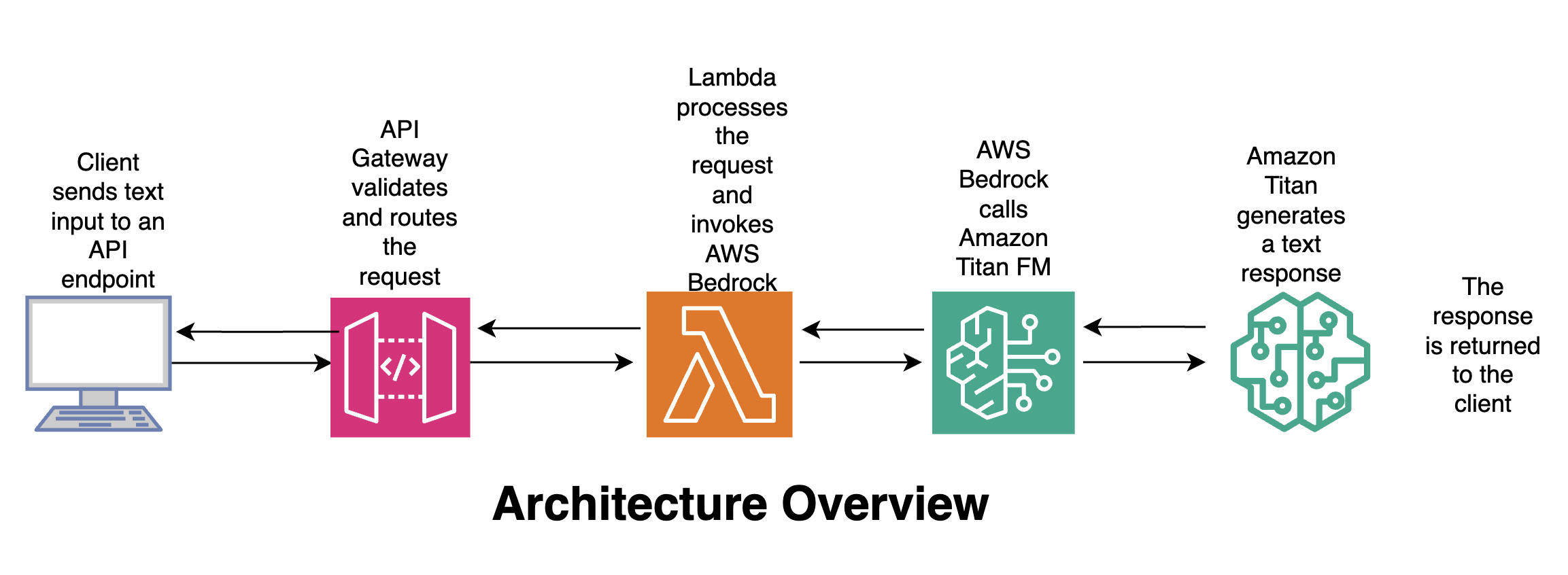
流程
- 客户端 – 将文本输入发送到 API 端点。
- API 网关 – 验证并路由请求。
- Lambda – 处理请求并调用 AWS Bedrock。
- Amazon Titan – 生成文本响应。
- 客户端 – 接收响应。
🛠️ 使用的工具和服务
| 服务 | 使用原因 |
|---|---|
| AWS Bedrock | 完全托管的服务,用于访问基础模型;无需管理基础设施;企业级安全;按使用量付费。 |
Amazon Titan Text (amazon.titan-text-express-v1) | 快速且成本高效的文本生成;适用于文本到文本的使用场景;在低温度下表现确定性;为企业工作负载而构建。 |
| AWS Lambda | 无服务器计算用于业务逻辑;处理请求验证和 AI 调用;自动扩展。 |
| Amazon API Gateway | 安全地将 AI 服务以 REST API 形式公开;提供身份验证、限流和监控;作为应用程序的公共接口。 |
| Python (Boto3) | 用于调用 Bedrock 的 AWS SDK;轻量且适合生产环境。 |
🧠 为什么这种设计很重要
- 无状态 AI 调用 – 基础模型不保留记忆。
- 显式控制 – 提示词和参数集中管理。
- 安全优先 – 通过 IAM 控制对 Bedrock 的访问。
- 成本管理 – 强制执行令牌上限和模型选择。
- 可复用性 – 多个应用可以共享同一 API。
这与在受监管和企业环境中构建 AI 平台的方式相吻合。
Source:
🧩 AWS Lambda:文本到文本处理逻辑
此示例展示了一个 Python AWS Lambda 函数,它:
- 从 API Gateway 接收文本。
- 调用 Amazon Bedrock(Titan Text 模型)。
- 返回生成的响应。
Lambda 充当您应用程序与基础模型之间的受控 AI 服务层。
1. 创建 Lambda 函数
| 步骤 | 操作 |
|---|---|
| 1 | 打开 AWS Management Console → Lambda。 |
| 2 | 点击 Create function。 |
| 3 | 选择 Author from scratch。 |
| 4 | 输入名称(例如 bedrock-text-to-text)。 |
| 5 | 选择 Python 3.x 作为运行时。 |
| 6 | 保持默认设置并点击 Create function。 |
2. 添加函数代码
将默认代码替换为来自 GitHub 仓库 的实现。
import json
import boto3
import os

# Initialise Bedrock client
bedrock = boto3.client(
    "bedrock-runtime",
    region_name=os.getenv("AWS_REGION")
)

def lambda_handler(event, context):
    """Handle API‑Gateway request, invoke Titan Text, and return the result."""
    # 1️⃣ Extract the text payload from the request body
    body = json.loads(event.get("body", "{}"))
    user_input = body.get("input", "")

    if not user_input:
        return {
            "statusCode": 400,
            "body": json.dumps({"error": "Missing 'input' in request body"})
        }

    # 2️⃣ Build the request payload for Titan Text
    payload = {
        "prompt": user_input,
        "temperature": 0.0,
        "maxTokens": 1024,
        "topP": 0.9,
        "stopSequences": []
    }

    # 3️⃣ Invoke the model
    try:
        response = bedrock.invoke_model(
            body=json.dumps(payload).encode("utf-8"),
            modelId="amazon.titan-text-express-v1",
            contentType="application/json",
            accept="application/json"
        )
        result = json.loads(response["body"].read())
        generated_text = result.get("completion", "")

        return {
            "statusCode": 200,
            "body": json.dumps({"output": generated_text})
        }

    # 4️⃣ Error handling
    except Exception as e:
        print(f"Error invoking Bedrock: {e}")
        return {
            "statusCode": 500,
            "body": json.dumps({"error": "Internal server error"})
        }
3. 调整 Lambda 设置
| 设置 | 推荐值 | 备注 |
|---|---|---|
| Timeout | 30 秒(或更高) | 为模型调用提供足够时间。 |
| Memory | 256 MiB | 对大多数文本到文本工作负载足够。 |
| Environment Variables | AWS_REGION(如果未自动设置) | Bedrock 客户端所需。 |
现在,Lambda 已准备好通过 API Gateway 接收文本,将其转发给 Amazon Titan Text,并返回生成的输出。 🎉
🔐 所需的 IAM 权限
Lambda 执行角色必须被授权调用 Bedrock 模型。(Lambda 已经拥有写入 CloudWatch 日志的权限。)
- 在 Lambda 控制台,进入 Configuration → Permissions。
- 点击 Role name 打开 IAM 角色。
- 附加以下内联策略(或将其添加到已有策略中):
{
  "Version": "2012-10-17",
  "Statement": [
    {
      "Sid": "AllowInvokeTitanText",
      "Effect": "Allow",
      "Action": [
        "bedrock:InvokeModel"
      ],
      "Resource": [
        "arn:aws:bedrock:*:*:model/amazon.titan-text-express-v1"
      ]
    }
  ]
}
提示: 如果计划使用其他 Bedrock 模型,请将它们的 ARN 添加到
Resource数组中。
📡 通过 API Gateway 暴露 Lambda
- 创建新 API – 在 API Gateway 中,选择 REST API(或选择 HTTP API 以获得更轻量的实现)。
- 添加 POST 方法 – 创建
/generate资源并添加 POST 方法。 - 配置集成 – 将 Integration type 设置为 Lambda Function,并选择您创建的 Lambda。
- 启用 CORS (如果 API 将被浏览器调用)。
- (可选)附加授权器 – 如 Cognito、JWT 等,以强制身份验证。
- 部署 API – 部署到某个阶段(例如
prod)。
🚀 测试端到端流程
curl -X POST https://<api-id>.execute-api.<region>.amazonaws.com/prod/generate \
  -H "Content-Type: application/json" \
  -d '{"input":"Explain the benefits of serverless architectures in 2 sentences."}'
预期的 JSON 响应
{
  "output": "Serverless architectures eliminate the need to manage infrastructure, allowing developers to focus on code. They also provide automatic scaling and pay‑as‑you‑go pricing, reducing operational costs."
}
📚 进一步阅读与资源
- AWS Bedrock 文档 – https://docs.aws.amazon.com/bedrock/
- Amazon Titan 文本模型卡 – https://aws.amazon.com/bedrock/titan-text/
- 无服务器 API 的最佳实践 – https://aws.amazon.com/blogs/compute/best-practices-for-building-serverless-apis/
{
  "Resource": [
    "arn:aws:bedrock:us-east-1::foundation-model/amazon.titan-text-express-v1"
  ]
}
Source: …
🌐 API 网关请求示例
-
创建 API – 在 API Gateway 控制台点击 Create API → REST API → Build。

-
创建资源 – 在 Resources 中点击 Create resource,输入名称并创建。

-
创建方法 – 点击 Create Method,选择 POST,选择 Lambda function 集成,启用 Lambda proxy integration,并选择你的 Lambda。

-
部署 API – 点击 Deploy API,创建一个新阶段,命名并部署。

-
复制调用 URL – 在 Stage details 页面,复制 Invoke URL,使用任意客户端(例如 Postman)进行测试。

测试请求(Postman)
POST https://05q0if5orb.execute-api.us-east-1.amazonaws.com/prod/text
Content-Type: application/json

{
  "text": "what is Amazon Bedrock"
}
✅ API 响应示例
{
  "response": "\nAmazon Bedrock is the name of AWS’s managed service for managing the underlying infrastructure that powers your intelligent bot. It is a collection of services that you can use to build, deploy, and scale intelligent bots at scale. Amazon Bedrock is a managed service that makes foundation models from leading AI startup and Amazon’s own Titan models available through APIs. For up‑to‑date information on Amazon Bedrock and how 3P models are approved, endorsed or selected please see the provided documentation and relevant FAQs."
}
🧠 为什么这种 Lambda 设计很重要
- 将基础模型置于安全的 API 之后。
- 强制使用一致的参数(temperature、token 限制)。
- 防止客户端直接访问 Bedrock。
- 实现日志记录、监控和治理。
这种模式常用于构建企业 AI 平台。
📦 示例用例
- 文本摘要 API
- AI 驱动的内容生成服务
- 分析解释引擎
- 内部 AI 助手后端
- 安全的生成式 AI 微服务