
构建一个霓虹风格的 Last.fm 吐槽机器人,年费仅 $1.75
Source: Dev.to
构建机器人 🤖
我去 Poe 并使用他们的 ScriptBot 功能创建了一个新机器人。我给它一个大致如下的系统提示:
“你是一个自命不凡的音乐评论家。你的工作是分析 Last.fm 个人资料并毫不留情地嘲讽它们。要讽刺、使用俚语,且毫不客气。”
在与 ScriptBot 反复迭代直到我对结果满意后,我得到了智能体 (lastfm-roaster),但我需要把输出从 Poe 导出到我的电子邮件。

密钥和凭证 🗝️
我们将使用 GitHub Actions 来运行此脚本,这意味着必须妥善保管 API 密钥。切勿在脚本中硬编码密码!
1️⃣ 获取密钥
| 密钥 | 获取方式 |
|---|---|
| Poe API Key | 前往 并复制你的密钥。 |
| Gmail 应用密码 | 在 Google 账户 → 安全 → 两步验证 → 应用密码,为 “Mail” 生成一个 16 位密码。 |
2️⃣ 在 GitHub 中存储
- 在 GitHub 上创建一个 私有 仓库。
- 前往 Settings → Secrets and variables → Actions。
- 添加以下三个 secret:
POE_API_KEYEMAIL_ADDRESSEMAIL_PASSWORD

第三步:代码 🐍
requirements.txt
openai
markdown
(是的,我们使用 openai!Poe 的 API 与 OpenAI 客户端兼容,使用起来非常简便。Gemini 2.5 Flash 通过 Poe API 引用,这样我就不必管理单独的密钥了。)
“霓虹”脚本 – lastfm_roast.py
import os
import smtplib
import markdown
import re
import itertools
from email.message import EmailMessage
from openai import OpenAI

# Configs (loaded safely from GitHub Secrets)
POE_API_KEY = os.environ.get("POE_API_KEY")
EMAIL_ADDRESS = os.environ.get("EMAIL_ADDRESS")
EMAIL_PASSWORD = os.environ.get("EMAIL_PASSWORD")
LASTFM_URL = "https://www.last.fm/user/profoundlypaige"

# --- NEON PALETTE ---
# A list of bright colors that look good on dark backgrounds
# (Pink, Cyan, Green, Orange, Purple, Yellow)
COLORS = ["#FF79C6", "#8BE9FD", "#50FA7B", "#FFB86C", "#BD93F9", "#F1FA8C"]

def get_roast():
    """Pings the Poe API to get the roast."""
    client = OpenAI(api_key=POE_API_KEY, base_url="https://api.poe.com/v1")
    try:
        print("🔥 Fetching roast from Poe...")
        response = client.chat.completions.create(
            model="lastfm-roaster",
            messages=[{"role": "user", "content": f"Roast my music taste: {LASTFM_URL}"}],
        )
        return response.choices[0].message.content
    except Exception as e:
        return f"Error fetching roast: {e}"

def inject_colors(html_content):
    """
    Finds every <b> tag and injects a different color from the palette.
    """
    color_cycle = itertools.cycle(COLORS)

    def replace_match(match):
        next_color = next(color_cycle)
        # Returns <b style="color: #...">...</b>
        return f''

    # Regex to replace <b> with the colored version
    return re.sub(r'', replace_match, html_content)

def create_html_email(roast_text):
    # 1. Convert Markdown to basic HTML
    raw_html = markdown.markdown(roast_text)

    # 2. Inject the rotating neon colors into bold tags
    colorful_html = inject_colors(raw_html)

    # 3. Wrap in the styled container
    html_template = f"""


        body {{ margin: 0; padding: 0; background-color: #121212; font-family: 'Helvetica Neue', Helvetica, Arial, sans-serif; }}
        .container {{
            max-width: 600px;
            margin: 40px auto;
            background-color: #1e1e1e;
            border-radius: 8px;
            padding: 20px;
            color: #f8f8f2;
        }}
        a {{ color: #8be9fd; }}


            {colorful_html}


    """
    return html_template

def send_email(html_content):
    msg = EmailMessage()
    msg["Subject"] = "Your Daily Last.fm Roast"
    msg["From"] = EMAIL_ADDRESS
    msg["To"] = EMAIL_ADDRESS
    msg.set_content("Your email client does not support HTML.", subtype="plain")
    msg.add_alternative(html_content, subtype="html")

    with smtplib.SMTP_SSL("smtp.gmail.com", 465) as smtp:
        smtp.login(EMAIL_ADDRESS, EMAIL_PASSWORD)
        smtp.send_message(msg)
        print("📧 Email sent!")

if __name__ == "__main__":
    roast = get_roast()
    html_email = create_html_email(roast)
    send_email(html_email)
GitHub Actions 工作流
创建 .github/workflows/roast.yml:
name: Daily Last.fm Roast

on:
  schedule:
    - cron: "0 8 * * *"   # Runs every day at 08:00 UTC
  workflow_dispatch:      # Allows manual runs

jobs:
  roast:
    runs-on: ubuntu-latest
    steps:
      - name: Checkout repository
        uses: actions/checkout@v4

      - name: Set up Python
        uses: actions/setup-python@v5
        with:
          python-version: "3.12"

      - name: Install dependencies
        run: pip install -r requirements.txt

      - name: Run roast script
        env:
          POE_API_KEY: ${{ secrets.POE_API_KEY }}
          EMAIL_ADDRESS: ${{ secrets.EMAIL_ADDRESS }}
          EMAIL_PASSWORD: ${{ secrets.EMAIL_PASSWORD }}
        run: python lastfm_roast.py
TL;DR
- 创建一个 Poe ScriptBot(
lastfm-roaster)。 - 将 API 密钥存储在 GitHub Secrets 中。
- 编写
lastfm_roast.py– 获取吐槽内容,注入霓虹色彩,并通过电子邮件发送。 - 添加 GitHub Actions 工作流,让脚本每天运行一次。
现在你再也不必隐藏那首尴尬的曲目——你只会每天收到一剂带有讽刺、炫彩嘲讽的“羞辱”,随时可以和朋友分享。祝使用愉快!
已清理的 Markdown 内容
下面是原始 markdown 段落的清理后版本。所有标题、代码块、图片和其他元素均已保留,但格式已整理以提升可读性。
CSS 与 HTML 模板
    .container {
        max-width: 800px;
        margin: 0 auto;
        background: #1e1e1e;
        color: #d1d5db;
        font-family: "Helvetica Neue", Helvetica, Arial, sans-serif;
        border-radius: 16px;
        overflow: hidden;
        box-shadow: 0 10px 30px rgba(0,0,0,0.5);
        border: 1px solid #333;
    }

    .header {
        background: linear-gradient(135deg, #2b2b2b 0%, #1a1a1a 100%);
        padding: 30px;
        text-align: center;
        border-bottom: 2px solid #333;
    }

    /* Gradient title text */
    .header h1 {
        margin: 0;
        font-size: 28px;
        letter-spacing: 2px;
        text-transform: uppercase;
        background: -webkit-linear-gradient(#FF79C6, #8BE9FD);
        -webkit-background-clip: text;
        -webkit-text-fill-color: transparent;
    }

    .content {
        padding: 30px;
        color: #d1d5db;
        line-height: 1.7;
        font-size: 16px;
    }

    h2 {
        color: #ffffff;
        border-left: 5px solid #BD93F9; /* Purple accent */
        padding-left: 15px;
        margin-top: 30px;
        text-transform: uppercase;
        font-size: 18px;
        letter-spacing: 1px;
    }

    ul { padding-left: 20px; }
    li { margin-bottom: 10px; }

    /* Link styles */
    a {
        color: #8BE9FD;
        text-decoration: none;
        border-bottom: 1px dotted #8BE9FD;
    }

    .footer {
        background-color: #121212;
        padding: 20px;
        text-align: center;
        font-size: 12px;
        color: #555;
    }
🔥 每日燃烧
{colorful_html}
由 Poe API、Gemini 2.5 Flash 和 GitHub Actions 新鲜提供
### Python 发送邮件脚本

```python
def create_html_email(roast_text):
    html_template = f"""


        Daily Roast
        {CSS_BLOCK}
🔥 每日燃烧
            {colorful_html}


            由 Poe API、Gemini 2.5 Flash 与 GitHub Actions 新鲜提供

            [查看你悲催的 Last.fm 个人资料]({LASTFM_URL})


"""
return html_template
def send_email(roast_text): msg = EmailMessage() msg[“Subject”] = “你的每日 Last.fm 嘲讽 🎸” msg[“From”] = EMAIL_ADDRESS msg[“To”] = EMAIL_ADDRESS msg.set_content(roast_text) msg.add_alternative(create_html_email(roast_text), subtype=‘html’)
try:
    with smtplib.SMTP_SSL("smtp.gmail.com", 465) as smtp:
        smtp.login(EMAIL_ADDRESS, EMAIL_PASSWORD)
        smtp.send_message(msg)
    print("✅ 邮件发送成功!")
except Exception as e:
    print(f"❌ 发送邮件失败: {e}")
if name == “main”: roast = get_roast() send_email(roast)
### 使用 GitHub Actions 自动化 🤖

创建 `.github/workflows/daily_roast.yml`:

```yaml
name: Daily Lastfm Roast
on:
  schedule:
    - cron: '0 12 * * *' # 每天中午 UTC

jobs:
  roast:
    runs-on: ubuntu-latest
    steps:
      - uses: actions/checkout@v2
      - uses: actions/setup-python@v2
        with:
          python-version: '3.9'
      - run: pip install -r requirements.txt
      - run: python lastfm_roast.py
        env:
          POE_API_KEY: ${{ secrets.POE_API_KEY }}
          EMAIL_ADDRESS: ${{ secrets.EMAIL_ADDRESS }}
          EMAIL_PASSWORD: ${{ secrets.EMAIL_PASSWORD }}
值不值得? 💸
这是我最喜欢的部分。Poe 会收取 计算点数 来运行模型(我使用的是 Gemini 2.5 Flash)。经过几次测试后,我记录了费用:
| 指标 | 数值 |
|---|---|
| 模型 | Gemini 2.5 Flash |
| 每次请求费用 | ~161 计算点 |
| 美元费用 | ~0.0048 美元/次嘲讽 |
年度费用:
$0.0048 × 365 天 = $1.75每年 $1.75 —— 只需不到两块钱,你就能拥有一个最先进的 LLM,分析你的收听趋势,并每天早上告诉你对独立流行音乐的品味是“复制且悲伤”。高价值 ROI! 📈
结果:前后对比
之前(聊天界面):
- 被困在应用中。
- 难以分享。
- 纯 Markdown 文本。
之后(霓虹升级版):
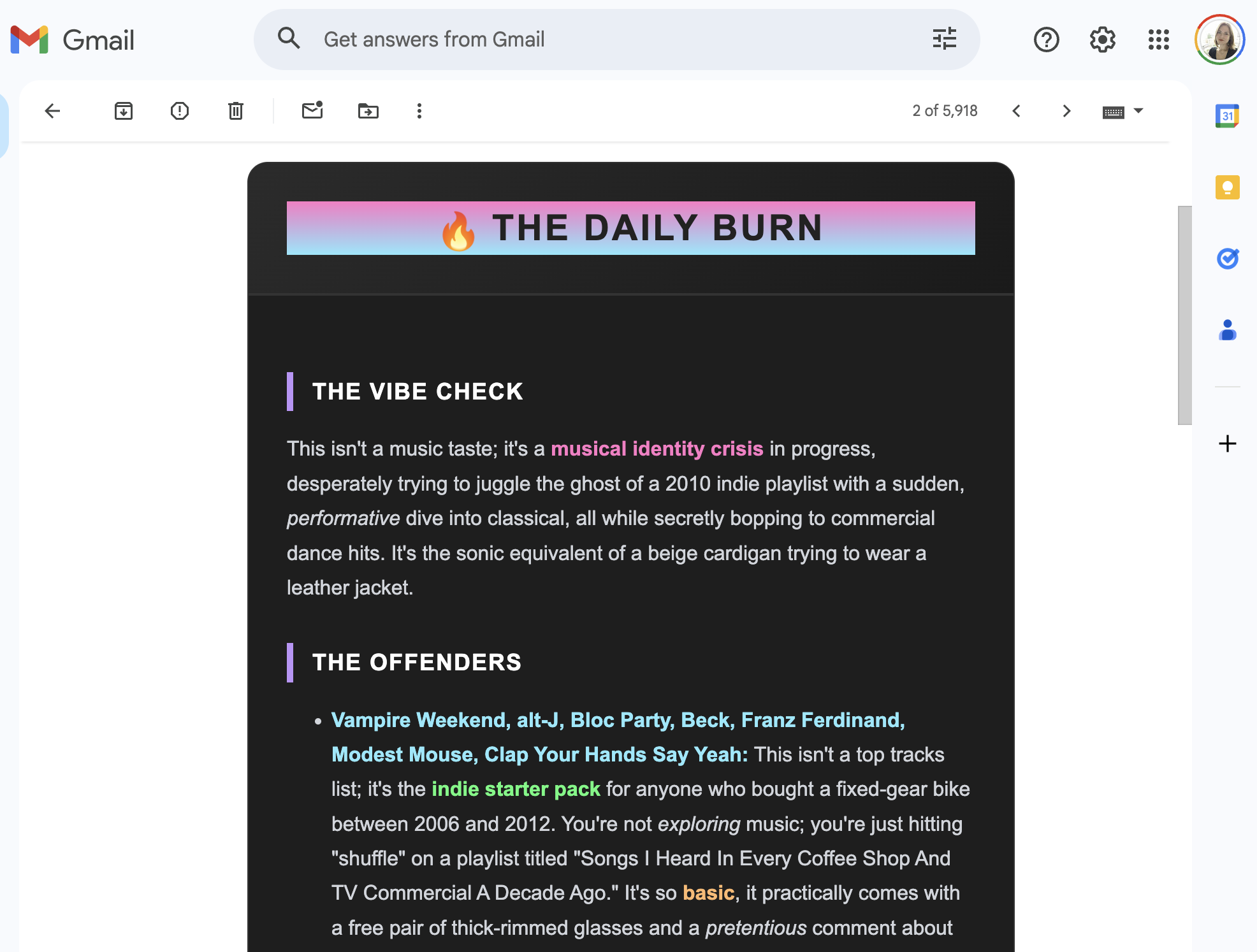
现在邮件展示了一个时尚的暗色模式卡片。乐队名称(被嘲讽的目标)以 粉红色、青色 和 绿色 高亮显示,毫不费力地让你知道 谁 成了被嘲笑的对象。因为是邮件,你可以立刻转发嘲讽给朋友,让他们也一起笑你的痛苦。
收尾
# (Custom Bot + API + HTML Generation + Actions)

This is my go‑to setup for almost all of my personal automation. It’s robust, free to host, and creates genuinely fun daily interactions.
提到的仓库
如果你尝试了,请在评论中告诉我,或者分享 AI 给你的最糟糕的吐槽。祝编码愉快!✨