
AWS Bedrock, Lambda 및 API Gateway를 사용한 프로덕션 준비된 텍스트‑투‑텍스트 API 구축
Source: Dev.to – Building a Production‑Ready Text‑to‑Text API with AWS Bedrock, Lambda & API Gateway
프로젝트 개요
이 프로젝트는 AWS Bedrock와 Amazon Titan Text를 사용하여 프로덕션 수준의 텍스트‑투‑텍스트 AI API를 설계하고 배포하는 방법을 보여줍니다. API는 Amazon API Gateway를 통해 안전하게 노출되고 AWS Lambda에 의해 구동됩니다.
목표는 조직이 실제 비즈니스 시스템에 생성형 AI 기능을 통합하면서 다음을 유지하도록 하는 방법을 제시하는 것입니다.
- 보안
- 확장성
- 비용 관리
- 가시성
비즈니스 사용 사례
많은 조직이 생성 AI를 활용하고자 합니다:
- 내부 코파일럿
- 자동 콘텐츠 생성
- 텍스트 요약
- 데이터 설명
- 고객 지원 자동화
기본 모델을 애플리케이션에 직접 노출하면 보안, 비용 및 거버넌스 위험이 발생할 수 있습니다.
이 프로젝트는 다음을 통해 해결합니다:
- 제어된 API 뒤에서 기본 모델을 추상화합니다.
- 일관된 프롬프트와 매개변수를 적용합니다.
- 접근, 로깅 및 비용 관리를 중앙화합니다.
그 결과는 여러 팀과 애플리케이션에서 재사용할 수 있는 보안 AI 서비스 레이어입니다.
Architecture Overview
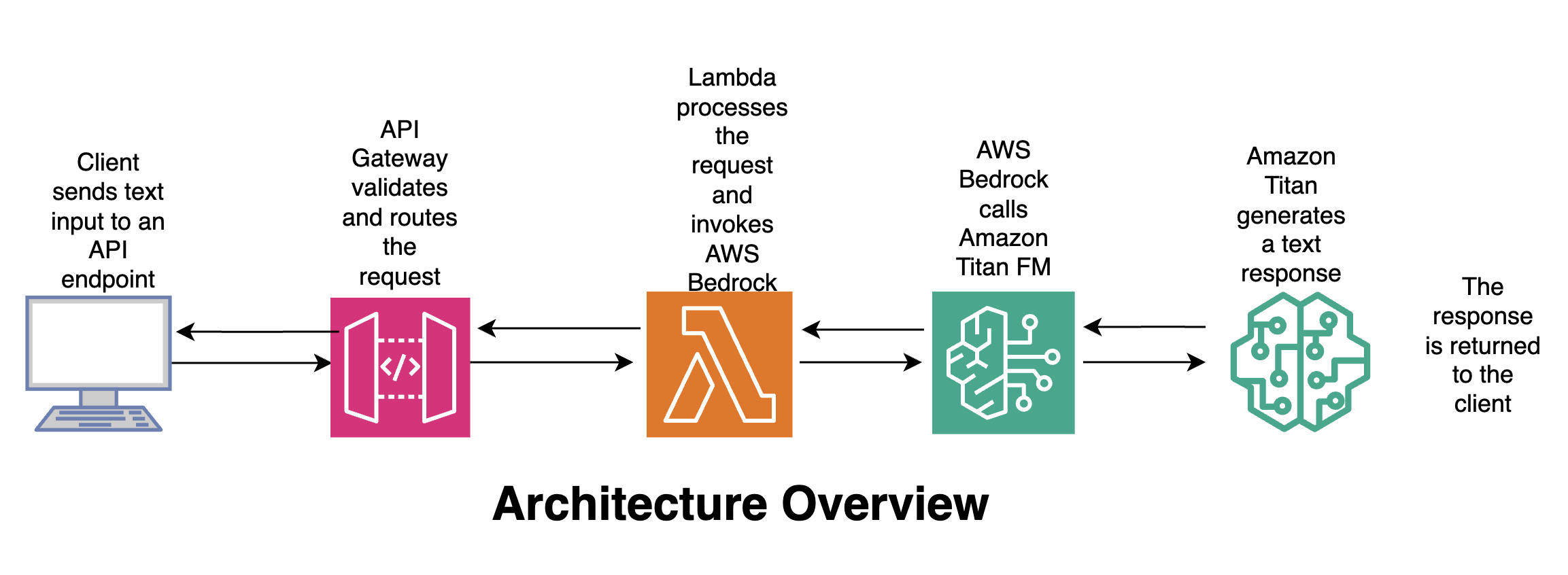
Flow
- Client – 텍스트 입력을 API 엔드포인트로 전송합니다.
- API Gateway – 요청을 검증하고 라우팅합니다.
- Lambda – 요청을 처리하고 AWS Bedrock을 호출합니다.
- Amazon Titan – 텍스트 응답을 생성합니다.
- Client – 응답을 수신합니다.
🛠️ 사용된 도구 및 서비스
| Service | Why it’s used |
|---|---|
| AWS Bedrock | 완전 관리형 서비스로, 기본 모델에 접근; 인프라 관리 불필요; 엔터프라이즈 수준 보안; 사용량 기반 과금. |
Amazon Titan Text (amazon.titan-text-express-v1) | 빠르고 비용 효율적인 텍스트 생성; 텍스트‑투‑텍스트 사용 사례에 이상적; 낮은 온도에서 결정론적 동작; 엔터프라이즈 워크로드용으로 설계. |
| AWS Lambda | 비즈니스 로직을 위한 서버리스 컴퓨팅; 요청 검증 및 AI 호출 처리; 자동으로 확장. |
| Amazon API Gateway | AI 서비스를 REST API로 안전하게 노출; 인증, 스로틀링, 모니터링 제공; 애플리케이션의 공개 인터페이스 역할. |
| Python (Boto3) | Bedrock 호출을 위한 AWS SDK; 가볍고 프로덕션 친화적. |
🧠 왜 이 설계가 중요한가
- 무상태 AI 호출 – 기본 모델은 메모리를 유지하지 않음.
- 명시적 제어 – 프롬프트와 파라미터가 중앙에서 관리됨.
- 보안‑우선 – IAM‑제어된 Bedrock 접근.
- 비용 관리 – 토큰 한도와 모델 선택이 강제됨.
- 재사용성 – 여러 애플리케이션이 동일한 API를 사용할 수 있음.
이는 규제 및 기업 환경에서 AI 플랫폼이 구축되는 방식과 일치합니다.
Source:
🧩 AWS Lambda: 텍스트‑투‑텍스트 처리 로직
이 예제는 다음을 수행하는 Python AWS Lambda 함수를 보여줍니다:
- API Gateway에서 텍스트를 수신합니다.
- Amazon Bedrock(Titan Text 모델)를 호출합니다.
- 생성된 응답을 반환합니다.
Lambda는 애플리케이션과 기본 모델 사이의 제어된 AI‑서비스 레이어 역할을 합니다.
1. Lambda 함수 만들기
| 단계 | 작업 |
|---|---|
| 1 | AWS Management Console → Lambda를 엽니다. |
| 2 | Create function을 클릭합니다. |
| 3 | Author from scratch를 선택합니다. |
| 4 | 이름을 입력합니다(예: bedrock-text-to-text). |
| 5 | 런타임으로 Python 3.x를 선택합니다. |
| 6 | 기본값을 그대로 두고 Create function을 클릭합니다. |
2. 함수 코드 추가
GitHub 저장소의 구현으로 기본 코드를 교체합니다.
import json
import boto3
import os

# Initialise Bedrock client
bedrock = boto3.client(
    "bedrock-runtime",
    region_name=os.getenv("AWS_REGION")
)

def lambda_handler(event, context):
    """Handle API‑Gateway request, invoke Titan Text, and return the result."""
    # 1️⃣ Extract the text payload from the request body
    body = json.loads(event.get("body", "{}"))
    user_input = body.get("input", "")

    if not user_input:
        return {
            "statusCode": 400,
            "body": json.dumps({"error": "Missing 'input' in request body"})
        }

    # 2️⃣ Build the request payload for Titan Text
    payload = {
        "prompt": user_input,
        "temperature": 0.0,
        "maxTokens": 1024,
        "topP": 0.9,
        "stopSequences": []
    }

    # 3️⃣ Invoke the model
    try:
        response = bedrock.invoke_model(
            body=json.dumps(payload).encode("utf-8"),
            modelId="amazon.titan-text-express-v1",
            contentType="application/json",
            accept="application/json"
        )
        result = json.loads(response["body"].read())
        generated_text = result.get("completion", "")

        return {
            "statusCode": 200,
            "body": json.dumps({"output": generated_text})
        }

    # 4️⃣ Error handling
    except Exception as e:
        print(f"Error invoking Bedrock: {e}")
        return {
            "statusCode": 500,
            "body": json.dumps({"error": "Internal server error"})
        }
3. Lambda 설정 조정
| 설정 | 권장 값 | 비고 |
|---|---|---|
| Timeout | 30 seconds(또는 그 이상) | 모델 호출에 충분한 시간 확보. |
| Memory | 256 MiB | 대부분의 텍스트‑투‑텍스트 작업에 충분. |
| Environment Variables | AWS_REGION(자동 설정되지 않을 경우) | Bedrock 클라이언트에 필요. |
이제 Lambda가 API Gateway를 통해 텍스트를 수신하고, Amazon Titan Text에 전달한 뒤, 생성된 출력을 반환할 준비가 되었습니다. 🎉
🔐 필요한 IAM 권한
Lambda 실행 역할은 Bedrock 모델을 호출할 수 있도록 허용되어야 합니다. (Lambda는 이미 CloudWatch에 로그를 기록할 권한을 가지고 있습니다.)
- Lambda 콘솔에서 Configuration → Permissions 로 이동합니다.
- Role name을 클릭하여 IAM 역할을 엽니다.
- 다음 인라인 정책을 연결합니다 (또는 기존 정책에 추가합니다):
{
  "Version": "2012-10-17",
  "Statement": [
    {
      "Sid": "AllowInvokeTitanText",
      "Effect": "Allow",
      "Action": [
        "bedrock:InvokeModel"
      ],
      "Resource": [
        "arn:aws:bedrock:*:*:model/amazon.titan-text-express-v1"
      ]
    }
  ]
}
팁: 추가 Bedrock 모델을 사용할 계획이라면, 해당 모델들의 ARN을
Resource배열에 추가하세요.
📡 Lambda를 API Gateway를 통해 노출하기
- Create a new API – In API Gateway, choose REST API (or HTTP API for a lighter footprint).
- Add a POST method – Create a
/generateresource and add a POST method. - Configure the integration – Set Integration type to Lambda Function and select the Lambda you created.
- Enable CORS (if the API will be called from browsers).
- (Optional) Attach an authorizer – e.g., Cognito, JWT, etc., to enforce authentication.
- Deploy the API – Deploy to a stage (e.g.,
prod).
🚀 End‑to‑End 흐름 테스트
curl -X POST https://<api-id>.execute-api.<region>.amazonaws.com/prod/generate \
  -H "Content-Type: application/json" \
  -d '{"input":"Explain the benefits of serverless architectures in 2 sentences."}'
예상 JSON 응답
{
  "output": "Serverless architectures eliminate the need to manage infrastructure, allowing developers to focus on code. They also provide automatic scaling and pay‑as‑you‑go pricing, reducing operational costs."
}
📚 추가 읽을 거리 및 자료
- AWS Bedrock 문서 – https://docs.aws.amazon.com/bedrock/
- Amazon Titan 텍스트 모델 카드 – https://aws.amazon.com/bedrock/titan-text/
- 서버리스 API를 위한 모범 사례 – https://aws.amazon.com/blogs/compute/best-practices-for-building-serverless-apis/
{
  "Resource": [
    "arn:aws:bedrock:us-east-1::foundation-model/amazon.titan-text-express-v1"
  ]
}
Source:
🌐 API Gateway 요청 예시
-
API 생성 – API Gateway 콘솔에서 Create API → REST API → Build를 클릭합니다.

-
리소스 생성 – Resources에서 Create resource를 클릭하고 이름을 입력한 뒤 생성합니다.

-
메서드 생성 – Create Method를 클릭하고 POST를 선택한 뒤 Lambda function 통합을 선택합니다. Lambda proxy integration을 활성화하고 사용할 Lambda를 지정합니다.

-
API 배포 – Deploy API를 클릭하고 새 스테이지를 생성한 뒤 이름을 지정하고 배포합니다.

-
Invoke URL 복사 – Stage details 페이지에서 Invoke URL을 복사하고, Postman과 같은 클라이언트로 테스트합니다.

테스트 요청 (Postman)
POST https://05q0if5orb.execute-api.us-east-1.amazonaws.com/prod/text
Content-Type: application/json

{
  "text": "what is Amazon Bedrock"
}
✅ API 응답 예시
{
  "response": "\nAmazon Bedrock is the name of AWS’s managed service for managing the underlying infrastructure that powers your intelligent bot. It is a collection of services that you can use to build, deploy, and scale intelligent bots at scale. Amazon Bedrock is a managed service that makes foundation models from leading AI startup and Amazon’s own Titan models available through APIs. For up‑to‑date information on Amazon Bedrock and how 3P models are approved, endorsed or selected please see the provided documentation and relevant FAQs."
}
🧠 왜 이 Lambda 설계가 중요한가
- 기초 모델을 안전한 API 뒤에 두어 보호합니다.
- 일관된 파라미터(temperature, 토큰 제한)를 강제합니다.
- 클라이언트가 Bedrock에 직접 접근하는 것을 방지합니다.
- 로깅, 모니터링 및 거버넌스를 가능하게 합니다.
이 패턴은 기업 AI 플랫폼을 구축할 때 일반적으로 사용됩니다.
📦 Example Use Cases
- 텍스트 요약 API
- AI‑기반 콘텐츠 생성 서비스
- 분석 설명 엔진
- 내부 AI 어시스턴트 백엔드
- 보안 GenAI 마이크로서비스