
Why Your Load Balancer Still Sends Traffic to Dead Backends
Source: Hacker News
# Health Checking: Who Does It?

> A service reports healthy. The load balancer believes it. A request lands on it and times out. Another follows. Then ten more. By the time the system reacts, hundreds of requests have drained into a broken instance while users stared at a spinner.

Health checking sounds simple: ask if something is alive, stop sending traffic if it isn’t. In practice, the mechanism behind that check—and **who** performs it—determines:

- **Detection speed** – how quickly your system notices a failure.
- **Response accuracy** – whether traffic is rerouted only when truly needed.
- **Complexity leakage** – how much of the health‑checking logic ends up in your application code.

The answer is fundamentally different depending on where load balancing lives:

1. **Central proxy (e.g., a dedicated load balancer or API gateway).**
   - The proxy performs health probes on each backend.
   - It decides locally whether to route traffic, keeping the client oblivious to failures.

2. **Client‑side load balancing (e.g., service‑mesh sidecars or SDK‑based round‑robin).**
   - Each client runs its own health checks and maintains its own view of which instances are healthy.
   - Failure detection and routing decisions are distributed across all callers.

Understanding where the health‑checking responsibility resides is the first step toward building a resilient system that avoids the “spinner” scenario described above.
Two Models for Distributing Traffic {#two-models-for-distributing-traffic}
Before getting into health checks, it helps to be precise about what each model looks like.
Server‑Side Load Balancing {#server-side-load-balancing}
A dedicated proxy sits between clients and the backend fleet. Clients know one address: the load balancer. The load balancer knows the backend pool and decides where each request goes.
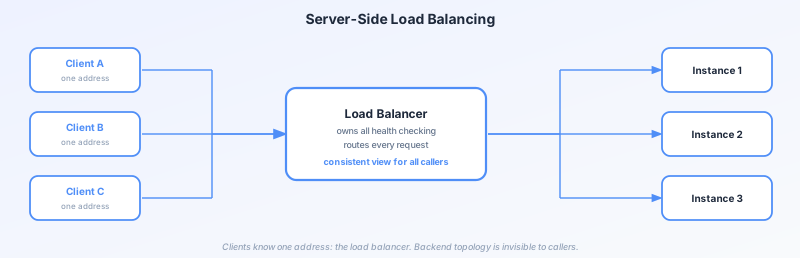
The load balancer is the single point of intelligence. It tracks backend health, maintains connection pools, and routes traffic. Clients are completely unaware of the backend topology; they see one stable address regardless of how many instances are behind it, or how many fail.
HAProxy, NGINX, AWS ALB, and most hardware appliances follow this model.
Client‑Side Load Balancing {#client-side-load-balancing}
The routing intelligence moves into the client. Each client holds a local view of the available backend instances, typically populated from a service registry, and makes its own routing decision on every request.
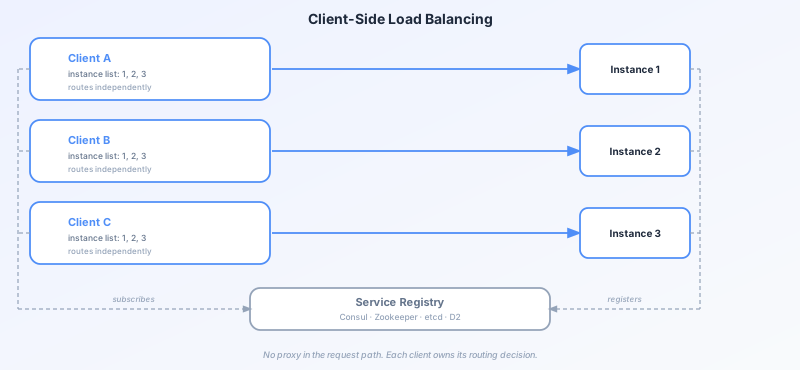
There is no proxy in the request path. A service registry keeps the authoritative list of instances. Clients subscribe to updates and maintain their own routing table. gRPC’s built‑in load balancing, Netflix Ribbon, and LinkedIn’s D2 all work this way. The registry often exposes instance addresses through DNS — which introduces its own propagation delays and failure modes, covered in It’s Always DNS.
Health Checking: Who Asks, and How
The two models produce fundamentally different answers to the same question: is this instance healthy?
Health Checking in Server‑Side Load Balancing
The load balancer owns health checking entirely. It runs periodic probes against each backend, typically a TCP connect, an HTTP request to a /health endpoint, or a custom command, on a fixed schedule.
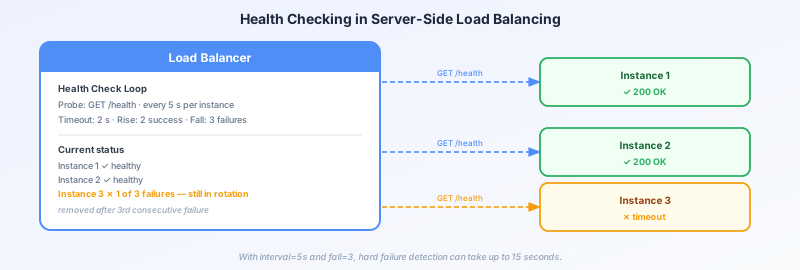
A typical configuration might look like:
- Interval: probe every 5 seconds
- Timeout: wait up to 2 seconds for a response
- Rise threshold: 2 consecutive successes to mark healthy
- Fall threshold: 3 consecutive failures to mark unhealthy
These thresholds exist to avoid flapping—toggling an instance in and out of rotation on a single transient failure. The downside is latency. With a 5‑second interval and a fall threshold of 3, a hard failure takes up to 15 seconds to detect. During that window, real traffic continues to hit the broken instance.
Once the load balancer marks an instance unhealthy, it removes it from the rotation immediately. No client needs to be updated; the change is in one place, takes effect instantly, and is consistent for all callers.
Health Checking in Client‑Side Load Balancing
With no central proxy, health checking is distributed. Each client must independently determine which instances in its local list are safe to use. There are two approaches, and most production systems use both.
Active health checks
The client (or a sidecar process) periodically probes each known instance, just like a server‑side load balancer would. The difference is that every client runs its own probe loop. With 500 clients each checking 20 instances every 5 seconds, that is 2 000 probe requests per second hitting your fleet, just for health signals, before any real traffic.
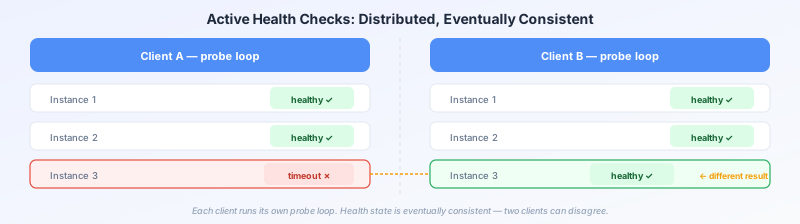
Each client forms its own independent view. Two clients probing the same instance at different moments can reach different conclusions, especially during the brief window when an instance is degrading. The fleet’s health state is eventually consistent rather than authoritative.
Passive health checks (outlier detection / failure tracking)
Instead of probing, the client watches the outcomes of real requests—connection refusals, timeouts, streams of 5xx responses, etc. These signals indicate that something is wrong with that instance. The client marks it unhealthy locally and stops routing to it for a back‑off period.
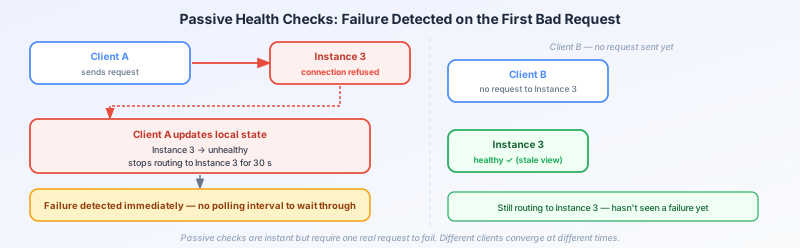
Passive checking has a meaningful advantage: failure detection is immediate. The first failed request triggers the response; there is no polling interval to wait through. The cost is that at least one real request must fail before the client reacts. In high‑throughput systems this is usually acceptable; in low‑traffic or bursty scenarios it can mean more user‑visible errors.
What Each Model Gets Right {#what-each-model-gets-right}
Server‑side Load Balancing
- Single source of truth – All clients see the same routing decisions without needing any knowledge of the backend topology.
- Operational simplicity –
- Health‑check configuration lives in one place.
- Changes propagate instantly to every caller.
- The backend is completely decoupled from routing logic.
- Typical use‑case – At modest scale (a few dozen services and hundreds of clients) this is almost always the right default.
Client‑side Load Balancing
- Scalability –
- Removes the central proxy, eliminating a bottleneck and a single point of failure.
- Reduces latency by keeping the request path local to the client.
- Provides passive health checking, giving sub‑request‑latency failure detection that a polling‑based central proxy cannot match.
- Trade‑offs –
- Distributed health state is harder to reason about; different clients may disagree on an instance’s health.
- Debugging routing anomalies requires inspecting state spread across hundreds of processes rather than a single point.
- Health‑check logic (thresholds, backoff, jitter, etc.) must be duplicated, tested, and maintained in every client library and language used by the organization.
Bottom line:
- Use server‑side load balancing when you value simplicity and have a modest number of services.
- Opt for client‑side load balancing when you need maximum scalability and latency reduction, and you’re prepared to handle the added operational complexity.
Choosing Between Them {#choosing-between-them}
There is no universal answer. The right model depends on your fleet size, call rates, operational maturity, and how much complexity you can manage in client libraries.
Server‑side load balancing
- Simplicity – easier to operate and reason about.
- Typical use case – works well for most teams and most services as a starting point.
Client‑side load balancing
- Scalability – shines when a central proxy becomes a bottleneck.
- Latency – provides sub‑millisecond failure detection and eliminates the overhead of an extra hop.
Hybrid approach
Many large systems combine both:
- Ingress layer – server‑side load balancing for external, uncontrollable clients.
- Internal service‑to‑service calls – client‑side load balancing where the client library can be standardized.
In this hybrid model, the health‑checking story and failure modes differ between layers. Understanding both is essential for reasoning clearly about where traffic actually goes when things go wrong.