
Why Android killed wide foldables and how it’s resurrecting them
Source: Android Authority
Tall fold or wide fold? Pick one.
1679 votes
Both Google and OPPO rejoined the masses with their next foldables, opting for designs that open in portrait orientation first, and no other company dared mess with that equation—until now. Rumor has it that Samsung has a new “wide” Galaxy Z Fold in the works1, and that made me realize something: it’s all Android’s fault — to a certain extent.
Why Android Originally Killed the Wide Foldable
Rita El Khoury / Android Authority
Google’s first foray into foldables with the Pixel Fold received a lukewarm response from testers and users. The device suffered a few hardware issues, but the biggest source of confusion was how it handled apps on the inner display.
Compatibility mode in Android 12L
In 2022 Google introduced compatibility modes in Android 12L — see the official Android 12L summary. The new system could detect whether an app was optimized for tablets and large displays and, if not, letterbox it (add black bars on the sides).
Previously, Android would simply stretch any app to fill the screen, often at the expense of usability and aesthetics. Google hoped that forcing letterboxing would push developers to adapt their apps for larger screens.
What actually happened
- User experience suffered. The black bars made apps look “unfinished” and reduced the usable screen area.
- Developers stayed idle. Even popular apps—Instagram, Booking.com, Roborock, Deliveroo, Tiqets, GetYourGuide, Too Good To Go, etc.—remained unoptimized. As of 2026 many of these apps still do not handle multiple display sizes or orientations gracefully.
- Orientation became a nightmare. On the Pixel Fold, an unoptimized app would occupy roughly half the inner screen in landscape mode. Rotating the device to portrait made the same app fill the entire display, forcing users to constantly switch orientations just to get a usable layout.
I experienced this first‑hand with Booking.com: in landscape the app was cramped; in portrait it suddenly expanded to full‑screen. I wanted to hold the phone open like a book and enjoy a seamless, full‑width experience, but the system forced me to treat the device more like a laptop.
The “square‑ish” workaround
The Pixel 9 Pro Fold changed aspect ratios, as reported by Android Authority (Pixel 9 Pro Fold aspect‑ratio story). Its inner display is slightly narrower than it is tall when opened, so many unoptimized apps now interpret the screen as portrait and immediately fill the width, eliminating the letterboxing effect.
Because the display is more square, rotating the device still shows a portrait‑styled UI on a landscape‑oriented screen, but the UI appears almost full‑screen, masking the underlying compatibility issue.
Bottom line
Google’s attempt to force developers to support large screens with Android 12L backfired:
- Few developers responded to the incentive.
- Users endured a sub‑par experience on both tablets and foldables.
- Google’s later hardware design (Pixel 9 Pro Fold) sidestepped the problem rather than solving it, effectively sweeping the issue under the rug while other Android foldable manufacturers adopted similar square‑ish form factors.
The result? Wide‑fold designs fell out of favor, and the “lazy‑developer” problem remains largely unsolved.
How Android Has Been Resurrecting Wider Folds
Rita El Khoury / Android Authority
If you’ve been watching tablets and foldables lately, you’ll know that Google has been working on a solution for the “letter‑boxed” problem that appears when portrait‑only apps run on wide screens. While newer square‑ish foldables don’t need it, tablets and wide foldables (e.g., the Pixel Fold) are often used in landscape, and keeping apps confined to a portrait window makes little sense.
The change in Android 14 QPR1
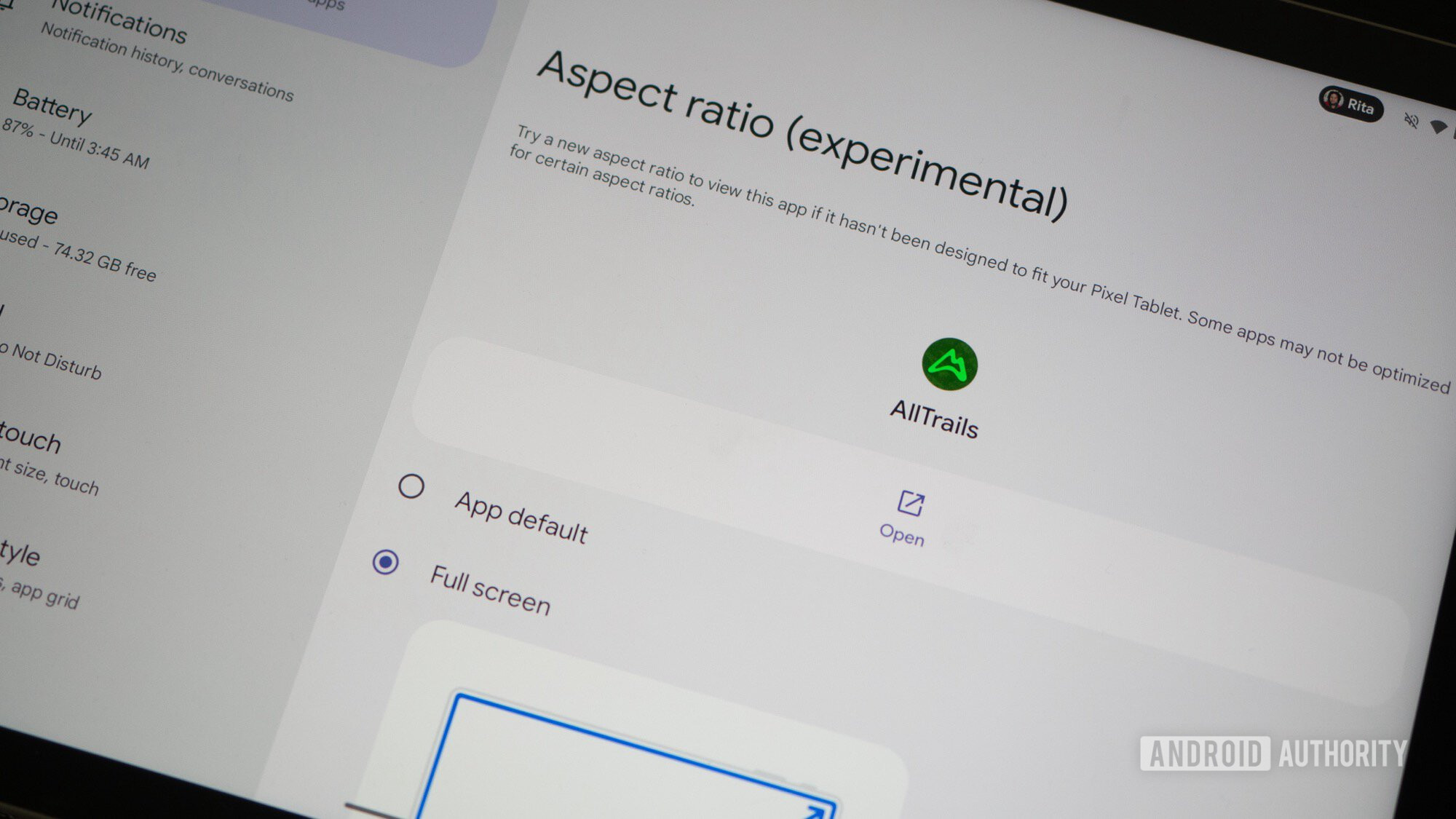
Starting with Android 14 QPR1, Google added a user‑controlled option to force unoptimized apps to go full‑screen – even if that might break part of the app’s layout.
How to use it:
- Open App Info for the app.
- Tap Aspect ratio.
- Choose App default, Full screen, or Half screen.
Android also shows a small icon on letter‑boxed apps that lets you switch to full‑screen with a single tap, without digging into the settings.
What this means for users
- A single tap now resizes a letter‑boxed app to full screen, fixing the biggest annoyance on wide foldables.
- In my experience, forcing apps (e.g., Booking.com) to full screen does not break or crop important UI elements.
- The extra stretching is usually harmless because most modern Android apps use responsive design, allowing them to reflow for larger landscape orientations even when they don’t explicitly declare support.
Check how elegantly Booking.com handles the forced full‑screen ratio – it looks as if it were built for a wide fold all along.
What’s coming in Android 16 and 17
- Android 16: The system will ignore an app’s aspect‑ratio preference on large foldables and tablets, though developers can still opt‑out.
- Android 17: The opt‑out option disappears. Apps targeting API level 37 must be resizable and support the system‑chosen aspect ratio.
These changes make the wide‑fold experience far more consistent. A user picking up a Pixel Fold today can simply tap a button to switch any app to full screen, and the choice persists for that app thereafter.
Timeline recap
| Android version | Impact on wide foldables |
|---|---|
| Android 12L (2023) | Reduced usability of wide foldables |
| Android 14 (2024) | Re‑introduced full‑screen forcing for unoptimized apps |
| Android 16 (2025) | System‑level override of app preferences on large screens |
| Android 17 (2026) | Mandatory resizability for all apps targeting API 37 |
With these improvements, 2026 is an ideal year for manufacturers to revive the foldable form factor. The prospect of Apple eventually releasing a wider iPhone Fold (see the leaked dimensions) adds extra incentive for the Android ecosystem.
Follow
Thank you for being part of our community. Please read our Comment Policy before posting.