
What happens when SQL Server PAGE gets corrupted ?
Source: Dev.to
Page Structure
Data files are divided into 8 KB pages, each consisting of:
| Component | Size | Description |
|---|---|---|
| Page Header | 96 bytes | Metadata about the page (page type, status bits, etc.) |
| Data Rows | 8 060 bytes | The actual row data stored in the table |
| Slot Array | 36 bytes | Off‑sets that point to the location of each row on the page |
Together these components total 8 192 bytes (8 KB) – the standard SQL Server page size.
Extents
An extent is a collection of eight contiguous 8 KB pages (64 KB total).
There are two types of extents:
- Uniform extents – all eight pages are allocated to a single object.
- Mixed extents – the pages are shared by multiple objects.
This design helps optimize space usage and performance. You can view the current allocation mode for a database with:
SELECT [name], [is_mixed_page_allocation_on]
FROM   sys.databases;
Physical Files
SQL Server stores pages in physical files that belong to one of three categories:
| File type | Extension | Purpose |
|---|---|---|
| Primary (or master) data file | .mdf | Holds system and user data by default, including system catalog data. |
| Secondary data file | .ndf | Optional additional data files used to spread storage across multiple disks or filegroups. |
| Transaction log file | .ldf | Records all modifications to the database to guarantee durability and enable recovery. |
These files work together to manage storage and ensure data integrity.
Checking Allocation & Structural Integrity
Let’s verify the allocation and structural integrity of the AdventureWorks2022 database (skipping index checks) and focus on the Person.Person table for our corruption test.
-- Check the table for logical consistency
DBCC CHECKTABLE ('AdventureWorks2022.Person.Person');
-- Check the whole database for allocation problems (no index checks)
DBCC CHECKALLOC ('AdventureWorks2022', NOINDEX);Identifying Pages Used by a Table
You can discover which pages a table occupies with DBCC IND:
DBCC IND ('AdventureWorks2022', 'Person.Person', -1);The output shows a breakdown of the table’s data across pages and files.
Inspecting a Specific Page
Once you have a page number, use DBCC PAGE to view its internal structure (header, row offsets, data rows, etc.). For example, to inspect page 1314 in file 1:
DBCC PAGE ('AdventureWorks2022', 1, 1314, 1) WITH TABLERESULTS;Simulating Page Corruption
⚠️ Only run the following on a test or development environment. Intentionally corrupting data can cause loss of information.
-- Put the database in single‑user mode
ALTER DATABASE [AdventureWorks2022] SET SINGLE_USER WITH NO_WAIT;

-- Overwrite a byte on the page to simulate corruption
DBCC WRITEPAGE ('AdventureWorks2022', 1, 1314, 0, 1, 0x11, 1);
Verifying the Corruption
Run DBCC CHECKDB or DBCC CHECKTABLE again to see how SQL Server detects the problem. (Do not use CHECKALLOC here, as it only checks allocation, not data integrity.)
DBCC CHECKDB ('AdventureWorks2022');
DBCC CHECKTABLE ('AdventureWorks2022.Person.Person');
You should receive an error similar to:
Msg 824, Level 24, State 2, Line 32
SQL Server detected a logical consistency‑based I/O error: incorrect checksum
(expected: 0x246e3cb2; actual: 0x24663cb2). It occurred during a ...
Cleaning Up
After the demonstration, return the database to multi‑user mode and, if desired, restore from a clean backup to remove the corruption.
ALTER DATABASE [AdventureWorks2022] SET MULTI_USER;Summary
- Pages are 8 KB units composed of a header, data rows, and a slot array.
- Extents group eight pages together and can be uniform or mixed.
- You can inspect page allocation with
DBCC INDand view page contents withDBCC PAGE. - Simulating corruption with
DBCC WRITEPAGEshows howDBCC CHECKDB/DBCC CHECKTABLEdetect integrity issues.
Understanding pages and how to work with them gives you deeper insight into SQL Server’s storage engine and helps you diagnose and resolve low‑level data problems.
Problem Overview
read of page (1:1314) in database ID 5 at offset 0x00000000a44000 in file
'C:\MSSQL\DATA\AdventureWorks2022.mdf'.

Additional messages in the SQL Server error log or operating system error log may
provide more detail. This is a severe error condition that threatens database
integrity and must be corrected immediately. Complete a full database
consistency check (DBCC CHECKDB).

This error can be caused by many factors; for more information, see SQL Server
Books Online.
More about DBCC commands on my earlier topic here:
MSSQL DBCC – How good are they really? 👌
Fix‑it Options
🤞 First Option – REPAIR_REBUILD
DBCC CHECKTABLE ('Person.Person', REPAIR_REBUILD);REPAIR_REBUILD can fix certain types of index corruption or inconsistent structures without causing data loss. It is safer than REPAIR_ALLOW_DATA_LOSS because it rebuilds corrupted indexes and structures instead of dropping data.
Result in this case
Msg 8928, Level 16, State 1, Line 39
Object ID 2101582525, index ID 1, partition ID 72057594049724416,
alloc unit ID 72057594057523200 (type In‑row data): Page (1:1314) could not be processed.
The repair level on the DBCC statement caused this repair to be bypassed.

Msg 8939, Level 16, State 98, Line 39
Table error: Object ID 2101582525, index ID 1, partition ID 72057594049724416,
alloc unit ID 72057594057523200 (type In‑row data), page (1:1314).
Test (IS_OFF (BUF_IOERR, pBUF->bstat)) failed. Values are 2057 and -4.
Repairing this error requires other errors to be corrected first.

Msg 8976, Level 16, State 1, Line 39
Table error: Object ID 2101582525, index ID 1, partition ID 72057594049724416,
alloc unit ID 72057594057523200 (type In‑row data). Page (1:1314) was not seen in the scan
although its parent (1:1568) and previous (1:1313) refer to it. Check any previous errors.
Repairing this error requires other errors to be corrected first.

Msg 8978, Level 16, State 1, Line 39
Table error: Object ID 2101582525, index ID 1, partition ID 72057594049724416,
alloc unit ID 72057594057523200 (type In‑row data). Page (1:1315) is missing a reference
from previous page (1:1314). Possible chain linkage problem.
Repairing this error requires other errors to be corrected first.

There are 19967 rows in 3807 pages for object "Person.Person".
CHECKTABLE found 0 allocation errors and 4 consistency errors in table
'Person.Person' (object ID 2101582525).
Conclusion: REPAIR_REBUILD cannot fix the problem.
😥 Second Option – REPAIR_ALLOW_DATA_LOSS
DBCC CHECKTABLE ('Person.Person', REPAIR_ALLOW_DATA_LOSS);Warning: This should be your last resort and only used if you accept the possibility of data loss.
Prerequisite: Take a full backup (BACKUP DATABASE) before running the command.
🤔 Third Option – Page Restore
Page restore replaces corrupted pages with clean copies from a backup, avoiding a full database restore. It works best when you have recent full and log backups.
1. Identify the suspect page(s)
SELECT * FROM msdb.dbo.suspect_pages;
2. Restore the corrupted page
RESTORE DATABASE [AdventureWorks2022] PAGE = '1:1314'
FROM DISK = N'Z:\BCKP\w19$SQ\AdventureWorks2022\FULL\w19$SQ_AdventureWorks2022_FULL_20260214_122842.bak'
WITH FILE = 1, NORECOVERY, NOUNLOAD, STATS = 5;
3. Apply the subsequent log backup(s) to keep the transaction‑log chain intact
RESTORE LOG [AdventureWorks2022]
FROM DISK = N'Z:\BCKP\w19$SQ\AdventureWorks2022\LOG\w19$SQ_AdventureWorks2022_LOG_20260214_122900.trn'
WITH FILE = 1, NORECOVERY, NOUNLOAD, STATS = 5, ONLINE;   -- ONLINE is Enterprise‑only
4. Take a fresh log backup (optional but recommended)
BACKUP LOG [AdventureWorks2022]
TO DISK = N'Z:\BCKP\w19$SQ\AdventureWorks2022\LOG\LOG_AdventureWorks2022'
WITH INIT;
5. Bring the database online
RESTORE LOG [AdventureWorks2022]
FROM DISK = N'Z:\BCKP\w19$SQ\AdventureWorks2022\LOG\LOG_AdventureWorks2022'
WITH RECOVERY;
6. Verify the repair
DBCC CHECKDB ('AdventureWorks2022');Tip: For large databases, page‑level restores combined with log restores are far less disruptive than a full database restore.
Summary of Repair Options
| Option | When to use | Risks | Prerequisites |
|---|---|---|---|
REPAIR_REBUILD | Minor index corruption, no data loss required | May not fix severe page errors | None (run DBCC CHECKDB first) |
REPAIR_ALLOW_DATA_LOSS | Last‑ditch effort when other methods fail | Possible data loss | Full database backup |
| Page restore + log restore | Corrupted page(s) with recent backups available | Requires correct backup set & log chain | Full backup containing the page, subsequent log backups |
Choose the method that best matches your environment, backup strategy, and tolerance for data loss. Always backup before attempting any repair.
🫡 Fourth Option: Remote Restore and Recreate
Restore to a new location and recreate that table (for small databases).
Keep it simple if the corruption is isolated to a single table or a small part of the database, and the database size allows for it. An alternative approach is to restore the database to a new location and then recreate the corrupted table on the primary DB. While doing that you could also create a trigger to deny any interaction if SQL Server still allows INSERT, UPDATE, or DELETE to be performed.
CREATE TRIGGER tr_tableDENY ON Person.Person
AFTER INSERT, UPDATE, DELETE
AS
BEGIN
    RAISERROR ('This table is temporarily locked for investigation.', 16, 1);
    ROLLBACK TRANSACTION;
END
Final Advice
- Run DBCC CHECKDB regularly. This is crucial for maintaining the integrity of your database, but don’t rely solely on DBCC checks.
- Set up real‑time alerts for corruption detection.
Suggested Monitoring Approach
Create a SQL Agent job that constantly monitors the msdb.dbo.suspect_pages table for new entries and sends an alert as soon as any corruption is detected. After the alert is processed, you can clean the table.
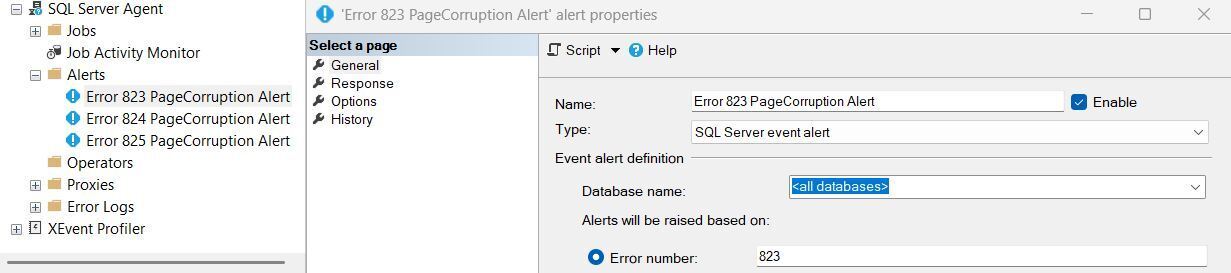
Since Error 823, 824, and 825 are associated with corruption in database pages, set up alerts for these specific errors as well. This way you’ll be notified immediately when they occur.
- In SQL Server Agent, right‑click Alerts → New Alert.
- Create an alert for each error number.
- Assign an Operator (e‑mail) as the response.
Error Descriptions
- Error 823 – I/O error while reading or writing to a disk.
- Error 824 – Logical consistency error detected in the data read from a page.
- Error 825 – Page failure during an I/O operation.