
Use of Git to push/pull code, track changes and version control
Published: (January 17, 2026 at 01:58 AM EST)
2 min read
Source: Dev.to
Source: Dev.to

Overview
Setting up Git and using it for version control involves a few key steps:
- Install Git
- Configure your user information
- Create a repository
- Make commits
- Push and pull changes
Below is a detailed, step‑by‑step guide.
Push and Pull
| Action | Description |
|---|---|
| Push | Sends your local changes (code or data) to a remote repository (e.g., GitHub). |
| Pull | Fetches and integrates changes from the remote repository into your local environment. |
Set Up Git
After installing Git, configure it with your user name and e‑mail address.
git config --global user.name "Your Name"
git config --global user.email "you@example.com"
Screenshot – Git Config

Create a Project Directory
mkdir project1          # create a folder called project1
cd project1             # move into the folder
Screenshots
-
Creating the folder

-
Changing into the folder

Initialise a Repository
git initScreenshots
-
Initialising the repo

-
Resulting .git folder

Making Commits
Add Files
git add .Screenshots
-
Staging files

-
Status after adding

Commit
git commit -m "Add readme.md"Pushing Changes
First, create a remote repository (e.g., on GitHub) and link it to your local repo:
git remote add origin https://github.com/your‑username/your‑repo.git
git push -u origin master   # or main, depending on your default branch
Screenshot – Adding a Remote & Pushing

Pulling Changes
To update your local repository with new changes from the remote repository:
git pull origin master # or mainScreenshot – Pulling

Recap
| Step | Command(s) | Purpose |
|---|---|---|
| Configure | git config --global user.name "Your Name"git config --global user.email "you@example.com" | Set your identity |
| Initialise | git init | Create a new local repository |
| Stage | git add . | Add all changes to the staging area |
| Commit | git commit -m "message" | Record a snapshot |
| Remote | git remote add origin <url> | Link to a remote repo |
| Push | git push -u origin master | Send commits to remote |
| Pull | git pull origin master | Bring remote changes locally |
Now you have a clean, functional guide for installing, configuring, and using Git for version control. Happy coding!
[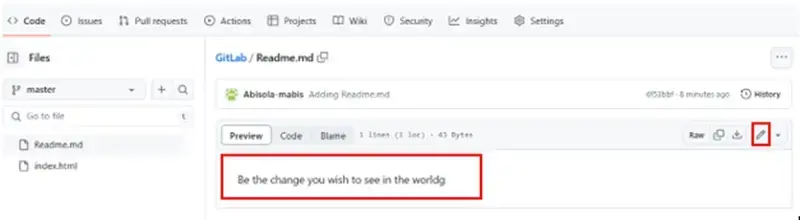](https://dev-to-uploads.s3.amazonaws.com/uploads/articles/5x3ffk12ix7cv0sp489t.webp)
[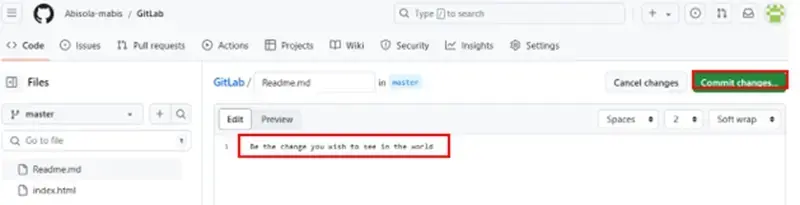](https://dev-to-uploads.s3.amazonaws.com/uploads/articles/vur0y48fbuv4yxeoy6kp.webp)