
Understanding Microsoft Entra Agent ID
Source: Dev.to
Introduction
As agents become more capable of making decisions, they need their own identities to ensure proper governance, security, and accountability. AI agents are already being used in a variety of workflows (perhaps you’ve deployed some yourself!). But as they become more capable and make autonomous decisions, several concerns and challenges must be addressed:
- How do we authenticate and authorize agents?
- How do we govern them?
- Probably most important of all, how do we distinguish them from humans?!
Microsoft Entra Agent ID extends identity capabilities to agents, helping developers build, govern, and protect agent identities. In this article we’ll explore how Entra Agent ID gives agents security capabilities such as access‑policy control, identity protection, and more.
Core Concepts
Agent Identity
The agent identity is the primary account an AI agent uses to authenticate to various systems. It has an object ID and an app ID that can be used for authentication and authorization. An agent identity is a special service principal in Entra ID.
- No password – Agent identities authenticate by presenting an access token issued to the service or platform they run on.
- Token capabilities – They can:
- Request agent tokens from Entra ID (the token’s subject).
- Receive incoming access tokens issued by Entra ID (the token’s audience).
- Request user tokens from Entra ID on behalf of an authenticated user (the token’s subject is the user, the actor is the agent identity).
Key Components
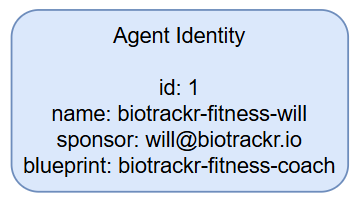
| Component | Description |
|---|---|
Object ID (id) | Unique identifier generated by Entra that identifies the account within a tenant. |
| Display name | Human‑readable name shown in Azure Portal, Teams, Outlook, etc. |
| Sponsor | The human user or group accountable for the agent. Sponsors can be contacted when security incidents occur. |
| Blueprint | Reusable template that defines the kind of agent and stores shared metadata for all agents of that type. |
| Optional agent user | A secondary user account (different id) that some agents need to access systems requiring a user identity. It has a 1:1 relationship with the agent identity. |
Agent Identity Blueprints
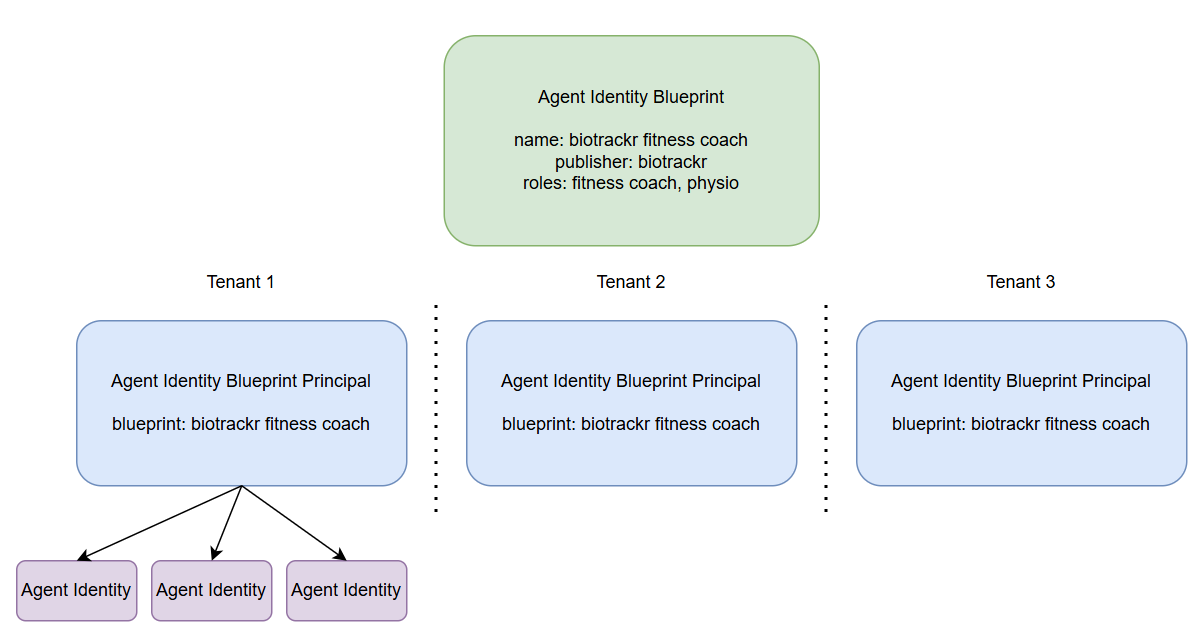
Agent identity blueprints are the templates and management structures used to create and manage multiple agent identities. They act as the parent of an agent identity, and all agent identities in a Microsoft Entra tenant are created from a blueprint.
Organizations may deploy many instances of an AI agent that pursue different goals and require different levels of access. Blueprints capture the common characteristics so that every identity created from the blueprint inherits a consistent configuration.
What a Blueprint Contains
- OAuth client ID and credentials – Used by the blueprint to request access tokens from Entra ID.
- Microsoft Graph permission
AgentIdentity.CreateAsManager– Allows the blueprint to create agent identities in the tenant. - Logical container – Administrators can apply policies and settings to a blueprint; those settings automatically affect every agent identity derived from it.
Blueprint Principals
When a blueprint is added to a tenant, Entra creates a blueprint principal object. This principal has two important roles:
- Token issuance – When the blueprint acquires a token, the token’s
oid(object ID) claim references the blueprint principal. - Policy enforcement – Policies applied to the principal flow down to all agent identities created from the blueprint.
Summary
- Agent identities give AI agents a first‑class identity in Entra ID, enabling secure authentication without passwords.
- Blueprints provide a reusable, policy‑driven way to create and manage large numbers of agents, while preserving governance and accountability.
- By leveraging Entra Agent ID, organizations can confidently scale AI‑driven automation while maintaining strong security, auditability, and clear separation between human and machine actors.
Agent Identity Blueprint Traceability
The agent identity blueprint is traceable to its principal object in the tenant.
Audit Logging records actions performed by the agent identity blueprint in audit logs as being executed by the principal. This provides accountability and traceability for operations carried out by the blueprint.
Agent User
An agent user is a secondary account that an AI agent uses to authenticate to various systems. These accounts are needed when agents must interact with systems that require user objects, essentially acting as digital workers.
- Agent users are a subtype of user identity within Microsoft Entra.
- They receive tokens with the claim
idtyp=user, allowing access to APIs and services that require user identities. - Agent users are not created automatically; they must be explicitly created and linked to their parent identity.
- Each agent identity can have at most one associated agent user, and each agent user is linked to exactly one parent agent identity.
- Each parent identity is linked to exactly one agent identity blueprint app.
Agent users are also created using an agent identity blueprint. They are always associated with a specific agent identity at creation, have distinct unique identifiers (separate from the agent identity), and can only authenticate by presenting a token issued to the associated agent identity.
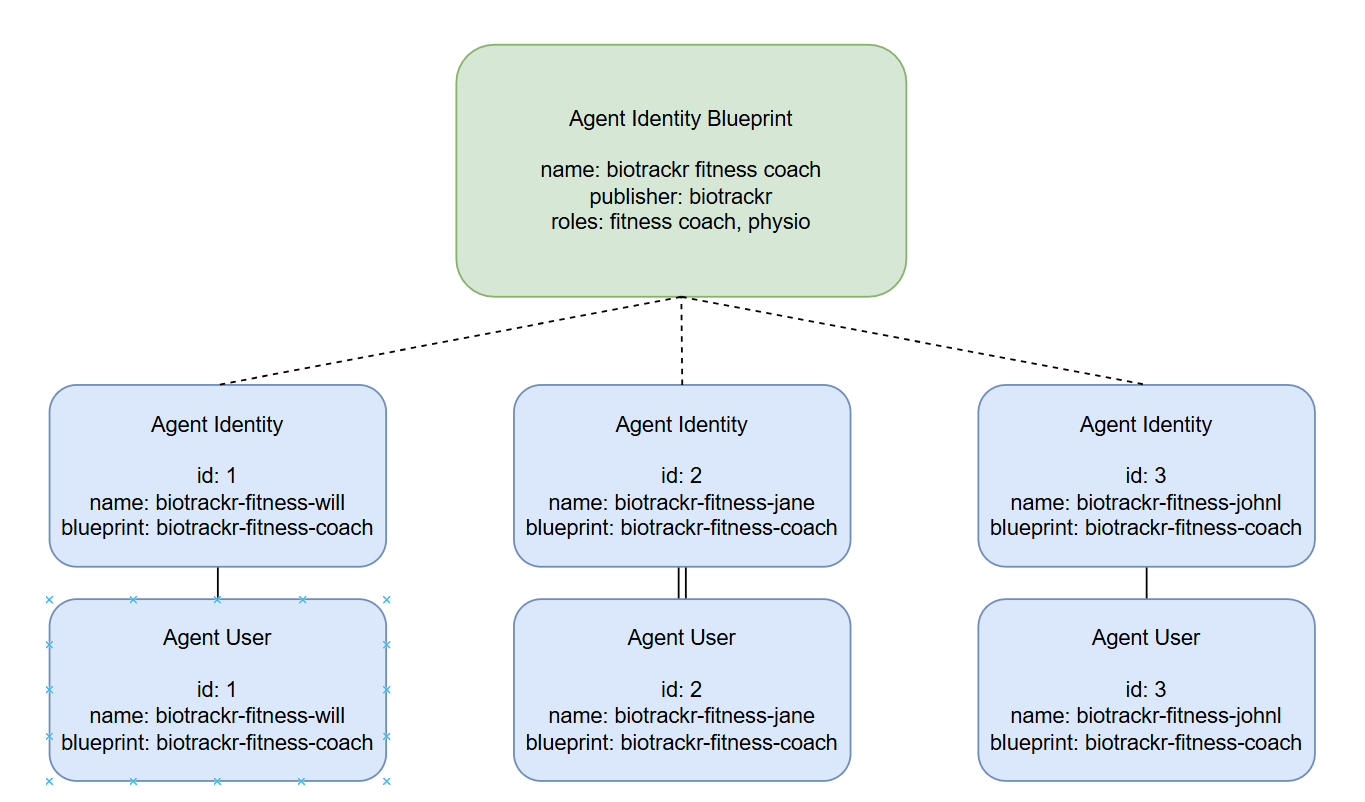
When creating agent users, the agent identity blueprint must be granted the necessary permissions, as agent users are optional. Once the blueprint has the proper permissions, it can:
- Create an agent user.
- Establish a parent relationship with a specific agent identity (the agent identity is the parent of the agent user).
Agent users can act like human‑user accounts but use a slightly different authentication model:
- Authentication occurs through Federated Identity Credentials assigned to the agent user.
- These credentials are also used for authenticating both the agent identity blueprint and the agent identity itself.
- Agent users are restricted to the credentials provided via their parent relationships, rather than passwords.
- Agent identities can impersonate their child agent users through built‑in impersonation mechanisms.
Agent Registry
The agent registry is a centralized repository that maintains metadata about all registered agents within an organization. It enables systems and services to discover agents based on capabilities, roles, and other attributes.
Key features
- Integrates with Entra Agent ID and Core Directory to enforce identity and discovery policies.
- Supports flexible mappings between agent cards and multiple agent instances.
- Serves as the single source of truth for agent‑related data.
The registry helps organizations:
- Secure agent discovery.
- Apply Zero Trust principles.
- Maintain governance over agent assets.
Operation Patterns
The agent identity platform supports two primary patterns for how agents operate and authenticate:
| Pattern | Description | Token Type |
|---|---|---|
| Interactive agents | Sign in as a user and act in response to user prompts (usually via a chat interface). They act on behalf of the signed‑in user, using that user’s authorization. | User token (delegated permissions) |
| Autonomous agents | Perform actions using their own identity, without a human user. They run in the background and make independent decisions. | Agent token (when the agent identity is authenticated) or Agent user token (when an agent user is authenticated) |
Owners, Sponsors, and Managers
The platform introduces an administrative model that separates technical administration from business accountability. The roles are:
- Owners – Technical admins for agents; handle operational and configuration aspects.
- Sponsors – Provide business accountability for agents.
- Managers – Human users who act as hiring managers or operational owners for an agent user.
Conclusion
Microsoft Entra Agent ID is still in preview, but it represents an important first step toward securing and governing the agents we deploy. I’ll be exploring this area in greater depth soon and will create more content as Entra Agent ID evolves.
If you have any questions about the content here, feel free to reach out to me on BlueSky or comment below.
Until next time, happy coding! 🤓🖥️