
Understand AWS IAM Identifiers
Source: Dev.to
What are AWS IAM Identifiers?
In AWS Identity and Access Management (IAM), every identity and resource must be uniquely identifiable. AWS achieves this using different types of identifiers, each designed for a specific purpose:
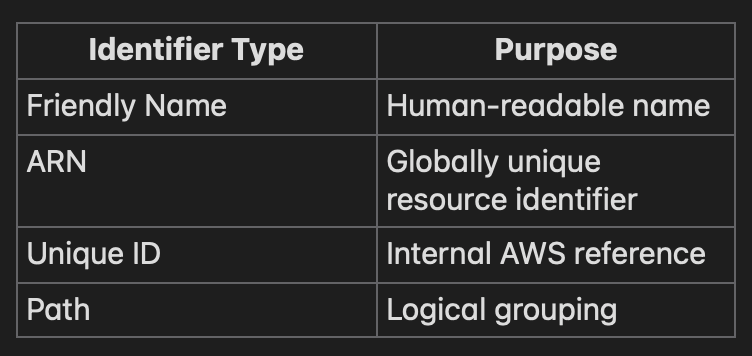
In simple terms:
- Friendly Name = Display name
- ARN = Full address
- Unique ID = Government‑issued ID number
1. Friendly Name
Friendly names are the names you assign to IAM resources such as users, roles, groups, and policies.
Example
IAM user = "mayur"
IAM role = "ec2-s3-readonly-role"
Why friendly names exist
- Easy for humans to read and remember
- Used in the AWS Console
- Used in CLI commands and scripts
Important
- Must be unique within the same account (not globally). Two AWS accounts can have the same friendly name.
2. ARN
An ARN (Amazon Resource Name) is a globally unique identifier, similar to a fully qualified domain name.
Example
arn:aws:iam::123456789012:user/mayurARN structure
arn:partition:service:region:account-id:resourceWhy ARNs matter
- Used in IAM policies
- Used by AWS services internally
- Required for cross‑account access
AWS trusts ARNs, not friendly names.
3. Unique ID
Every IAM resource also gets a unique ID assigned by AWS.
Example
AIDAJQABLZS4A3QDU576QWhy AWS uses this
- Friendly names can change
- ARNs can change if the path changes
- Unique IDs ensure consistency
You typically won’t use these directly, but AWS relies on them internally; they cannot be changed or reused even if resources are deleted.
4. Paths
Paths allow you to logically group IAM resources.
Example
/dev/admins/dev-adminPaths
- Don’t affect permissions
- Help with organization
- Are included in the ARN
When paths are useful
- Large enterprises
- Multiple teams
- Environment separation
How these identifiers work together
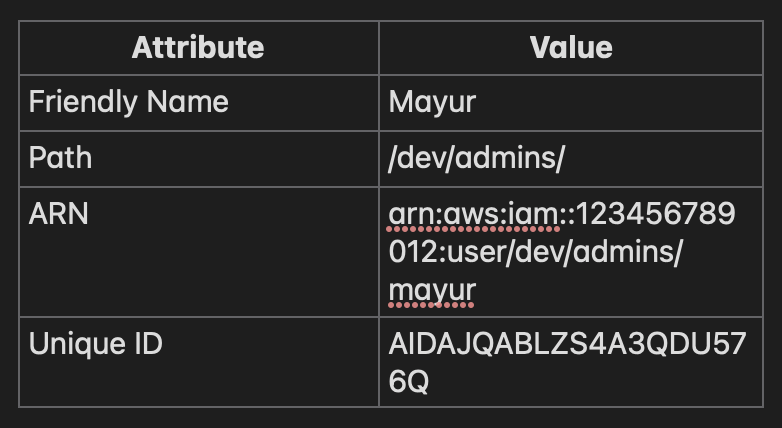
Each identifier serves a different audience:
- Humans → Friendly Names
- Policies & Services → ARNs
- AWS internal systems → Unique IDs
Common Mistakes to Avoid
- Assuming friendly names are globally unique
- Renaming IAM resources without checking impact on other resources
- Confusing a role ARN with an instance‑profile ARN
- Using wildcards carelessly in ARN‑based policies
Once you understand why each identifier exists, IAM becomes easier and safer to manage.