
TradingView Signal Live Trading: New Version Solution
Source: Dev.to
Overview
TradingView is currently one of the most popular financial‑market charting and analysis platforms in the world. It provides real‑time market data covering global markets, including stocks, futures, forex, and cryptocurrencies. The platform’s standout feature is its extensive library of technical‑analysis tools and indicators, ranging from basic moving averages, MACD, and RSI to various complex custom indicators. More importantly, TradingView hosts an active trading community where thousands of users share their trading strategies, technical analyses, and market perspectives.

One of TradingView’s most powerful features is its Pine Script programming language. This scripting language is specifically designed for technical indicators and trading strategies, with relatively simple syntax that even programming beginners can quickly learn. Through Pine Script, traders can transform their trading ideas into executable strategy code and back‑test them against historical data to validate their effectiveness. Many traders follow a daily workflow of opening TradingView to check market conditions, running their strategy scripts, and making analysis and decisions based on the signals generated.
TradingView’s Limitations: The Idealized World of Paper Trading
Despite its powerful features, TradingView has significant limitations when it comes to live trading. The platform primarily offers Paper Trading functionality, which is essentially simulated trading. In a paper‑trading environment, everything is overly idealized:
- Orders are always filled immediately, without considering market depth and liquidity.
- Price slippage is virtually negligible.
- Fees can be configured, but they still differ from real‑trading conditions.
As a result, strategy performance in paper trading often far exceeds actual live‑trading results. A strategy showing 300 % annualized returns in back‑testing might only achieve 50 % (or less) in live trading—a discrepancy that leaves many traders confused and disappointed.
TradingView does offer integration with some live brokers, but the options are very limited. The supported brokers are mainly traditional forex and stock brokers like OANDA, AMP, and TradeStation. For the currently most active cryptocurrency market, major exchanges such as Binance and OKX have no direct integration support. Even for the brokers that are integrated, users frequently report unstable connections, order delays, and incomplete feature support.
This is hardly surprising—TradingView’s core business is providing professional charting and analysis tools and generating revenue through subscription memberships. Live‑trading integration involves complex technical development, regulatory compliance, and legal risks, which clearly isn’t their priority.
Early Solutions: Extended API Integration
Facing the challenge of TradingView’s inability to execute live trades directly, FMZ Quant platform introduced a solution back in 2020. Through extended APIs and webhook mechanisms, TradingView trading signals could be transmitted to FMZ strategy bots, which would then execute trades on real exchanges. The basic principle works as follows:
- TradingView detects a trading signal and triggers an alert.
- The alert sends an HTTP request to FMZ’s extended API via webhook.
- FMZ receives the request and forwards the instruction to the strategy bot.
- The bot parses the instruction content and places orders on the configured exchange.
The initial approach involved writing trading instructions directly in the webhook URL parameters (e.g., buy:1 to indicate buying 1 coin). While this achieved basic functionality, it lacked flexibility: the instruction content was fixed, couldn’t be dynamically adjusted, and couldn’t utilize variables provided by TradingView.
Later in 2022, FMZ upgraded its extended API to support reading instruction content from the HTTP request body. This allowed traders to write JSON‑formatted instructions in TradingView’s alert messages, containing detailed information such as trading pair, price, quantity, and trade direction, while also using TradingView placeholder variables like closing price and strategy position size.
The solution greatly improved flexibility, but for beginners, writing and debugging JSON‑formatted messages still presented a learning curve, and the FMZ‑side strategy code needed to handle complex parameter parsing and error‑handling logic.
Cross‑Platform Copy Trading Strategy: A Completely New Approach
FMZ’s recently launched “Cross‑Platform Copy Trading Strategy” adopts an entirely different design philosophy, reducing the complexity of integrating TradingView signals to a minimum. The core concept is:
Instead of focusing on “what trading action to execute,” focus on “what is the current position state.”
In traditional approaches, TradingView sends an instruction like “buy 1 BTC”, and FMZ executes the buy action. In the new approach, TradingView sends state information like “currently holding 1 BTC,” and FMZ synchronizes its own position to match this state.
Benefits
- If you start the FMZ strategy midway, or if the strategy was previously stopped, as long as TradingView sends the next position state, FMZ can automatically adjust to the correct position.
- Missing historical trading signals no longer cause position inconsistencies.
Cross‑Platform Copy Trading Strategy – FMZ + TradingView
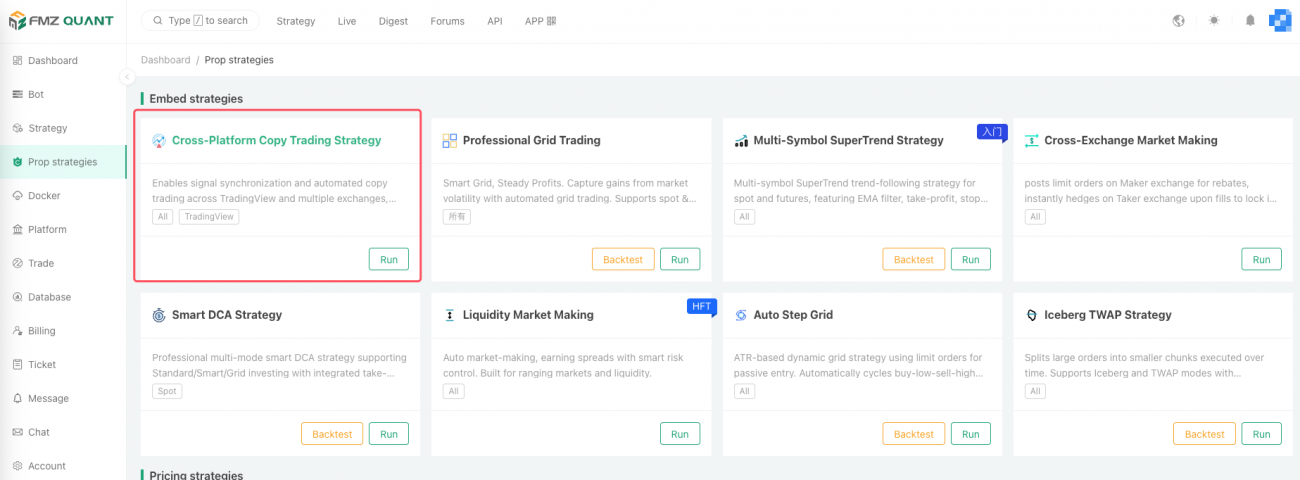
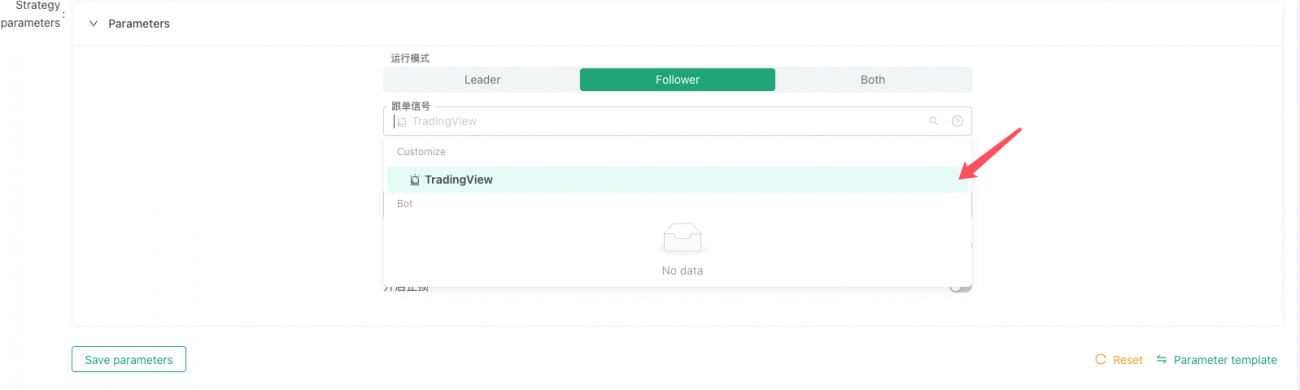
In practice, traders need to:
- Deploy the “Cross‑Platform Copy Trading Strategy” on the FMZ platform.
- Choose Follower mode.
- Set the signal source to TradingView.
When the strategy starts FMZ automatically generates two pieces of information:
- Webhook address – the URL to which TradingView will send alerts.
- Message format – a single‑line string:
{{syminfo.basecurrency}}_{{syminfo.currency}},{{strategy.position_size}}syminfo.basecurrency– the base currency (e.g., BTC)syminfo.currency– the quote currency (e.g., USDT)strategy.position_size– current position size (positive = long, negative = short, 0 = flat)
Setting up TradingView
- Enter the FMZ‑generated message format in the Pine strategy’s alert settings.
- Paste the FMZ‑generated webhook URL as the Webhook URL.
When the TradingView strategy triggers (open, close, add, or reduce a position), the alert sends the current position state to FMZ.
Example – BTC/USDT pair
| TradingView signal | Message sent to FMZ | FMZ action |
|---|---|---|
| Open long 1 BTC | BTC_USDT,1 | If flat → open 1 BTC long; if already 0.5 BTC → add 0.5 BTC; if already 1 BTC → no change |
| Close position | BTC_USDT,0 | Close all BTC positions |
| Open short 1 BTC | BTC_USDT,-1 | Close any long, then open 1 BTC short |
Screenshots (TradingView)
Setting the webhook URL

Setting the message format
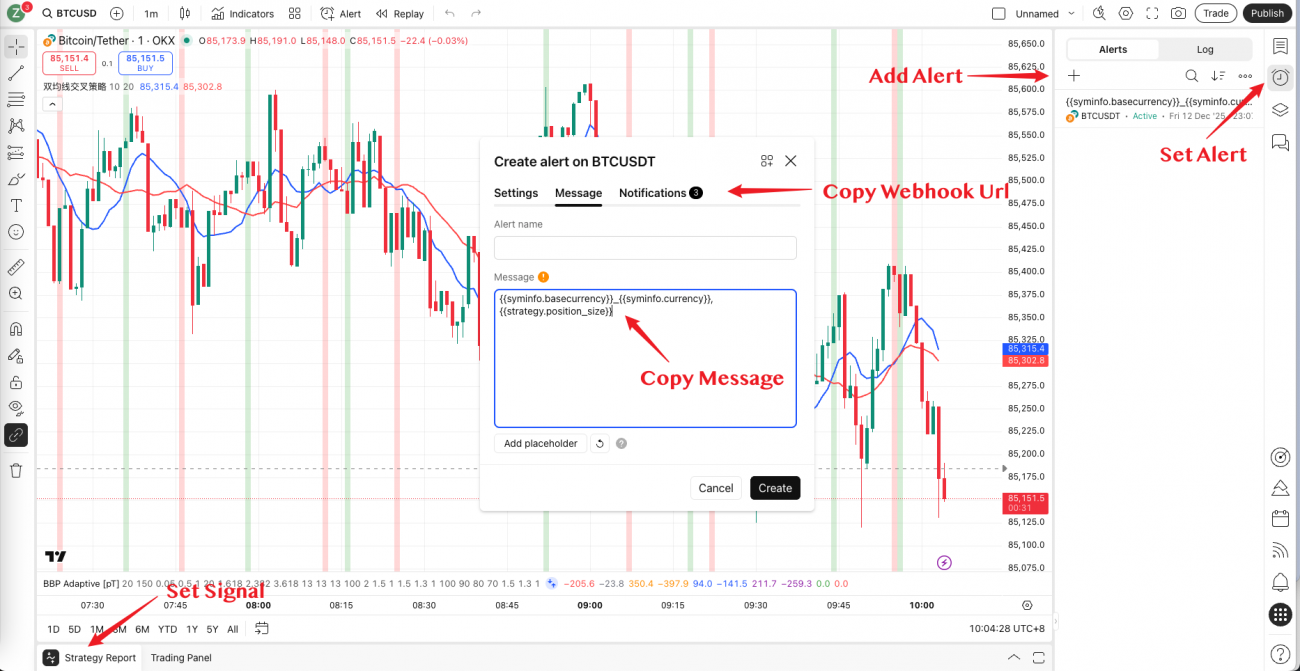
Alert creation
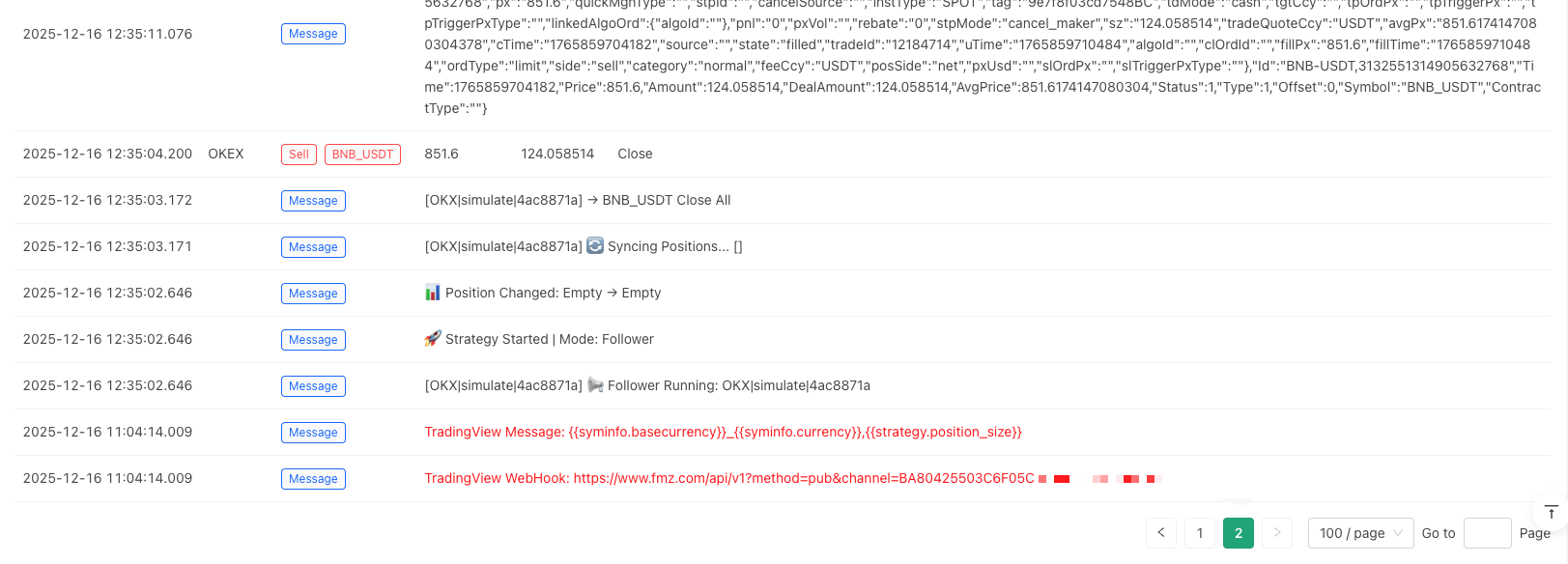
FMZ Copy‑Trading Options
| Option | Description |
|---|---|
| Copy mode | Equal Quantity – replicate the exact position size (good for accounts with similar capital). Equal Ratio – replicate the same percentage of capital (useful when account sizes differ). |
| Scaling ratio | Multiply the copied quantity (e.g., 50 % = half‑size, 200 % = double‑size). |
| Reverse copy | Execute the opposite side of the signal (long → short, short → long). Ideal for hedging or strategy validation. |
| Symbol restriction | Follow signals only from specified trading pairs; others are ignored. |
| Maximum position ratio per symbol | Cap the proportion of total capital that a single symbol can use, preventing over‑concentration. |
n – Account‑Level Protection Mechanism
n is an account‑level protection mechanism that automatically clears all positions to protect capital when total account losses reach a set threshold.
New Copy‑Trading Mode – Qualitative Improvements
Usability
- Configuration: Only two items need to be copied and pasted – the message format and the webhook address.
- No JSON required: You don’t have to understand JSON syntax, write complex parameter configurations, or modify strategy code on the FMZ side.
- All logic encapsulated: Position synchronization, parameter parsing, and error handling are built into the strategy.
Functionality
The copy‑trading mode now includes a suite of practical features that previously required custom code:
- Ratio‑based copying
- Scaling
- Reverse trading
- Position control
- Stop‑loss
Reliability
- The design follows position states rather than raw trading actions.
- If the strategy stops or restarts mid‑process, it can correctly resynchronize to the current position.
- This greatly reduces position errors caused by connection interruptions, strategy restarts, or other exceptional situations.
Prerequisites
- TradingView account – Must be Pro level or above to use the Webhook feature (Basic/free accounts do not support it).
- Two‑Factor Authentication (2FA) – Required by TradingView for webhook usage (security requirement).
Recommended Testing Procedure
- Start small – Use a demo account or a tiny amount of capital.
- Validate the pipeline:
- TradingView alerts trigger correctly.
- FMZ receives and parses the signals accurately.
- The exchange places orders successfully.
- Positions synchronize as expected.
- Measure latency – Typical end‑to‑end delay is 2–3 seconds (TradingView trigger → FMZ order completion).
- Monitor slippage & fees – Real‑world trading costs often differ from paper‑trading assumptions.
- Scale gradually – Only after thorough testing should you increase capital exposure.
Conclusion
From TradingView’s paper‑trading stage to real live trading, the evolution has moved from:
- Writing instructions in URLs →
- JSON message formats →
- Position‑state synchronization
This progression reflects a broader trend: quantitative trading tools are becoming more usable and reliable.
- TradingView excels at charting, analysis, and back‑testing.
- FMZ provides stable, reliable trade execution.
Together, they let traders leverage the strengths of each platform.
Key takeaway: No matter how advanced the tools, trading strategy logic and risk control remain the keys to success. Even the best‑backtested strategy on TradingView will face unexpected market conditions. The cross‑platform copy‑trading strategy offers a reliable execution bridge, but it cannot replace a trader’s market understanding, risk management, and continuous strategy optimization.
We hope this tool helps more traders turn their ideal strategies into real profits.