
The DNA of Data: Objects & Arrays Masterclass
Source: Dev.to

Introduction
Welcome back. In this article, we’re going to dive deep into the absolute core of working with data in JavaScript: Objects and Arrays.
If you’ve already worked with variables, you know they are great for storing a single piece of data. But in real‑world applications—whether you’re building an app with React, a backend with Node.js, or anything else—you will never deal with just a single isolated value. You will deal with collections of data. You need to group things, and that is exactly what objects and arrays allow us to do.
We won’t just look at the basic syntax; I want you to understand what happens under the hood and how to manipulate these structures like a pro.
Arrays: Ordered Lists and Their Secrets
Let’s start with Arrays. Imagine you are building an app for the Madrid Metro. You have a list of lines. The order matters, right? Line 1 comes before Line 2.
In JavaScript we use square brackets [] to create an array. It is, essentially, a list of values where each value has a numerical position (an index).

Note: Indices start at 0.
Arrays are iterable objects that come with powerful built‑in methods.
The Spread Operator (...)
The spread operator lets you expand an array (or object) into individual elements. It’s essential for copying, concatenating, and inserting values without mutating the original structure.
Manipulating Arrays
We rarely create an array and leave it static. We need to add elements, remove them, or transform them. This is where methods like push, pop, filter, map, and reduce come into play.

Notice how we use
map. This is one of the most important functions in modern development, especially in React, to transform data without mutating the original array.
Objects: Key‑Value Pairs
While arrays are for ordered lists, objects are for grouping data related to a specific entity—a user, a product, a configuration, etc. We use curly braces {} and define key: value pairs.

You can access properties using dot notation (user.name) or bracket notation (user['role']). Bracket notation is extremely useful when the key you want to access is stored in a variable.
Reference Types vs. Primitives
This is a concept where many developers stumble. You might have noticed that I used const to declare the array and the object above. You might wonder:
“If it’s
const, why can I change things inside it?”
Great question! This happens because arrays and objects are reference types. The variable does not store the value itself; it stores a memory address (a pointer) that points to where the data lives.
When we modify a property inside the object, we are not changing the memory address, only the data at that destination. That’s why const allows it. However, this also means that if we copy an object simply by assigning it to another variable, we are copying the pointer, not the data.
Modern Syntax: Spread and Destructuring
ES6+ gave us fantastic tools to work with these structures in a cleaner way.
Spread Operator
If you want to create a real copy of an object or combine two arrays, the spread operator is your best friend.

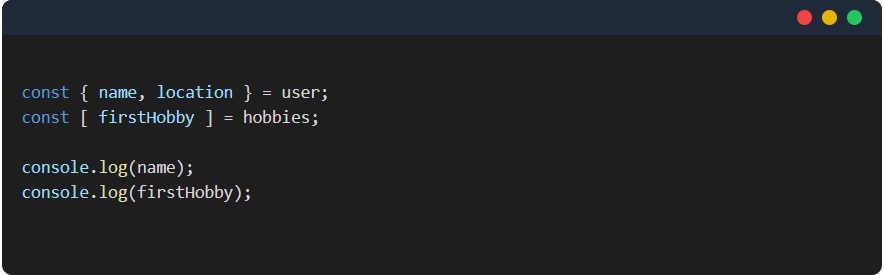
Destructuring
What if you only want to extract a specific property from an object and store it in a variable? Destructuring does this in a single line of code.

// Example of object destructuring
const user = { name: 'Ada', role: 'Developer', age: 30 };
const { name, role } = user; // name = 'Ada', role = 'Developer'
Closing Thoughts
Understanding objects and arrays is foundational for any JavaScript developer. Mastering their modern syntax—spread, rest, and destructuring—will make your code more readable, maintainable, and efficient.
Happy coding! 🚀
Putting It All Together: Arrays of Objects
Here is where theory meets reality. In almost all applications, you will work with Arrays of Objects. Think of a JSON response from an API.
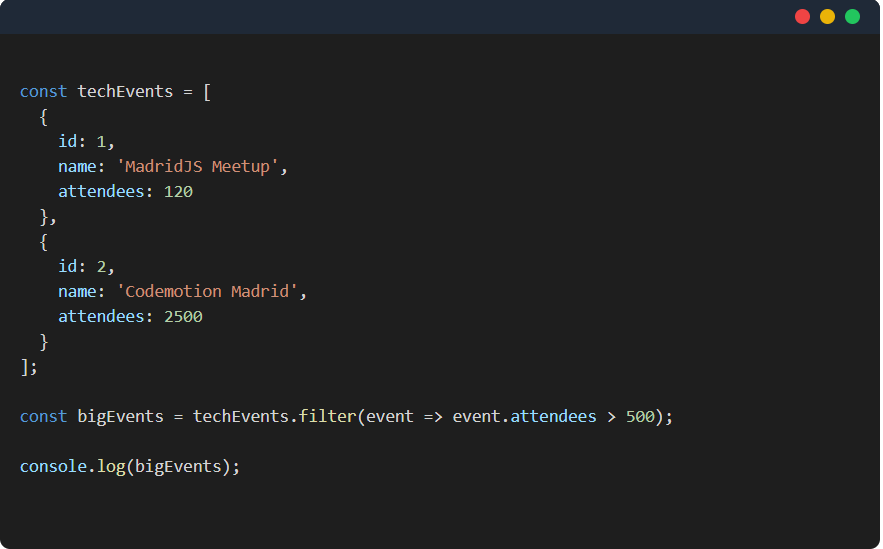
Mastering these structures is not just about learning syntax. It’s about understanding how to model your data. Whether at Glovo handling menus or at Fever filtering events, you will always come back to these fundamentals.
I hope this gave you a much clearer vision! Try the code in your console and see you in the next article on CodeSyllabus.com.