
The #1 Skill Most Developers Miss When Using AI Coding Agents
Source: Dev.to
The Debate Over AI Coding Agents
The debate over AI coding agents is missing the most important factor. It’s not about prompt engineering; it’s about understanding the context window.
Developers are divided:
- One side claims “coding agents suck.”
- The other insists “you’re just using them wrong; it’s a skill issue.”
Both perspectives contain truth, but the most common skill issue isn’t prompt engineering—it’s a fundamental misunderstanding of the tool’s primary constraint.
If there is a skill issue that I see most often with devs, it is not thinking enough about the context window.
What Is the Context Window?
The context window is the complete set of input and output tokens an LLM processes in a single session. Think of it as the model’s working memory—everything it can see and consider when generating a response.
It includes:
- Input Tokens – your system prompt, instructions, and user messages.
- Output Tokens – the assistant’s generated responses.
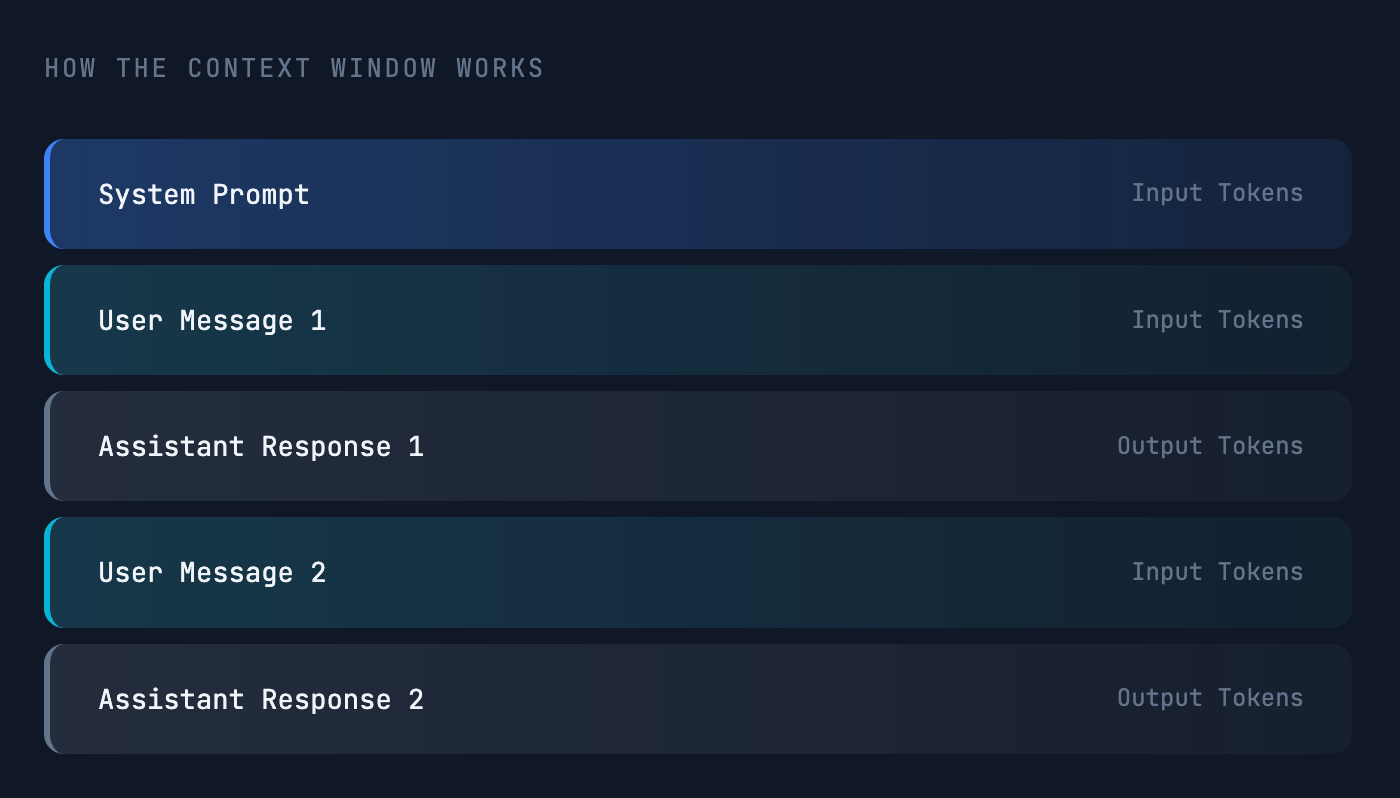
As your conversation grows, so does the token count. Eventually you’ll hit a limit set by the model’s provider. This can happen when a conversation becomes too long or when a single input is very large (e.g., uploading extensive documentation). Exceeding the limit results in an error and generation stops cold.
Context Windows in 2025
Model providers set different limits based on architecture and cost. Limits can range from a few thousand to several million tokens, but bigger isn’t always better.
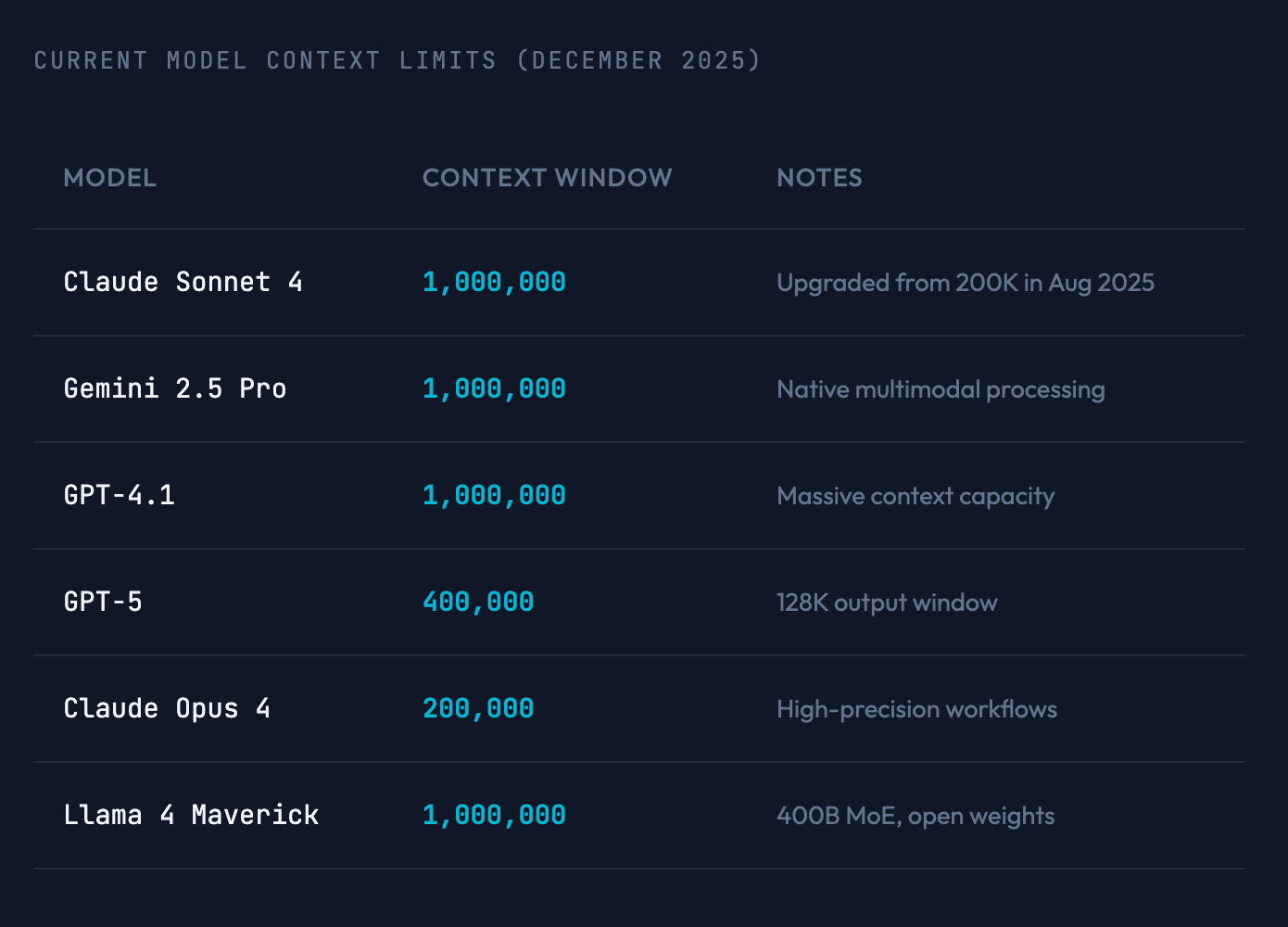
Gemini has really large context windows, but as we’ll see… bigger is not always better.
The Paradox: More Context, Worse Performance
Counterintuitive truth: the more information you give a model, the worse it performs at retrieving specific details. This holds for all models, from the smallest to the largest.
Why infinite context doesn’t exist
-
Cost & Memory
LLM processing is expensive. Larger contexts consume significantly more memory per request, driving up both computational costs and latency. -
Performance Degradation
An LLM’s attention is not distributed evenly across the context. Tokens at the very beginning and very end of a conversation have the most impact on the output. Tokens in the middle are often de‑prioritized or ignored entirely.
This is called the “Lost in the Middle” problem.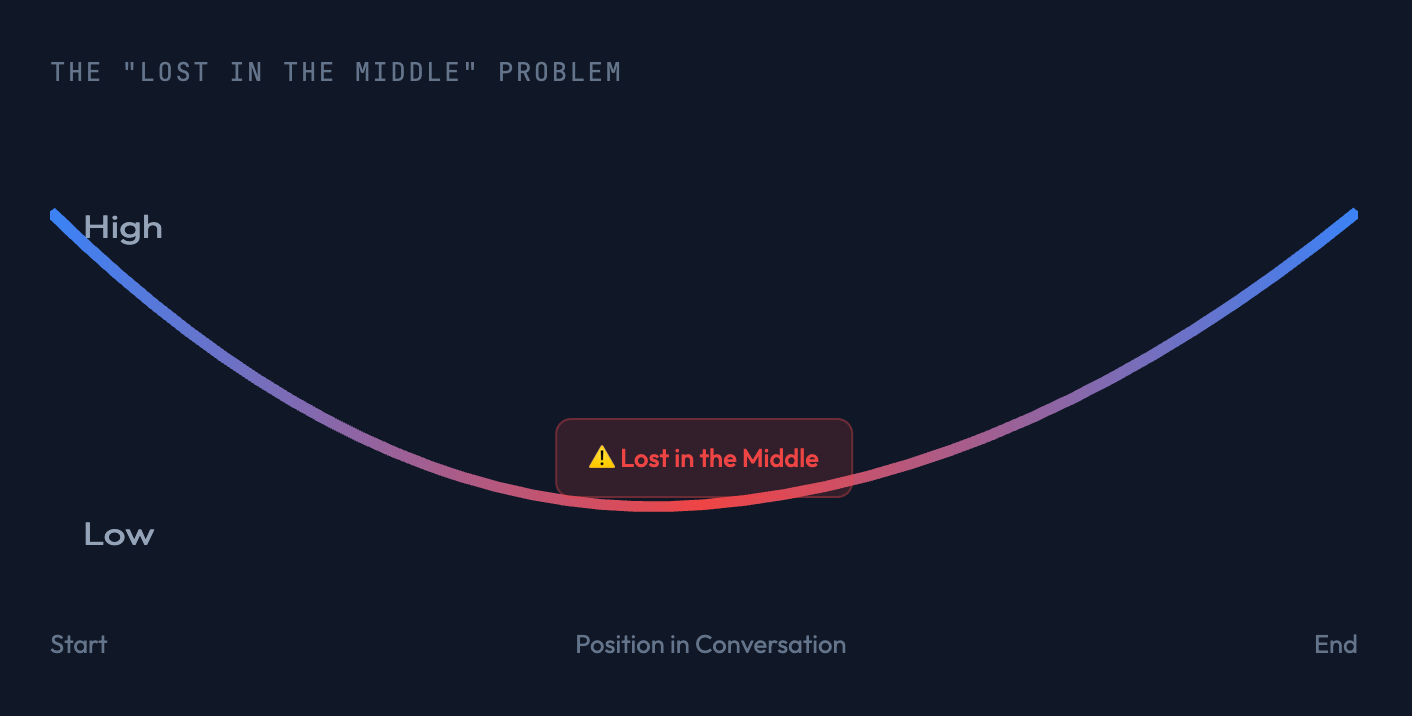
It isn’t a bug; it’s an emergent property of transformer architecture. It mirrors human cognitive biases:
- Primacy Bias – better recall for items at the beginning.
- Recency Bias – better recall for items at the end.
Just like humans, models do better with less, more focused information.
Case Study: A 10‑Million‑Token Window Is Useless If the Model Can’t Use It
When Meta announced a model with a 10‑million‑token context window, it seemed like a breakthrough. Real‑world testing quickly revealed severe lost‑in‑the‑middle problems. You could feed the model vast amounts of information, but it would fail to retrieve or act on it effectively.
When you’re assessing an LLM, don’t just look at how big the context window is. Look at how well it retrieves information from that window.
The Solution: Keep Your Context Lean and Focused
Shorter context windows suffer less from the lost‑in‑the‑middle problem. The key to better performance is proactive management:
- Regularly clear your coding agent’s chat history to refresh its “memory” and ensure your instructions stay high‑priority.
- This is the single most effective way to improve results.
Step 1 – Get Full Transparency Into Your Context Usage
You cannot manage what you cannot measure. A good coding agent provides tools to inspect the current state of your context window. For example, in Cursor:

Step 2 – Make clear Your Default Action
When you start a new, unrelated task—or when context usage gets high (e.g., fewer than 50 k tokens free)—the best practice is to clear the conversation history entirely. This frees up the whole context window, giving you a blank slate and ensuring maximum performance for the new task.

Step 3 – Use compact When You Need to Preserve the Conversation’s Intent
compact is an alternative that clears the detailed history but generates an LLM‑powered summary. This preserves the vibes or core goals of the conversation in a much smaller package.
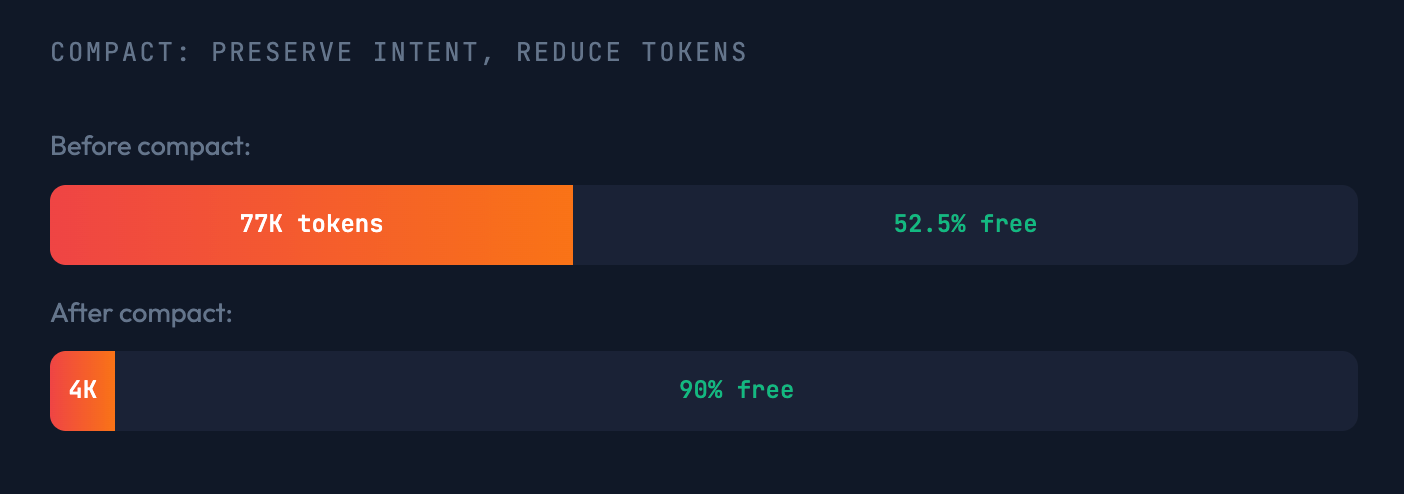
This preserves some of the intention… like a mini rules file just for this conversation.
Note: Generating the summary itself takes time and consumes tokens.
A Word of Warning: Hidden Context Can Sabotage Performance
Be extremely cautious about tools and configurations that add large amounts of hidden context. This bloats your window from the start, pushing your actual conversation into the dreaded middle.
Common Culprits
- LSP/MCP Servers – can inject enormous toolsets into your system prompt.
- Large Rule Files – overly complex or numerous custom rules in tools like Cursor or Claude Code.
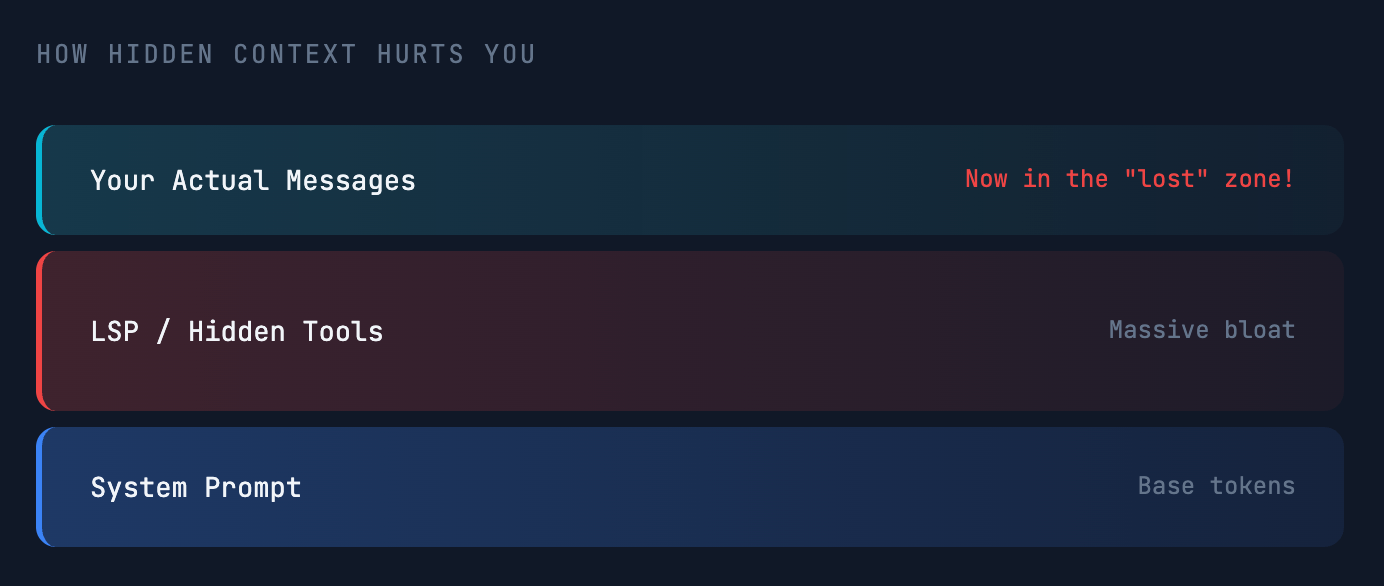
When hidden tools consume most of your context, your actual messages end up in the lost‑in‑the‑middle zone, exactly where the model pays the least attention.
Key Takeaways
- The context window is the model’s entire memory (input + output). As conversations grow, this fills up quickly and performance suffers.
- All models have a hard‑coded limit and suffer from lost‑in‑the‑middle attention decay. Even million‑token windows aren’t immune to this problem.
- A leaner, more focused context consistently yields better performance. Clear early, clear often.
The New Mindset
Develop a healthy paranoia about what’s in your context. Actively manage it with tools like clear and compact. This skill separates frustrating interactions from productive partnerships with AI.
Mastering the context window is the key to great results.