
Supercharge Your Web Dev game with Chrome MCP - Part 1
Source: Dev.to
Introduction
Hi everyone! I’m a product engineer who’s worked across very different kinds of organisations, from tight‑knit tech teams in large corporates, to startups, to the largest consultancy in the world. Across all of them, I’ve seen how products get built at very different speeds, and how much those speeds shape the way teams work.
For the past six months, I’ve been working at an AI startup, where speed and iteration aren’t occasional crunch modes – they’re the everyday game. In that environment, developers don’t really have the option to ignore AI tooling. If you want to keep up, you have to embrace it, not just to write code faster, but to iterate, debug, validate, and ship better.
This post is the first in a three‑part series based on a talk I gave under the same title. The talk compressed a lot of ideas into slides; this series is my attempt to slow down and properly elaborate on the core concepts behind it.
In this first part, I’ll focus on the foundations: what the Model Context Protocol (MCP) is, why it exists, and how different types of MCP servers enable more reliable AI‑powered developer workflows. The next posts will go deeper into concrete examples and hands‑on use cases.
How MCP changes the way we build with AI
When people talk about AI in developer workflows, the conversation often jumps straight to code generation: faster scaffolding, better autocomplete, smarter refactors. All useful, but also a little narrow.
The real friction in day‑to‑day web development isn’t usually writing code. It’s everything that happens around it: checking layouts, cross‑referencing designs, running tests, inspecting network requests, reproducing bugs, validating performance. None of this is hard in isolation; it’s just fragmented.

If I’m debugging a UI issue, my mental loop looks something like this:
- Open DevTools → inspect the DOM.
- Check the Network panel.
- Jump to Figma to confirm spacing or colors.
- Maybe spin up Puppeteer to reproduce the issue.
- Return to the editor to apply a fix.
Each step is logical, but together they form a slow, manual choreography that only exists in my head.
This is the gap MCP fills.
MCP – the missing connective tissue
I like to think of MCP as the love language between you, the LLM, and your tools. The phrase sounds playful, but it’s surprisingly accurate.
Before MCP, LLMs were isolated. They could reason, but they couldn’t see or do much without bespoke integrations. Every tool required custom glue code. Every AI application hard‑coded how it talked to Git, the filesystem, a browser, or a design tool. As the number of tools grew, the complexity didn’t scale linearly – it exploded.
This became a real problem once LLMs started moving beyond chatbots into agents, IDEs, and production developer workflows. The model wasn’t the bottleneck anymore; integration was.

MCP emerged in late 2023 as a response to this. Its core idea is simple but powerful: standardise how models receive context and use tools. In the same way HTTP decouples browsers from servers, MCP decouples models from the systems they interact with.
That decoupling turns out to be the key to everything that follows.
A cleaner separation of responsibilities
MCP introduces a clear Host – Client – Server architecture.

As a developer, I appreciate this not because it’s novel, but because it’s familiar. It follows the same separation‑of‑concerns principles we already trust in software design.
| Component | Role |
|---|---|
| Host | Where you work – your IDE, editor, or chat interface. Owns the UI and interaction flow. Doesn’t need to know how tools work internally. |
| Client | Lives inside the host. Speaks MCP, manages context, discovers available tools, and orchestrates requests. Think of it as the MCP‑aware brain. |
| Server | Where real capabilities live. Exposes tools, data, and prompts, and handles the messy details of talking to external systems (APIs, databases, files, browsers, design tools). |
What I find elegant here is that each piece stays honest about its role. Hosts don’t become integration nightmares. Servers don’t need to care about UI or prompt phrasing. The protocol does the connecting.

Source: “Model Context Protocol (MCP): Landscape, Security Threats, and Future Research Directions”
MCP servers aren’t just APIs
… (the original text cuts off here; continue in the next part of the series.)
A Subtle but Important Shift MCP Introduces: How We Think About “Tools”
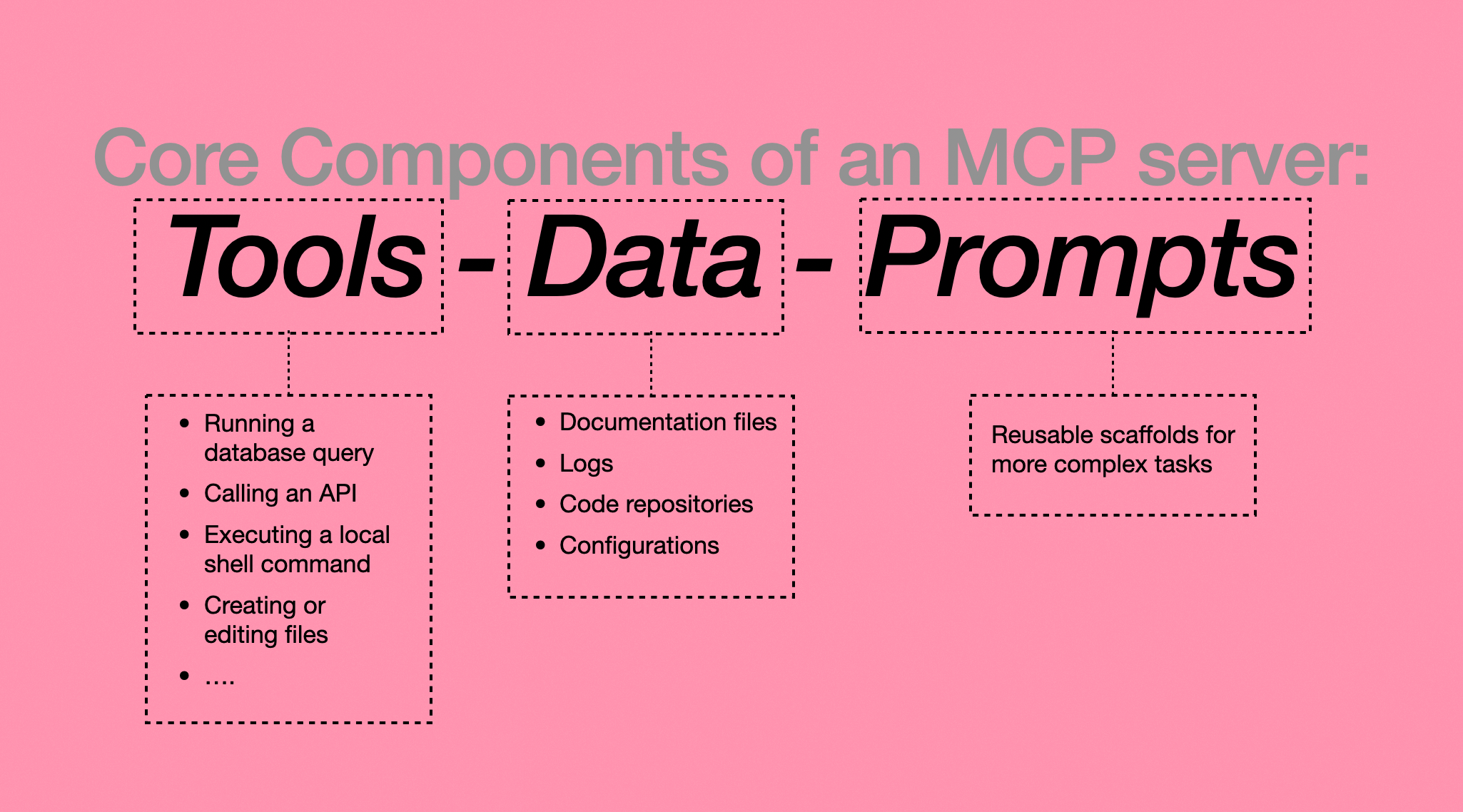
An MCP server doesn’t merely expose endpoints—it exposes capabilities in a model‑friendly way, grouped into three concepts: tools, data, and prompts.
Tools
Tools are actions—things the model can do: run a database query, call an API, edit a file, execute a shell command. These are explicit, structured, and side‑effecting.
Data (or Resources)
Data are the context the model can read: documentation, logs, code repositories, configuration files. They don’t execute anything, but they ground the model in reality.
Prompts
Prompts are reusable ways of thinking. Instead of rewriting the same instructions repeatedly, prompts encode best practices (e.g., how to review a PR, analyse logs, summarise changes).
What matters isn’t any single piece, but how they work together.
Prompts guide reasoning. Data provides truth. Tools enable action. This combination makes MCP workflows feel reliable instead of fragile.
Three Kinds of MCP Servers – And Why the Distinction Matters
Over time I’ve found it useful to group MCP servers into three broad categories. This isn’t taxonomy for its own sake; it clarifies the role each server plays in a system.
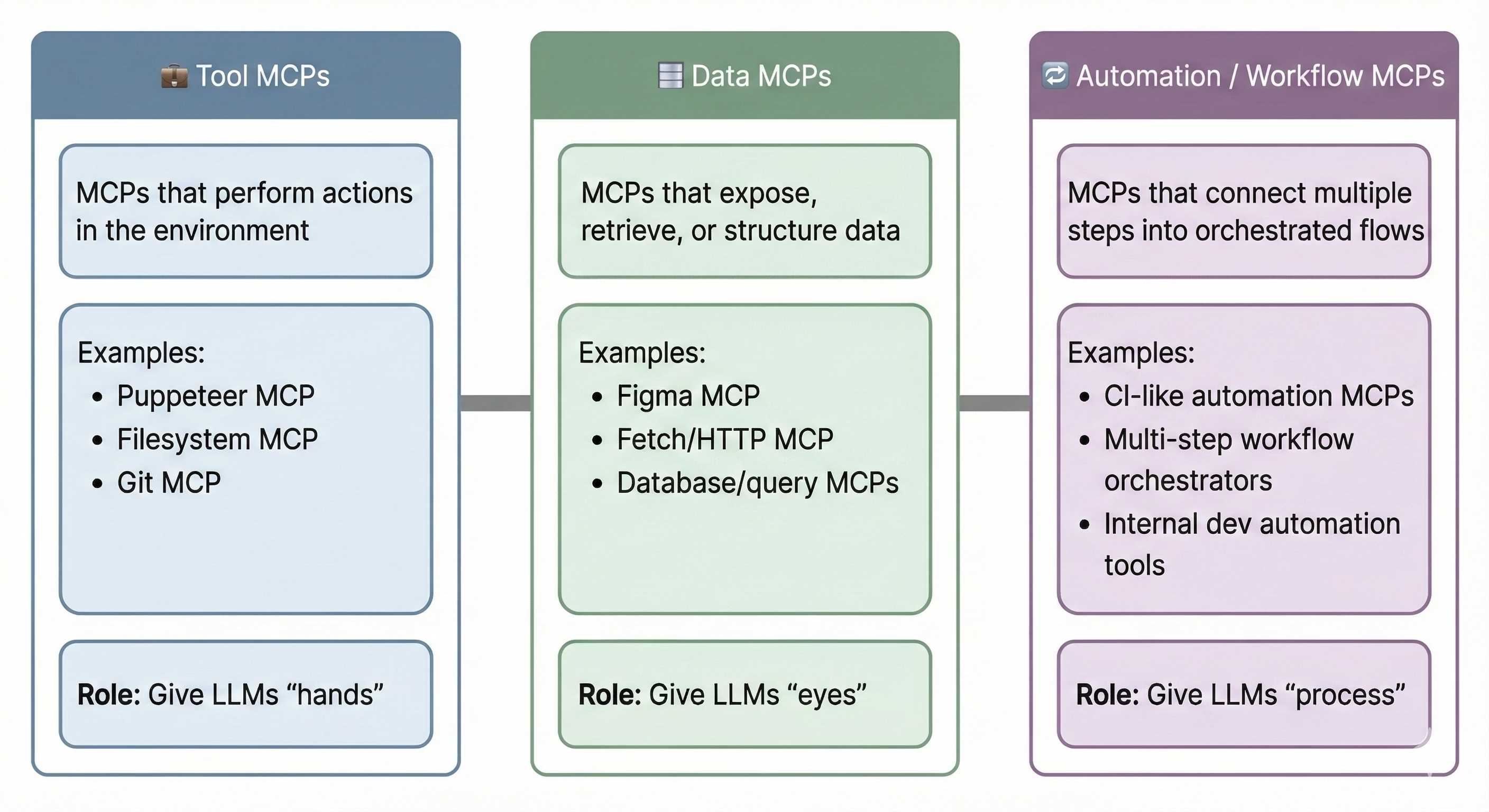
1. Tool MCPs – Giving the Model Hands
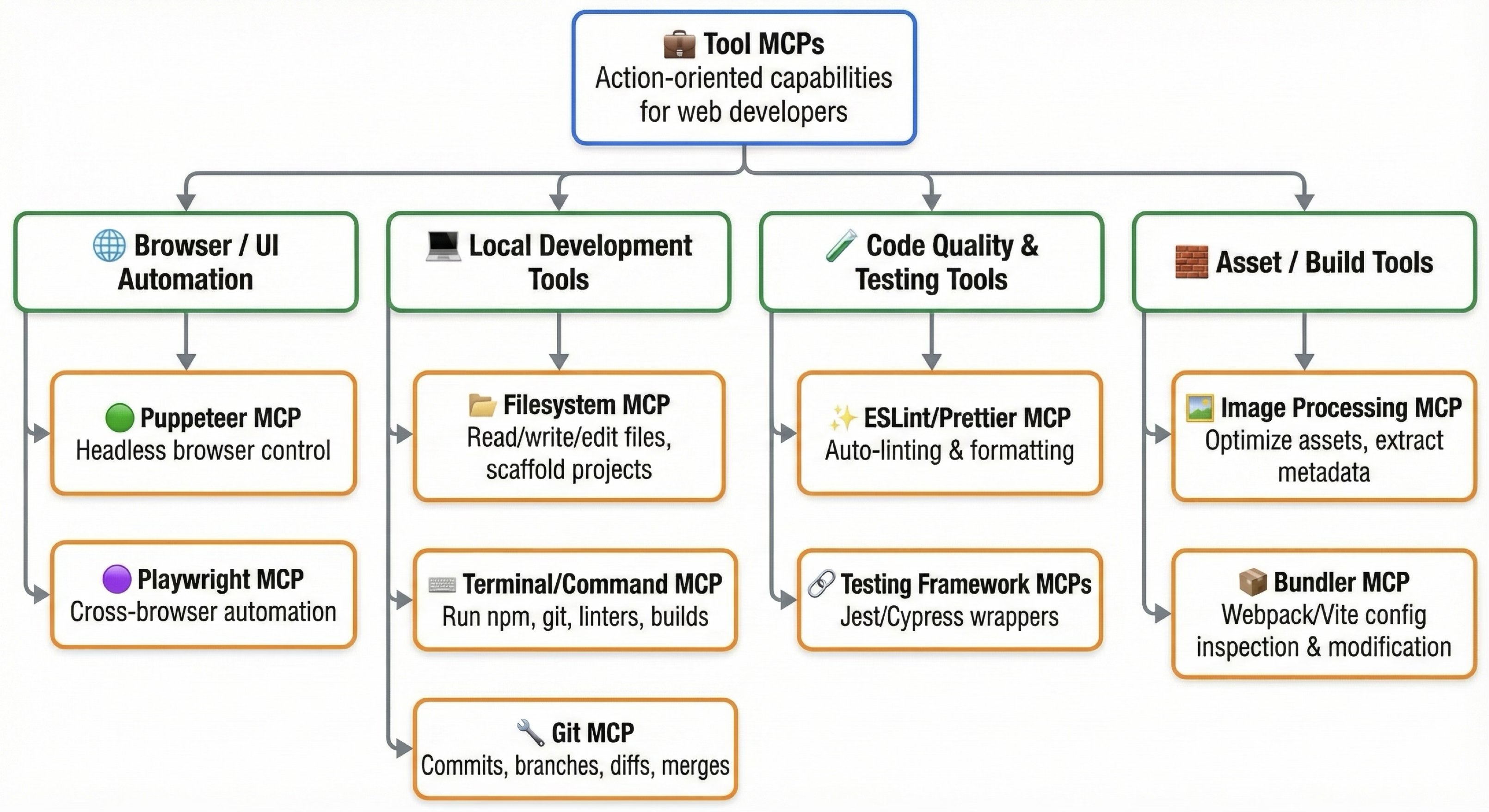
Tool MCPs let the model act. Browser automation, filesystem access, Git operations, CLI wrappers—these turn an LLM from a passive assistant into something that can actually execute work. Debugging a UI bug becomes a closed loop: reproduce → inspect → fix → verify.
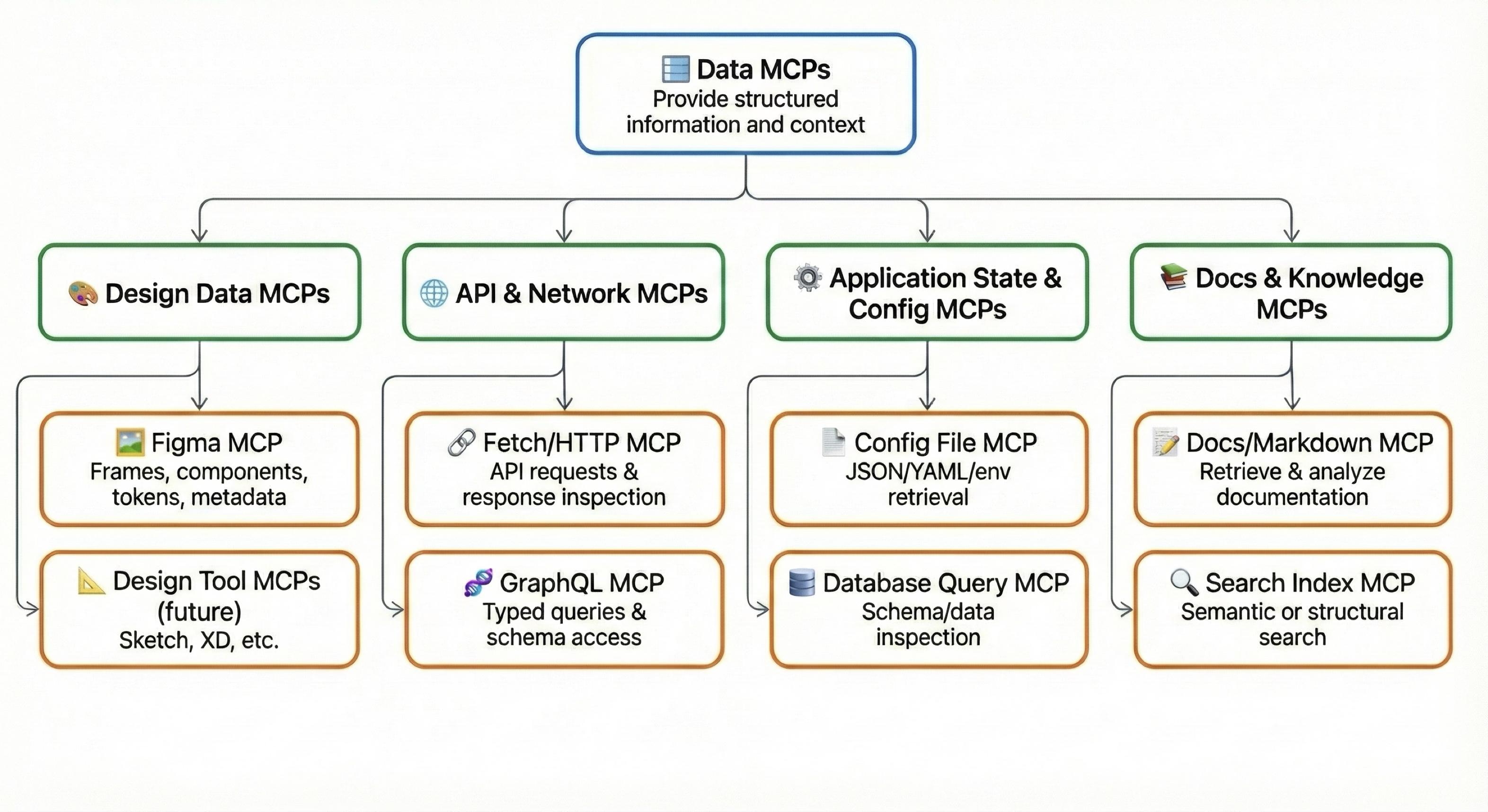
2. Data MCPs – Giving the Model Eyes
Without access to real designs, APIs, or schemas, an LLM is forced to guess. Data MCPs (e.g., Figma, Fetch/HTTP, database queries, documentation servers) let the model reason with accuracy. Design‑to‑code stops being aspirational and becomes dependable.
3. Automation MCPs – Coordinating Everything
Automation MCPs don’t just expose a single action or dataset; they orchestrate multi‑step workflows. CI pipelines, QA routines, design‑consistency checks—all become repeatable processes instead of manual rituals. If Tool MCPs are hands and Data MCPs are eyes, Automation MCPs are the coordinator that connects everything.
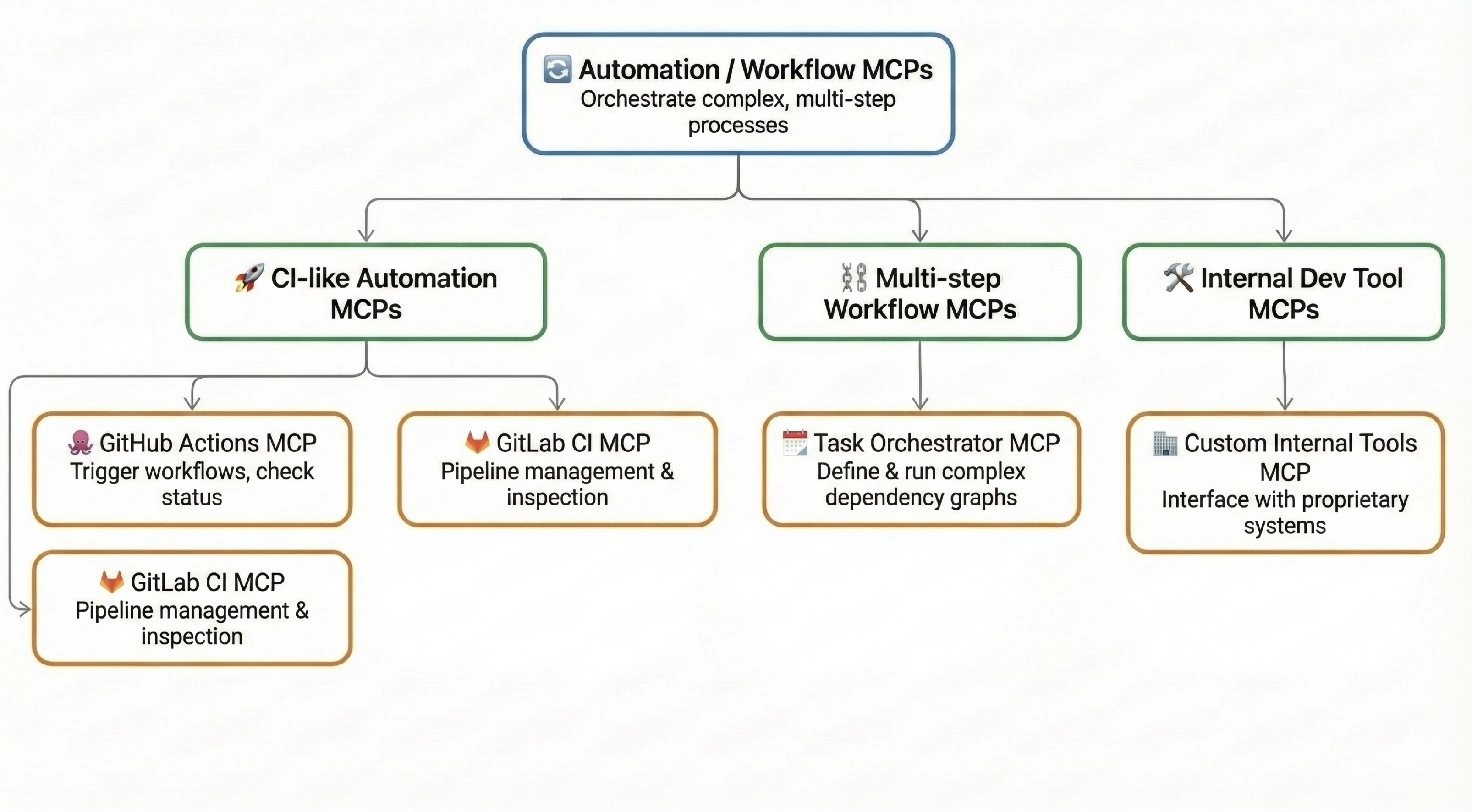
The Real Power Is in Composition
Individually each MCP category is useful; together they’re transformative.
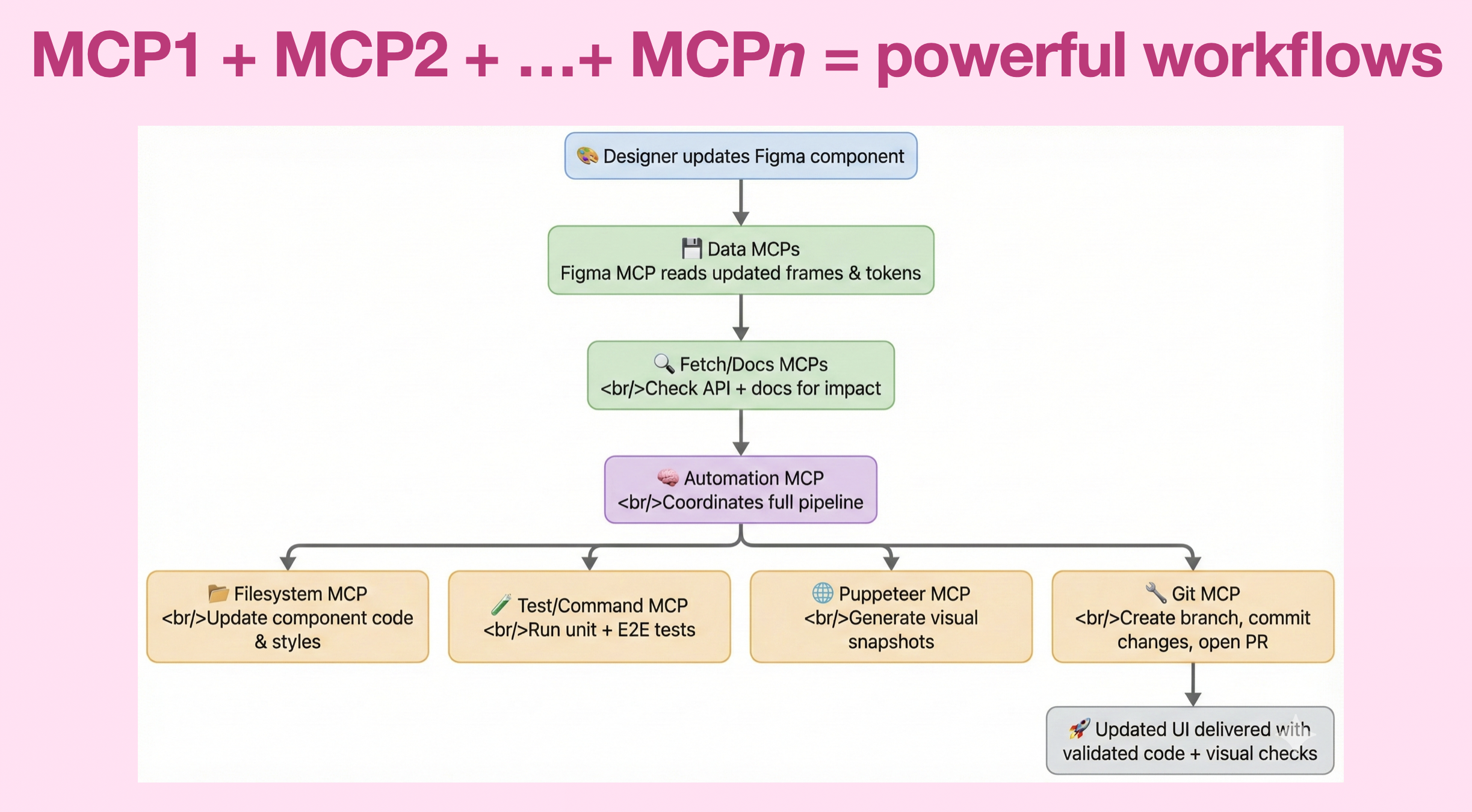
Example: A design change in Figma is detected via a Data MCP, implemented through Tool MCPs, validated in the browser, committed to Git, and wrapped into a pull request—all orchestrated by an Automation MCP. That entire flow is impossible if any one piece is missing.
This is the moment the LLM stops feeling like a chat interface and starts feeling like a teammate. Not because it’s “smarter”, but because it’s finally embedded into the same systems developers already rely on.
MCP – The Standard Contract for Your Bespoke Needs
MCP isn’t exciting because it’s flashy; it’s exciting because it’s boring in the best possible way. It introduces structure where there was none, replaces bespoke glue with standard contracts, and lets us design AI‑powered workflows using the architectural instincts we already trust.
In the next post I’ll zoom in on one specific MCP server—Chrome DevTools MCP—and show what this looks like in a real web‑development workflow.
Stay tuned – see you in the next post!