
Stitch together lots of little HTML pages with navigations for interactions
Source: Hacker News
Introduction
I wrote about building websites with LLMs — (L)ots of (L)ittle ht(M)l page(s) — and I think it’s time for a post‑mortem on that approach.
I like it.
I’ve tweaked a few things from that original post but the underlying idea is still the same, which I would describe as:
Avoid in‑page interactions that require JavaScript in favor of multi‑page navigations that rely on HTML and are enhanced with CSS view transitions (and a dash of JS if/where prudent).
Example: Menu Navigation
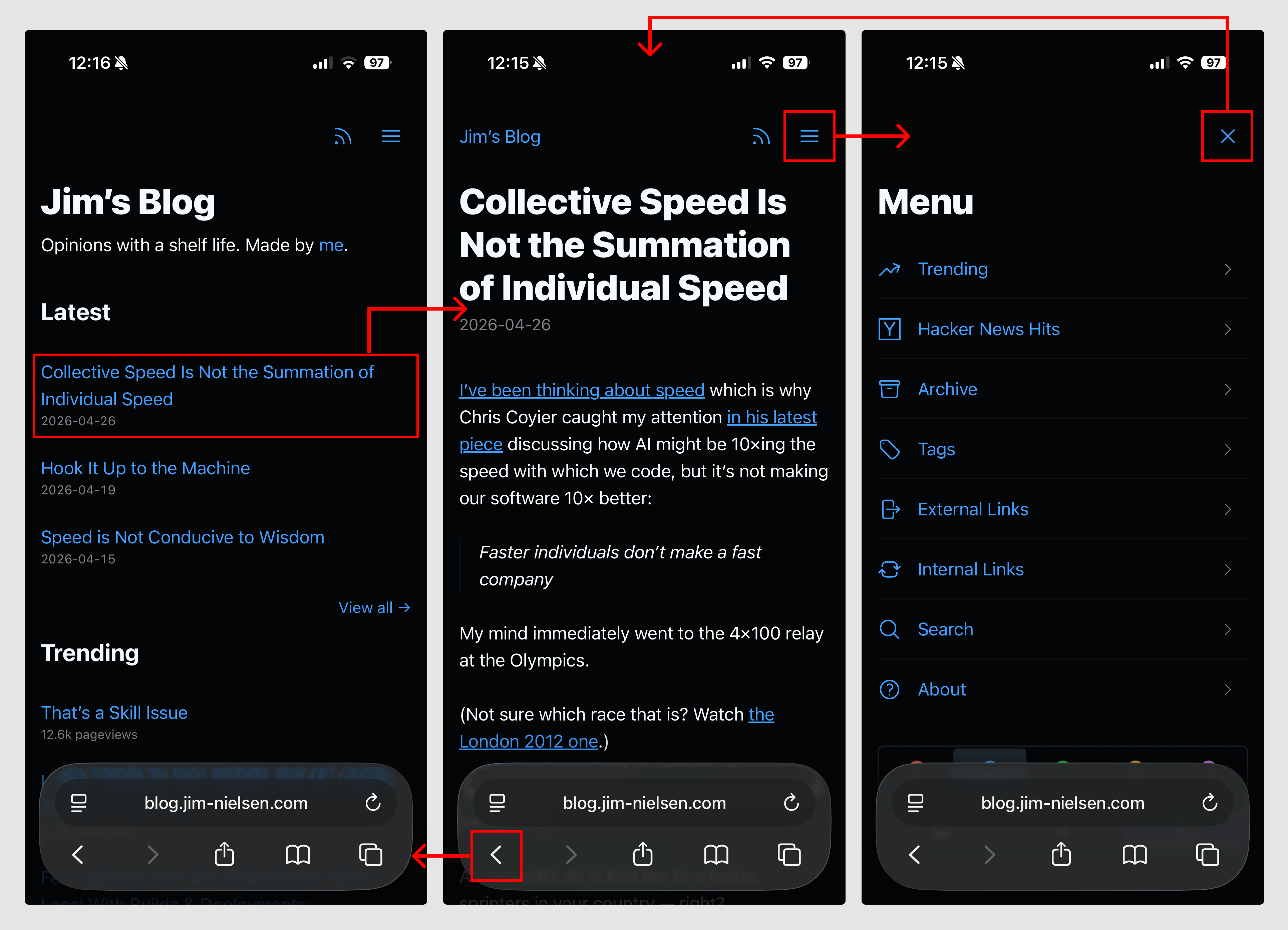
On my blog I have a “Menu”. It doesn’t “expand”, “slide out”, or “pop in” like a typical JavaScript widget. Instead, it navigates to an entirely new page that is focused solely on the menu options.
The navigation is just a regular link:
[…](/menu/)When viewed in a modern browser, the transition is enhanced with CSS view transitions, giving a smoother effect. On older browsers, or with JavaScript disabled, the link still works because it’s just a normal navigation.
How It Works Under the Hood
All pages (except the menu page) contain a link to the menu. When you navigate to the menu, that link changes to an “X” that “closes” the menu. The closing link points back to the home page (/) but is enhanced with a small JavaScript snippet that performs a history.back() when possible, preventing an extra entry in the browser history.
    …


    …
The document.referrer check determines whether the user arrived via a navigation (most likely from within the blog) or by directly typing the URL. If there is a meaningful history entry, history.back() is used; otherwise, the page redirects to /.
Visual Overview
Video Demonstration
Here’s a video of how it all works, if that’s your thing: (video link omitted)
Conclusion
While this solution seems simplistic, arriving at it required careful thought about what is essential to navigation, how the interaction could span multiple pages, and how to keep page sizes small for fast, robust performance.
When you view the browser primarily as a document navigator rather than a runtime for arbitrary code, many design complexities disappear, leading to simpler, more maintainable web experiences.