
Show HN: Generate Web Interfaces from Data
Source: Hacker News

syntux is the generative UI library for the web.
Give it a value and it designs the UI to display it.
- ⚡ Streamable – display UI as you generate.
- 🎨 Custom Components – use your own React components.
- 💾 Cacheable – reuse generated UIs with new values.
How does it work?
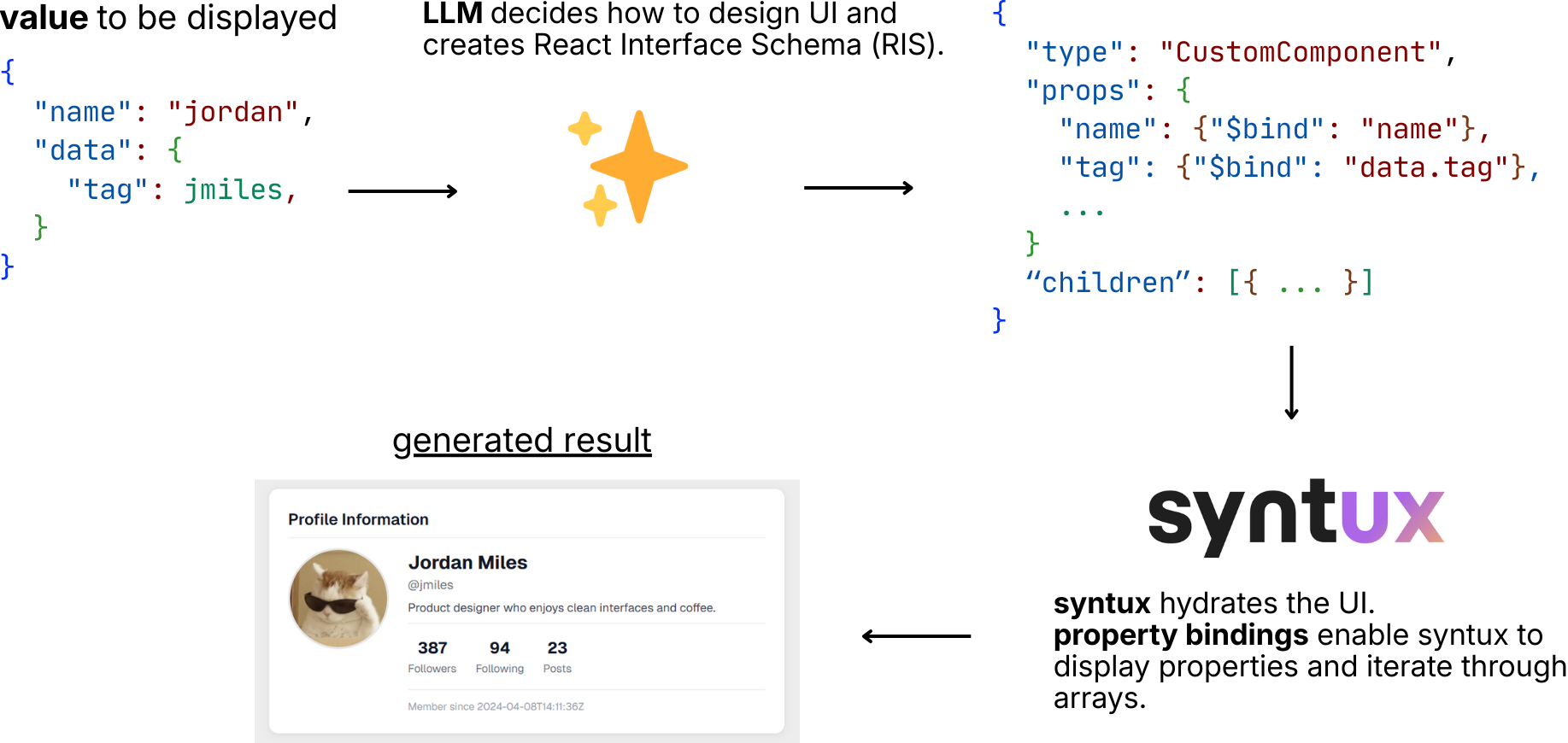
syntux generates a JSON‑DSL to represent the UI, known as the React Interface Schema. The specifics are in the FAQ below.
➡️ View documentation
API
syntux is built for React and Next.js.
One component is all you need:
const valueToDisplay = {
  username: "John",
  email: "john@gmail.com",
  age: 22,
};
syntux takes the value into consideration and designs a UI to best display it. value can be an object, array, or primitive.
Tip
If you are passing a large array or an object with untrusted input, use the skeletonize property. See the explanation in the FAQ.
Installation
From the root of your project:
npx getsyntux@latestThis will automatically install the required components in the lib/getsyntux folder.
syntux uses the Vercel AI SDK to support all LLM providers. Install the model providers you need:
npm i ai
npm i @ai-sdk/anthropic   # if you're using Claude
Examples
Basic Example
Generate a simple UI with a hint:
import { GeneratedUI } from "@/lib/getsyntux/GeneratedUI";
import { createAnthropic } from "@ai-sdk/anthropic";

/* This example uses Claude, but all models are supported! */
const anthropic = createAnthropic({ apiKey: "YOUR_API_KEY" });

export default function Home() {
  const valueToDisplay = { username: "John", email: "john@gmail.com", age: 22 };
  return (

  );
}
Caching
Cache a generated UI based on a user ID:
import { GeneratedUI } from "@/lib/getsyntux/GeneratedUI";
import { createAnthropic } from "@ai-sdk/anthropic";

const anthropic = createAnthropic({ apiKey: "YOUR_API_KEY" });
const cache: Map = new Map();

export default function Home() {
  const userID = 10;
  const valueToDisplay = { /* … */ };

  return (
     cache.set(userID, result)}
      model={anthropic("claude-sonnet-4-5")}
      value={valueToDisplay}
    />
  );
}
Custom Components
Use your own components (or a library’s) in the generated UI:
import { GeneratedUI } from "@/lib/getsyntux/GeneratedUI";
import { CustomOne, CustomTwo } from "@/my_components";

export default function Home() {
  const valueToDisplay = { /* … */ };

  return (

  );
}
Note: The
componentsarray above can be generated automatically with
npx getsyntux generate-defs. See the documentation.
Custom Actions
Attach server actions automatically to component events:
import { GeneratedUI } from "@/lib/getsyntux/GeneratedUI";
import { defineTool } from "getsyntux";

export default function Home() {
  const valueToDisplay = { /* … */ };

  return (
     {
            "use server";
            // …delete logic…
          },
          "id: string",
          "deletes post with given id"
        ),
        refresh: defineTool(async () => {
          "use server";
          // …refresh logic…
        }),
      }}
    />
  );
}
Note: The name of the action should clearly describe its purpose (it is seen by the LLM). Use
defineToolto add further context to actions. See the documentation.
FAQ
How expensive is generation?
syntux is highly optimized to save tokens. See the cost estimation table and explanation.
How does generation work? (Does it generate source code?)
Generated UIs must be secure, reusable, and cacheable. Therefore, syntux does not generate source code. It generates a React Interface Schema (RIS), a JSON‑DSL that describes the UI. The schema is then hydrated by syntux and rendered.
How does caching work?
The generated UI is determined by the React Interface Schema. If the same schema is provided, the same UI will be generated. The schema is a simple string; you can store it wherever you like (memory, file, database, etc.). Use the onGenerate and cached props to retrieve or provide a cached schema.
What about state? Can state be generated?
Generating state is considered an anti‑pattern and leads to poorly performing, insecure applications. If you need state, wrap non‑stateful components in stateful ones and pass those as custom components to syntux.
What does the React Interface Schema look like?
(The schema format is described in detail in the documentation and FAQ.)
Flat JSON List for UI Rendering
The data is a list of JSON objects, each separated by a newline.
Every object contains:
- element/component information (
type) - props for the element
- An
idand aparentIdthat are used to reconstruct the tree as the UI streams in
Why a flat list?
- The RIS does not hard‑code values – it binds to properties of the
value. - It includes built‑in iterators (identified by the
typefield), making the schema reusable and token‑efficient for arrays. - Prior to version 0.2.x the schema was a deep JSON tree; after 0.2.x it was switched to a flat list so the UI can be built progressively (streamed).
Example
{"id":"loop_1","parentId":"root","type":"__ForEach__","props":{"source":"authors"}}
{"id":"card_1","parentId":"loop_1","type":"div","props":{"className":"card"},"content":{"$bind":"$item.name"}}- The first object creates a
__ForEach__iterator overauthors. - The second object creates a
divwith classcardfor each item, binding its content to$item.name.
Further reading
To understand the format in depth—or to implement your own parser—see the specification.
syntux is open‑source software, released under the MIT License.