
Security Bite: This app tells you if your Mac’s webcam or mic was triggered while you were away
Source: 9to5Mac
Mac’s built‑in privacy indicators
The Mac’s built‑in green LED privacy indicator—paired with the on‑screen indicators in macOS—does a solid job of alerting users in real time when the webcam or microphone is active. When you’re actively working on your Mac, they’re hard to miss. But that protection assumes you’re actually there to see the privacy indicators light up.
What happens when you’re away?
If malware triggers the camera or microphone while you’re away, you won’t see the LED and you won’t know that your device is being recorded or eavesdropped on.
OverSight: A free, open‑source watchdog
In a previous Security Bite column I explained why plastic webcam covers are no longer necessary on modern MacBooks, thanks to Apple’s 2008 design change that hard‑wires the camera module and LED indicator in the same circuit. While this eliminated many stealth webcam attacks, other threats still exist.
Apple security researcher and Objective‑See founder Patrick Wardle suggested the free, open‑source tool OverSight as an additional layer of defense.
Key features
- Real‑time notifications whenever the webcam or microphone is activated, including the name of the responsible process.
- Log of activation events so you can review what happened while you were away.
- Detection of piggybacking attacks where malware attaches to an already‑active video stream (e.g., Zoom, FaceTime) without turning the LED back on.
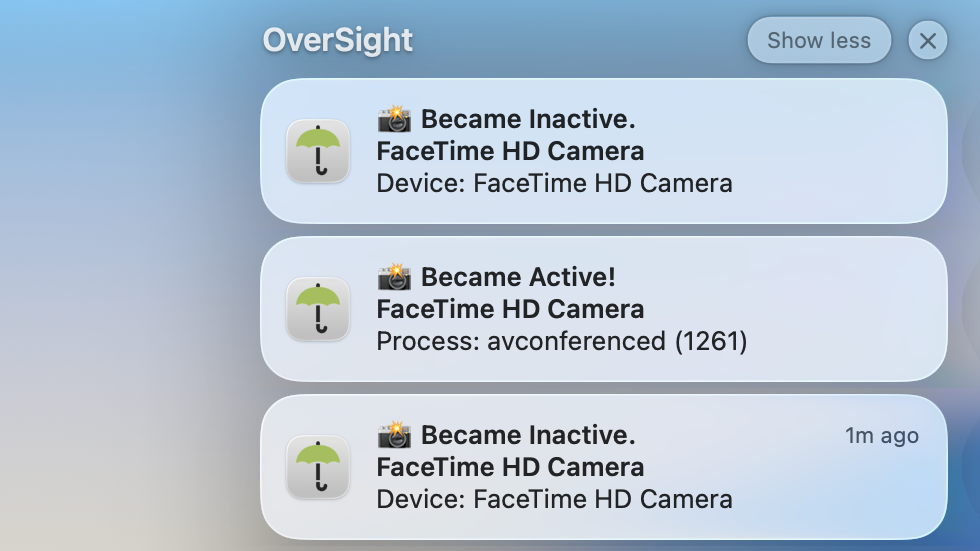
Historically, threats like Fruitfly, Mokes, Crisis, and others have lingered on systems for long periods, activating the camera only when users step away from their desks. OverSight doesn’t prevent the activation itself, but it records every event, giving you a clear audit trail.
Personal experience
After running OverSight on my personal Mac for a few weeks, I found it invaluable. It provides instant awareness of hardware access without the need for custom scripts or digging through system internals.
You can learn more and download OverSight from the Objective‑See Foundation’s website: OverSight – Objective‑See.
Why use OverSight?
- Peace of mind: Know exactly when your camera or mic is used.
- Visibility: Identify unexpected processes that try to access audio/video hardware.
- Free and open source: No cost, community‑maintained, and regularly updated.
Security Bite is 9to5Mac’s weekly deep dive into Apple security, covering new threats, privacy concerns, vulnerabilities, and more.