
Securing PII in Data Lakes: AWS Lake Formation Access Control
Source: Dev.to
AWS Community Day Bengaluru 2025 – “PII Data Management with Lake Formation”
Presentation by Ankit Sheth
Date: May 23 2025
What is a Data Lake? (And Why Should You Care?)
A data lake is a large, flexible storage repository that can hold any type of data—structured, semi‑structured, or unstructured—at any scale. Typical contents include:
- Customer records
- Application logs
- Images, videos, and sensor data
Unlike traditional databases, which require a predefined schema, data lakes follow a schema‑on‑read approach: you ingest raw data first and define its structure only when you query it. This makes data lakes both flexible and cost‑efficient.
Key Characteristics of Data Lakes
- Single source of truth – All data lives in one place, simplifying discovery and governance.
- Support for multiple formats – CSV, JSON, Parquet, Avro, plain files, etc.
- Fast ingestion & consumption – Data can be loaded quickly and accessed by many analytics tools.
- Low‑cost storage – AWS data lakes typically use Amazon S3, which is far cheaper than traditional databases.
- Decoupled storage & compute – You only pay for compute when you run queries; storage costs remain constant.
- Built‑in protection & security – Services like Lake Formation let you define fine‑grained access policies and audit usage.
If you’ve ever struggled with data scattered across silos, these benefits will sound familiar.
Why the Access Layer Matters
The session zeroed in on Lake Formation’s Access Layer, which implements role‑based access control (RBAC). When dealing with sensitive data—SSNs, credit‑card numbers, health records—you need precise control over who can see what.
The Challenge with Traditional Approaches
Consider an e‑commerce platform:
| Team | Data Needs |
|---|---|
| Marketing | Customer demographics |
| Finance | Transaction records |
| Data Science | Raw click‑stream for recommendation models |
| Analytics | Business‑wide reports |
Each team requires a different level of access. Some need full visibility, others only anonymized data, and a few must never see PII. Managing these permissions manually quickly becomes a mess.
How Lake Formation Solves This: Role‑Based Access
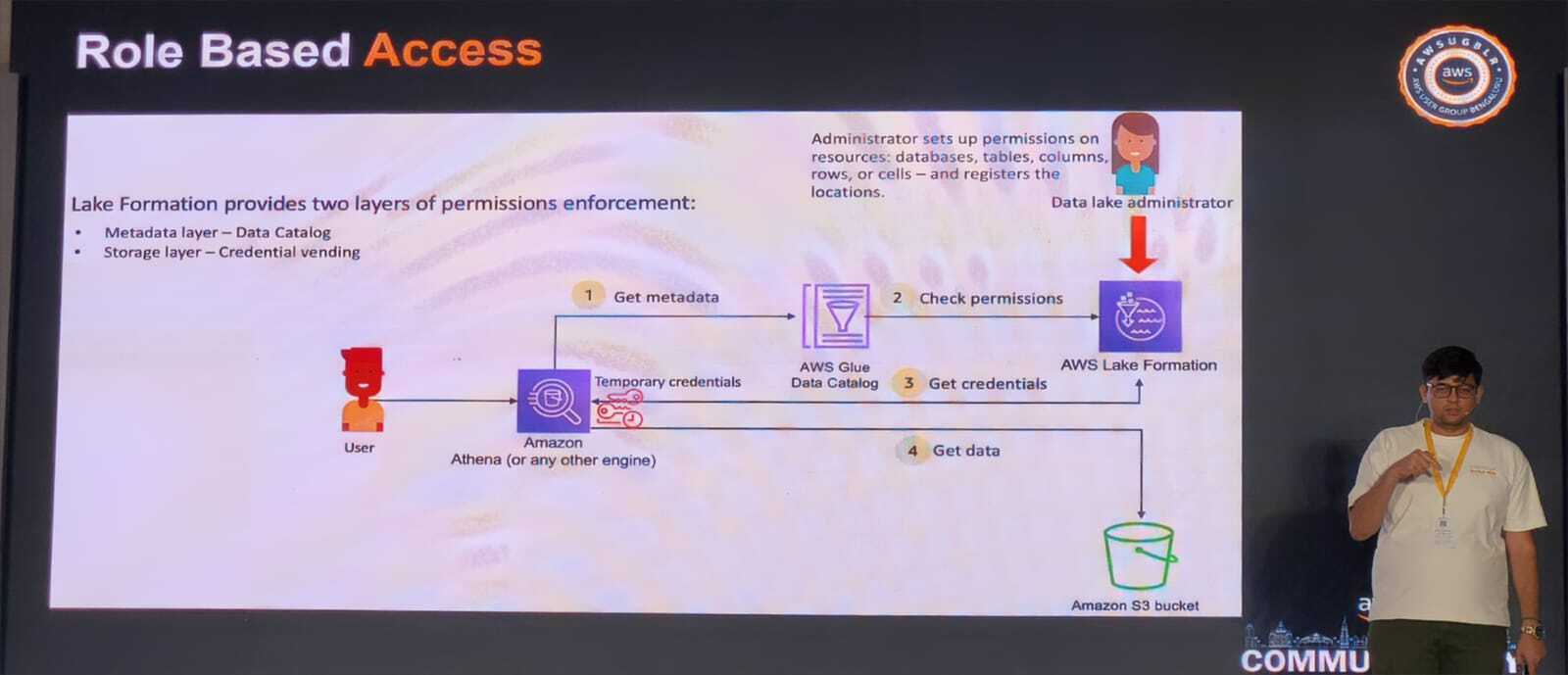
Lake Formation provides a central place to define permissions that apply across the entire data lake. The slide shown in the session illustrated this workflow clearly.
The Permission Flow
- Administrator sets up permissions – Grants rights at the database, table, column, row, or even cell level and registers the resources in Lake Formation.
- User queries data – A user (e.g., via Amazon Athena) sends a query with temporary credentials.
- Lake Formation checks metadata – The AWS Glue Data Catalog is consulted for table definitions.
- Permissions are verified – Lake Formation confirms that the user’s role is allowed to access the requested data.
- Credentials are vended – If authorized, temporary S3 credentials are issued.
- Data is retrieved – The user can now read the data from the bucket.
Two Layers of Protection
Lake Formation enforces permissions at both:
- Metadata layer – Controlled through the AWS Glue Data Catalog.
- Storage layer – Controlled via credential vending for Amazon S3 access.
This dual‑layer approach ensures that even if one layer is bypassed, the other still blocks unauthorized data access.
Database‑Level vs. Table‑Level Permissions
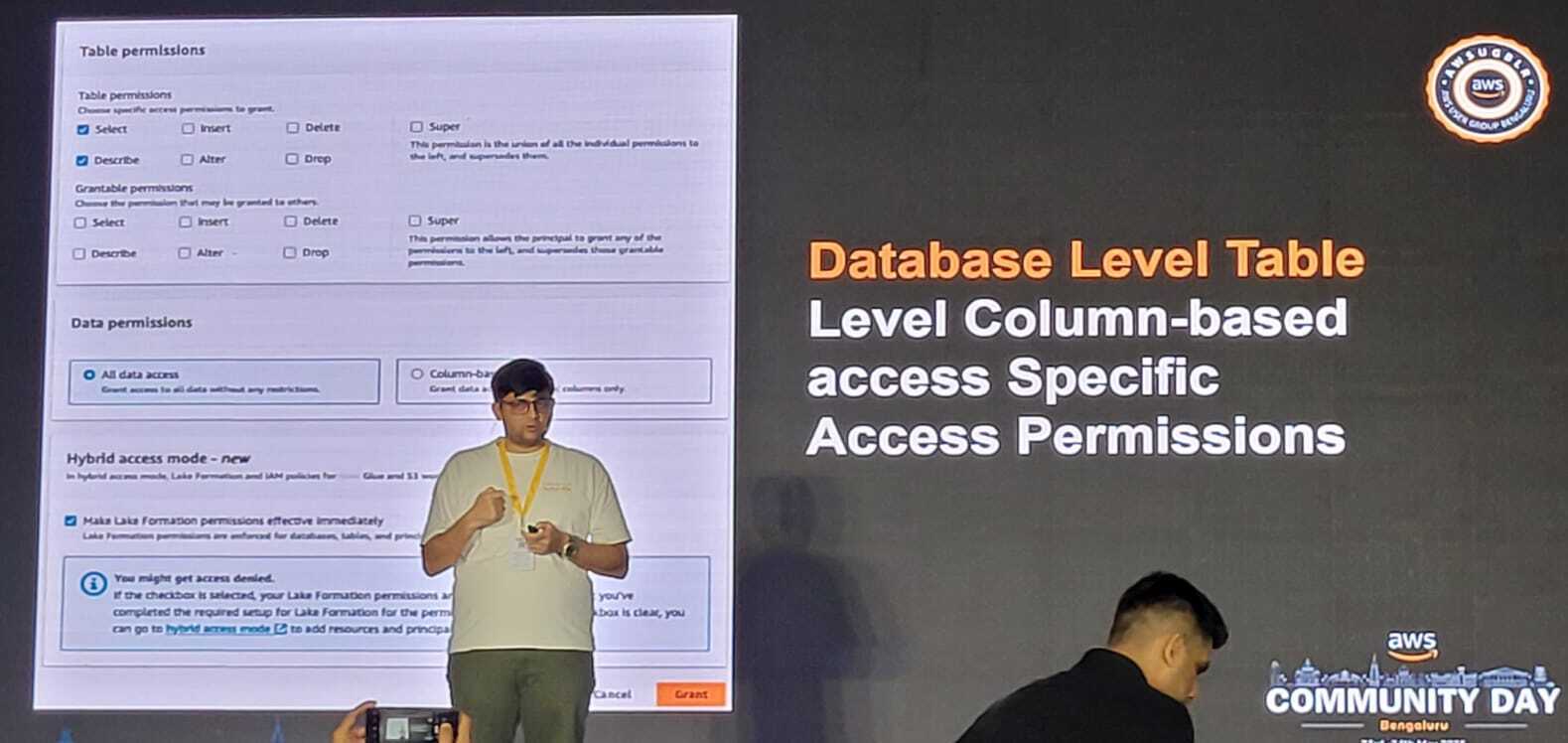
- Database‑level – Grants access to all tables within a database.
- Table‑level – Grants access to specific tables, columns, or rows, enabling fine‑grained control.
Takeaways
- Lake Formation simplifies the management of PII and other sensitive data by providing a unified, fine‑grained permission model.
- Role‑based access lets you enforce the principle of least privilege across teams and use cases.
- The two‑layer security (metadata + storage) adds a robust safety net against accidental or malicious data exposure.
If you’re building or modernizing a data lake on AWS, incorporating Lake Formation’s access layer is a best‑practice you shouldn’t overlook.

## Database‑Level Permissions
These are wide‑ranging permissions that cover the whole database. You might grant someone:
- **SELECT** – Read data from all tables
- **INSERT** – Add new records
- **DELETE** – Remove records
- **ALTER** – Modify table structures
- **SUPER** – Full administrative rights, including the ability to grant permissions to others
## Table‑Level Column‑Based Access
Lake Formation really shines here. You can set up access to specific columns within certain tables. For example:
- Your **marketing team** can see `customer_name` and `email`, but not `credit_card_number`.
- Your **compliance team** can see everything.
- Your **external contractors** can only see anonymized, aggregated data.
This detailed control is crucial when handling personal information. Instead of creating many copies of the same data with different columns hidden (which is both tricky and costly), you define the access rules once and Lake Formation enforces them automatically.
> **Note:** You could try to achieve this with S3 bucket policies, but it quickly becomes unmanageable. Every time you add a new user, role, or dataset, you’d have to update policies in several places manually. Lake Formation centralises everything in one place.
## Real‑World Scenarios Where This Helps
### Scenario 1: Healthcare Data
A hospital stores patient information in a data lake.
- **Doctors** need full access to medical history.
- **Billing staff** should only see insurance and payment details.
- **Researchers** looking at health trends can only use anonymised data and must not see any personally identifying information.
With Lake Formation, you set these rules once. The system enforces them automatically, regardless of whether users access the data via Athena, Redshift Spectrum, or other connected tools.
### Scenario 2: E‑Commerce Platform
An online store wants to study buying habits.
- **Marketing teams** can view customer demographics and purchase types, but not exact prices (reserved for the finance team).
- **Data scientists** building machine‑learning models need transaction patterns but not customer names.
Lake Formation lets you create role‑based policies that match these business needs precisely.
### Scenario 3: Regulatory Compliance
If you’re based in the EU, GDPR requires tight control over personal data.
Lake Formation provides audit‑ready logs that track who accessed what data and when, simplifying compliance checks during audits.About the Author
As an AWS Community Builder, I enjoy sharing what I’ve learned through my own experiences and events, and I like to help others on their path. If you found this helpful or have any questions, feel free to get in touch! 🚀
🔗 Connect with me on LinkedIn
References
- Event: AWS Community Day Bangalore 2025
- Topic: Securing PII in Data Lakes: AWS Lake Formation Access Control
- Date: May 23, 2025
- Location: Conrad Bengaluru