
React Components Explained: A Beginner-Friendly Guide with Examples
Source: Dev.to
Introduction
A React component (functional component) is just a JavaScript function that returns an HTML‑like code (JSX — JavaScript XML). It is the core concept in React and solves many developers’ problems.
Why Components Are Important in React
React components eliminate unnecessary repetition of the same code with different data. For example, rendering four product cards with the same design but different data can be done with a single component used multiple times. This promotes UI consistency, makes the code easier to understand, and simplifies maintenance. Components are therefore essential in any React application.
Types of Components in React
Functional Component
Functional components are the modern, recommended way of writing components. They are simple and widely used today.
function Welcome() {
  return
## Hello, React!
;
}
Class Component
Class components are an older approach and are less common in modern apps.
class Welcome extends React.Component {
  render() {
    return
## Hello, React!
;
  }
}
Note: A detailed functional vs. class component comparison can be provided upon request.
Creating Your First Component
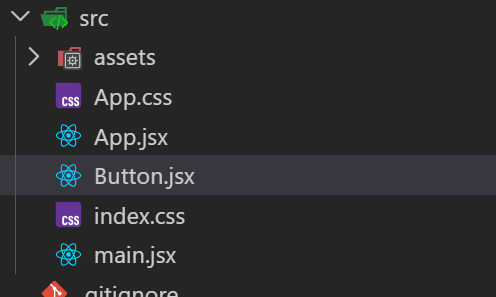
Step 1 – Create the file
Create a file with a .jsx extension in src/ (e.g., Button.jsx).
Step 2 – Write the component
function Button() {
  let name = "John Doe";
  return Hello World by {name};
}
Step 3 – Export the component
export default Button;The complete Button.jsx file:
function Button() {
  let name = "John Doe";
  return Hello World by {name};
}

export default Button;
Step 4 – Import and use the component
import Button from "./Button";You can render the component using either syntax:
or
Example usage in App.jsx
import Button from "./Button";

function App() {
  return (


## Hello World


  );
}

export default App;
When you run the app, you’ll see the button rendered:

Component Naming Rules
- Start the component name with an uppercase letter.
- Use one component per file.
- Choose clear, descriptive names.
Common Mistakes to Avoid
- Using lowercase component names.
- Forgetting the
exportstatement. - Returning multiple elements without a wrapper element.