
Rate Limiting: Concepts, Algorithms, and Distributed Challenges
Source: Dev.to
Introduction
If you’ve ever built an API or backend service, you’ve probably faced one of these problems:
- One user sends too many requests
- Bots abusing your endpoints
- Traffic spikes breaking your service
- Retries or cron jobs accidentally overloading your system
This blog is about rate limiting, a simple but critical technique used to protect systems from these issues.
In this post we will:
- Understand why rate limiting is needed
- Learn how common rate limiting algorithms work
- See where rate limiting fits in real systems
You don’t need prior knowledge of rate limiting. If you understand basic APIs and requests, you’ll be able to follow along.
Table of Contents
- The Problem Rate Limiting Solves
- What Rate Limiting Actually Does
- Common Rate Limiting Algorithms
- Fixed Window Counter
- Sliding Window
- Token Bucket
- Leaky Bucket
- Comparing the Algorithms
- Rate‑Limiting Algorithms Overview
- Challenges in Distributed Systems
- Key Takeaway
The Problem Rate Limiting Solves
When a request hits your server, it consumes resources such as CPU time, memory, database connections, and network bandwidth. Under normal usage this works fine, but problems start when too many requests arrive at the same time.
Typical causes
- A single user sending requests in a tight loop
- Bots hitting public endpoints
- Retry mechanisms without proper back‑off
- Sudden traffic spikes after a release or promotion
The server sees all requests as the same; it doesn’t know which request is important and which one is harmful.
Why this becomes a serious problem
If request volume keeps increasing without limits:
- Response times go up
- Databases start slowing down
- Timeouts increase
- Error rates spike
- Eventually the service becomes unavailable for everyone
Why we can’t just “scale the server”
Our common reaction is “let’s just add more servers.” Scaling helps, but it does not solve the root problem:
- Unlimited requests will eventually overwhelm any system
- Scaling increases cost
- Databases and third‑party APIs may not scale the same way
If we keep scaling, we only delay failure.
What systems really need
- A way to control how fast requests are allowed
- Protection against accidental or intentional abuse
- Fairness so one user cannot starve others
This is exactly the problem rate limiting is designed to solve.
What Rate Limiting Actually Does
At its core, rate limiting controls how frequently an action is allowed within a given time period. Most commonly, this action is an API request.
A rate limit usually looks like this:
- Allow 100 requests per minute per user
- Allow 10 requests per second per IP
- Allow 1 request per second for a sensitive endpoint
When the limit is reached, the system does not process further requests until enough time has passed.
What happens when a limit is exceeded
- The request is rejected
- The server responds immediately
- Resources are preserved for other users
In HTTP‑based systems this is commonly returned as a 429 Too Many Requests response. Early rejection prevents unnecessary work such as database queries or external API calls.
What rate limiting guarantees
- Fair usage – One user cannot consume resources meant for everyone else
- Predictable performance – The system remains responsive even under load
- Controlled bursts – Some algorithms allow short bursts while still enforcing long‑term limits
- System protection – Accidental bugs or misbehaving clients are contained early
What rate limiting does NOT do
- Authentication (it does not verify who the user is)
- A complete security solution
- A replacement for proper input validation
It is a traffic‑control mechanism, not a security gate.
Common Rate Limiting Algorithms
Different systems use different rate‑limiting algorithms depending on their needs. No algorithm is universally “best”; each makes different trade‑offs among simplicity, accuracy, and flexibility.
Fixed Window Counter
The simplest form of rate limiting.
How it works
- Time is divided into fixed windows (e.g., 1 minute, 1 hour).
- For each user, the system keeps a counter for the current window.
- Every incoming request increments this counter.
- Once the counter reaches the limit, further requests are rejected.
- When the window ends, the counter is reset to zero.
Example
- Limit: 5 requests per minute
- Window: 12:00 – 12:01
A user sends 5 requests at 12:00:59 → all allowed.
The counter resets at 12:01:00 → another 5 requests are allowed.
This means the user effectively made 10 requests in 1 second.


Why Fixed Window fails
- Users can exploit window boundaries.
- Traffic becomes very bursty.
- Backend services can suddenly receive huge spikes.
- The system becomes unfair under load.
When Fixed Window can be acceptable
- Very low‑traffic systems.
- Internal tools.
- Prototypes or demos.
- Cases where correctness is less important than simplicity.
In most production APIs, Fixed Window is usually avoided.
Sliding Window
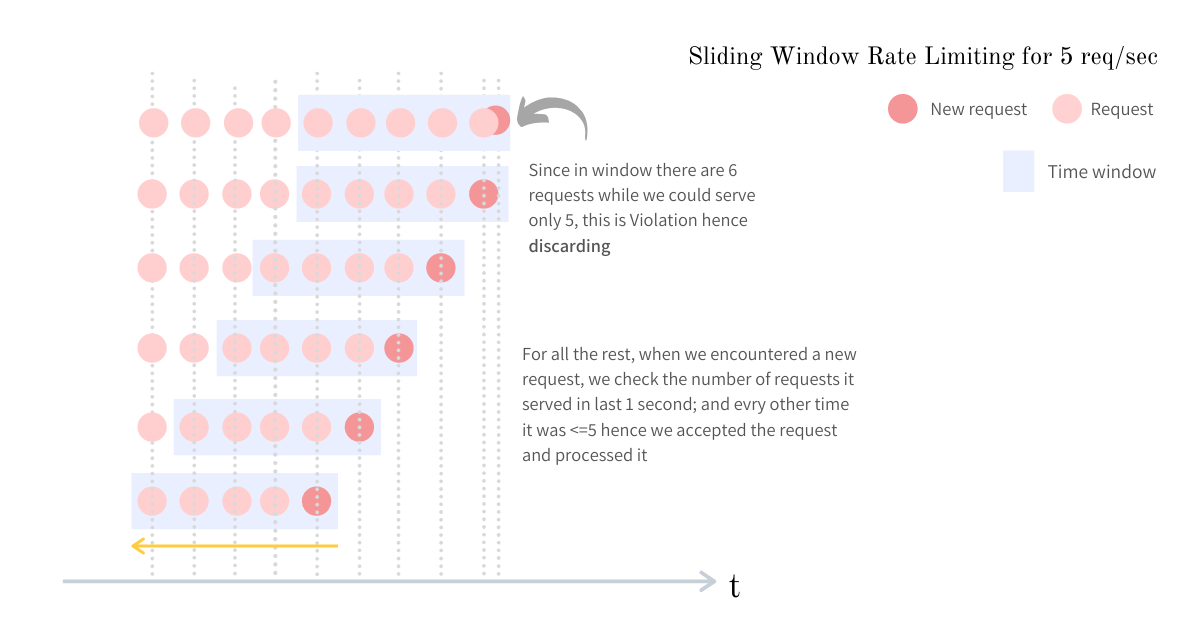
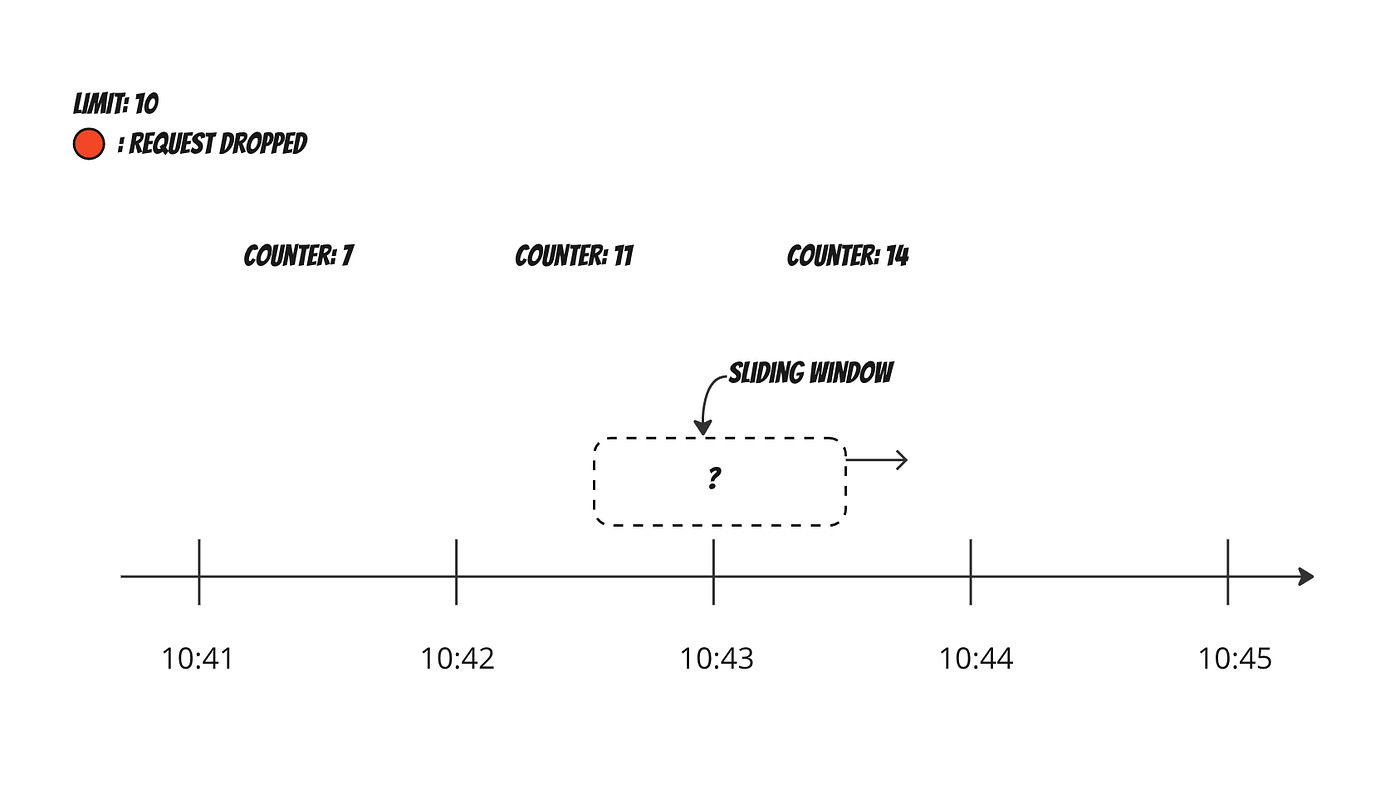
Sliding‑window algorithms fix the burst problem of fixed windows by looking at the last N seconds from the current time.
How it works
- The system always looks at the last
Nseconds from the current time. - Every request is evaluated against this rolling window.
- The system counts how many requests occurred in the previous
Nseconds. - If the count exceeds the limit, the request is rejected.
Example
Limit: 100 requests per 60 seconds- At any moment, the system checks how many requests happened in the previous 60 seconds.
- This prevents sudden spikes caused by window resets, as requests are spread more evenly over time.
Pros
- Much fairer request distribution.
- Traffic spikes are naturally reduced.
- No burst problems at window boundaries.
Cons
- The system needs to store timestamps of requests.
- Memory usage increases with traffic.
- More computation per request.
Token Bucket
One of the most commonly used algorithms in production because it balances strict limits with a good user experience.
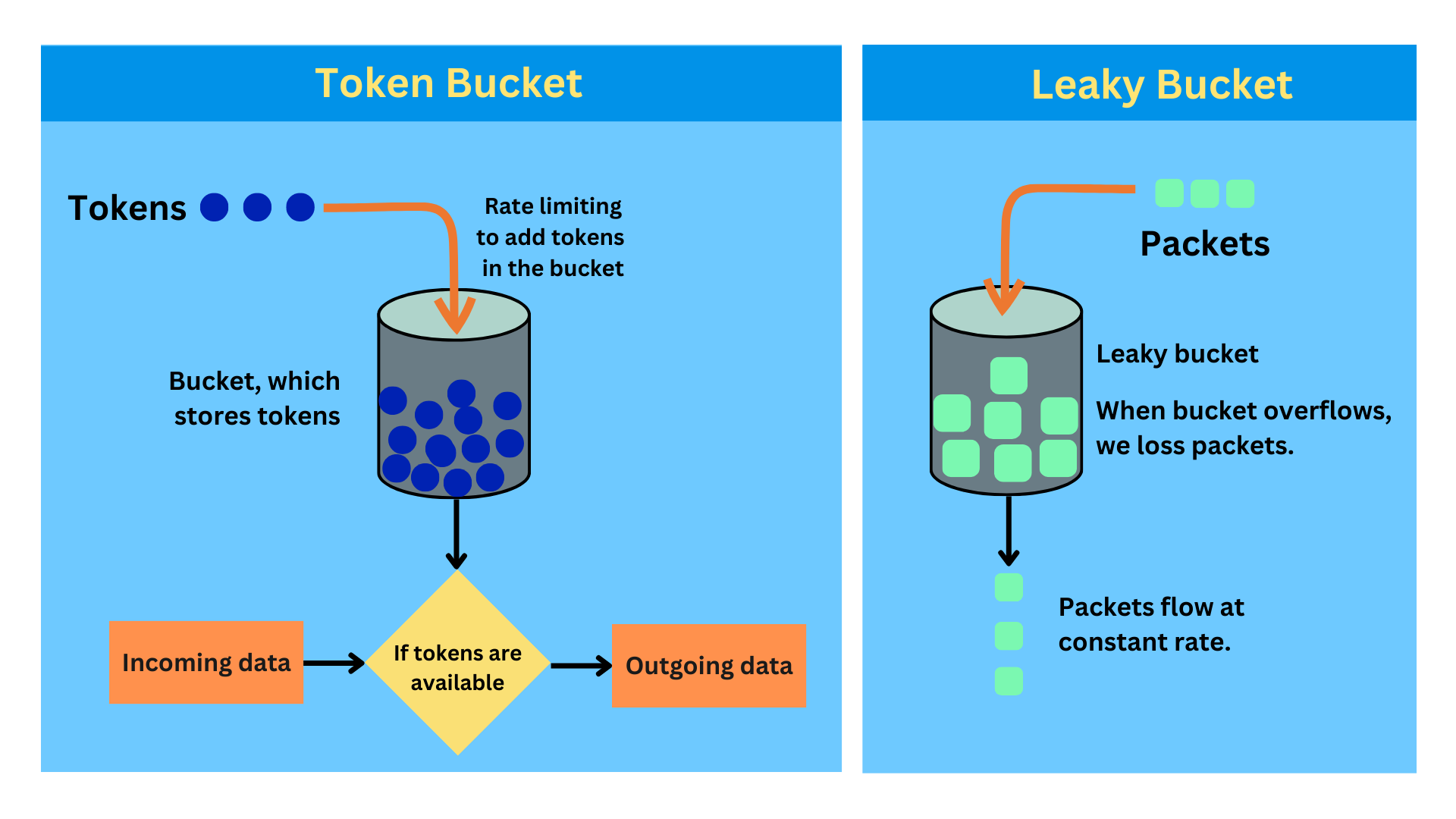
How it works
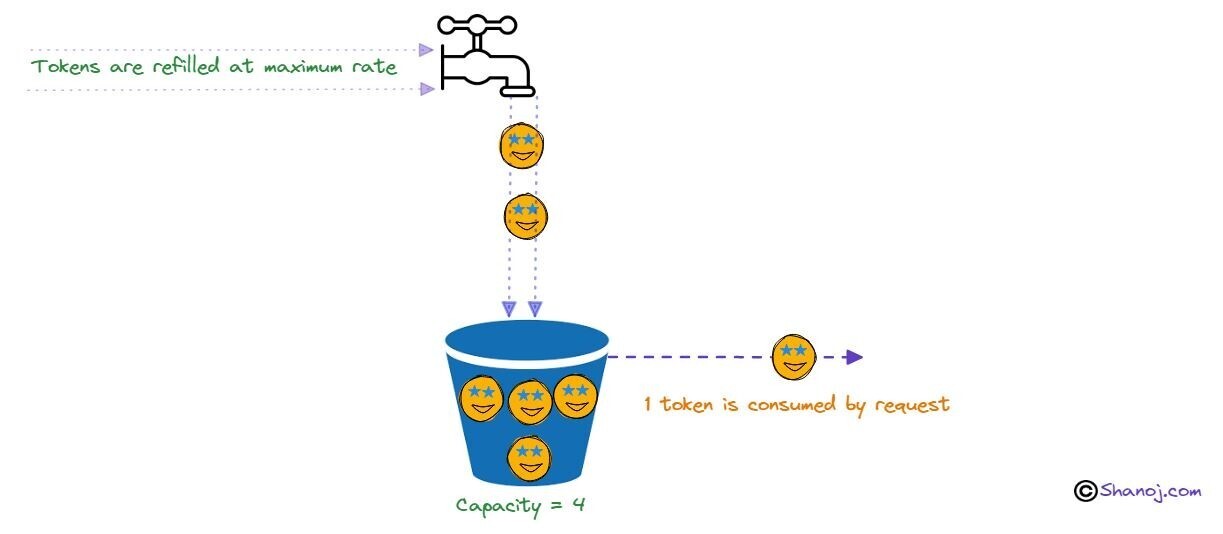
- Each user has a bucket that holds tokens.
- Tokens are added to the bucket at a fixed rate.
- Each request consumes one token.
- If there are no tokens left, the request is rejected.
- The bucket has a maximum capacity, so tokens cannot grow infinitely.
Example
Bucket size: 10 tokens
Refill rate: 1 token per second| Situation | Result |
|---|---|
| User is idle → bucket fills to 10 tokens | Ready for a burst |
| User sends 10 requests instantly | All allowed |
| 11th request | Rejected |
| After 1 second, 1 token is added | 1 request allowed |
Why it works well
- Allows short bursts without breaking the system.
- Enforces long‑term rate limits.
- Provides a better user experience.
- Simple and efficient to implement.
Because of these properties, Token Bucket is often the default choice for APIs.
Leaky Bucket
Focuses on producing a smooth and stable output rate.
How it works
- Incoming requests are placed into a queue (the bucket).
- Requests leave the queue at a constant, fixed rate.
- If the queue becomes full, new requests are dropped.
Example
- Many requests arrive at once.
- The system processes requests at a steady pace.
- Extra requests are dropped when the queue is full.
Pros
- Protects downstream systems very well.
- Ensures predictable processing speed.
- Prevents sudden traffic spikes.
Cons for user‑facing APIs
- Burst requests are delayed or dropped.
- Latency increases under load.
- User experience can suffer.
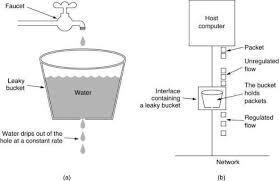
Leaky Bucket is more suitable for background jobs and pipelines than for interactive APIs.
Comparing the Algorithms
The goal here is to understand which algorithm fits which situation.
High‑level Comparison
| Algorithm | Burst handling | Fairness | Complexity | Common usage |
|---|---|---|---|---|
| Fixed Window | Poor | Low | Very low | Simple or low‑traffic systems |
| Sliding Window | Good | High | High | Systems needing accuracy |
| Token Bucket | Excellent | High | Medium | Default for most public APIs |
| Leaky Bucket | Excellent (output) | Medium | Medium | Background jobs, pipelines |
Rate‑Limiting Algorithms Overview
| Algorithm | Accuracy | Burst Capacity | Complexity | Typical Use‑case |
|---|---|---|---|---|
| Token Bucket | Very good | High | Medium | Most APIs |
| Leaky Bucket | Poor | Medium | Medium | Background jobs |
Choose the algorithm that best matches your traffic pattern, fairness requirements, and operational constraints.
Challenges in Distributed Systems
So far, everything we discussed assumes a single server. In real‑world applications this is rarely the case—most systems run on multiple servers behind a load balancer. This introduces several important challenges.