
New macOS stealer campaign uses Script Editor in ClickFix attack
Source: Bleeping Computer
Overview

A new campaign delivering the Atomic Stealer malware to macOS users abuses the Script Editor in a variation of the ClickFix attack that tricked users into executing commands in Terminal.
Script Editor is a built‑in macOS application for writing and running scripts, primarily AppleScript and JXA, that can execute local scripts and shell commands. It is a trusted application pre‑installed on macOS systems.
While this is not the first time it has been abused for malware delivery, the researchers note that, in the context of the ClickFix social‑engineering technique, it does not require the victim to manually interact with the Terminal and execute commands.

Apart from the Terminal‑based variant being widely reported, macOS Tahoe 26.4 added protection against ClickFix attacks in the form of a warning when trying to execute commands.
In a new campaign distributing Atomic Stealer observed by security researchers at Jamf, the hackers target victims with fake Apple‑themed sites that pose as guides to help reclaim disk space on their Mac computers. These pages contain legitimate‑looking system cleanup instructions but use the applescript:// URL scheme to launch Script Editor with a pre‑filled executable code.
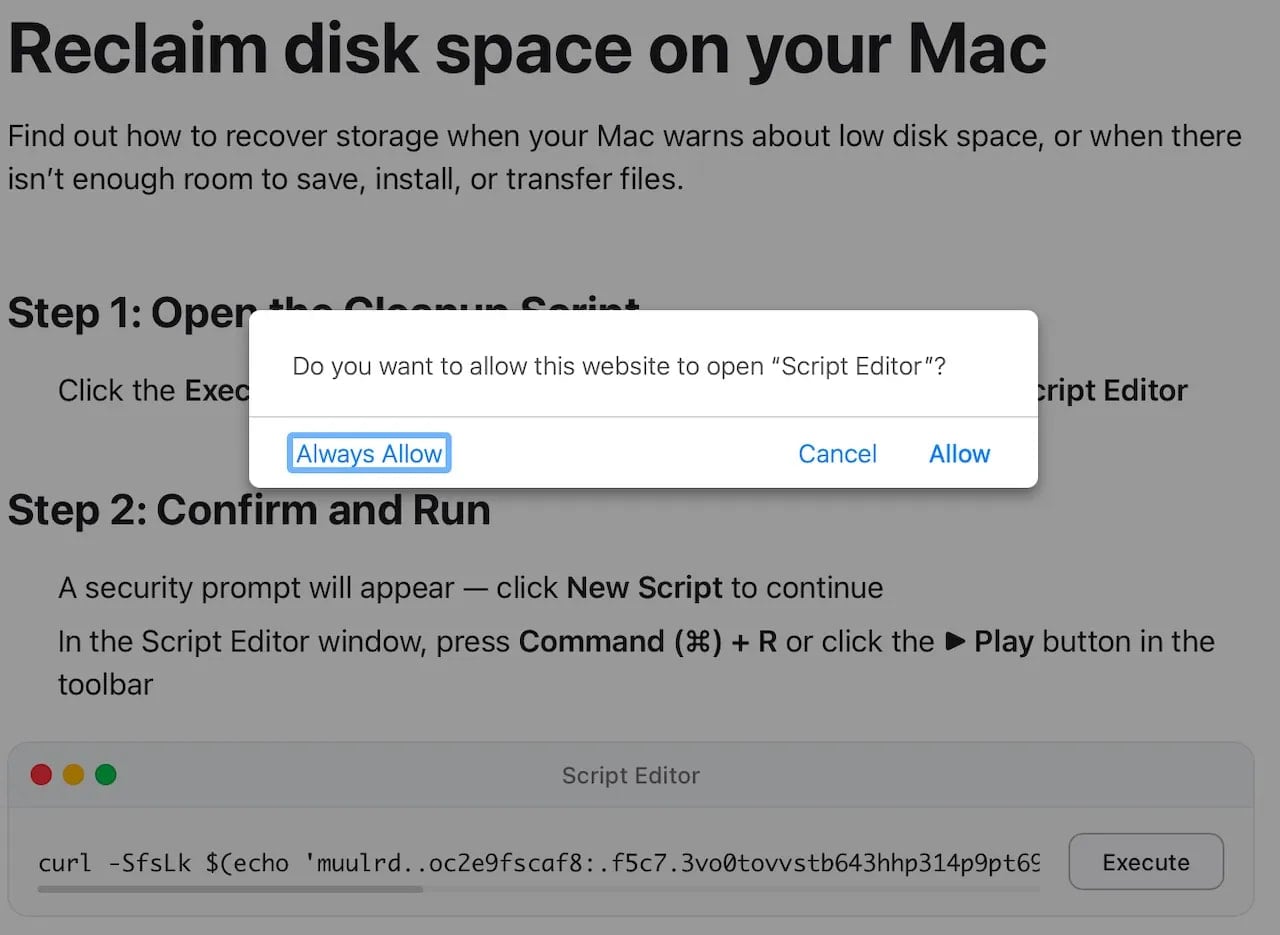
Prompt to open the Script Editor by the malicious web page
Source: Jamf
The malicious code runs an obfuscated curl | zsh command, which downloads and executes a script directly in system memory:
curl | zshThe script:
- Decodes a Base64‑encoded, gzip‑compressed payload.
- Downloads a binary to
/tmp/helper. - Removes security attributes with
xattr -c. - Makes the binary executable and runs it.
The final payload is a Mach‑O binary identified as Atomic Stealer (AMOS), a commodity malware‑as‑a‑service that has been extensively deployed in ClickFix campaigns using various lures over the past year.
Targeted Data
Atomic Stealer harvests a broad spectrum of sensitive information, including:
- Keychain entries
- Desktop files
- Browser cryptocurrency wallet extensions
- Browser autofill data, passwords, cookies, and stored credit cards
- System information
Last year, AMOS also added a backdoor component to give operators persistent access to compromised systems.
Mitigation
- Treat Script Editor prompts as high‑risk; do not run them unless you fully understand and trust the source.
- Rely only on official Apple documentation for macOS troubleshooting guides.
- While Apple Support Communities can be helpful, remember that they are user‑generated and may not be risk‑free.
Automated Pentesting Covers Only 1 of 6 Surfaces
This whitepaper maps six validation surfaces, shows where coverage ends, and provides practitioners with three diagnostic questions for any tool evaluation.