
Microsoft: June 2026 Windows updates break Recycle Bin prompts
Source: Bleeping Computer
Microsoft has confirmed a confusing Windows bug that causes different filenames to appear in the confirmation dialog when deleting a file from the Recycle Bin.
“When permanently deleting a single item from the Recycle Bin, the confirmation dialog displays the internal Recycle Bin filename (for example, $Rxxxxx.ext) instead of the original filename,” the company explained in a Thursday update to the Windows release health dashboard.
“The Recycle Bin itself correctly displays the original filename, and restoring the item also restores it using the original filename.”

While Microsoft didn’t share how widespread this known issue is, it said that it affects all supported Windows releases across both client and server platforms after installing the June 2026 security updates.
The complete list of affected Windows versions includes:
-
Client: Windows 11, version 26H1; Windows 11, version 25H2; Windows 11, version 24H2; Windows 11, version 23H2; Windows 10, version 22H2; Windows 10 Enterprise LTSC 2021; Windows 10 Enterprise LTSC 2019; Windows 10 Enterprise LTSB 2016,
- Server: Windows Server 2025; Windows Server 2022; Windows Server 2019; Windows Server 2016; Windows Server 2012 R2; Windows Server 2012.
Microsoft said that its engineers are working on a fix for this bug, which will ship to affected systems in a future Windows update.
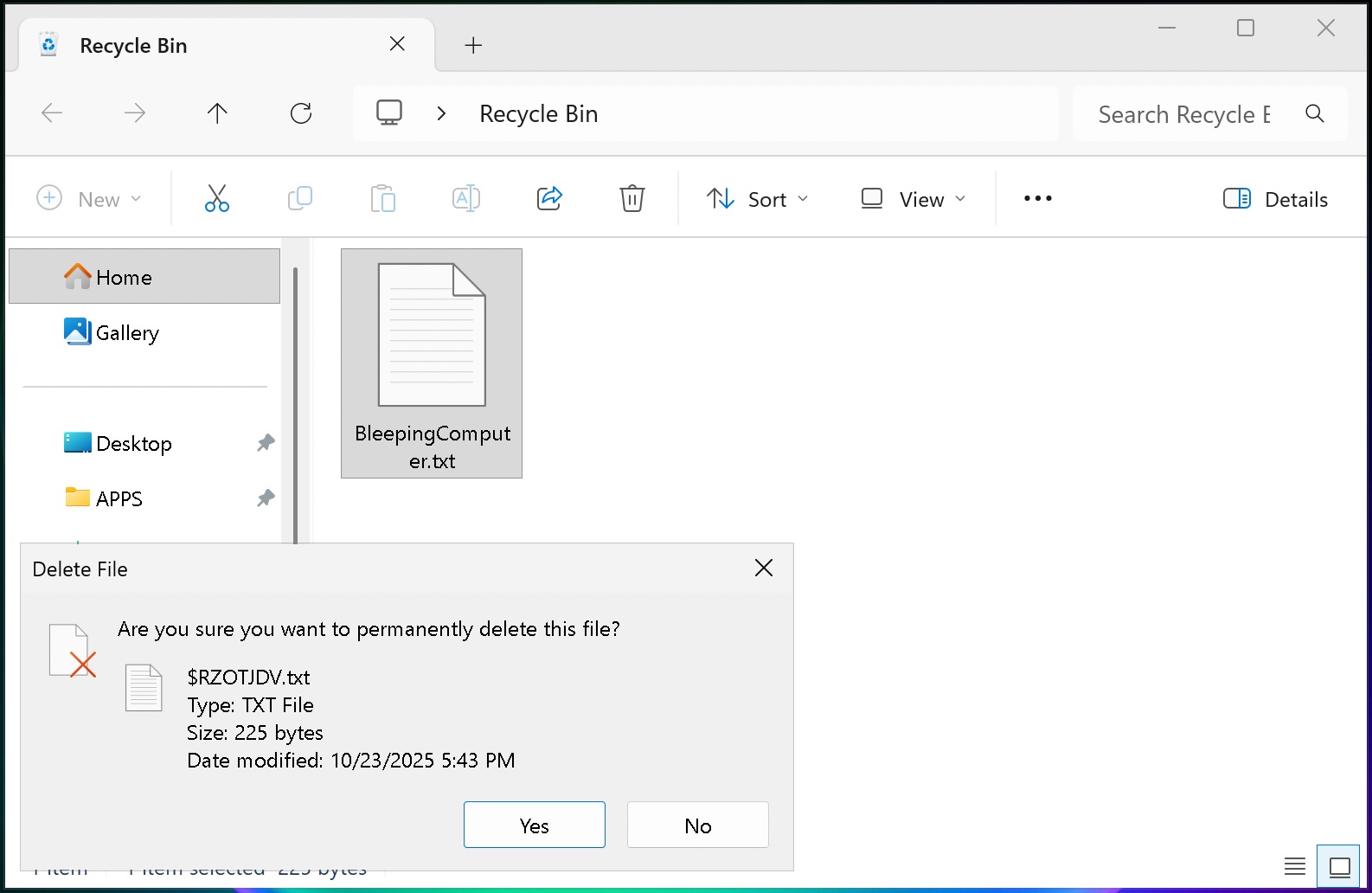 Recycle Bin bug (BleepingComputer)
However, while a fix is not yet generally available, Microsoft added that a temporary workaround is available for businesses that will reach out to its Business Support team.
“A workaround is available for affected devices. To apply this workaround in your organization and mitigate the issue, please contact Microsoft’s Support for business,” it noted.
Earlier this week, Microsoft confirmed another issue that blocks third-party apps from launching Word, Excel, PowerPoint, Access, and other Office applications (or from opening documents) on Windows systems after installing the June 2026 updates.
More recently, on Thursday, it also fixed a known issue that caused the June 2026 security updates to fail on Windows Server 2016 systems that didn’t have the May KB5087537 security update installed.

[Test every layer before attackers do](https://hubs.li/Q04jQ9z40)
Security teams log 54% of successful attacks and alert on just 14%. The rest move through your environment unseen.
The Picus whitepaper shows how breach and attack simulation tests your SIEM and EDR rules so threats stop slipping by detection.
[Get the whitepaper](https://hubs.li/Q04jQ9z40)