
Microsoft expands Windows restore to more enterprise devices
Source: Bleeping Computer
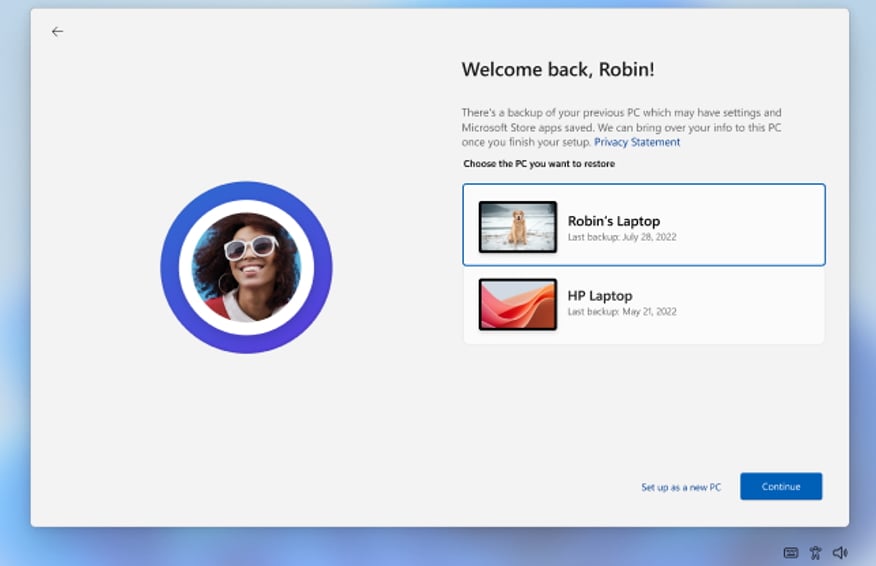
Microsoft now allows more enterprise users to restore their personal settings and Microsoft Store apps from a previous Windows 11 device. The feature, known as the first sign‑in restore experience, is part of Windows Backup for Organizations, an enterprise‑grade backup tool that simplifies backups and migration to Windows 11.
What the feature does
When a user signs in to a new or re‑imaged Windows 11 device with a Microsoft Entra ID account, a prompt appears on the first login offering to:
- Restore previous Windows settings
- Restore the Microsoft Store app list
- Configure the device as new
If the user skips the restore step during the initial setup, they will not be prompted again.
Expanded support
Previously limited to devices joined to Microsoft Entra, the update now extends support to:
- Hybrid‑managed environments
- Multi‑user device setups
- Windows 365 Cloud PCs
This broadens the reach across a wider range of enterprise deployment scenarios.
“This allows users to restore Windows settings, restore their Microsoft Store app list, or choose to configure the device as new,” Microsoft said.
“This feature extends restore capabilities beyond Microsoft Entra‑joined devices to support hybrid‑managed environments, improving readiness for new or re‑imaged Windows 11 devices.”
— Microsoft Message Center
Administration
The first sign‑in restore feature is managed through existing Windows Backup for Organizations policies and can be configured via:
- Microsoft Intune
- Group Policy
IT administrators can enable or disable the experience without learning new tools, retaining full control over which devices and users receive the restore prompt.
Availability
General availability begins with devices that have installed Windows updates released February 24, 2026 and later. The experience is governed by the same policies that control other Windows Backup for Organizations features.
Background
Windows Backup for Organizations was first announced at Microsoft Ignite 2024 as an opt‑in feature disabled by default. It entered public preview in May 2025 and reached general availability in October 2025.
- Announcement: Microsoft Ignite 2024 blog
- Public preview: BleepingComputer article (May 2025)
- GA release: BleepingComputer article (October 2025)