
Microsoft 365 Backup to add file-level restore for faster recovery
Source: Bleeping Computer
Microsoft will soon begin rolling out a significant upgrade to Microsoft 365 Backup to speed up recovery by allowing administrators to restore individual files and folders.

What is Microsoft 365 Backup?
Microsoft 365 Backup is a SharePoint, OneDrive, and Exchange backup and restore service designed to protect against data loss from ransomware, accidental deletion, or data corruption.
Granular file‑level restore
Until now, Microsoft 365 Backup operated at the site or drive level, meaning a single corrupted or deleted file could trigger a time‑consuming full restore. The new granular restore capabilities let admins:
- Browse and search existing restore points for protected SharePoint sites and OneDrive accounts.
- Select only the specific files or folders needed for recovery.
The feature is exclusively available to tenants that already have Microsoft 365 Backup enabled and can only be used by admins assigned the SharePoint Backup Administrator role. End users are not directly affected; restore operations are initiated by admins and remain invisible to the user experience.
“Microsoft 365 Backup will enable admins to browse, search, and restore individual files or folders from SharePoint and OneDrive restore points starting early 2026,” Microsoft said in a Thursday Message Center update.
Message Center details
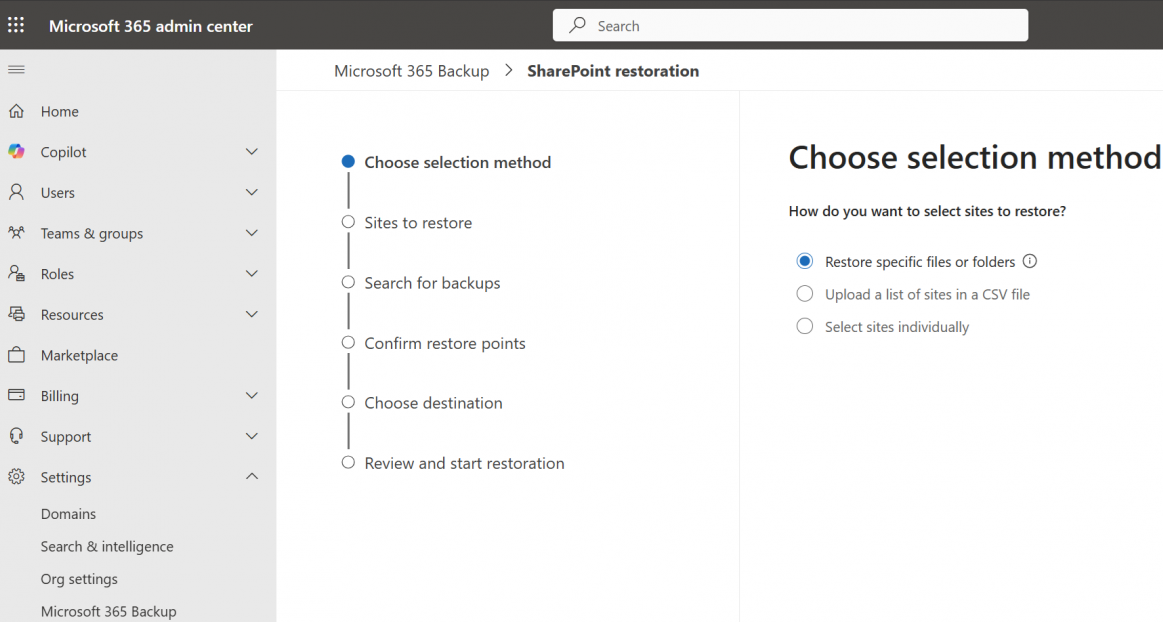 Microsoft 365 Backup granular restore (Microsoft)
Availability
- Public preview: Early March 2026
- General availability: Expected worldwide between late April and early May 2026
Recommendations for administrators
- Review your Microsoft 365 Backup coverage for SharePoint and OneDrive.
- Ensure backup administrators are familiar with the granular restore workflow.
- Update internal recovery runbooks to incorporate file‑ and folder‑level restore scenarios.
“This feature introduces a new method for admins to access existing Microsoft 365 Backup restore points at a more granular level (file or folder), without changing where or how backup data is stored. Admins gain finer control to restore specific files or folders containing personal data when responding to recovery, correction, or remediation scenarios,” Microsoft added.
Related update
Last month, Microsoft also expanded Windows Backup for Organizations, an enterprise‑grade backup tool that now allows enterprise users to restore personal settings and Microsoft Store apps from a previous Windows 11 device.
Read more about the Windows Backup expansion