
Mastering SQL Joins and Window Functions
Source: Dev.to
SQL Joins
A JOIN combines rows from two or more tables based on a related column between them. Joins help in:
- Retrieving connected data stored across multiple tables.
- Matching records using common columns.
- Improving data analysis by combining related information.
- Creating meaningful result sets from separate tables.
Example Tables
Customers
| customer_id | name |
|---|---|
| 1 | Alice |
| 2 | Bob |
| 3 | Carol |
Orders
| order_id | customer_id | amount |
|---|---|---|
| 101 | 1 | 250 |
| 102 | 1 | 300 |
| 103 | 2 | 150 |
1. INNER JOIN
Retrieves rows where matching values exist in both tables. It combines records based on a related column.
Syntax
SELECT
    c.customer_id,
    c.name,
    o.order_id,
    o.amount
FROM Customers AS c
INNER JOIN Orders AS o
    ON c.customer_id = o.customer_id;
Result

Note:
JOINwithout a qualifier is equivalent toINNER JOIN.
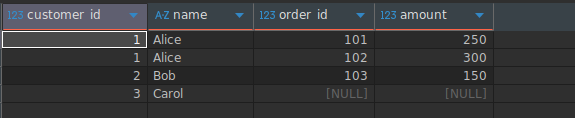
2. LEFT JOIN (LEFT OUTER JOIN)
Returns all rows from the left table and matching rows from the right table. If no match exists, the right‑hand columns contain NULL.
Syntax
SELECT
    c.customer_id,
    c.name,
    o.order_id,
    o.amount
FROM Customers AS c
LEFT JOIN Orders AS o
    ON c.customer_id = o.customer_id;
Result
3. RIGHT JOIN (RIGHT OUTER JOIN)
Retrieves all rows from the right table and the matching rows from the left table. It is less common because the same outcome can be achieved with a LEFT JOIN by swapping table order.
4. FULL OUTER JOIN
Returns all rows from both tables. When a row has no match on the opposite side, the missing columns are filled with NULL.
Syntax
SELECT
    c.customer_id,
    c.name,
    o.order_id,
    o.amount
FROM Customers AS c
FULL JOIN Orders AS o
    ON c.customer_id = o.customer_id;
When to Use Joins
Use joins when:
- You need to combine related datasets.
- Your database is normalized.
- You want enriched or relational views of data.
Window Functions
SQL window functions allow calculations across a set of rows that are related to the current row without collapsing the result into a single aggregated row. They are commonly used for aggregates, rankings, and running totals.
Basic Syntax
FUNCTION_NAME() OVER (
    PARTITION BY ...
    ORDER BY ...
)
The OVER clause defines the “window” of rows for the calculation:
- PARTITION BY – Divides the data into groups (partitions).
- ORDER BY – Specifies the order of rows within each partition.
Example Dataset
| sale_id | region | amount |
|---|---|---|
| 1 | East | 200 |
| 2 | East | 200 |
| 3 | East | 100 |
| 4 | West | 300 |
| 5 | West | 150 |
Types of Window Functions
1. Aggregate Window Functions
These calculate aggregates over a window while retaining individual rows. Common functions:
SUM()– Sum of values.AVG()– Average of values.COUNT()– Row count.MAX()– Maximum value.MIN()– Minimum value.
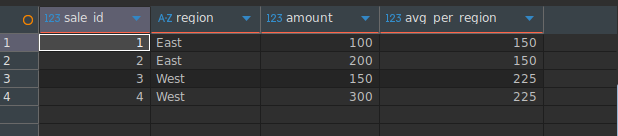
Example – Region‑wise average
SELECT
    sale_id,
    region,
    amount,
    AVG(amount) OVER (PARTITION BY region) AS avg_region_sales
FROM Sales;
Result
2. Ranking Window Functions
These assign a rank to each row within a partition based on a specified order.
RANK()
Assigns ranks; ties receive the same rank and the next rank is skipped.
SELECT
    sale_id,
    region,
    amount,
    RANK() OVER (
        PARTITION BY region
        ORDER BY amount DESC
    ) AS sales_rank
FROM Sales;
DENSE_RANK()
Similar to RANK(), but does not skip ranks after ties.
SELECT
    sale_id,
    region,
    amount,
    DENSE_RANK() OVER (
        PARTITION BY region
        ORDER BY amount DESC
    ) AS sales_dense_rank
FROM Sales;
ROW_NUMBER()
Provides a unique sequential number for each row within the partition, regardless of ties.
SELECT
    sale_id,
    region,
    amount,
    ROW_NUMBER() OVER (
        PARTITION BY region
        ORDER BY amount DESC
    ) AS row_num
FROM Sales;
3. Analytic (Non‑Aggregate) Window Functions
These perform calculations that reference other rows but do not aggregate them.
LEAD()/LAG()– Access the next/previous row’s value.FIRST_VALUE()/LAST_VALUE()– Return the first/last value in the window.NTILE()– Distribute rows into a specified number of buckets.
Example – Running total
SELECT
    sale_id,
    region,
    amount,
    SUM(amount) OVER (
        PARTITION BY region
        ORDER BY sale_id
        ROWS BETWEEN UNBOUNDED PRECEDING AND CURRENT ROW
    ) AS running_total
FROM Sales;
Summary
- Joins merge rows from multiple tables based on relationships. Choose the appropriate join type (
INNER,LEFT,RIGHT,FULL) depending on which rows you need to keep. - Window functions let you compute aggregates, rankings, and other analytics per row while still seeing the full result set. They are essential for advanced reporting, time‑series analysis, and data‑science pipelines.
Use both tools together to build rich, performant queries that turn raw relational data into actionable insights.
Ranking Functions in SQL
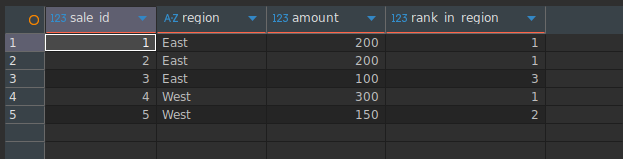
RANK()
Assigns a rank to each row within a partition, skipping numbers when there are ties.
SELECT
    sale_id,
    region,
    amount,
    RANK() OVER (
        PARTITION BY region
        ORDER BY amount DESC
    ) AS rank_in_region
FROM Sales;
Result
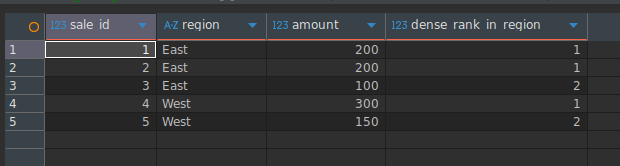
DENSE_RANK()
Assigns a rank without skipping numbers, even when there are ties.
SELECT
    sale_id,
    region,
    amount,
    DENSE_RANK() OVER (
        PARTITION BY region
        ORDER BY amount DESC
    ) AS dense_rank_in_region
FROM Sales;
Result
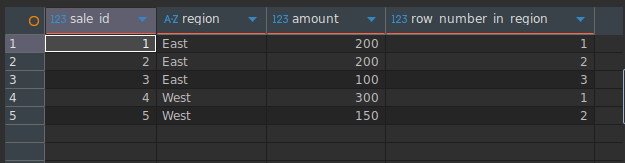
ROW_NUMBER()
Gives a unique sequential number to each row in the result set.
SELECT
    sale_id,
    region,
    amount,
    ROW_NUMBER() OVER (
        PARTITION BY region
        ORDER BY amount DESC
    ) AS row_number_in_region
FROM Sales;
Result
Tips for Using Window Functions
- Partition carefully – Without a
PARTITION BY, the entire table is treated as a single group. - Check
ORDER BY– It determines the calculation order inside the window. - Optimize performance – Window functions can be slow on large datasets; consider adding appropriate indexes.
Conclusion
Joins and window functions are two powerful tools in SQL that, when combined, unlock advanced data analysis.
- Joins bring data together from multiple tables, forming a complete and meaningful dataset. They are foundational in relational databases and essential for analytics, reporting, backend systems, and data‑engineering workflows.
- Window Functions let you perform advanced calculations across related rows without collapsing the data (as
GROUP BYdoes). They preserve each row while adding insights such as rankings, running totals, comparisons, and percentiles.