
Level Lock Pro Review: An Apple Home Key Smart Lock That Doesn't Look Like One
Source: MacRumors
Level Lock Pro Review
The Level Lock Pro is Level’s latest smart lock, featuring Matter connectivity for Apple Home, multiple unlocking methods, door‑status reporting, and the understated design that Level products are known for.
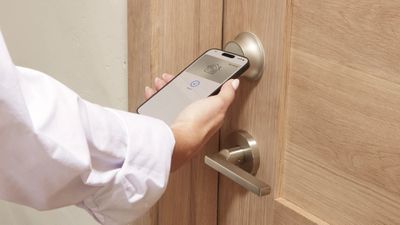
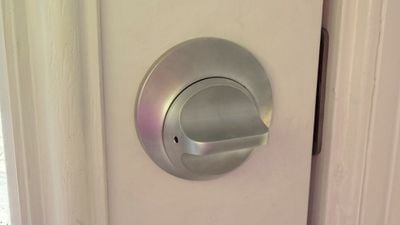
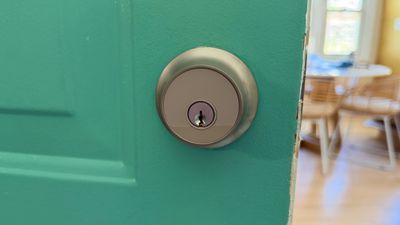
I’ve tested and reviewed several great HomeKit‑compatible smart locks, but Level locks are my personal favorite because of the look. From both the inside and the outside, Level locks look like a standard deadbolt—not a bulky smart lock. I previously used feature‑rich Aqara locks for about a year, but grew tired of the bulky boxes on my doors. A couple of months ago I bought two standard Level locks, and later Level sent me the Level Lock Pro.
Aesthetic Verdict
I don’t think any smart lock has a better aesthetic than the Level Lock. If looks matter to you, these are the locks to get. They come in satin nickel and matte black, matching many standard doorknobs, and have an IP54 water‑ and dust‑resistance rating, so they’ll hold up fine in the rain.
Pricing & Competition
- Level Lock Pro: $349
- Level Lock (standard): $249
- Aqara locks: $150 – $270
- Matter‑compatible locks (Eufy, Yale, Kwikset, etc.): similar price range
Level locks are not the cheapest on the market; you pay a premium for design.
Installation
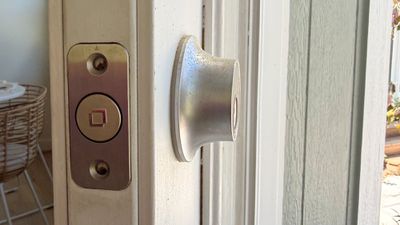
The Level Lock Pro replaces a standard deadbolt and strike plate, so installation is essentially swapping out the existing hardware and following the Level Lock Pro instructions.
I’ve found Level locks a bit trickier to install than other smart locks because:
- The bolt is wide and circular, not the shape of most deadbolts.
- Fitting the lock into the door and aligning the strike plate can require extra fiddling.
I usually get things working, but there is some frustration involved.
Unlocking Methods
The Level Lock Pro is intentionally simple. You can:
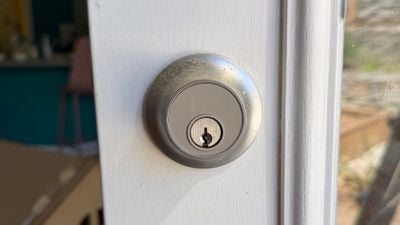
- Use a traditional key.
- Use one of the two included NFC key fobs.
- Tap to unlock with your iPhone or Apple Watch.
- Unlock via the Home app, Level app, or by asking Siri.
There are no fingerprint, palm, or facial‑recognition sensors.
HomeKit & Apple Integration
- Matter connectivity for HomeKit.
- Supports Apple Home Key, allowing you to store a digital key in the Wallet app on iPhone or Apple Watch. With Home Key you can unlock by simply tapping your device—no need to unlock the phone or use Face ID.
Level App Features
The Level app (which I don’t use personally) provides:
- Locking/unlocking.
- Assigning and managing access codes.
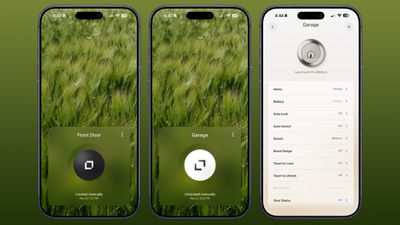
- Auto‑lock and auto‑unlock (Bluetooth‑based, triggers when you’re in range).
- Sound adjustment.
- Door‑status alerts.
- Temporary entry codes for one‑time guests or weekly cleaners.
The app follows Level’s clean, uncomplicated design, making all features easy to reach.
Door‑Status Monitoring
Door status tells you whether the door is open or closed, even when it’s unlocked. I have a Level Lock Pro on my garage door—a door that’s often left unlocked—so the alert when it opens is very useful.
Automation & Notifications
- Siri and the Home app can unlock the door, even when you’re not home.
- I often ask Siri to open the door as I approach, so I rarely need to tap.
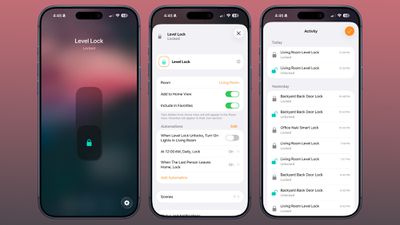
- The Home app sends a notification to my iPhone and Apple TV whenever a lock is locked or unlocked, and the Activity log records each event.
- All Home members can access the lock, and you can also share access via the Level app (including temporary entry).
Automations
The Home app lets you create automations such as:
- Auto‑locking when everyone leaves the house.
- Unlocking at a specific time.
I have an automation that locks all my doors at 10 p.m. as a safety net.
Connectivity & Remote Access
- To add any Matter‑enabled device to HomeKit you need a Matter‑over‑Thread controller (e.g., HomePod or Apple TV) that also acts as a border router.
- The Level Lock Pro connects to Apple Home via Thread, not Wi‑Fi.
- If you prefer Wi‑Fi, you can add the optional Level Connect Wi‑Fi Bridge. I haven’t needed it because HomeKit provides all the functionality I want.
- A keypad can be added for numeric‑code entry if desired.
Battery Life
Most smart locks use a replaceable battery (typically AA or a proprietary lithium cell). The Level Lock Pro’s battery life is comparable to other premium smart locks—usually 6‑12 months under normal usage, depending on how often you use Bluetooth, Thread, and the auto‑unlock feature. Keep an eye on the battery indicator in the Level app or Home app to avoid being locked out.
Bottom Line
If you value a sleek, minimalist look and deep Apple ecosystem integration, the Level Lock Pro is an excellent choice. It may cost a bit more than other Matter‑compatible locks, and installation can be fiddly, but the design, reliable HomeKit support, and simple unlocking options make it a standout smart lock for Apple‑centric homes.
Battery Replacement
The Level Lock Pro’s battery is located in the deadbolt (not in the box that goes on the door). It uses a CR2 lithium battery, which fits inside the deadbolt once the cap is removed.
How to replace the battery:
- Open the door and lock it.
- Remove the deadbolt cap.
- Pop out the old battery.
- Insert the new CR2 battery.
The Level app displays battery status, so you can monitor when a replacement is needed. Each battery typically lasts about one year, and I haven’t needed to change mine yet.
Security Features
According to Level, the Level Lock Pro has an ANSI Grade 1 bump‑ and pick‑resistant cylinder—a feature not common among smart locks. This means the lock is:
- Resistant to lockpicking
- Harder to drill out
- More difficult to bump
These attributes provide an extra layer of security for your home.
How to Buy
The Level Lock Pro is available:
- From the Level website:
- From Amazon:
Price: $349
Note: Level provided MacRumors with a Level Lock Pro for the purpose of this review. No other compensation was received.
Popular Stories
1. watchOS 27 Will Add These New Features to Your Apple Watch
Apple will unveil watchOS 27 during its WWDC 2026 keynote on Monday, June 8. The first developer beta is expected to be released immediately after the keynote, with a public beta typically following in July. The final update should roll out to all compatible Apple Watch models in September. Below is a recap of the rumored features.
2. Apple Preparing “Most Significant Overhaul in the iPhone’s History”
Apple is reportedly planning to launch its first foldable iPhone in September 2026—potentially called the iPhone Ultra. Bloomberg’s Mark Gurman, writing in his Power On newsletter, called the device “the most significant overhaul in the iPhone’s history,” noting that while the iPhone 4, iPhone 6, and iPhone X were major milestones, this represents an entirely new design.
3. Apple Released Two New Accessories This Month
May was relatively quiet for new Apple hardware, but the company did add two accessories to its online store:
- Pride Edition Sport Loop for the Apple Watch – a rainbow‑colored band made from 11 woven nylon yarns, priced at $49 in the U.S.
- (The second accessory was part of Apple’s 2026 Pride Collection; details were truncated in the source.)