
JavaScript Array Methods Explained in Simple Words (With Examples)
Source: Dev.to
Introduction
Arrays are used to store multiple values in one variable.
const fruits = ["Apple", "Banana", "Mango"];But how do we add, remove, or change items inside an array?
JavaScript provides a set of array methods that make these operations easy.
Let’s learn the most important ones step‑by‑step.
1. Adding & Removing Elements
push() – Add at the End
Adds a new element to the end of an array (mutates the original array).
const fruits = ["Apple", "Banana"];
fruits.push("Mango");

console.log(fruits);
// ["Apple", "Banana", "Mango"]
pop() – Remove from the End
Removes the last element from an array (mutates the original array).
const fruits = ["Apple", "Banana", "Mango"];
fruits.pop();

console.log(fruits);
// ["Apple", "Banana"]
unshift() – Add at the Beginning
Adds a new element at the beginning of an array (mutates the original array).
const fruits = ["Banana", "Mango"];
fruits.unshift("Apple");

console.log(fruits);
// ["Apple", "Banana", "Mango"]
shift() – Remove from the Beginning
Removes the first element of an array (mutates the original array).
const fruits = ["Apple", "Banana", "Mango"];
fruits.shift();

console.log(fruits);
// ["Banana", "Mango"]
2. Copying & Modifying Arrays
slice() – Copy Part of an Array
Returns a new array containing selected elements without modifying the original array.
Syntax
array.slice(startIndex, endIndex);startIndex→ where to start (included)endIndex→ where to stop (NOT included)
Example 1 – Slice a Portion
const numbers = [10, 20, 30, 40];
const result = numbers.slice(1, 3);

console.log(result);
// [20, 30]
Why? Start at index 1 (value 20) and stop before index 3 (value 40).
Example 2 – Copy the Whole Array
const numbers = [1, 2, 3];
const copy = numbers.slice();

console.log(copy);
// [1, 2, 3]
This creates a shallow copy of the original array.
splice() – Add or Remove Anywhere
Used to add, remove, or replace elements at any position (mutates the original array).
Syntax
array.splice(startIndex, deleteCount, item1, item2, ...);startIndex→ where to startdeleteCount→ how many elements to removeitem1, item2, …→ (optional) items to add
Remove Elements
const numbers = [1, 2, 3, 4];
numbers.splice(1, 2); // start at index 1, remove 2 elements

console.log(numbers);
// [1, 4]
Add Elements
const numbers = [1, 4];
numbers.splice(1, 0, 2, 3); // start at index 1, remove 0, add 2 and 3

console.log(numbers);
// [1, 2, 3, 4]
Important rule: splice() inserts items at startIndex; the existing element at that index (and those after it) shift to the right. It does not insert after the index.
3. Searching Methods
includes() – Check if a Value Exists
const fruits = ["Apple", "Banana"];
console.log(fruits.includes("Apple")); // true
Returns true or false.
indexOf() – Find Position
const fruits = ["Apple", "Banana"];
console.log(fruits.indexOf("Banana")); // 1
Returns the index of the element, or -1 if not found.
find() – Find First Matching Element
Returns the first element that satisfies a condition, or undefined if none match.
Syntax
array.find(function(element) {
  return condition;
});
Example
const numbers = [5, 10, 15, 20];
const result = numbers.find(function(num) {
  return num > 10;
});

console.log(result);
// 15
Important: find() stops searching as soon as it finds a match.
4. Looping Methods
forEach() – Loop Through an Array
Runs a provided function once for each array element. It does not return a new array and does not change the original array unless you modify it inside the callback.
Syntax
array.forEach(function(element, index, array) {
  // code to run
});element→ current valueindex(optional) → position of the elementarray(optional) → the whole array
Example 1 – Simple Loop
const numbers = [1, 2, 3];
numbers.forEach(function(num) {
  console.log(num);
});
Output
1
2
3
Example 2 – With Index
const fruits = ["Apple", "Banana", "Mango"];
fruits.forEach(function(fruit, index) {
  console.log(index, fruit);
});
Output
0 Apple
1 Banana
2 Mango
Important rule: forEach() iterates over the entire array, returns undefined, and never produces a new array.
These methods cover the most common array operations you’ll need in everyday JavaScript programming. Happy coding!
JavaScript Array Methods Cheat Sheet
map() – Create a New Array
The map() method is used to:
- Transform each element in an array
- Return a new array
- Never change the original array
Syntax
array.map(function (element, index, array) {
  return newValue;
});element→ current valueindex→ position (optional)array→ full array (optional)
Example 1
const numbers = [1, 2, 3];

const doubled = numbers.map(function (num) {
  return num * 2;
});

console.log(doubled);
// [2, 4, 6]
What happened?
| Original | Operation | Result |
|---|---|---|
| 1 | 1 × 2 | 2 |
| 2 | 2 × 2 | 4 |
| 3 | 3 × 2 | 6 |
map() collects all returned values into a new array.
Important Rules
map()always returns a new array.- It must have a
returnstatement. - It does not modify the original array.
Example 2 – Arrow Function (Modern Way)
const numbers = [1, 2, 3];

const doubled = numbers.map(num => num * 2);

console.log(doubled);
// [2, 4, 6]
filter() – Filter Based on Condition
The filter() method is used to:
- Select elements that match a condition
- Return a new array
- Never change the original array
Syntax
array.filter(function (element, index, array) {
  return condition;
});- If the condition is true → element is kept
- If the condition is false → element is removed
Example 1 – Basic Example
const numbers = [1, 2, 3, 4];

const even = numbers.filter(function (num) {
  return num % 2 === 0;
});

console.log(even);
// [2, 4]
Only even numbers are kept.
Important Rules
filter()always returns a new array.- It may return fewer elements, or even an empty array.
Example 2 – Arrow Function
const numbers = [5, 10, 15, 20];
const greaterThan10 = numbers.filter(n => n > 10);

console.log(greaterThan10);
// [15, 20]
reduce() – Combine All Values into One
The reduce() method is used to:
- Take all array elements
- Combine them into a single value
It can return a number, string, object, or another array.
Syntax
array.reduce(function (accumulator, currentValue) {
  return updatedValue;
}, initialValue);accumulator→ stores the result step‑by‑stepcurrentValue→ current element in the loopinitialValue→ starting value (optional but recommended)
Example 1 – Add All Numbers
const numbers = [1, 2, 3, 4];
const total = numbers.reduce(function (sum, num) {
  return sum + num;
}, 0);

console.log(total);
// 10
Example 2 – Multiply Numbers
const numbers = [2, 3, 4];
const result = numbers.reduce(function (total, num) {
  return total * num;
}, 1);

console.log(result);
// 24
Quick Comparison Table
| Method | Returns New Array? | Modifies Original? | Typical Use |
|---|---|---|---|
map() | ✅ | ❌ | Transform each element |
filter() | ✅ | ❌ | Select elements that meet a condition |
reduce() | ❌ (returns a single value) | ❌ | Aggregate values into one result |
push() / pop() / splice() | ❌ | ✅ | Directly mutate the array |
slice() / concat() | ✅ | ❌ | Non‑mutating copies |
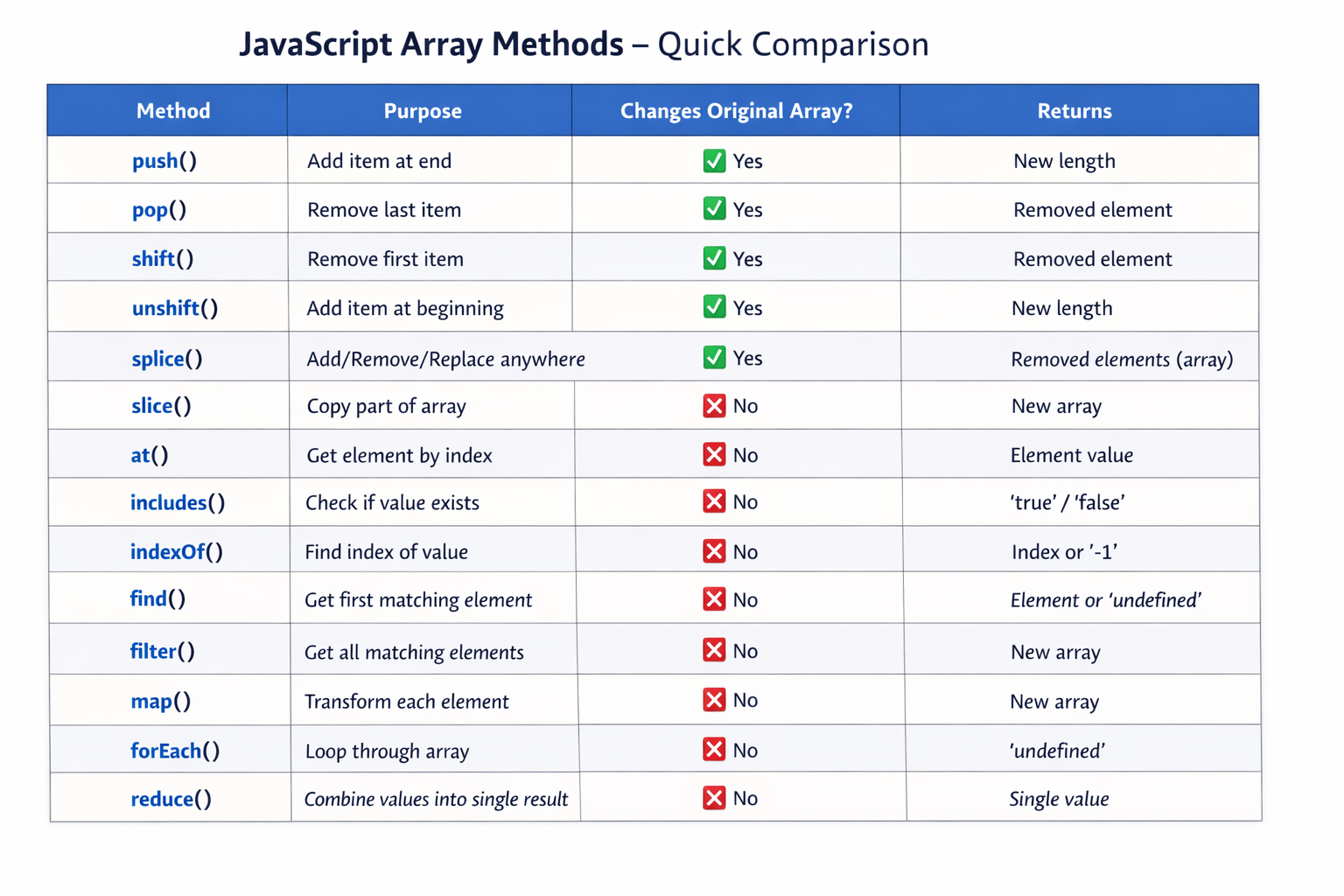
The table helps you quickly understand which methods modify the array and which return a new one.