
iOS 26.4 beta 1: Notification Forwarding onboarding, allow search on iCloud․com, and more [Video]
Published: (February 18, 2026 at 10:15 AM EST)
4 min read
Source: 9to5Mac
Source: 9to5Mac
# iOS Decoded – iOS 26.4 Beta 1 Overview
In this episode of [_iOS Decoded_](https://9to5mac.com/guides/ios-decoded/), we dive into everything new in **iOS 26.4 beta 1**. Highlights include the first look at **Notification Forwarding** for third‑party smart watches and other EU‑approved hardware, plus fresh iCloud.com capabilities such as secure Photos and iCloud Drive search on the web.
Below are five standout features you’ll see in the update. For a complete walkthrough, watch the full video and don’t forget to **[subscribe to 9to5Mac on YouTube](https://www.youtube.com/c/9to5mac?sub_confirmation=1)** for more in‑depth guides.
## Five Standout Features
1. **Notification Forwarding** – Seamlessly route alerts from iPhone to compatible smart watches and other devices in the EU.
*Read more:* [iOS 26.3 beta Notification Forwarding](https://9to5mac.com/2025/12/15/ios-26-3-beta-notification-forwarding/)
2. **Secure Photos on iCloud.com** – End‑to‑end encrypted photo library accessible via the web without compromising privacy.
3. **iCloud Drive Search** – Powerful, server‑side search that finds files across all devices instantly.
4. **Enhanced Focus Modes** – New customization options, including location‑based triggers and deeper app integration.
5. **Live Text in Safari** – Select, copy, and translate text directly from web pages without leaving the browser.
---
*Stay tuned for more detailed coverage of each feature in the full video.*
## What’s New in iOS 26.4 Beta 1?
### Notification Forwarding
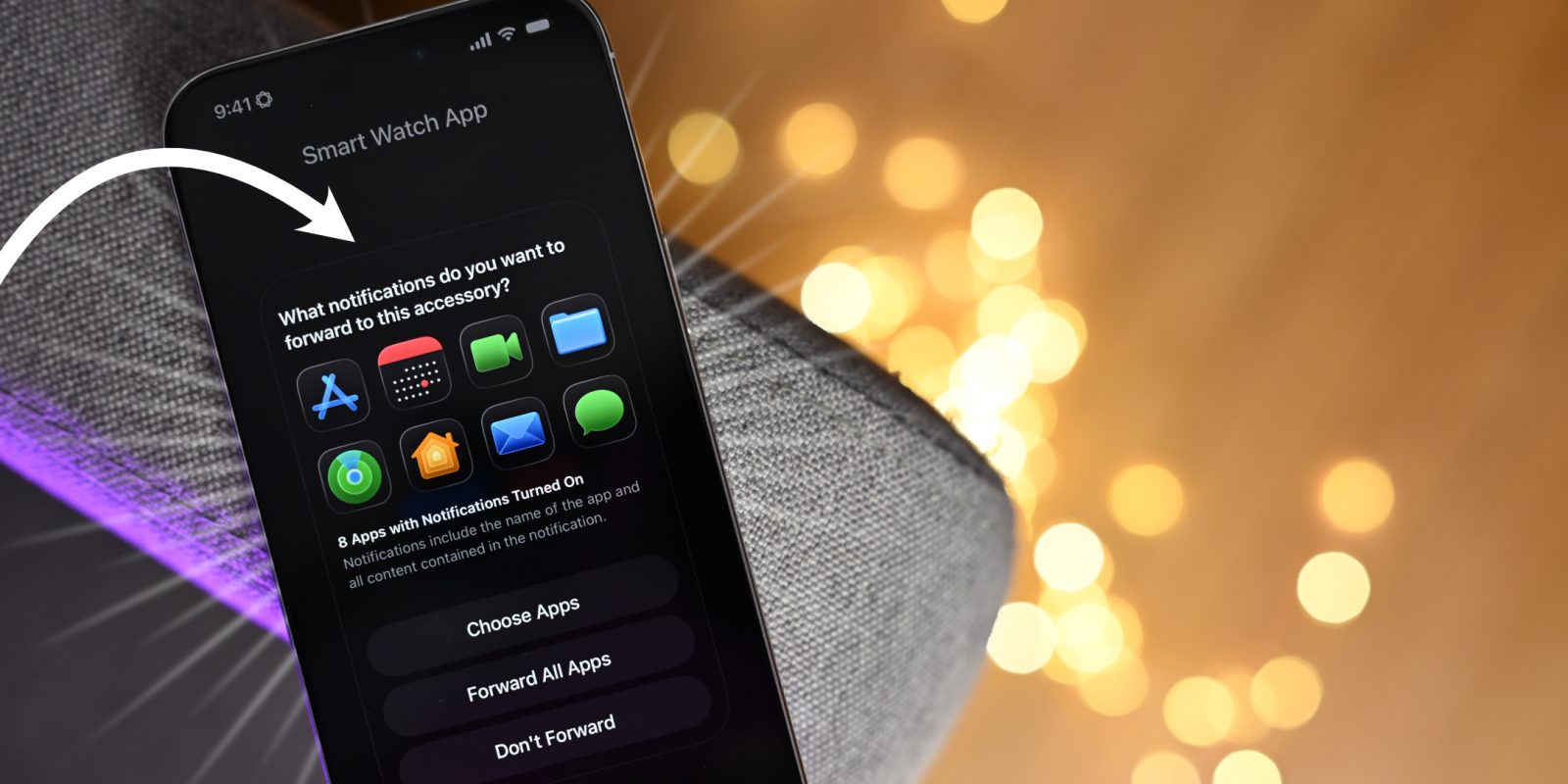
iOS 26.4 beta 1 introduces the first look at **Notification Forwarding**, a feature slated for EU users later this year. Apple adds a simple onboarding flow for compatible Bluetooth accessories—such as third‑party smartwatches—right in the developer beta.
#### How it works
1. **Discovery** – iOS scans for nearby compatible accessories (similar to the AirPods setup).
2. **Pairing** – When an accessory is found, you can **Connect**, **Unpair**, **Send a test notification**, or **Request notification forwarding**.
3. **Permissions** – After you request forwarding, a permissions dialog appears.
4. **Selection** – You choose which apps’ notifications to forward.
#### Screenshots
| Pairing screen | Forwarding selection |
|---|---|
|  |  |
*(If you prefer the original URLs, replace the `src` values with the links from the source article.)*
#### Key points
- **EU‑only** for now; Apple plans to expand later.
- **Single‑device limit** – you can enable forwarding on **one** accessory at a time (e.g., you can’t have an Apple Watch **and** a third‑party watch receive the same notifications simultaneously).
- **Privacy considerations** – third‑party devices will gain access to the content of forwarded notifications, which may include data Apple itself does not normally see.
---
*Stay tuned for updates as Apple expands the feature beyond the EU and refines the multi‑device support.*
## Video: iOS 26.4 Beta 1 – Everything New
[Subscribe to 9to5Mac on YouTube for more videos](https://www.youtube.com/c/9to5mac?sub_confirmation=1)
---
### Allow Search on iCloud.com
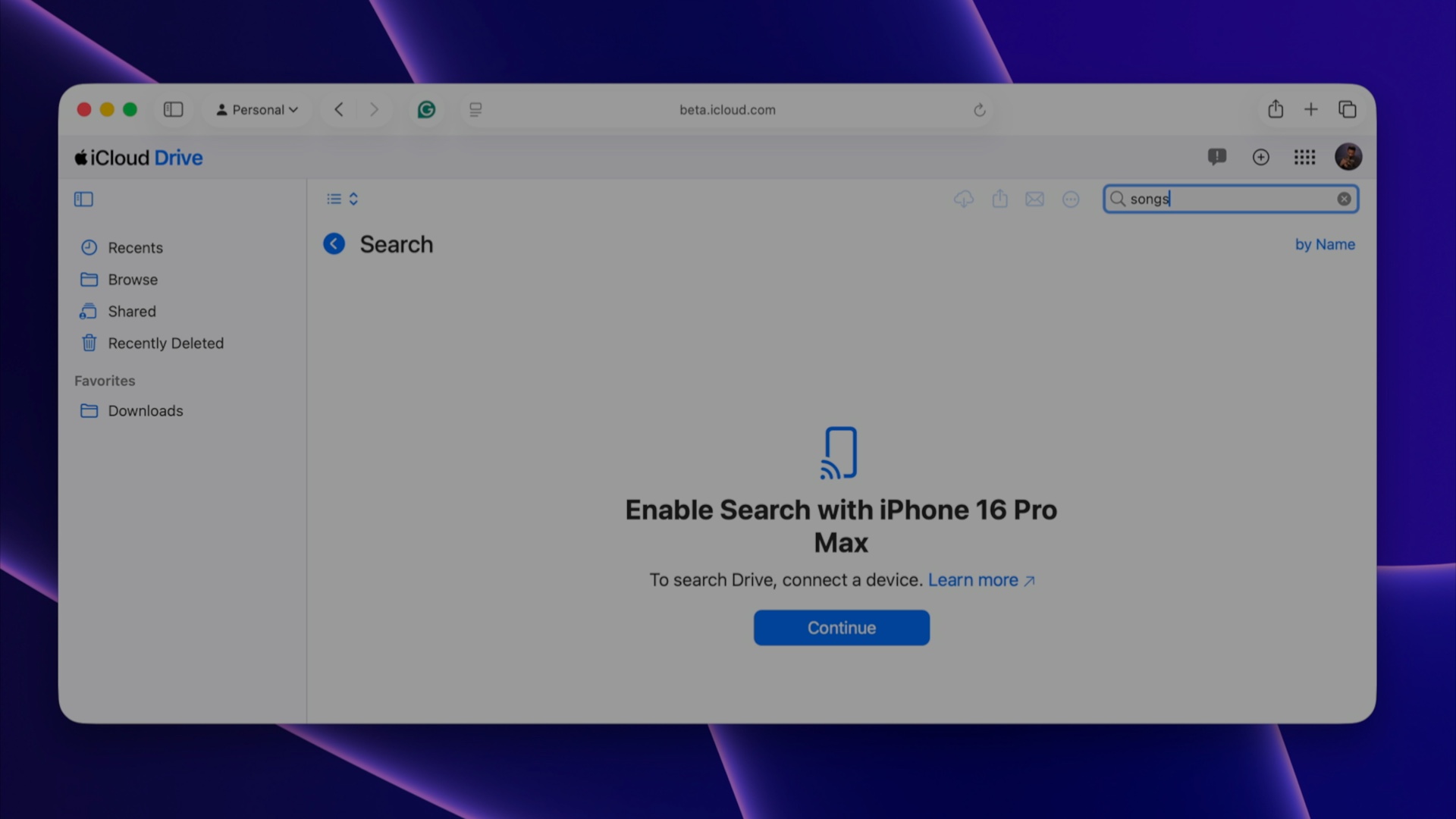
A new iCloud feature in iOS 26.4 beta 1 lets users enable a setting that allows searching for **Photos** and **iCloud Drive** content on iCloud.com.
1. Open **Settings → User → iCloud → iCloud.com** and turn on **Allow Search**.
2. Visit the [iCloud Beta website](https://beta.icloud.com/).
3. Search fields appear in the **Photos** and **iCloud Drive** sections.
4. When you start a search, you’ll be prompted to enable search on a trusted device.
5. After confirming on the trusted device, results from iCloud Drive and Photos are returned on iCloud.com.
---
### Migrate Data Between Browsers
Since iOS 18.2, Safari’s **Export/Import** feature has been limited to the Files app.
With iOS 26.4, Apple lets you move browser data **directly** from a compatible web browser, making it easier to switch or sync data across browsers.
---
### New Ambient Music Widgets
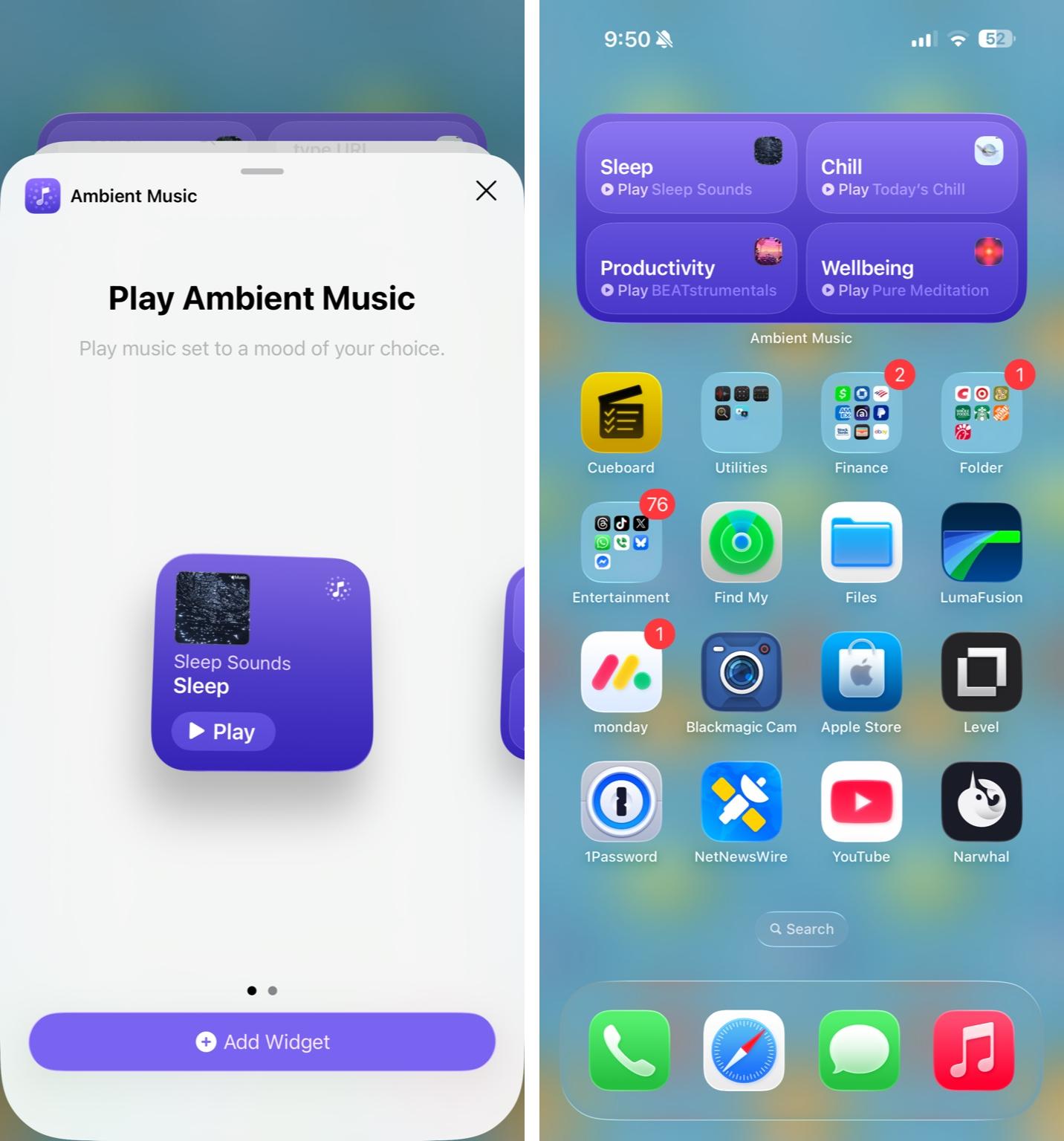
iOS 18.4 introduced ambient‑music playback from Control Center. iOS 26.4 adds two Home‑screen widgets (small and medium) that provide **one‑tap playback** of Apple’s suggested or custom ambient playlists.
---
### More HomePad Evidence
iOS 26.4 drops additional clues about Apple’s upcoming **HomePad** smart‑home device:
* A new **CompanionSetup** system app, likely used to pair the HomePad.
* An unheard‑before chime included in the app (available in the video).
These hints add to earlier rumors:
* [January 2026 launch‑update article](https://9to5mac.com/2026/01/23/apples-rumored-homepad-device-gets-encouraging-launch-update/)
* [February 2025 “tentpole‑cook” feature article](https://9to5mac.com/2025/02/26/ios-184-hints-tentpole-cook-feature-of-apples-new-homepad/)
* [February 2025 Home‑device category article](https://9to5mac.com/2025/02/21/apple-home-device-category-ios-18-4/)
---
> **Watch the full video walkthrough** for many more updates in iOS 26.4 beta 1.
---
### Preferred Source Badges


---
*FTC: We use income‑earning auto‑affiliate links.* [More information](https://9to5mac.com/about/#affiliate)
[](https://benqurl.biz/3WZyqpL)