
I Tried Windsurf — An AI Native Coding Environment
Source: Dev.to
Source: Dev.to – I tried WindSurf, an AI‑native coding environment
VS Code vs. Windsurf: A Quick Comparison
I’ve been using VS Code for years—primarily for React and React Native development. With Agent Mode and GitHub Copilot getting stronger, I wanted to test something specific: does an AI‑native editor like Windsurf actually change the workflow, or is it just a different packaging of similar capabilities?
Below is the breakdown after using Windsurf and reviewing its docs.
What Windsurf Actually Is

Windsurf is an AI‑native code editor built by the team behind Codeium.
Unlike VS Code (where AI comes through extensions), Windsurf is architected around AI at its core. Its system, called Cascade, provides:
- Codebase‑wide understanding
- Multi‑file edits
- Structured task execution
- Terminal interaction
- Persistent memory
- Fast context retrieval
- Multi‑model comparison (Arena)
If you already use VS Code with Agent Mode, the capability overlap is significant. The main differences are architectural and workflow‑oriented.
1️⃣ Request Queueing (Genuinely Useful)
In Windsurf you can submit multiple instructions while a previous one is still executing.
Example workflow
Refactor the authentication module → create a Profile component → optimise the API serviceWindsurf behavior
- Accepts all incoming requests.
- Queues them automatically.
- Executes the tasks sequentially.
- Advances to the next task as soon as the current one finishes.
You don’t need to wait between prompts. This isn’t parallel execution—it’s a formal task queue.
VS Code Agent Mode is more conversational: you typically wait for a task to finish before issuing the next instruction, and it has no built‑in queue system.
2️⃣ Cascade Memory (Persistent Agent Context)
Windsurf includes Cascade Memory, a persistent context layer that can:
- Retain architectural understanding
- Preserve project‑level awareness
- Maintain continuity across sessions
VS Code Agent Mode provides strong session‑level context (step‑by‑step execution, file edits, tool calls, terminal logs) but does not expose a dedicated persistent agent memory system. This makes Windsurf feel slightly more stateful over time.
3️⃣ Fast Context (Important for Large Projects)
Fast Context focuses on:
- Retrieving only relevant files
- Reducing unnecessary token usage
- Improving response speed
- Increasing signal quality

In VS Code, context is usually based on open files, visible code, and workspace scanning. Fast Context is more explicit and retrieval‑optimized, which matters a lot in medium‑to‑large repositories.
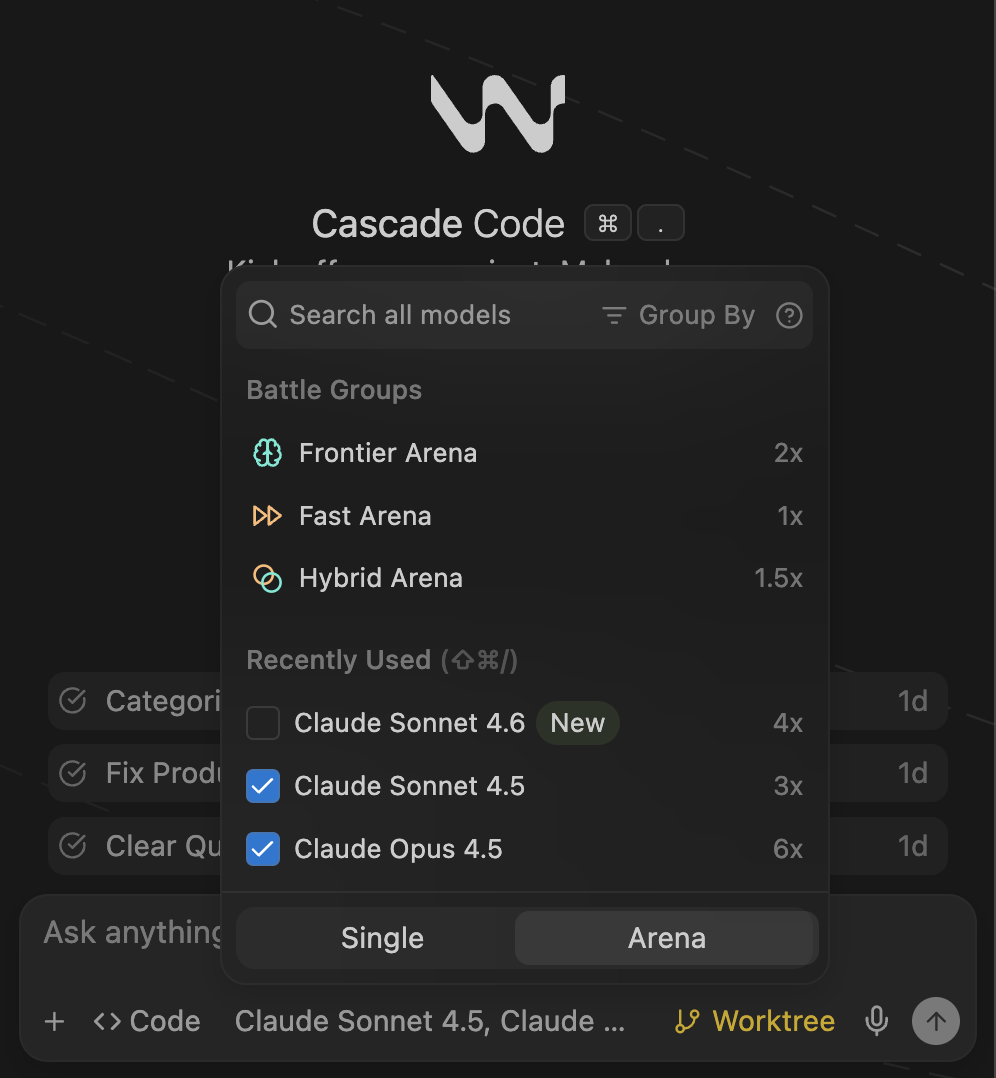
4️⃣ Arena (Strongest Differentiator)
Arena lets you run the same prompt across multiple AI models and compare the outputs side‑by‑side.
You can compare GPT‑4, Claude, Gemini, etc., for tasks such as:
- Refactoring
- TypeScript migration
- Performance optimisation
- Architecture changes
VS Code + Copilot does not offer built‑in model comparison, making Arena a clear differentiator.
5️⃣ Worktrees (Execution Isolation)
Cascade Worktrees provide:
- Isolated working environments
- Safer large refactors
- Controlled AI‑driven changes
In VS Code, isolation is managed manually through Git branches or worktrees. Windsurf integrates isolation directly into AI execution.

Windsurf vs. VS Code + Copilot
| Feature | VS Code + Copilot | Windsurf |
|---|---|---|
| Multi‑step Tasks | ✅ | ✅ |
| Structured Execution Logs | ✅ | ✅ |
| Request Queueing | No formal queue | ✅ |
| Persistent Memory Layer | No explicit system | ✅ |
| Fast Context Retrieval | Implicit | ✅ (explicit) |
| Execution Isolation | Manual (Git‑based) | ✅ (Worktrees) |
| Model Comparison | ❌ | ✅ (Arena) |
| Ecosystem | Massive | Limited |
| Stability | Very high | Good |
The raw capability gap isn’t huge; the difference lies in workflow structure and architecture.
So, Is It Worth Switching?
If you already use VS Code with Agent Mode and Copilot, Windsurf may not feel revolutionary. You won’t magically build 10× faster overnight.
However, during my use I noticed a few subtle advantages:
- Multi‑file changes produced slightly cleaner imports and more consistent updates across files.
- The stronger context handling and structured execution flow felt smoother, especially in larger codebases.
These observations are based on personal experience rather than formal benchmarks. If you value built‑in request queueing, persistent memory, fast context, and especially model comparison, Windsurf is worth a try. Otherwise, VS Code remains a rock‑solid, highly extensible choice.
Windsurf vs. VS Code: Development‑Workflow Comparison
| Feature | Windsurf | VS Code |
|---|---|---|
| Structured request queueing | ✅ | ❌ |
| Persistent agent memory | ✅ | ❌ |
| Explicit context optimisation | ✅ | ❌ |
| Multi‑model comparison | ✅ | ❌ |
| Maturity & ecosystem | ❌ | ✅ |
Windsurf feels designed around AI‑first workflows from the start, while VS Code is still the more mature and widely adopted editor.
Your Experience
If you’ve tried Windsurf, I’d love to hear your thoughts:
- Which feature actually changed your workflow?
- Did you notice improvements in context handling or imports?
- Or did it feel similar to your current setup?
Feel free to share what stood out for you!