
I built kerf-cli because Claude Code told me not to worry about cost
Source: Dev.to
A few weeks ago I logged into Claude Code, typed /cost, and got back this:
With your Claude Max subscription, no need to monitor cost.
Two days later I had used 91 % of my weekly limit in a single morning of work. I had no idea which session, which project, or which model was responsible. I tried ccusage (which is great) and it gave me totals — but I wanted to ask questions like:
- “Which of my projects is eating Opus tokens unnecessarily?”
- “What’s my actual cache‑hit rate over the last 30 days?”
Those answers weren’t there.
So I built kerf‑cli — a local‑first cost‑intelligence tool for Claude Code. This post is about why it exists, what it does, and what I learned about Claude Code billing along the way.
The actual problem
Anthropic gives you a lot of data and almost no analytics on top of it. Every Claude Code session is logged to
~/.claude/projects//.jsonlwith full token breakdowns: input, output, cache_read, cache_creation, model, timestamp, git branch. The data is rich; the tooling on top of it is thin.
What existed when I started
| Tool | What it offered |
|---|---|
Claude Code’s /cost command | Current‑session only; actively discourages Max subscribers from looking |
| Anthropic’s web console | Org‑level dashboards for Teams/Enterprise; nothing for solo developers on Pro/Max |
ccusage | Excellent for quick reports, but parses JSONL on every invocation with no persistence |
| Other CLIs / menu‑bar apps | Mostly read‑only reporters |
What I wanted (and didn’t get)
- A persistent analytical layer I could query with SQL
- Real budget enforcement that blocks Claude Code when I exceed a cap, not just a warning
- Concrete optimization recommendations – e.g. “switch these 12 sessions from Opus to Sonnet and you’ll save $140 / month”
How kerf works
Kerf is a TypeScript CLI built on commander, ink, and better-sqlite3. The architecture is dead simple:
- Ingest Claude Code’s existing JSONL session files into a local SQLite database.
- Sync –
kerf syncruns once to ingest every session you’ve ever had; subsequent syncs are incremental (only changed files are re‑parsed). - Query – All commands and the web dashboard query that SQLite DB directly, making everything fast.
The commands that matter
kerf summary
The bread‑and‑butter – “what did I spend?”
$ kerf summary --period week --by-project

For week (Apr 1 → Apr 7):
  Total cost: $178.04
  Sessions:   25
  Tokens:     454.0M
  Cache hit:  98%

By project:
  projects   $117.00 (66%) 5 sessions
  subagents  $42.50  (24%) 14 sessions
  kerf       $14.54  (8%)  4 sessions
kerf query
The SQL escape hatch I built mostly for myself:
$ kerf query "SELECT date(timestamp) AS day,
                     ROUND(SUM(cost_usd), 2) AS cost
              FROM messages
              WHERE timestamp > date('now', '-7 days')
              GROUP BY day
              ORDER BY day DESC"
Result:
| day | cost |
|---|---|
| 2026‑04‑07 | $46.62 |
| 2026‑04‑06 | $11.84 |
| 2026‑04‑04 | $33.51 |
| 2026‑04‑03 | $28.20 |
| 2026‑04‑02 | $14.33 |
--examplesprints a dozen useful queries to copy.--schemaprints the database schema.- Writes are blocked – only
SELECTstatements are allowed.
kerf efficiency
The command that actually saves money. This is the one I use every Monday morning.
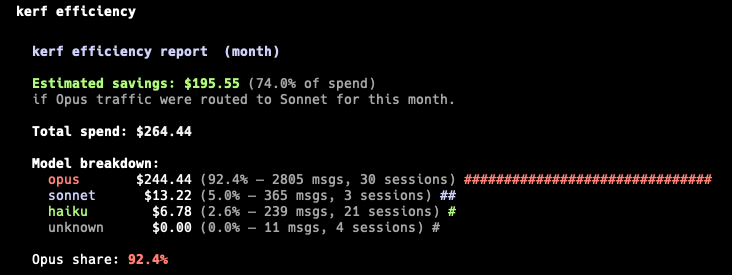
Result: The analyzer pointed out that most of my Opus sessions had patterns that would have been fine on Sonnet (file edits, small refactors, dependency bumps). Switching those workflows cut a meaningful chunk of my monthly Claude bill with zero quality difference.
kerf budget + kerf init --enforce-budgets
The killer feature.
$ kerf budget set 50 --period weekly   # set a $50 weekly cap
$ kerf init --enforce-budgets          # install a Claude Code PreToolUse hook
The hook runs kerf budget check before every tool call. If you’re over budget, the hook returns exit code 2 and Claude Code blocks the action.
Difference: Other tools only warn; Kerf enforces.
kerf dashboard
A local web UI for visual people. It opens at http://localhost:3847 and is SQLite‑backed, so queries are sub‑100 ms. Features:
- Three “killer‑features” cards (budget, efficiency, cache) front‑and‑center
- Sortable session table with drill‑down
- Stacked cost‑over‑time chart by model
- Zero auth, zero cloud, zero data leaving your machine
That’s the screenshot at the top of this post.
What I learned about Claude Code billing
A few non‑obvious things from spending too much time staring at JSONL files:
Cache reads can be 60 %–80 % of your total cost.
Cache reads are billed at 10 % of the standard input rate, which sounds cheap until you realize you’re caching 50 K tokens per turn and reading them on every message. Optimizing yourCLAUDE.mdand reducing cache invalidation was the biggest single lever I found.Opus is the default and it almost never needs to be.
Runningkerf efficiencyon a month of data showed that 90 % of my Opus tokens were spent on sessions with no complexity signal (no debugging, no architecture decisions, no large refactors — just file edits and small fixes). Switching those workflows to Sonnet saved a substantial amount without sacrificing quality.
Technical insights
- Switching to Sonnet cut costs by 4× with no measurable quality drop.
- Claude Code’s JSONL streams partial‑usage updates.
When parsing them you must keep the maximum value per field across duplicate message IDs, not the latest value. My v2.1 parser under‑counted input tokens because it kept the last entry instead of the max, so the final zero‑input chunk overwrote the real numbers from earlier chunks. Fixed before launch, but it’s a subtle trap anyone parsing these logs will hit. - The 5‑hour billing window is real, but Anthropic doesn’t expose it clearly.
Max subscribers are billed against a rolling 5‑hour window, not a daily quota. If you don’t track this, you can be surprised when the window rolls over mid‑session.
Technical decisions I’d defend
SQLite over a JSON file.
JSON is fine forccusage’s “read once, compute, discard” model. For an analytics layer you want sub‑100 ms queries, joins, aggregations, and a schema‑migration story. SQLite viabetter-sqlite3is the right tool.Local‑only over cloud‑first.
Adding cloud sync brings auth, storage, privacy controls, GDPR compliance, and a business model—none of which serve the primary use case of “show me where my money went.” Kerf is local‑first on purpose. A hosted team tier is on the roadmap but will always be optional.Ink for the terminal UI.
React components in the terminal feel weird at first, but the composability is worth it.Hooks as the enforcement mechanism.
Claude Code ships a native hook system. Using hooks means Kerf doesn’t have to intercept or proxy Claude Code’s traffic—it just responds to events Claude Code already emits.
What’s next
v1 is focused on doing one thing well: Claude Code observability for individual developers. The roadmap from here:
- v2.x: Cursor and Codex support
- v2.x: Slack/Discord alerts on budget thresholds
- v2.x: GitHub Actions integration for cost gates on PRs
- v3.x (paid team tier): Cloud sync, team aggregation, SSO
None of that ships before I’m sure v1 is rock solid. The CLI will always be free and MIT‑licensed.
Try it
npm install -g kerf-cli
kerf sync
kerf summary- GitHub:
- Show HN discussion:
If you’ve hit billing surprises with Claude Code, I’d love to hear about them in the comments. The more weird patterns I see, the better the analyzer gets.