
I Asked My AI to Remind Me to Drink Water. It Built a Product Instead.
Source: Dev.to
I was 62 minutes into a coding session when I asked my AI assistant:
“Do you even have a rule to remind me about water?”
It did. It just couldn’t do anything about it — AI only responds when you talk to it. It can’t push notifications.
Drinking water is one of those things everyone knows they should do but nobody actually does during deep work. So instead of relying on a rule the AI couldn’t enforce, we built a tool that can.
That conversation turned into an open‑source product in under 30 minutes.
The Problem Nobody Talks About
Developers know they should hydrate. We install apps, set phone timers, buy fancy water bottles. But when you’re deep in code, you dismiss everything:
- Phone buzzes? Ignored.
- Browser‑tab notification? Closed without reading.
What you can’t ignore is a window that appears on top of everything and won’t go away until you click OK.
From Request to Script (5 Minutes)
I said:
“Write a PowerShell script that shows a popup every 40 minutes.”
The AI’s first version used Windows balloon notifications — those tiny toasts in the bottom‑right corner. I tested it.
It disappeared on its own after 5 seconds. Useless.
🧑 “Make the window 5× bigger.”
The AI switched from balloon notifications to WinForms — a proper GUI window with a dark theme, centered on screen, TopMost = $true. No more missed reminders.
The Script: 90 Lines of PowerShell
The entire thing is one file — water‑reminder.ps1:
param(
    [int]    $Interval = 40,
    [string] $Title    = "Water Reminder",
    [string] $Message  = "Drink a glass of water!",
    [string] $Subtitle = "Take a 10 minute break",
    [char]   $Emoji    = [char]::ConvertFromUtf32(0x1F4A7),
    [int]    $Width    = 500,
    [int]    $Height   = 300
)
Every parameter is configurable. Want a stretch reminder every 25 minutes? A Pomodoro break timer? Just change the flags:
powershell -File water-reminder.ps1 -Interval 25 -Message "Stretch!" -Title "Break Time"The Dark UI
The popup uses a dark theme that doesn’t blind you during late‑night sessions:
- Background:
rgb(30, 30, 40)— almost black - Accent:
rgb(100, 180, 255)— soft blue - Typography: Segoe UI with a 48 pt emoji on top
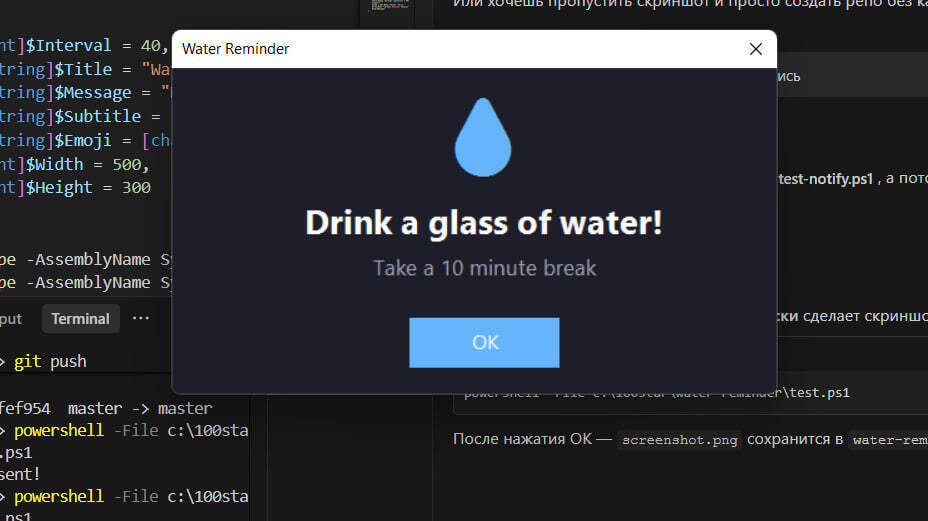
No Electron. No Node. No dependencies. Just PowerShell and the .NET assemblies that ship with every Windows installation.
The Loop
while ($true) {
    Start-Sleep -Seconds ($Interval * 60)
    $count++
    $time = Get-Date -Format "HH:mm:ss"
    Write-Host "[$time] Reminder #$count"
    Show-Reminder
}
That’s it. Sleep → popup → repeat. The counter logs to the console so you can see how many reminders you’ve gotten today.
From Script to Product (20 Minutes)
After testing it for a few minutes, I said: “Turn this into a product so others can use it too.”
The AI:
- Created a project folder with proper structure.
- Wrote a README (see the repo) following my readme‑guidelines.
- Added an MIT license.
- Created
ARCHITECTURE.mddocumenting every parameter. - Published to GitHub with topics for discoverability.
One command to publish:
gh repo create water-reminder --public --source=. --push \
    --description "Desktop reminder to drink water and take breaks"
VS Code Auto‑Start (The Best Part)
I didn’t want to remember to launch the script every morning, so I added a VS Code task that starts it automatically when I open my workspace:
{
    "label": "Water Reminder",
    "type": "shell",
    "command": "powershell -File water-reminder.ps1",
    "presentation": { "reveal": "silent", "panel": "dedicated" },
    "isBackground": true,
    "runOptions": { "runOn": "folderOpen" }
}
Open VS Code → reminder starts silently in a background terminal → first popup in 40 minutes.
One‑time activation: Ctrl+Shift+P → Tasks: Manage Automatic Tasks in Folder → Allow.
What I Actually Learned
The best tools solve your own problems first.
I didn’t set out to build a product. I just wanted a reliable reminder to drink water during long coding sessions. The product came second.AI can’t compensate for missing infrastructure.
My AI had a rule to remind me about water, but it physically can’t push notifications. Recognising the gap between “capability” and “infrastructure” is the real skill.PowerShell is underrated for desktop utilities.
No install. No dependencies. No build step. Double‑click and it works on every Windows machine since Windows 7. For small tools, this beats Electron by ~100×.Productising a script takes 20 minutes, not 2 days.
README + LICENSE + GitHub repo + topics = the minimum viable product for an open‑source utility. If your tool works, ship it.
Try It
git clone https://github.com/maximosovsky/water-reminder.git
powershell -File water-reminder.ps1
Star the repo if you forget to drink water too:
Building in public, one utility at a time.
Follow the journey: LinkedIn · GitHub
[https://github.com/maximosovsky](https://github.com/maximosovsky)