
How to make LLMs work on large amounts of data
Source: Dev.to
Text‑to‑SQL vs. LLM‑Based Approaches
Text‑to‑SQL tools have long dominated the market for applying intelligence over massive datasets.
With the rise of large language models (LLMs), the landscape has shifted to include a variety of new techniques, such as:
- Retrieval‑Augmented Generation (RAG)
- Coding/SQL agents
- …and other hybrid solutions
The Core Challenge
LLMs cannot directly see the raw data. Instead, they receive only an abstracted view, for example:
- Summaries
- Sample rows
- Schema descriptions
- Partial slices generated by another system
When you need to process large numbers of rows, feeding them all to an LLM becomes impractical.
How to Tackle This with Datatune
Datatune provides a scalable way to bridge the gap between massive data tables and LLMs:
- Chunking & Sampling – Break the dataset into manageable pieces or select representative samples.
- Schema‑aware Prompts – Include concise schema information so the LLM understands column meanings.
- Iterative Retrieval – Use RAG‑style loops to fetch additional rows only when the model requests more context.
- Result Aggregation – Combine the LLM’s partial outputs into a final, coherent answer or SQL query.
Quick Start
# Install Datatune
pip install datatune

# Example: Generate a query for a large table
datatune generate \
    --table my_large_table.csv \
    --prompt "Find the top 5 customers by total purchase amount" \
    --max-chunk-size 5000
The command above:
- Loads the table in chunks of 5 000 rows.
- Sends schema + sampled data to the LLM.
- Returns a ready‑to‑run SQL statement (or Python code) that respects the full dataset.
🎵 Datatune





Scalable data transformations with row‑level intelligence.
Datatune isn’t just another Text‑to‑SQL tool. With Datatune, LLMs and agents get full, programmatic access to your data and can apply semantic intelligence to every record.
How It Works
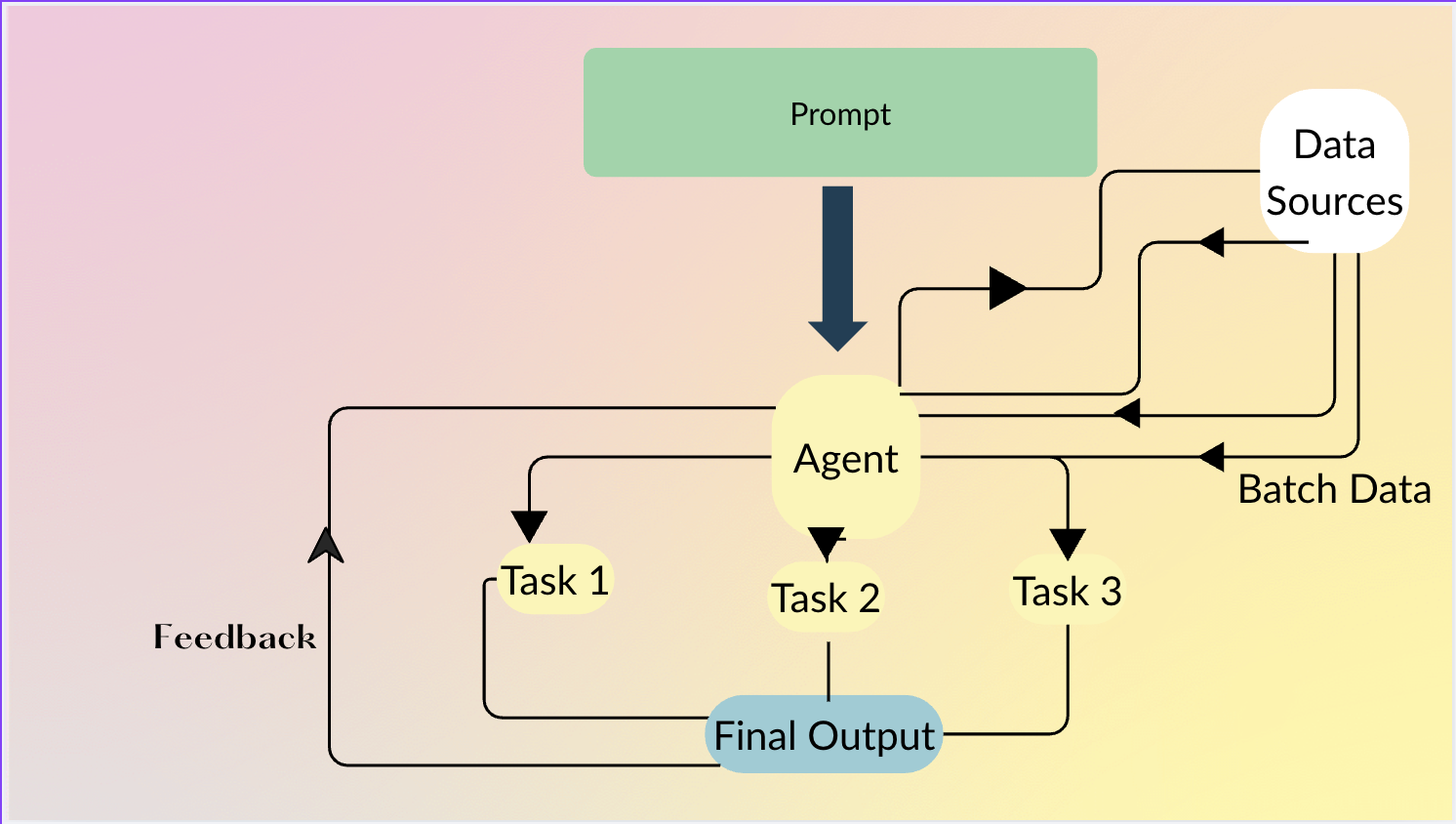
Installation
pip install datatuneQuick Start (Python API)
import datatune as dt
from datatune.llm.llm import OpenAI
import dask.dataframe as dd

llm = OpenAI(model_name="gpt-3.5-turbo")
df = dd.read_csv("products.csv")

# Extract categories using natural language
mapped = dt.map(
    prompt="Extract categories from the description and name of product.",
    output_fields=["Category", "Subcategory"],
    input_fields=["Description", "Name"]
)(llm, df)

# Filter with simple criteria
filtered = dt.filter(
    prompt="Keep only electronics products",
    input_fields=["Name"]
)(llm, mapped)
The Context Length Problem
LLMs are becoming larger and larger in terms of context‑length capabilities. Even with an optimistic 100 M‑token window, a typical enterprise dataset quickly outgrows what can be processed in a single request.
Example: a mid‑sized enterprise
| Item | Quantity |
|---|---|
| Rows in a transactional table | 10 000 000 |
| Columns per row | 20 |
| Average characters per column | 50 |
10 000 000 rows × 20 columns × 50 characters
= 10 000 000 000 characters
≈ 2.5 billion tokens   (≈ 4 characters per token)
A 100 M‑token context window can only hold 1/25 of that data.
Solving Large‑Scale Data Processing with Datatune
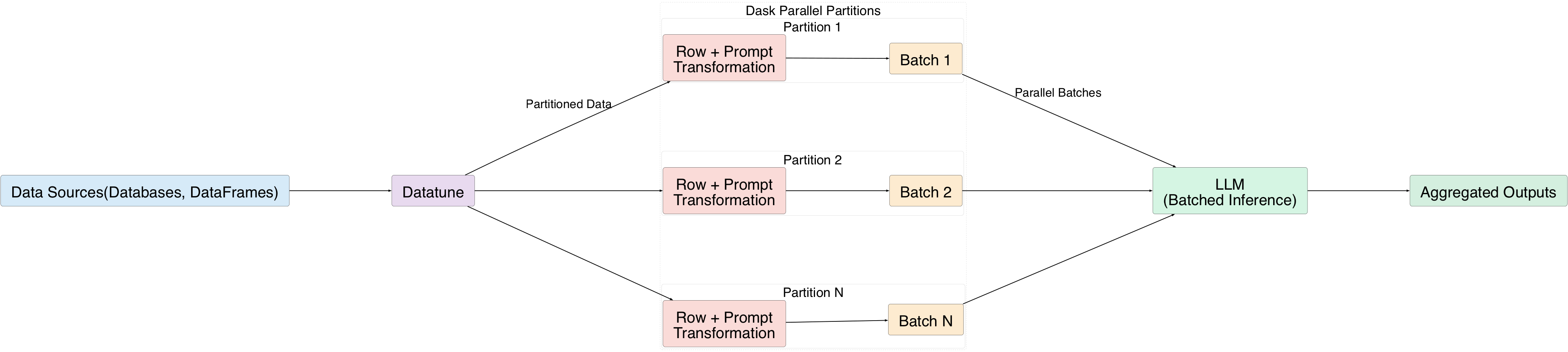
Datatune gives LLMs full access to massive datasets by processing rows in batches:
- Each row is transformed using a natural‑language prompt.
- Rows are grouped into batches and sent to the LLM.
- Dask’s parallel execution splits the data into partitions, allowing many batches to be processed simultaneously.
Understanding Data‑Transformation Operations
Datatune provides four first‑order primitives (also called primitives):
| Primitive | Description |
|---|---|
| MAP | Transform each row to new fields. |
| FILTER | Keep rows that satisfy a condition. |
| EXPAND | Add new rows derived from existing ones. |
| REDUCE | Aggregate rows into summary statistics. |
All primitives can be driven by natural‑language prompts.
MAP Example
mapped = dt.map(
    prompt="Extract categories from the description and name of the product.",
    output_fields=["Category", "Subcategory"],
    input_fields=["Description", "Name"]
)(llm, df)
Chaining MAP and FILTER
# 1️⃣ Extract sentiment and topics from each review (MAP)
mapped = dt.map(
    prompt="Classify the sentiment and extract key topics from the review text.",
    input_fields=["review_text"],
    output_fields=["sentiment", "topics"]
)(llm, df)

# 2️⃣ Keep only negative reviews (FILTER)
filtered = dt.filter(
    prompt="Keep only rows where sentiment is negative."
)(llm, mapped)
Datatune Agents
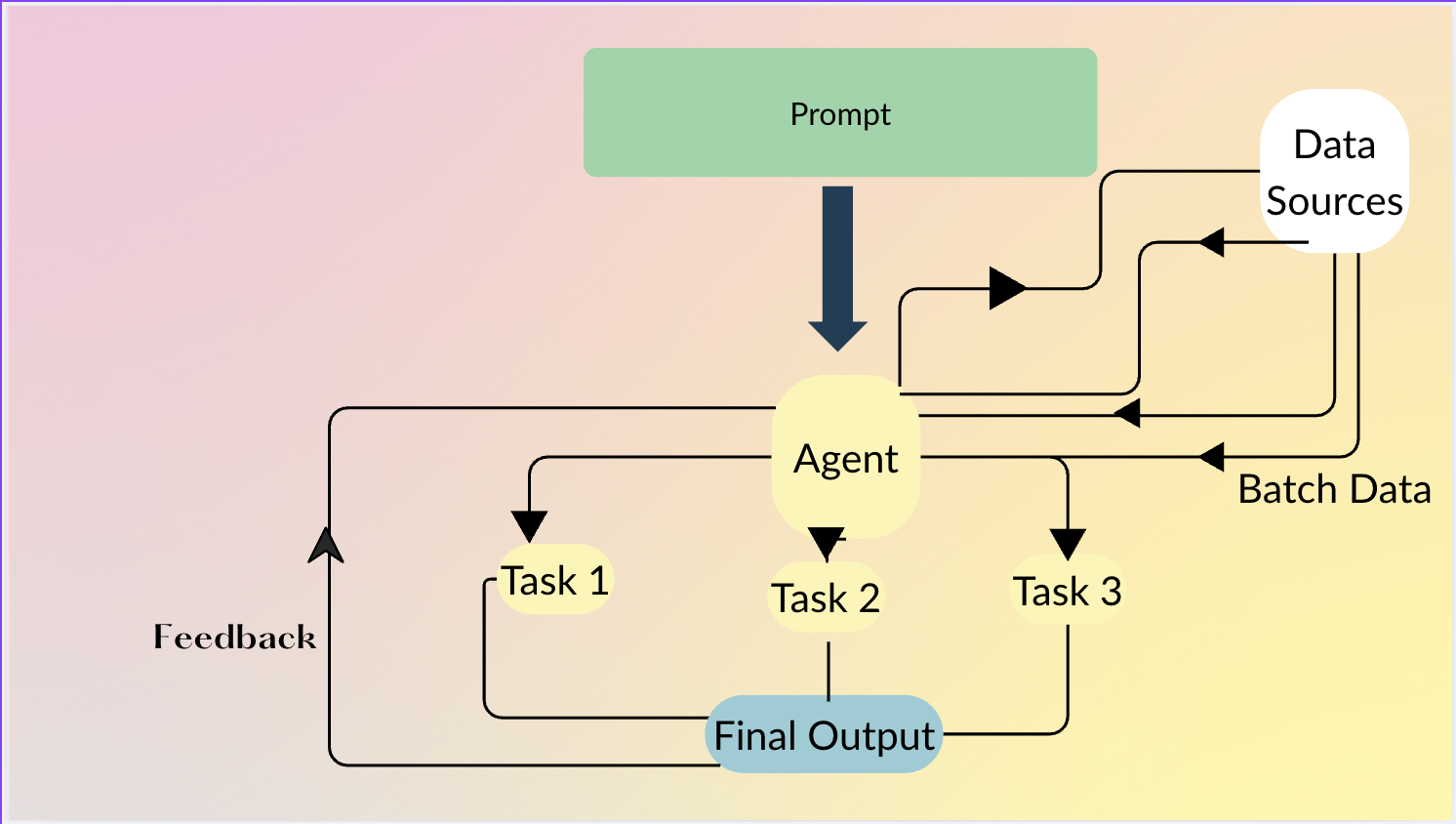
Agents let users describe what they want in plain language; the agent decides how to chain primitives (MAP, FILTER, etc.) and can even generate Python code when row‑level intelligence isn’t required.
Agent Example
df = agent.do(
    """
    From product name and description, extract Category and Subcategory.
    Then keep only products that belong to the Electronics category
    and have a price greater than 100.
    """,
    df
)
The agent automatically:
- Maps product name/description →
Category,Subcategory. - Filters rows where
Category == "Electronics"andprice > 100.
Data Sources
Datatune works with many data back‑ends:
- DataFrames – Pandas, Dask, Polars, etc.
- Databases – via Ibis integration (DuckDB, PostgreSQL, MySQL, …).
Contributing
Datatune is open‑source and we welcome contributions!
🔗 Repository: https://github.com/vitalops/datatune