
How to determine whether the route comes from Navigation or router on the target page?
Source: Dev.to
Context
When an app uses both Navigation (NavPathStack) and router.pushUrl to jump to the same destination page, developers need a way inside that destination page to know which mechanism triggered the navigation.
Description
Both Navigation and Router can be used for route redirection. The challenge is to determine the route source on the target page.
- Navigation – a root view container for route navigation. It displays the home page (direct children of
Navigation) or non‑home pages (children ofNavDestination) and manages switching via routes. - router – a HarmonyOS module that enables navigation through URLs, supporting page jumps, replacements, and backward navigation.
Solution / Approach
Redirect from the main page
| Method | API used |
|---|---|
| Navigation‑based routing | NavPathStack.pushPathByName() |
| Router‑based routing | router.pushUrl() |
Target page logic
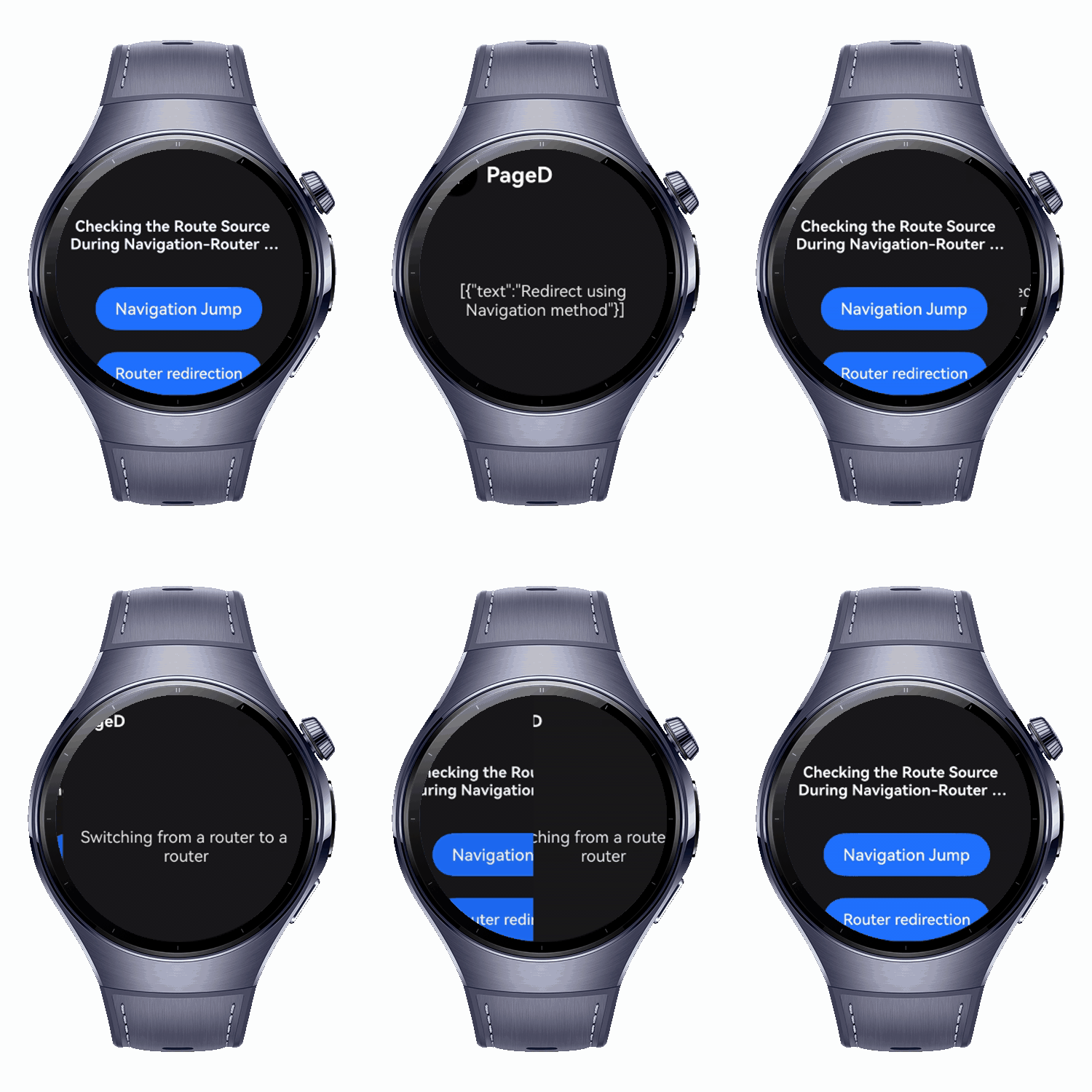
In the onReady callback of the NavDestination component:
- Call
UIContext.router.getParams(). - If it returns
undefined, the route originated from Navigation. Retrieve parameters withNavPathStack.getParamByName(). - Otherwise, the route came from router. Use
getParams()to fetch the parameters.
Example code (main page)
export class RouterParams {
  text: string;

  constructor(str: string) {
    this.text = str;
  }
}

@Entry
@Component
struct Index {
  pageInfos: NavPathStack = new NavPathStack();

  build() {
    Navigation(this.pageInfos) {
      Scroll() {
        Column({ space: 20 }) {
          Button('Navigation Jump', { stateEffect: true, type: ButtonType.Capsule })
            .width('80%')
            .height(40)
            .onClick(() => {
              // Navigation route redirection
              const info = new RouterParams('Redirect using Navigation method');
              this.pageInfos.pushPathByName('PageD', info);
            });

          Button('Router redirection', { stateEffect: true, type: ButtonType.Capsule })
            .width('80%')
            .height(40)
            .onClick(() => {
              // Router route redirection
              this.getUIContext()
                .getRouter()
                .pushUrl({ url: 'pages/PageD', params: new RouterParams('Switching from a router to a router') })
                .catch(() => {});
            });
        }
        .width('100%')
        .height('100%')
        .justifyContent(FlexAlign.Center)
        .padding('20vp');
      }
    }
    .title('Checking the Route Source During Navigation‑Router Switching');
  }
}
Example code (target page)
import { RouterParams } from './Index';

@Builder
export function PageDBuilder() {
  PageD();
}

@Entry
@Component
struct PageD {
  pageInfos: NavPathStack = new NavPathStack();
  @State message: string = 'test';

  build() {
    NavDestination() {
      Column({ space: 20 }) {
        Text(this.message);
      }
      .justifyContent(FlexAlign.Center)
      .alignItems(HorizontalAlign.Center)
      .height('100%')
      .width('100%')
      .margin({ left: 5 });
    }
    .title('PageD')
    .onReady((context: NavDestinationContext) => {
      this.pageInfos = context.pathStack;
      const routerParams = this.getUIContext().getRouter().getParams();

      if (routerParams === undefined) {
        // Navigation origin
        this.message = JSON.stringify(this.pageInfos.getParamByName('PageD'));
        console.info('Navigation jump');
      } else {
        // Router origin
        this.message = (routerParams as RouterParams).text;
        console.info('Router redirection');
      }
    });
  }
}
Key Takeaways
-
Identify the route source in
NavDestination.onReady()by checkingUIContext.router.getParams().undefined→ Navigation origin (useNavPathStack.getParamByName()).- Defined → router origin (use
getParams()).
-
Parameter handling differs between Navigation and router; use the appropriate API to retrieve passed data.
-
Framework recommendation: Prefer Navigation over
router + @Entryfor complex animations and shared‑element interactions, as the latter imposes page isolation limitations.