
How I Built Nucleon CLI: One Tool to Replace My Entire Development Workflow
Source: Dev.to
Source: Dev.to
How I Built Nucleon CLI: One Tool to Replace My Entire Development Workflow
“There has to be a better way…”
That’s what I thought after spending 20 minutes just to set up a new React project, configure deployment, and run basic health checks. I was juggling 15+ different CLI tools, and frankly, I was tired of it.
So I built Nucleon CLI – a universal developer‑workflow engine that replaces your entire toolchain with one intelligent interface.
The Problem: Tool Fragmentation Hell
My typical project setup looked like this:
# Create a fresh Next.js app
npx create-next-app my-app
cd my-app

# ---- Manual folder restructuring (≈10 min) ----

# ---- Deployment setup ----
npm install -g vercel
vercel login
vercel link
# (configure environment variables…)

# ---- Code analysis ----
npm install -g eslint
# (add manual configuration files…)

# ---- Environment debugging ----
node --version
npm --version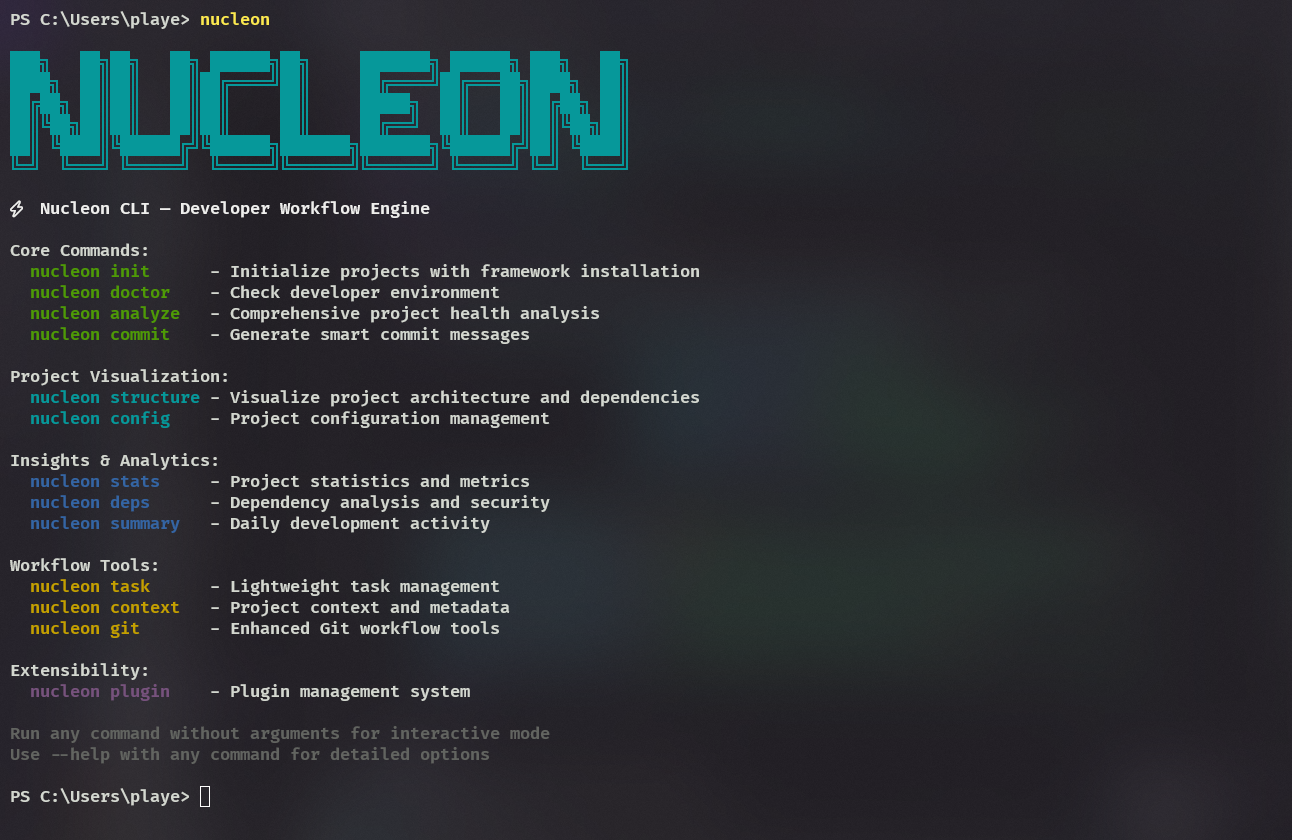
Figure 1: A cluttered terminal with many unrelated commands.
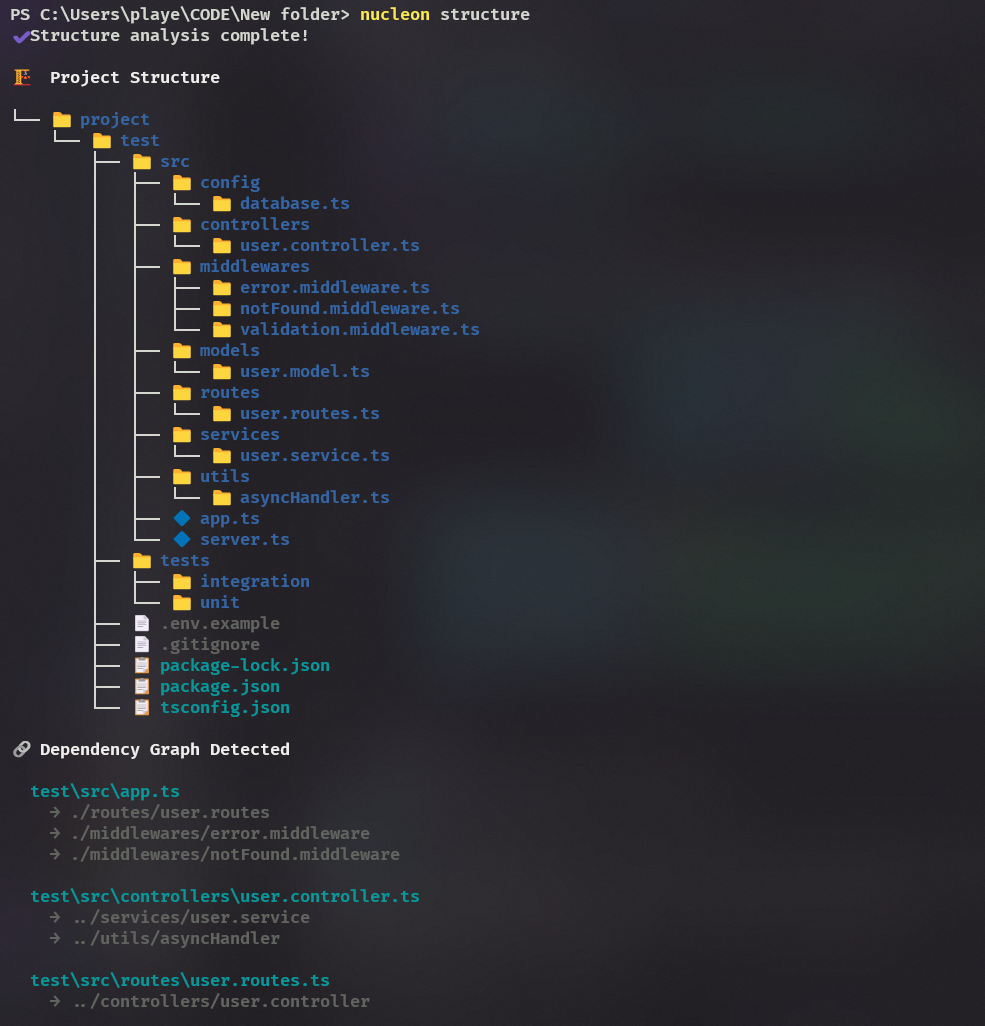
Figure 2: More fragmented tooling.
“Works on my machine” – debugging for 30 minutes…
Total time: 45 + minutes before writing a single line of business logic.
The real kicker? I had to remember different commands, flags, and configurations for each tool. Context‑switching was killing my productivity.
The Solution: One CLI to Rule Them All
What if you could replace all of that with:
npm install -g nucleon-cli

nucleon init      # Professional project setup in 30 seconds
nucleon analyze   # Instant code‑base health check
nucleon deploy    # Smart deployment with pre‑flight checks
nucleon doctor    # Fix environment issues automatically
That’s exactly what Nucleon CLI does.
What Makes It Different
🧠 Context‑Aware Intelligence
Unlike generic scaffolding tools, Nucleon understands your project context:
| Project type | What Nucleon provides |
|---|---|
| Express | Full MVC architecture (controllers, routes, services, models) |
| Next.js | Proper component organization with barrel exports |
| FastAPI | Layered architecture (api, controllers, services, schemas) |
| React + Vite | Complete folder structure with hooks, services, and utils |
🏗️ Professional Structures, Not Toy Examples
Here’s what nucleon init creates for an Express API:
src/
├── controllers/   # Request handlers
├── routes/        # API endpoints
├── services/      # Business logic
├── models/        # Data models
├── middlewares/   # Custom middleware
├── config/        # App configuration
└── utils/         # Helper functions
Complete with error handling, validation middleware, and TypeScript configuration.
⚡ Smart Deployment
nucleon deploy does more than just run vercel deploy. It:
- ✅ Checks git status for uncommitted changes
- ✅ Validates environment variables
- ✅ Runs pre‑flight health checks
- ✅ Provides rollback capability if deployment fails
🔧 Environment Diagnostics
nucleon doctor catches issues before they break your flow.
Nucleon Doctor Report
✔ Node.js installed (v18.17.0)
✔ npm installed (v9.6.7)
✔ Git installed (v2.41.0)
⚠ TypeScript not found (optional)
✔ Vercel CLI installed

✔ package.json found
✔ Dependencies installed
⚠ Uncommitted changes detected
Suggestions
- Run
npm install -g typescriptfor a better development experience. - Commit your changes before deploying.
Technical Deep Dive
Architecture Decisions
- TypeScript First: Built entirely in TypeScript for better developer experience and maintainability.
- Commander.js: Chosen for its excellent TypeScript support and intuitive API.
- Cross‑Platform: Handles Windows, macOS, and Linux PATH configuration automatically.
- Plugin Architecture: Extensible system for community contributions.
Key Features Implementation
Smart Project Detection
// Detects project type and applies appropriate structure
const projectType = detectFramework(process.cwd());
const template = templates[projectType];
await createProfessionalStructure(template);
Intelligent Analysis
// Analyzes codebase and provides actionable insights
const analysis = analyzeProject(process.cwd());
console.log(`Health Score: ${analysis.healthScore}/100`);
console.log(`Suggestions: ${analysis.suggestions.join(', ')}`);
Community Response
“Finally, a CLI that understands modern development workflows!” – Early user feedback
“The project structures are exactly what I’d set up manually – but in 30 seconds.” – Community member
Real Impact Numbers
| Task | Before | After |
|---|---|---|
| Project setup | 45 minutes | 30 seconds |
| Environment debugging | Hours | 2 minutes |
| Deployment prep | 15 minutes | 1 command |
| Code analysis | Manual guesswork | Instant insights |
Try It Yourself
# Install the CLI globally
npm install -g nucleon-cli

# Create a professional Next.js project
nucleon init

# Analyze your existing codebase
nucleon analyze

# Deploy with confidence
nucleon deploy

# Check your development environment
nucleon doctor
GitHub: nucleon
What’s Next
- More framework support (Vue, Svelte, Angular)
- Database‑integration templates
- CI/CD pipeline generation
- Team collaboration features
- Plugin marketplace
Contributing
This is an open‑source project, and I’d love your contributions! You can help in many ways:
- 🐛 Bug reports and feature requests
- 💻 Code contributions – add new commands or improve existing ones
- 📚 Documentation improvements – keep the docs clear and up‑to‑date
- 🎨 New project templates – expand the starter options
Check out the contributing guide to get started.
Final Thoughts
Building Nucleon CLI taught me that the best tools don’t just automate tasks—they understand the whole workflow, reduce context‑switching, and let developers focus on what truly matters: building great software.
Streamline Your Development Workflow
Instead of learning 20+ different CLI tools, developers can now focus on what they do best: building amazing products.
What’s your biggest development‑workflow pain point?
I’m always looking for the next feature to build!
If you found this helpful, give Nucleon CLI a try and let me know what you think. ⭐
Star the repo if you like it—it really helps with visibility!
Try Nucleon CLI
npm install -g nucleon-cliGitHub: https://github.com/your‑username/nucleon-cli (replace with the actual repository URL)