
How does Tab Order work in the DOM?
Source: Dev.to
Tab order in the DOM follows these rules
Default behavior
Elements are focused in the order they appear in the HTML source (top to bottom, left to right). Only focusable elements participate by default: links, buttons, form inputs, textareas, selects, and elements with a contenteditable attribute.
The tabindex attribute
The tabindex attribute overrides the default order in three ways:
tabindex="0"
Makes any element focusable and positions it in the natural DOM order. Useful for custom interactive elements like a “ acting as a button.
Positive values (tabindex="1", tabindex="2", …)
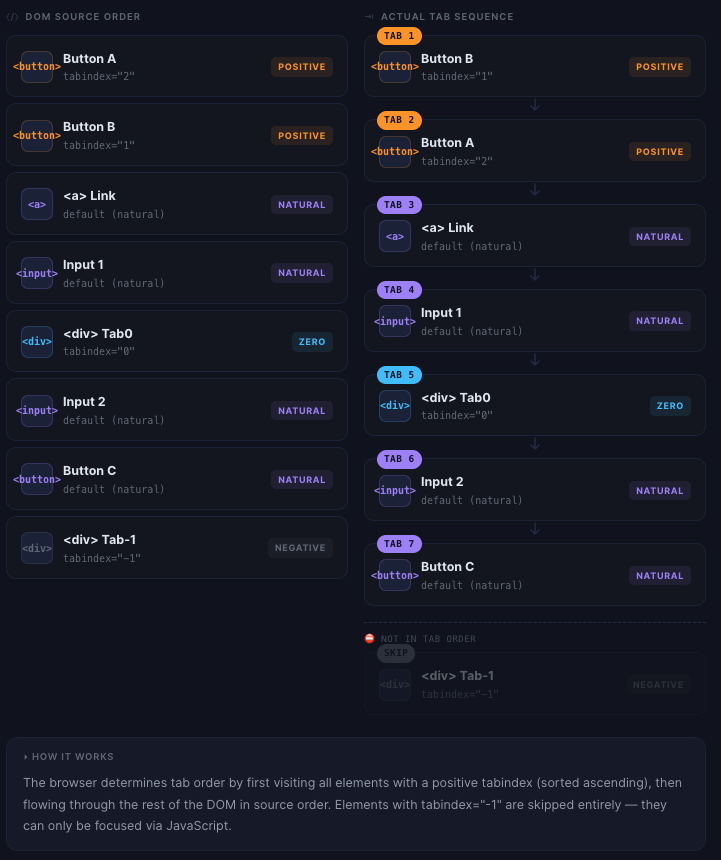
Jump that element ahead of the natural order—elements with lower positive numbers come first, then the rest of the DOM flows normally after all positive‑indexed elements are done. This is generally discouraged because it creates a jarring, unpredictable experience for keyboard users.
tabindex="-1"
Makes an element focusable programmatically (via .focus() in JavaScript) but removes it from the sequential tab order entirely. Handy for things like modals or dynamically shown panels that need to receive focus on demand but shouldn’t be reachable via the Tab key.
Quick mental model
- All elements with positive
tabindexvalues, sorted in ascending order. - Everything else in DOM source order (including elements with
tabindex="0"). - Elements with
tabindex="-1"are skipped entirely during tabbing.
Note: If an element is hidden (
display: noneorvisibility: hidden) or disabled, it is automatically removed from the tab order regardless of itstabindexvalue.