
Here’s Exactly How I Implemented @defer for Granular Code Splitting in Days — Step-by-Step
Source: Dev.to
@defer Fundamentals and Setup
Angular’s @defer block is a game‑changer for performance, letting you split heavy template sections—like charts or dashboards—into separate JavaScript bundles that load only when triggered by events such as viewport entry, user interaction, or browser idle time. This slashes your initial payload, speeding up Largest Contentful Paint (LCP) and overall app startup, especially in large single‑page apps where not every user needs every feature right away.
Requirements for Success
- Angular v17 or later (stable deferrable views from Angular 18 onward).
- Components, directives, and pipes inside an
@deferblock must be standalone and not referenced elsewhere in the same file (e.g., noViewChildqueries or external imports that would cause eager loading). - Transitive dependencies can be a mix of standalone or NgModule‑based, but keep placeholders lightweight since their dependencies load upfront.
Basic Syntax in Action
@defer (on viewport) {

}
@placeholder {

}- Triggers:
idle(default),interaction,hover,timer(2s), or a customwhen showLargeChart. - Loading indicator:
@loading (minimum 1s) { } - Error handling:
@error { Retry? } - Prefetch:
prefetch on idleloads the bundle early without rendering it.
Verify Your Build Wins
- Run
ng buildand look for new chunks such asdefer-heavy-chart.js. - Serve the app, open Chrome DevTools → Network, and confirm that the heavy bundle loads only when the trigger fires.
- For unit tests, you can simulate defer states with:
TestBed.deferBlockBehavior = DeferBlockBehavior.Manual;Real‑World Starter: Dashboard Magic
@defer (on viewport; prefetch on idle) {

}
@placeholder (minimum 500ms) {

}
Wrapping a data‑heavy dashboard widget this way can shrink the main bundle by 30 %+ on complex pages, delivering a smooth experience for below‑the‑fold metrics.
Core Triggers and Sub‑Blocks
| Trigger | Description |
|---|---|
idle | Fires on browser idle via requestIdleCallback (default). |
viewport | Loads when the element enters the viewport (Intersection Observer). |
interaction | Fires on click, keydown, or other user interactions. |
hover | Fires on mouseover or focusin. |
immediate | Loads right after non‑deferred content renders. |
timer(2s) | Loads after the specified delay. |
Multiple triggers can be combined with semicolons (OR logic). Prefetching is specified separately, e.g.:
@defer (on viewport; prefetch on idle) { ... }Sub‑Blocks for Seamless UX
@placeholder– Eagerly loaded, lightweight content shown before the deferred bundle. Useminimum 500msto avoid flicker.@loading– Shown after the trigger fires, before the bundle resolves. Parameters likeafter 100ms; minimum 1scontrol timing.@error– Displays a fallback UI if the load fails. Wrap these blocks in a container witharia-live="polite"for screen‑reader announcements.
@defer (on hover) {

}
@placeholder {  }
@loading {  }
@error {  }
Custom Triggers with when
Use when for bespoke logic:
@defer (when isVisible()) {

}
when evaluates a signal or expression once; it does not revert. You can also combine with prefetch:
@defer (when userClicked(); prefetch when dataReady) { ... }Advanced Patterns and Optimization
Nested @defer and Cascading Avoidance
Nested defer blocks enable layered lazy loading, but improper stacking can cause multiple bundles to fire simultaneously. Stagger triggers to avoid cascading requests:
@defer (on viewport) {
  @defer (on interaction) {

  } @placeholder {
    Click to expand
  }
} @placeholder {
  Scroll to see more
}
@if (isExpanded) {

}- Outer block uses
viewportto load only when the section scrolls into view. - Inner block waits for an explicit interaction, preventing a burst of network requests.
SSR/SSG and Hydration Magic
- On the server, only
@placeholdercontent (or nothing) is rendered; triggers are ignored because there is no viewport or idle state. - During client‑side hydration, configured triggers fire, making the UI interactive.
- Enable incremental hydration with
hydrate ontriggers for SEO‑friendly server rendering without inflating client bundles. Pair withprefetch on idleto preload code before hydration.
Bundle Analysis and HMR Pitfalls
- Install the explorer:
npm i -D source-map-explorer. - Build with source maps:
ng build --source-map. - Run the analysis:
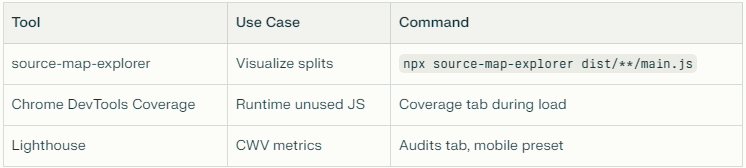
npx source-map-explorer dist/**/main.jsThe interactive treemap shows how main bundles shrink as heavy standalone components split off.
HMR note: Development servers eager‑load all @defer chunks, bypassing triggers. Disable HMR for accurate testing:
ng serve --no-hmrVisual Example
Accessibility with ARIA Live Regions
Screen readers may miss the transition from placeholder to loaded content. Wrap defer blocks in a container with ARIA live attributes:
@defer (on hover) {  }
@placeholder {  }
@loading {  }
@error {  }
This ensures that dynamic content changes are announced automatically, keeping the UI both performant and inclusive.