
Here’s everything new coming to Safari on macOS 27 Golden Gate
Source: 9to5Mac
macOS 27 includes several additions and improvements in Safari, including optional AI-powered features that help organize tabs and keep users up to date on changes to the websites they’re watching. Here’s everything new.
Automatic tab groups
During yesterday’s WWDC keynote, Apple mentioned a few new features coming to Safari on macOS 27 later this year.
One of them is an Apple Intelligence-powered feature that will automatically organize tabs into topics.

The feature is optional and, when turned on, will let Safari analyze the content of each page, and group tabs by shared topics, such as “Vacation planning” or “School project research.”
As users open new tabs, Safari can automatically add them to existing groups when they match the same topic. Users can then save those automatically organized tabs as a new Tab Group, or simply close the whole group once they’re done with that subject or project.
Notify Me
Yet another Apple Intelligence-powered feature, Notify Me will let users set the conditions for when they want to be notified after the content of a specific page changes.
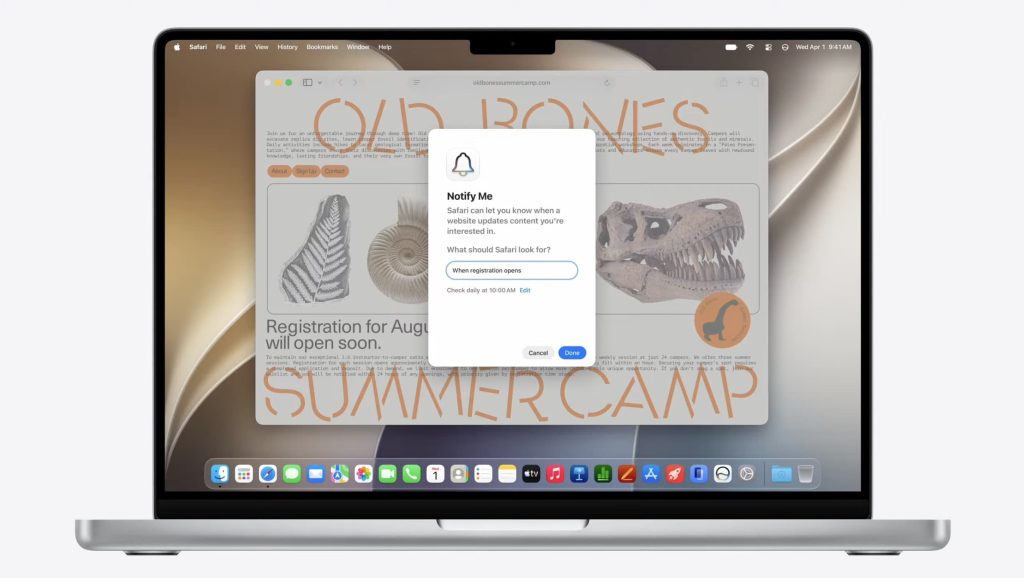
Users can set the automation to run daily, monthly, or on specific days of the week, as well as choose the exact time it should check for changes.
They can also use natural language to describe the kind of change they’re watching for, such as “Price drop on the shoes” or “When registration opens,” so Safari knows what to look for on the page.
Describe an extension
As with Notify Me, users will be able to describe in natural language what they want their new extension to do and how it should behave, and Safari will handle the rest.
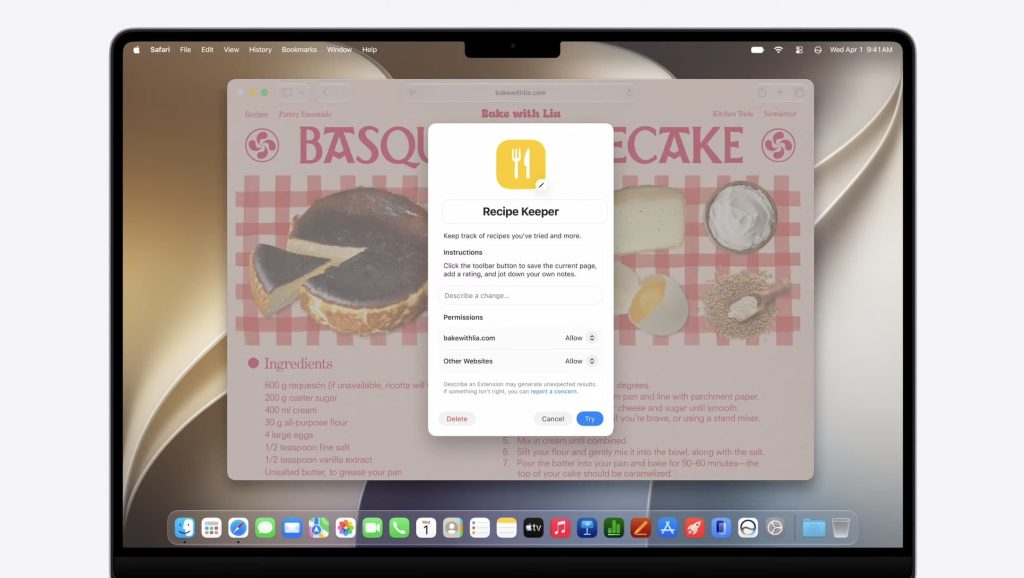
During the WWDC keynote, Apple showed an example where a user wrote:
“Save and track cooking recipes from around the web. Click the toolbar button to see your saved recipes and add notes to each.
Safari then created a Recipe Keeper extension with a new prompt field for the user to describe further changes they wanted to make, as well as options to control which sites were allowed to add or change recipes.
Swipe down to refresh
Just like on iOS and iPadOS, Mac users running macOS 27 will be able to pull down from the top of a page to refresh its content.
As the rubber band effect kicks in, Safari slowly reveals a spinning refresh indicator. Once the page has been pulled down far enough, Safari refreshes the entire page, just as users are already used to on iPhone and iPad.
Here’s the new behavior in action:
Passwords
Just like on iOS 27, Safari will be able to automatically and proactively change compromised passwords on the user’s behalf, and you can read more about that in our coverage of this specific feature here.
In addition to the features showcased during the WWDC keynote, Apple has made several under-the-hood tweaks to Safari as part of its broader effort to make apps and system experiences feel faster across its platforms.
That includes:
-
Enhanced power efficiency in macOS and iOS
-
Faster start page content loading
-
Faster web application performance
-
Faster handling of JavaScript
-
Smoother animations and graphics
-
Smoother scrolling
-
Smoother start page resizing
-
Multiple tab views in visionOS
For developers, the WebKit blog has started taking deeper dives into the new technologies included in Safari on macOS 27 and Apple’s other operating systems, and you can read more about that here.
For ongoing updates and full coverage of WWDC26, head over to our news hub.
What’s your favorite new feature coming to Safari? Let us know in the comments.
Worth checking out on Amazon
-
 
FTC: We use income earning auto affiliate links. More.