
Have you ever built a dashboard nobody opens?
Source: Dev.to


The problem
I have built dashboards that nobody opened. I’ve also been on the other side—begging for a dashboard, then never looking at it. There’s a particular kind of guilt in that. Someone spent a week wiring up the SQL, the joins, the colour‑coded conditional formatting. You bookmarked it. You promised yourself you’d check it Monday morning. Then weeks went by.
I came across a thread on a BI subreddit the other week where someone had pulled usage logs on their team’s dashboards. One manager had begged for a dashboard for months—pinged the builder constantly, “this is critical, I need it now.” The builder delivered. The manager opened it twice… in four months.
I felt that, both as the builder and as the manager.
The thing nobody says about dashboards is that they ask humans to pull. The dashboard sits on a server somewhere with the right numbers, perfectly correct, and the way you find out what’s happening is: you go to it, log in, filter the date range, click the chart. Humans don’t do that. Humans check email. Humans check Slack. Humans check the place they’re already going to be.
So I stopped building dashboards. I started building agents that watch the data themselves and email me when something matters.
The Monday email
Here’s the one that landed in my inbox this morning at 9 am, before I’d even sat down. I built it in about ten minutes.
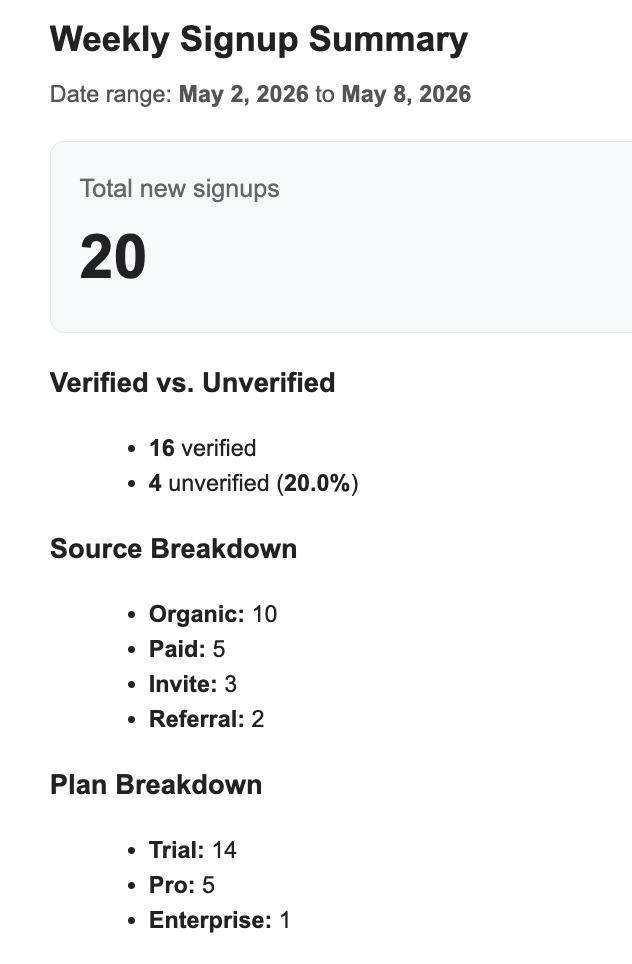
The Monday‑morning email. The agent did the count, did the breakdown, and flagged the things actually worth looking at.
Sunday night, while I was sleeping, an agent ran. It queried the workspace database—the user‑signups table, the verification flags, the plan tier—counted everything for the past seven days, and looked for anything that didn’t fit the pattern. It found 20 sign‑ups, 16 of them verified, 4 not. Then it noticed something specific: three of those four came from the same disposable‑email domain within a 24‑minute window, and one of the others was on an enterprise plan with a note saying “high‑intent lead, didn’t verify email.” It told me about all of them by name, in plain English.
I didn’t ask for any of that. I asked for “a Monday‑morning summary, no dashboard required.” The agent decided what was worth flagging.
What you don’t see in the email
The thing nobody tells you about giving an AI access to your customer database is that the agent that reads your data can also delete it. The agent that sends one email can send a thousand. The agent that flags suspicious sign‑ups can leak their addresses into a debug log everyone on your team can read.
I didn’t build any of those guardrails. They came with the agent.

The whole agent on one screen. Trigger, two governance gates, model, toolbox. Notice the right column: Gmail — 1/62 tools enabled.
Underneath this Monday email, the agent has exactly one Gmail tool enabled: send. Not delete, not forward, not reply‑all. If anyone tried to social‑engineer the agent into “email all your customers,” it physically can’t—because the tool isn’t there.
A separate agent watches every SQL the main agent tries to run. Anything that drops a table or truncates a column gets blocked before it touches the database. This isn’t a rule baked into the system prompt; it’s a separate decision made by a separate model, against the actual SQL.
Customer email addresses are stripped from the run logs before anyone on the team scrolls through them.
I asked for a Monday email. I got an agent that can only send a Monday email.
Why this works where dashboards don’t
It pushes. The report lands in the inbox I’m already checking. There’s no “remember to check the dashboard” step. The friction goes from log‑in → navigate → filter to scroll‑past‑the‑Amazon‑receipt.
It interprets. A dashboard tells me what is. The agent tells me what changed, what’s weird, and what to look at first. “20 sign‑ups” is fine. “Three of these came from a disposable‑email domain in 24 minutes” is the actual signal.
It catches what humans miss. By encoding guardrails (SQL‑destruction gate, PII‑redaction gate, limited toolset) the agent can safely act on data without exposing the organization to accidental or malicious damage.
It’s cheap and fast. Building a simple scheduled agent takes minutes, whereas a polished dashboard can take weeks of engineering, design, and maintenance.
Takeaway
If you’re tired of dashboards that gather dust, try flipping the problem: push the insight to where you already are (email, Slack, Teams) and let an AI decide what’s worth surfacing. With a few guardrails—limited tool access, separate validation models, and data‑redaction steps—you get a safe, actionable summary without the overhead of a never‑opened dashboard.
Humans miss. The same agent that writes the report queries the data. If something doesn’t add up — anomalous bursts, an enterprise‑tier user who didn’t verify — it surfaces in the same email. No second pass. No “let me dig into that.”
The reason the AI‑analytics chat tools you’ve tried can’t quite do this is that they’re chat boxes. They wait for you to ask. The agent doesn’t wait. It runs on a schedule, queries the same data the chart would have queried, and pushes the result somewhere you’ll actually see it.
That’s the difference between data sitting and data finding you.
Try it
Here’s the exact prompt I gave to the Workspace Assistant in ContextGate (that little robot icon on the bottom right) to build the whole thing for me:
Build me an agent that emails me a Monday‑morning summary of our user signups — counts, verified vs not, and anything that looks weird in the data. No dashboard required.Click Approve when it asks to set up the database and connect Gmail, and you have it.