
GPU Flight — System Architecture
Source: Dev.to
System Diagram
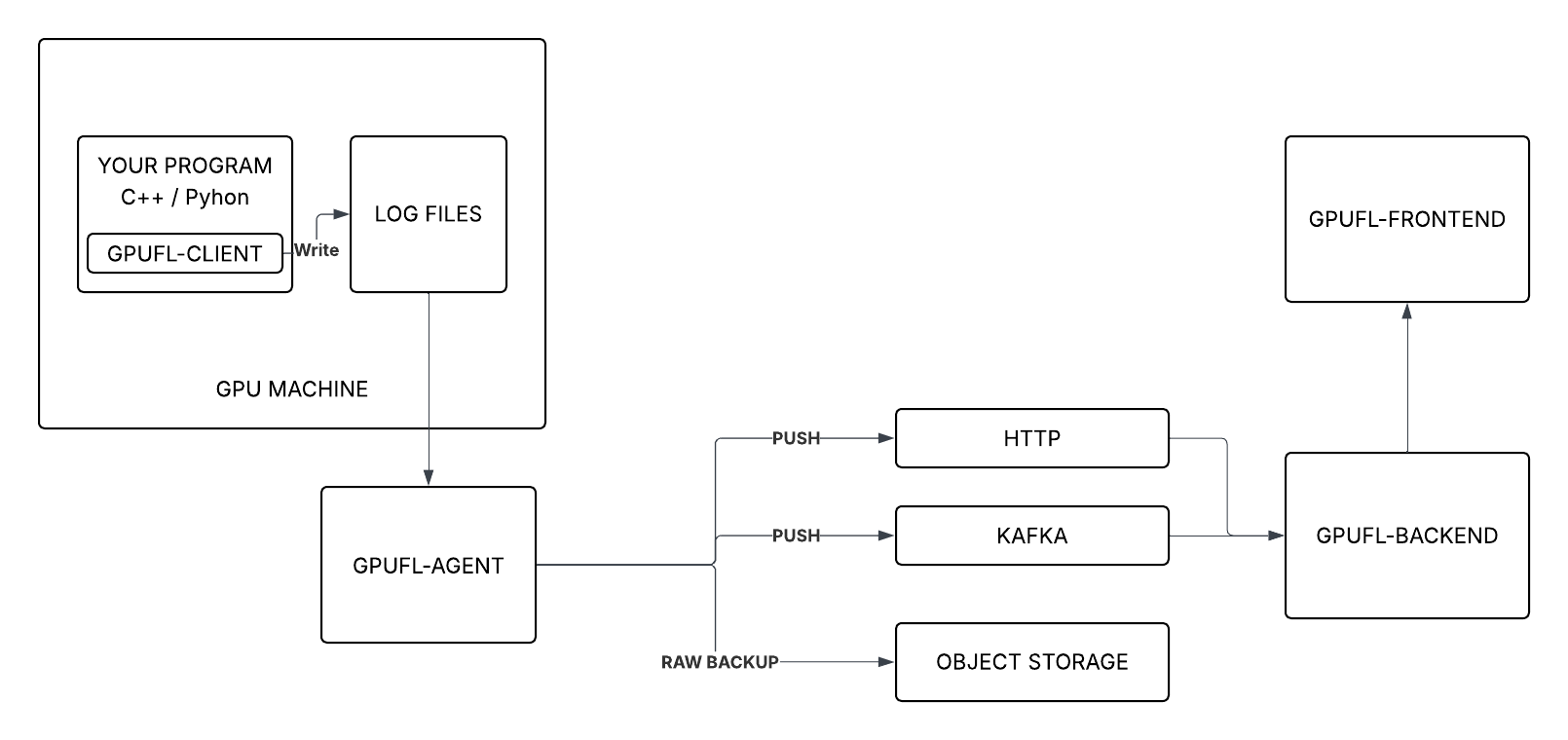
In a Nutshell
| Component | Role |
|---|---|
| gpufl‑client | Runs on the GPU machine, hooks into CUDA activity, and writes structured logs. |
| gpufl‑agent | Watches the logs and forwards events to the backend via HTTP or Kafka. |
| gpufl‑backend | Receives events, stores them, and provides APIs for querying. |
| gpufl‑front | React UI for browsing sessions and inspecting GPU behavior. |
The Client
Implemented as a C++ library (or the gpufl Python package).
- Link the library into your application.
- Call
gpufl::init()at program start – GPU Flight then automatically collects GPU‑related events.
What the client can capture
- Kernel launches – name, grid/block dimensions, register count, shared memory, occupancy, timing.
- Memory copies – direction, size, duration, throughput.
- SASS metrics – warp‑level per‑instruction counters (when the SassMetrics engine is enabled).
- PC samples – warp stall‑reason distribution (when the PcSampling engine is enabled).
- System metrics – periodic NVML snapshots (GPU utilization, VRAM usage, temperature, power draw, fan speed).
Log files
The client writes three JSONL files (log rotation is automatic):
.device.log   # kernel launches, memory copies, timing
.scope.log    # GFL_SCOPE blocks with optional SASS/PC data
.system.log   # periodic NVML snapshots
The agent tracks file offsets, so events are never re‑sent across rotations.
The Agent
The agent is a separate process that tails the log files and forwards events to the backend.
Because it is decoupled from the client, it can run anywhere that can access the log folder (same machine, NFS share, separate host, etc.).
┌──────────────────────────────┐
│         GPU Machine            │
│                                │
│  gpufl-client → .log files     │
│                │               │
│          gpufl-agent           │   ← simplest: agent on the same machine
└────────────────────┼───────────┘
                     │  (or NFS / shared volume)
                     ▼
              gpufl-agent           ← or: agent on a separate machine
Why the split?
Keeping profiling logic isolated makes the instrumentation library easier to maintain and portable across environments. Changing the transport (HTTP ↔ Kafka ↔ S3) never requires recompiling the client.
Agent responsibilities
- Tail all three log streams concurrently.
- Persist file positions via a cursor file (survives restarts).
- Follow log rotation automatically.
- Publish events via HTTP or Kafka.
- Optionally archive compressed raw logs to S3‑compatible storage.
The raw
.logfiles contain the full original event stream. Archiving them enables long‑term retention, auditability, and re‑processing with updated analysis logic.
Configuration examples
# HTTP — simplest, good for dev or small deployments
gpufl-agent \
    --folder=/var/log/gpuflight \
    --type=http \
    --url=http://backend:8080/api/v1/events/
# Kafka — recommended for production
gpufl-agent \
--folder=/var/log/gpuflight \
--type=kafka \
--brokers=kafka:9092# Kafka + S3 archival
gpufl-agent \
--folder=/var/log/gpuflight \
--type=kafka \
--brokers=kafka:9092 \
--archiver-endpoint=https://s3.amazonaws.com \
--archiver-bucket=gpu-traces \
--archiver-access-key=KEY \
--archiver-secret-key=SECRETHTTP vs. Kafka
When many GPU machines send data simultaneously, publishing directly to the backend via HTTP couples the producer rate to the backend’s processing speed. If the backend slows down, restarts, or goes down temporarily, events can back up or be lost.
GPU node 1 ──┐
GPU node 2 ──┼── gpufl-agent ──► Kafka ──► gpufl-backend
GPU node 3 ──┘
Benefits of a message queue (Kafka):
- Buffering – holds events while the backend restarts or lags.
- Burst handling – absorbs spiky event rates typical of GPU workloads.
- Multiple consumers – other services can read the same topic (alerting, analytics, archival, etc.).
For a single machine or development setup, HTTP remains simpler and perfectly adequate. The agent supports both modes with a single flag.
The Backend
Implemented as a Spring Boot REST service with two main responsibilities:
Ingestion –
POST /api/v1/events/{eventType}whereeventTypeisdevice,scope, orsystem.
In a Kafka deployment, a consumer bridge reads from the topic and calls the same endpoint internally.Query API – provides:
- Sessions list
- System metrics over time
- Kernel events per session
- Profile samples per scope
The frontend consumes only this public API; there is no hidden internal interface.
Event types
| Type | Contents |
|---|---|
| device | Kernel launches, memory copies, precise timing (CUPTI). |
| scope | GFL_SCOPE timing blocks, optionally enriched with SASS metrics and PC samples. |
| system | Periodic NVML snapshots (GPU util %, VRAM, temperature, power draw, fan speed). |
Authentication
All backend endpoints are protected with Bearer tokens.
The Frontend
A React application that visualises:
- Sessions and their timelines
- Per‑kernel performance details
- System‑level metrics (GPU utilization, temperature, etc.)
- Scope‑level profiling data (SASS counters, PC samples)
It talks exclusively to the backend’s REST API, making the UI completely decoupled from the data‑collection pipeline.
Recap
- Client → writes structured JSONL logs.
- Agent → tails logs, forwards events (HTTP/Kafka), optionally archives raw logs.
- Backend → ingests events, stores them, serves query API (protected by Bearer tokens).
- Frontend → React UI built on top of the public API.
This modular design lets you swap transport mechanisms, scale ingestion independently, and keep profiling logic lightweight and portable.
GPU Flight Overview
- Ingestion – Direct HTTP ingestion from the agent; API keys for programmatic access from the frontend or external tooling.
- Data retention – Configurable cleanup policy keeps disk usage bounded. Old sessions are pruned automatically once they exceed the configured retention window.
- Frontend – A React + TypeScript single‑page application (SPA) with a dark theme, connected to the backend REST API.
Main Dashboard
The main view is a three‑tab dashboard scoped to a single profiling session:
┌────────────────────────────────────────────────────┐
│  Session: my_training_run  [host: gpu-node-01]     │
├──────────────┬─────────────┬───────────────────────┤
│   Kernels    │   Scopes    │       System           │
└──────────────┴─────────────┴───────────────────────┘
Kernels tab
- Timeline of kernel launches.
- Clicking a kernel opens the Inspector, showing:
- Occupancy, register count, shared memory, grid & block dimensions.
- The CPU call stack that triggered the launch.
Scopes tab
- Hierarchical tree of
GFL_SCOPEblocks with timing breakdowns. - For sessions using the SASS Metrics engine, each scope also displays divergence data from the previous post.
System tab
- Time‑series charts for:
- GPU utilization %
- VRAM usage
- Temperature
- Power draw
- Fan speed
Session Selector
The selector lets you browse by host and application name, making it easy to compare runs across machines or over time.
Next Post: Local Setup Guide
A Docker Compose file will be provided that brings up the full stack—client example, agent, backend, and frontend—on a single machine. This will let you try GPU Flight without any manual configuration.
What’s coming next?
- Cloud demo – A live deployment is in progress. Once available, a link will be posted so you can explore real GPU profiling data in the UI without setting up anything yourself.
Open‑Source
GPU Flight is open source.