Goodbye InnerHTML, Hello SetHTML: Stronger XSS Protection in Firefox 148
Source: Hacker News
Cross‑site scripting (XSS) remains one of the most prevalent vulnerabilities on the web. The new standardized Sanitizer API provides a straightforward way for developers to sanitize untrusted HTML before inserting it into the DOM. Firefox 148 is the first browser to ship this security‑enhancing API, advancing a safer web for everyone. We expect other browsers to follow soon.
Why XSS Is Still a Problem
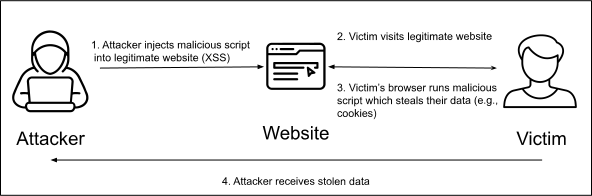
An XSS vulnerability arises when a site inadvertently lets attackers inject arbitrary HTML or JavaScript through user‑generated content. An attacker can then monitor and manipulate user interactions and steal data for as long as the vulnerability remains exploitable. XSS has long been notoriously difficult to prevent and has ranked among the top three web vulnerabilities (CWE‑79) for nearly a decade.
From CSP to the Sanitizer API
Firefox has been deeply involved in XSS mitigation since the beginning, spearheading the Content‑Security‑Policy (CSP) standard in 2009. CSP lets sites restrict which resources (scripts, styles, images, etc.) the browser can load and execute, providing a strong line of defense. However, CSP has struggled with adoption because it requires significant architectural changes and ongoing review by security experts.
The Sanitizer API fills that gap by offering a standardized way to turn malicious HTML into harmless HTML. The setHTML() method integrates sanitization directly into HTML insertion, providing safety by default.
Simple Example
document.body.setHTML(`
  Hello my name is
`);
The sanitizer removes the “ element and its onclick attribute, leaving only safe markup:
## Hello my name is
Replacing innerHTML with setHTML()
Developers can opt into stronger XSS protection with minimal code changes by swapping error‑prone innerHTML assignments for setHTML():
// Before
element.innerHTML = unsafeHTML;

// After
element.setHTML(unsafeHTML);
If the default configuration of setHTML() is too strict—or not strict enough—for a particular use case, a custom configuration can be supplied to define which elements and attributes should be kept or removed. See the options reference for details.
To experiment with the Sanitizer API before adding it to a production page, try the Sanitizer API playground.
Combining with Trusted Types
For even stronger protection, the Sanitizer API can be combined with Trusted Types. Once setHTML() is adopted, sites can enable Trusted Types enforcement more easily, often without complex custom policies. A strict Trusted Types policy can allow setHTML() while blocking other unsafe HTML insertion methods, helping prevent future XSS regressions.
Adoption in Firefox 148
Firefox 148 supports both the Sanitizer API and Trusted Types, giving developers a safer default for handling untrusted HTML. By adopting these standards, developers can prevent XSS without needing a dedicated security team or major implementation changes.