
GitHub Browser Plugin for AI Contribution Blame in Pull Requests
Source: Hacker News
Quick‑Start (TL;DR)

-
Add
git‑aito your workflow – install the CLI and any editor extensions you need.
👉 git‑ai on GitHub -
Build, install, and authenticate
refined‑github‑ai‑pr
👉 refined‑github‑with‑ai‑pr on GitHub -
Push AI‑generated code to a branch and open a Pull Request on GitHub.
-
Open the PR in the “Changes” view:
https://github.com///pull//changes -
Enjoy the AI annotations – scroll down for example screenshots.
💌 Stay updated – join my email list for the latest news and releases.
Identifying AI Contributions
The Rise of Low‑Friction AI Contributions
With the proliferation of effortless code‑generating tools like Claude Code, Codex, and Cursor, low‑effort contributions are being submitted en masse—often as spam—in hopes of getting a name attached to popular open‑source projects. Most contributors are well‑intentioned; the workflow is new, and the tools and norms haven’t been established yet.
Some projects have publicly banned AI‑generated contributions, for example:
- Zig –
- tldraw –
- ghostty –
These projects go as far as vetting contributors into a select trusted group.
When AI‑Generated Code Can Be Appropriate
Depending on a team’s preferences and the nature of the project, less consequential and isolated code may be suitable for a 100 % AI contribution. Typical scenarios include:
- Non‑user‑facing tooling
- Private‑beta features
- Proof‑of‑concept implementations
Being able to retroactively identify which parts of the codebase were AI‑generated can be valuable. For example, a snippet added by Cursor at 3 a.m. six months ago might later become part of a refactor.
Percentages, Policies, and Maintainer Trust
Projects like Zig may never allow AI contributions, and that stance is respected. However, in cases where the reaction is a blanket refusal, maintainers might be more open if they could codify an allowable percentage of AI‑generated code per pull request.
Even without a hard‑and‑fast rule, a percentage metric could serve as a gut check—an overall score that contributes to a broader assessment of PR quality.
Enter the Git‑AI Project

What Git‑AI Does
Git‑AI automatically tracks agentic AI code contributions across your team and codebase, line‑by‑line, preserving the prompts that generated the code. It integrates with existing Git workflows without slowing you down (thanks to Rust) and stays out of the way, so you can work as if it isn’t even there.
What Data Git‑AI Captures
- Per‑line AI contributions
- The model and prompt used for each generated snippet
Git‑AI stores this information in Git notes—blobs attached to commit refs. Because the metadata lives with the commit, it survives operations such as merge --squash, rebase, reset, and cherry‑pick.
Project Goals (from the README)
From the README.md
- 🤖 Track AI code in a multi‑agent world – Provide a vendor‑agnostic way to measure AI impact across repositories.
- 🎯 Accurate attribution – Follow code from laptop → pull request → merge. Tools like Claude, Cursor, and Copilot stop tracking after generation; Git‑AI continues the trace.
- 🔄 Survive real‑world Git workflows – Annotations persist through
merge --squash,rebase,reset,cherry‑pick, etc. - 🔗 Link prompts to code – Preserve valuable context and requirements embedded in team prompts alongside the generated code.
- 🚀 Git‑native & fast – Built on Git plumbing commands, it adds negligible overhead.
GitHub PR Interface Support
Why Focus on Pull Requests?
To experiment with a developer‑friendly solution, I wanted to drop this tooling into a common point of convergence within collaborative version‑control workflows: GitHub Pull Requests.
Existing git‑ai Integrations with VS Code
git‑ai ships with many integrations and even has an RFC v3.0, so other tooling providers can implement it themselves.
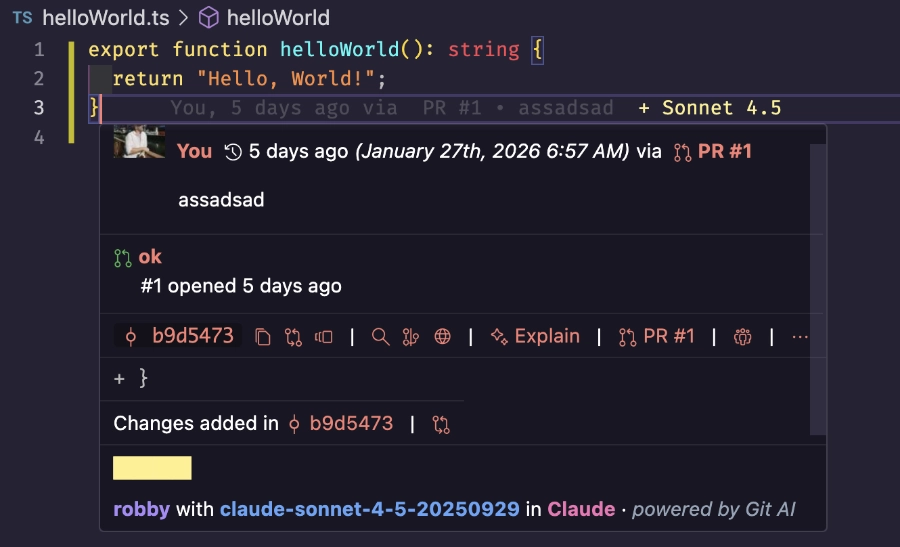
The VS Code integration works very well:
- AI‑generated code is highlighted in the gutter.
- Selecting a line shows the model that produced the snippet.
- Hovering provides additional context.
Extending the GitHub PR Experience
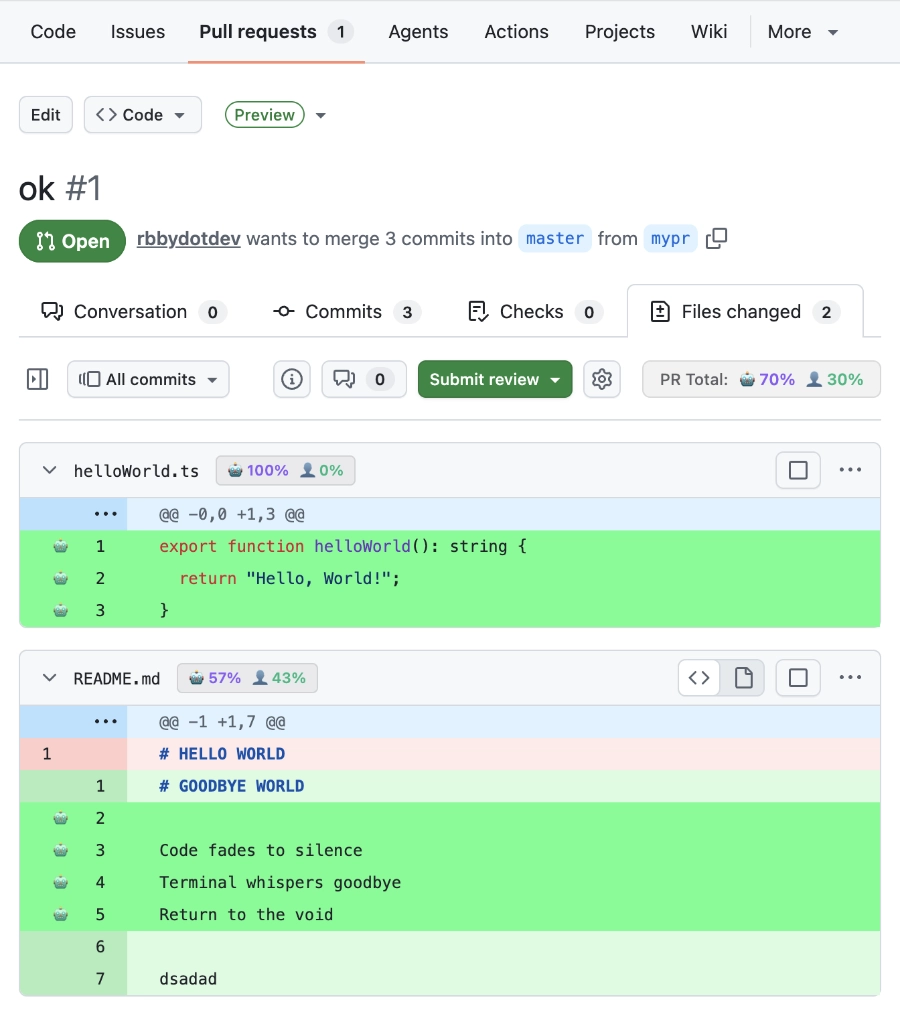
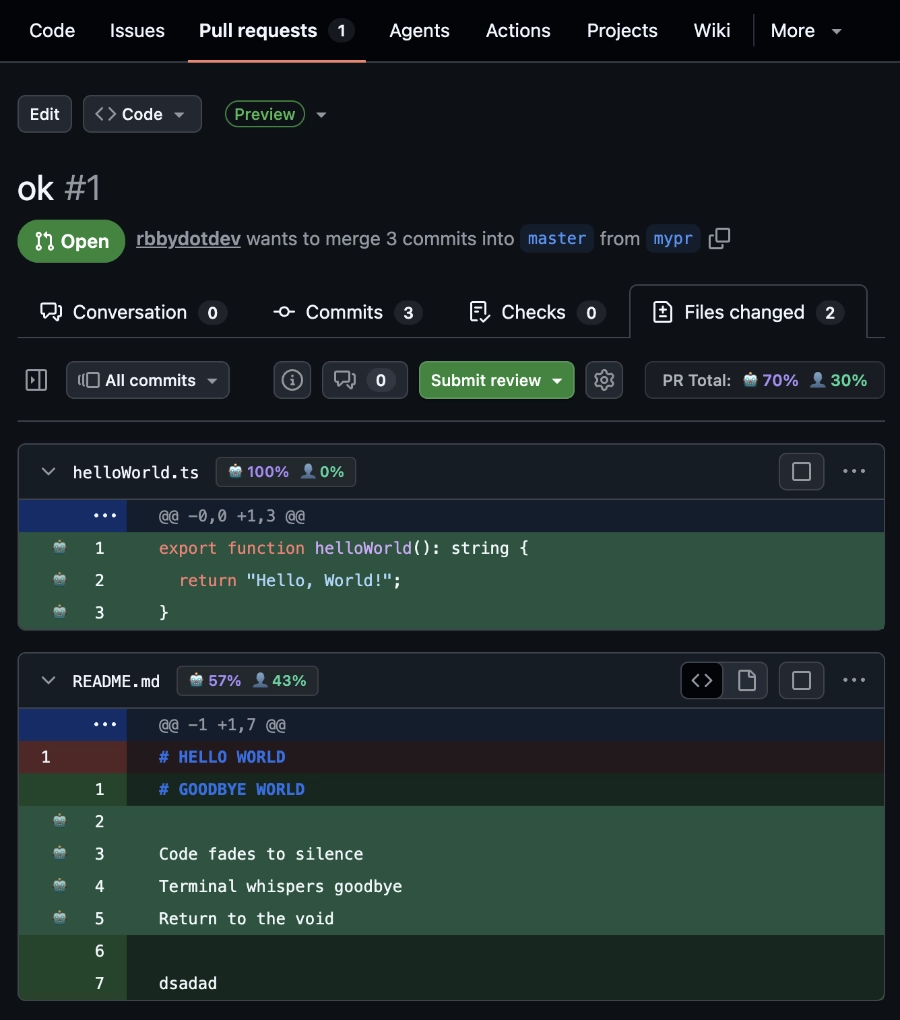
To bring the same editor‑style highlighting—and a human‑vs‑AI contribution meter—into the GitHub PR UI, I forked the popular refined‑github extension:
- Original repo:
- Fork with AI support:
The fork retains all features of the original and adds a toggle for AI‑contribution blaming in the options panel.
Screenshots
| Light mode | Dark mode |
|---|---|
 |  |
More on git‑ai Tooling
There is currently no official support from git‑ai (as of Jan 2026) for adding AI annotations directly to the GitHub PR interface. However, an early‑access feature called “Stat Bot” is available:
- Stat Bot – aggregates git‑ai data at the PR, developer, repository, and organization levels.
- Repo:
Consider trying Stat Bot; it’s a great way to support the creators of git‑ai.
Caveats
-
Major caveat:
refined-github-with-ai-praugments GitHub’s HTML via CSS classes. GitHub may change those classes without notice, which could break the plugin.This plugin is a beta prototype intended to spark discussion about how we might work with AI‑assisted code in PRs. I encourage the community to join the conversation—perhaps GitHub will implement similar features natively in the future.
-
Get involved:
- Comment on the related Hacker News post.
- Open an issue or submit a PR for the fork.
Your feedback will help shape the next generation of AI‑aware development tools!