
From Figma to Production Code in Minutes: A Professional Engineer's Guide to Visual Copilot
Source: Dev.to
Introduction
The design‑to‑development handoff represents one of the most significant bottlenecks in modern web‑development workflows.
A 2023 industry survey found that 79 % of frontend developers spend more than a full day converting Figma designs into production‑ready code (source).
This repetitive translation task—manually interpreting layouts, spacing, colors, and typography from design files—consumes engineering capacity without adding strategic value to products.
Enter Visual Copilot, an AI‑powered Figma plugin developed by Builder.io that fundamentally changes how teams move from design to implementation. Rather than manual pixel‑by‑pixel translation, Visual Copilot generates clean, responsive, production‑grade code directly from Figma designs in seconds, potentially reclaiming 50‑80 % of the time engineers spend on this task.
This article explores Visual Copilot from a professional engineering perspective: how it works, when it delivers genuine productivity gains, its current limitations, and how to integrate it effectively into your development workflow.
How Visual Copilot Works: The Technical Foundation
Visual Copilot represents a departure from naive screenshot‑based design‑to‑code approaches. Its architecture consists of three layers:
1. AI Model & Pattern Recognition
Builder.io trained a specialized large language model (LLM) exclusively on the design‑to‑code problem, rather than using a general‑purpose code‑generation model.
This specialized training enables the system to recognize design patterns (button components, navigation patterns, card layouts) and accurately map them to semantic HTML and component structures, even when Figma files lack formal auto‑layout definitions.
2. Mitosis Compiler
Once the AI recognizes design intent, the Mitosis compiler—an open‑source transpiler originally created for converting React to multiple frameworks—transforms the structured design data into clean, well‑organized code. This compiler ensures consistent code structure across different framework targets.
3. LLM Polish & Customization
A final LLM pass cleans and optimizes the output, aligning code styling with specified conventions (Tailwind CSS class naming, component‑structure preferences, TypeScript configuration). Teams can provide custom instructions to enforce internal code standards and architectural patterns.
The result is code that isn’t just syntactically correct; it mirrors the design structure intelligently and integrates with your existing component libraries and design systems.
Framework & Styling Flexibility
One of Visual Copilot’s most significant advantages over competing tools is its extensive framework support. You can generate code for:
- Frontend Frameworks: React, Vue, Angular, Svelte, Next.js
- Styling Solutions: Tailwind CSS, CSS Modules, Emotion, Styled Components, Styled JSX
- Mobile Platforms: React Native, Flutter, Swift, Kotlin
- Baseline: Clean HTML/CSS for lightweight applications
This flexibility means a single Figma design can generate multiple framework‑specific implementations, supporting teams with heterogeneous tech stacks or those evaluating new technologies.
The Workflow: From Design to Deployment
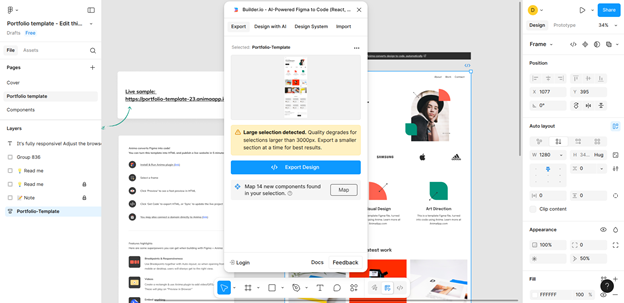
Using Visual Copilot requires minimal setup:
1. Prepare Your Figma File
- Organize layers with semantic naming (avoid generic “Group” labels)
- Apply Auto Layout to components (mirrors CSS Flexbox behavior)
- Define design tokens for colors, spacing, and typography
- Keep designs under 3 000 px in dimension
2. Export from Figma
- Open the Figma file containing your design.
- Open the Actions menu (
Ctrl+Kon Windows,Cmd+Kon macOS). - Search for “Builder.io AI‑Powered Figma to Code.”
- Select the root frame or a specific component layer.
- Click “Export Design.”
3. Review in Builder.io
- AI processes the design and imports it into Builder.io’s visual editor.
- Preview the generated layout in real‑time.
- Inspect component hierarchy and CSS values.
- Test responsiveness across breakpoints.
4. Generate Framework‑Specific Code
- Navigate to the Develop tab.
- Select your target framework (React, Vue, HTML, etc.).
- Choose your styling approach (Tailwind, CSS Modules, etc.).
- Click Generate to receive clean, production‑ready code.
5. Refine with AI Assistance
- Use natural‑language prompts (e.g., “Convert this to use Material Design buttons,” “Add dark‑mode support”).
- AI adjusts the code while preserving structure and logic.
- Copy the final code directly into your repository.
Comparing Visual Copilot with Anima: Practical Differences
Your choice between Visual Copilot and Anima—the second major player in Figma‑to‑code automation—depends on your team’s priorities and project characteristics.
Visual Copilot Strengths
- Maximum framework flexibility (React, Vue, Angular, mobile platforms)
- Multiple styling approaches within a single export
- Custom AI prompts for iterative refinement
- Integration with Builder.io’s drag‑and‑drop editor for rapid iteration
- Supports component mapping to existing codebases (~70 % accuracy with AI validation)
Visual Copilot Trade‑offs
- Requires the Builder.io platform for the full workflow (not a pure plugin)
- Subscription‑based pricing
- More visual defects requiring manual adjustment than some competitors
Anima
Strengths
- Single‑plugin operation (no external platform required)
- Fewer visual discrepancies after code generation
- Simpler initial learning curve
- Faster export‑to‑code iteration
- Better component state handling
Trade‑offs
- Less flexibility in framework choice
- Smaller ecosystem for advanced customization
- Limited styling library options
Comparison Summary
- Engineering teams that value framework diversity and integration with existing component systems – Visual Copilot’s additional flexibility justifies the steeper setup curve.
- Organizations standardized on React + Tailwind – Anima may offer faster time‑to‑value with less configuration.
Real‑World Effectiveness: The Honest Assessment
The critical question for engineering leaders is not “Does Visual Copilot work?” but rather “How much refinement is actually required, and is the time savings real?”
Our research and user feedback reveal a nuanced picture: