
FFmpeg at Meta: Media Processing at Scale
Source: Meta Engineering
FFmpeg in Our Workflow
FFmpeg is a true multi‑tool for media processing. As an industry‑standard solution it supports a wide variety of audio and video codecs and container formats, and it can orchestrate complex filter chains for editing and manipulation. For the people who use our apps, FFmpeg enables new video experiences and improves the reliability of existing ones.
How We Use FFmpeg
- Execution volume – Meta runs the
ffmpegCLI and theffprobeutility tens of billions of times per day. - Core capabilities – Simple transcoding and editing of individual files are straightforward, but our production workflows have additional, specialized requirements.
History of Our Internal Fork
| Period | Situation |
|---|---|
| Early years | Developed an internal fork of FFmpeg to add features not yet present upstream (e.g., threaded multi‑lane encoding, real‑time quality‑metric computation). |
| Later years | The fork diverged significantly from the upstream codebase. |
| Recent releases | Upstream FFmpeg added new codecs, file‑format support, and reliability improvements, allowing us to ingest more diverse user video content. |
These changes forced us to maintain both the latest open‑source FFmpeg releases and our internal fork, leading to:
- A growing feature‑set gap between the two codebases.
- Complex, error‑prone rebasing of internal changes.
Collaboration & Migration
We partnered with FFmpeg developers, FFlabs, and VideoLAN to upstream the missing functionality. The effort focused on two critical gaps:
- Threaded, multi‑lane transcoding – Enables parallel processing of video streams for higher throughput.
- Real‑time quality‑metric computation – Provides immediate feedback on output quality during encoding.
With these patches merged upstream and a series of refactorings, we have now:
- Fully deprecated the internal fork.
- Standardized on the upstream FFmpeg for all of our use cases.
This cleaned‑up markdown preserves the original information while improving readability and structure.
Building More Efficient Multi‑Lane Transcoding for VOD and Livestreaming
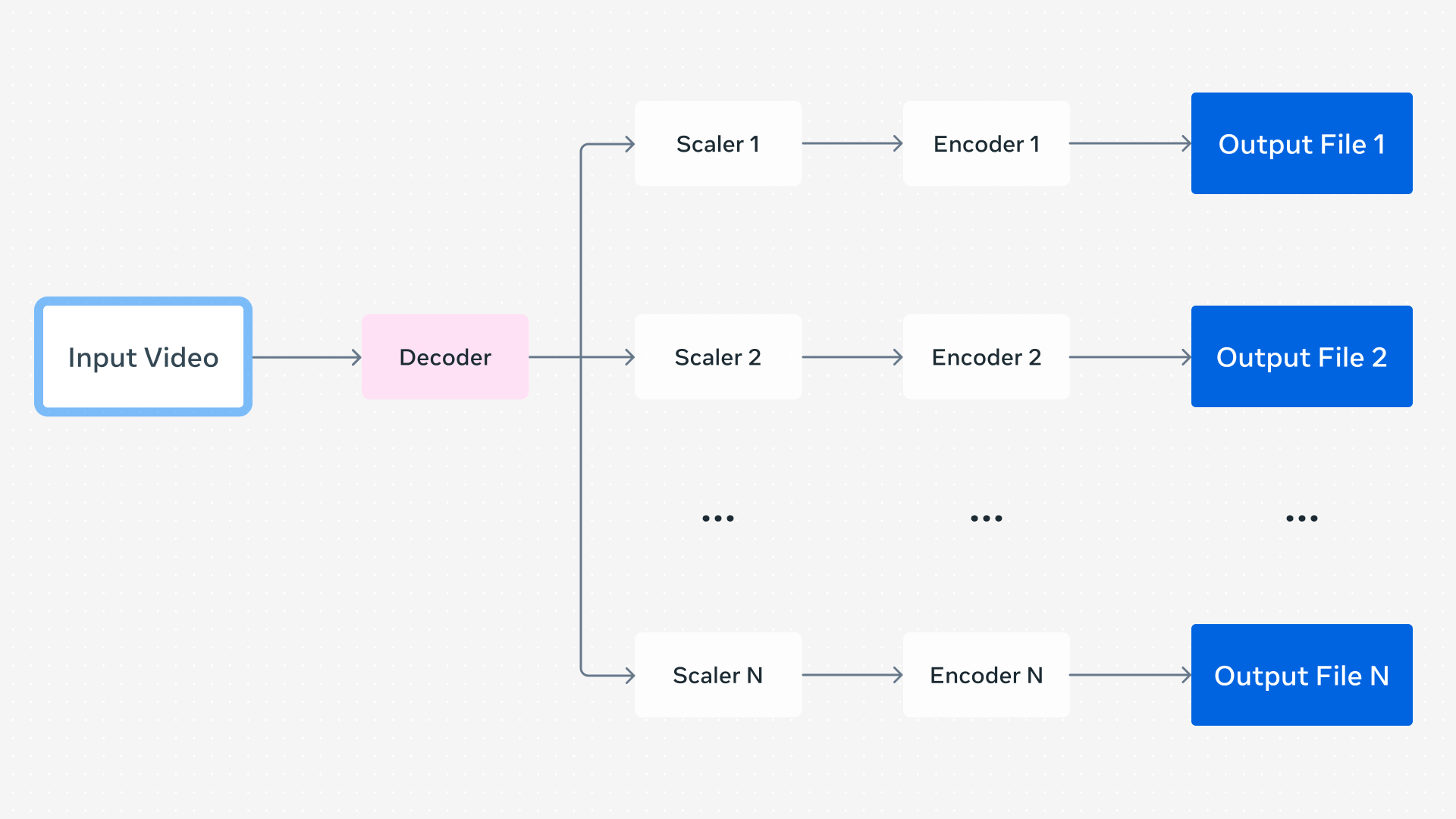
Figure: A video transcoding pipeline producing multiple outputs at different resolutions.
When a user uploads a video through one of our apps, we generate a set of encodings to support Dynamic Adaptive Streaming over HTTP (DASH) playback. DASH lets the app’s video player dynamically choose an encoding based on signals such as network conditions. These encodings can differ in:
- Resolution
- Codec
- Frame‑rate
- Visual‑quality level
All are created from the same source video, and the player can seamlessly switch between them in real time.
The naïve approach
A very simple system runs separate FFmpeg command lines for each lane, one‑by‑one in serial.
Running each command in parallel would reduce wall‑clock time, but it quickly becomes inefficient because every process repeats the same decoding work.
A better solution
Generate multiple outputs within a single FFmpeg command line:
- Decode the source video once.
- Feed the decoded frames to each output’s encoder instance.
This eliminates duplicate decoding and reduces process‑startup overhead.
Given that we process over 1 billion video uploads daily, each requiring multiple FFmpeg executions, even modest per‑process savings translate into massive efficiency gains.
Parallelized video encoding
Our internal FFmpeg fork added another optimization: parallelized video encoding.
- Individual encoders are often multi‑threaded, but older FFmpeg versions executed each encoder serially for a given frame when multiple encoders were present.
- By running all encoder instances in parallel, overall parallelism improves dramatically.
Contributions from FFmpeg developers (including those at FFlabs and VideoLAN) implemented more efficient threading starting with FFmpeg 6.0, with final refinements landing in FFmpeg 8.0. This work was directly inspired by the design of our internal fork and represented “the most complex refactoring of FFmpeg in decades” — see the announcement on X: . The result is faster, more efficient encodings for all FFmpeg users.
Remaining work
To fully migrate off our internal fork, we still need one upstream feature: real‑time quality metrics. Once added, we can retire the fork entirely and continue benefiting from the upstream improvements.
Enabling Real‑Time Quality Metrics While Transcoding for Livestreams

Visual‑quality metrics give a numeric representation of the perceived visual quality of media and can be used to quantify the loss incurred from compression. These metrics fall into two categories:
| Type | Description |
|---|---|
| Reference | Compares a reference (original) encoding to a distorted (compressed) encoding. |
| No‑reference | Estimates quality without needing the original source. |
FFmpeg can compute several reference metrics—PSNR, SSIM, and VMAF—by running a second command after the encoding is finished. This works for offline or VOD workflows, but it is unsuitable for livestreaming where we need metrics in real time.
Real‑time approach
- Insert a decoder after each video encoder used by an output lane.
- The decoder produces a bitmap for every frame after compression.
- Compare this bitmap with the original (pre‑compression) frame.
- Output a quality metric for each encoded lane on‑the‑fly, all within a single FFmpeg command line.
Why it works now
The “in‑loop” decoding capability was added to FFmpeg starting with version 7.0, thanks to contributions from the FFmpeg developers, FFlabs, and VideoLAN. Because of this feature we no longer need a custom FFmpeg fork to obtain real‑time quality metrics.
Feel free to adapt the command line to your specific codec, bitrate, and metric requirements.
Upstreaming When It Has the Greatest Community Impact
Real‑time quality metrics during transcoding, more efficient threading, and similar improvements can benefit many FFmpeg‑based pipelines—both inside and outside Meta. When a change can help the broader FFmpeg community and the industry, we strive to contribute it upstream.
However, some patches we develop are highly specific to Meta’s infrastructure and do not generalize well. In those cases, keeping the changes internal is more practical.
Hardware‑Accelerated Support in FFmpeg
FFmpeg already supports hardware‑accelerated decoding, encoding, and filtering through standard APIs for devices such as:
- NVIDIA – NVDEC / NVENC
- AMD – Unified Video Decoder (UVD)
- Intel – Quick Sync Video (QSV)
These APIs let developers use a common command‑line interface without needing device‑specific flags.
Meta Scalable Video Processor (MSVP)
We have added support for the Meta Scalable Video Processor (MSVP)—our custom ASIC for video transcoding—through the same FFmpeg APIs. This approach:
- Enables the same tooling across different hardware platforms.
- Minimizes platform‑specific quirks.
Because MSVP is used only within Meta’s own infrastructure, external FFmpeg developers cannot easily test or validate support for it. Consequently, the MSVP patches remain internal, where we can:
- Rebase them onto newer FFmpeg releases as needed.
- Perform extensive validation to guarantee robustness and correctness during upgrades.
In summary, we upstream changes that deliver broad community value, while retaining highly specialized patches—like MSVP support—within Meta to ensure they remain reliable and well‑maintained.
Our Continued Commitment to FFmpeg
With more efficient multi‑lane encoding and real‑time quality metrics, we were able to fully deprecate our internal FFmpeg fork for all VOD and livestreaming pipelines. Thanks to standardized hardware APIs in FFmpeg, we’ve also been able to support our MSVP ASIC alongside software‑based pipelines with minimal friction.
FFmpeg has withstood the test of time, boasting over 25 years of active development. Recent improvements that:
- enhance resource utilization,
- add support for new codecs and features, and
- increase overall reliability
enable robust support for a broader range of media. For people on our platforms, this translates to new experiences and more reliable existing ones.
We plan to continue investing in FFmpeg in partnership with open‑source developers, delivering benefits to Meta, the wider industry, and the users of our products.
Acknowledgments
We would like to acknowledge contributions from:
- The open‑source community
- Our partners at FFlabs and VideoLAN
- Meta engineers, including:
- Max Bykov
- Jordi Cenzano Ferret
- Tim Harris
- Colleen Henry
- Mark Shwartzman
- Haixia Shi
- Cosmin Stejerean
- Hassene Tmar
- Victor Loh