
Evaluation: Prove it before you ship it
Source: Dev.to
Monitoring vs. Evaluation
“Monitoring tells you what’s happening — evaluation tells you how good it is.”
You can build an agent that responds instantly, never crashes, and answers every question with absolute confidence. But confidence without correctness is just a well‑dressed mistake.
That’s why Oracle AI Agent Studio gives us two complementary capabilities: Monitoring and Evaluation. In this post we focus on Evaluation – what it is, how to set it up, and why you should care before your agent goes anywhere near production.
Curious about Monitoring? Check out this post.
Why Evaluation Matters
Evaluation ensures your agent can meet defined standards and business outcomes across three dimensions:
- Accuracy
- Latency
- Token usage
Without it, you’re essentially deploying on vibes.
A proper evaluation framework lets you validate that your agent:
- Answers correctly
- Responds within an acceptable time window
- Doesn’t burn through your token budget faster than your cloud‑spend budget
Think of it as a test suite for your AI agent.
The Metrics: What Gets Measured
Oracle AI Agent Studio provides a rich set of metrics. It’s useful to know which ones belong to Evaluation and which to Monitoring, because they serve different purposes.
| Metric | Evaluation | Monitoring |
|---|---|---|
| Error Rate | ✅ | ✅ |
| Error Count | ✅ | ✅ |
| Session Count | ✅ | ✅ |
| P99 Latency | ✅ | ✅ |
| P50 Latency | ✅ | ✅ |
| Total Tokens | ✅ | ✅ |
| Input Token Count | ❌ | ✅ |
| Output Token Count | ✅ | ✅ |
| Median Correctness | ✅ | ❌ |
| Groundedness | ✅ | ❌ |
| Answer Relevance | ✅ | ❌ |
| Context Relevance | ✅ | ❌ |
The quality metrics—Correctness, Groundedness, Answer Relevance, and Context Relevance—are exclusive to Evaluation. They tell you whether your agent is genuinely useful, not just technically operational.
Quick definitions
- Median Correctness – How closely the agent’s answer matches the expected reference response (0 → 1). Think of it as the agent’s grade on a test.
- Groundedness – Whether the generated answer is actually grounded in the retrieved source content. A grounded response stays faithful to the knowledge base and doesn’t hallucinate.
- Answer Relevance – How directly and precisely the response addresses the user’s question. Getting the right answer to the wrong question doesn’t count.
- Context Relevance – The quality of the retrieved information itself – whether the context pulled in by the agent was appropriate and reliable enough to produce a good answer.
Setting Up an Evaluation: Step‑by‑Step
Step 1 — Define Your Evaluation Set
Think of this as your test plan. It includes:
- Test questions – the inputs your agent needs to handle
- Expected responses – the gold‑standard answers you’ll measure against
- Success criteria – the thresholds each metric must meet
An evaluation set without expected responses is just a demo. The expected responses turn a run into a meaningful quality gate.
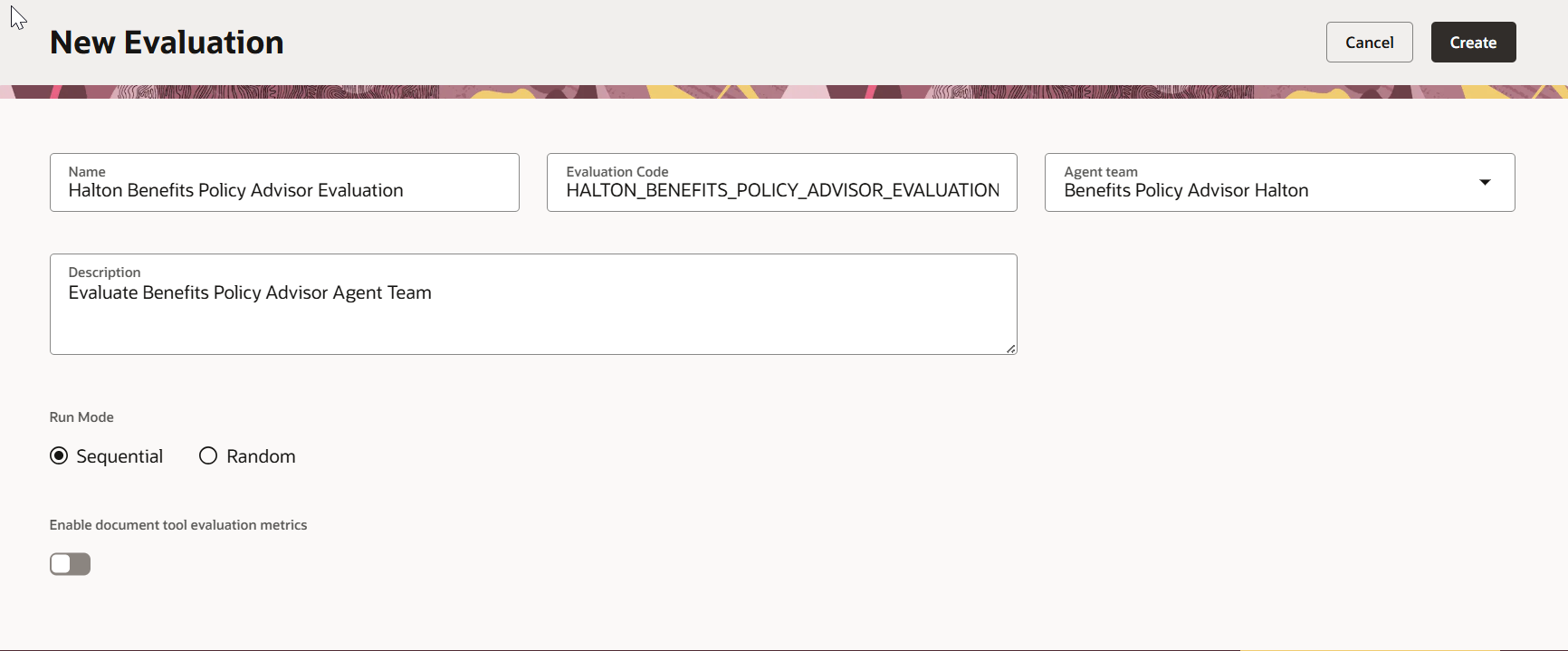
Step 2 — Choose Your Run Mode
| Mode | Description |
|---|---|
| Sequential | Runs questions in the exact order you define them. Use when one question depends on the context from the previous one (e.g., a multi‑turn conversation). |
| Random | Runs questions in a randomised order. Useful for independent questions and helps reduce positional bias. |
Step 3 — Define Your Questions
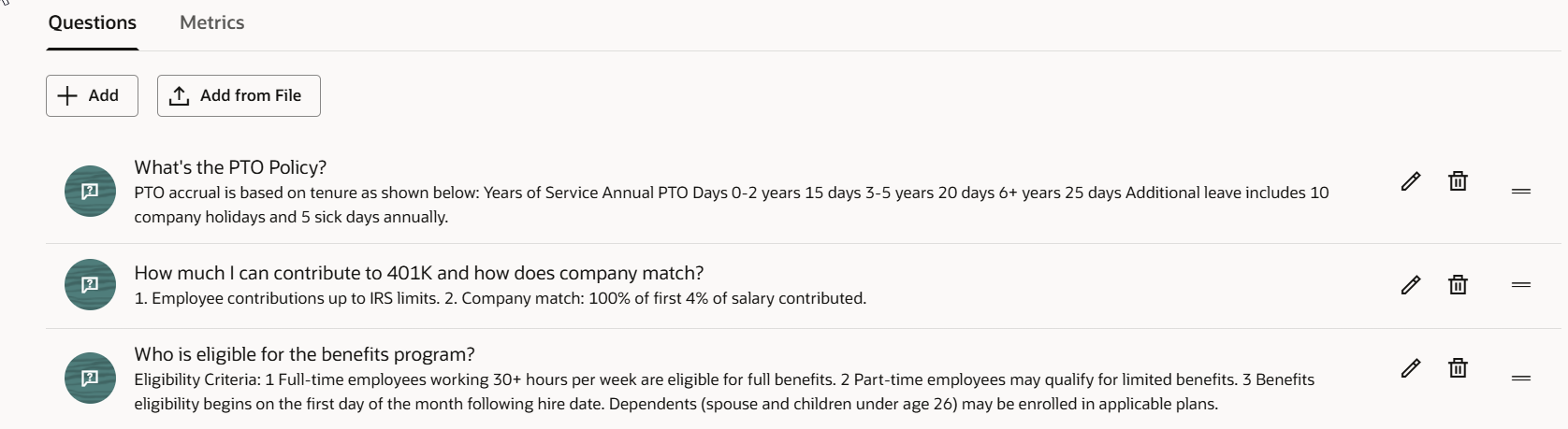
In the Questions tab, add the questions users are expected to ask, paired with the exact responses you want the agent to return.
Example – HR Benefits Agent
Q: Who is eligible for the benefits program?
A:
Eligibility Criteria:
- Full‑time employees working 30+ hours per week are eligible for full benefits.
- Part‑time employees may qualify for limited benefits.
- Benefits eligibility begins on the first day of the month following hire date.
- Dependents (spouse and children under age 26) may be enrolled in applicable plans.
Keep your expected responses as close to production‑quality as possible. The correctness metric is only as good as the reference answer you define.
Step 4 — Configure Your Metrics
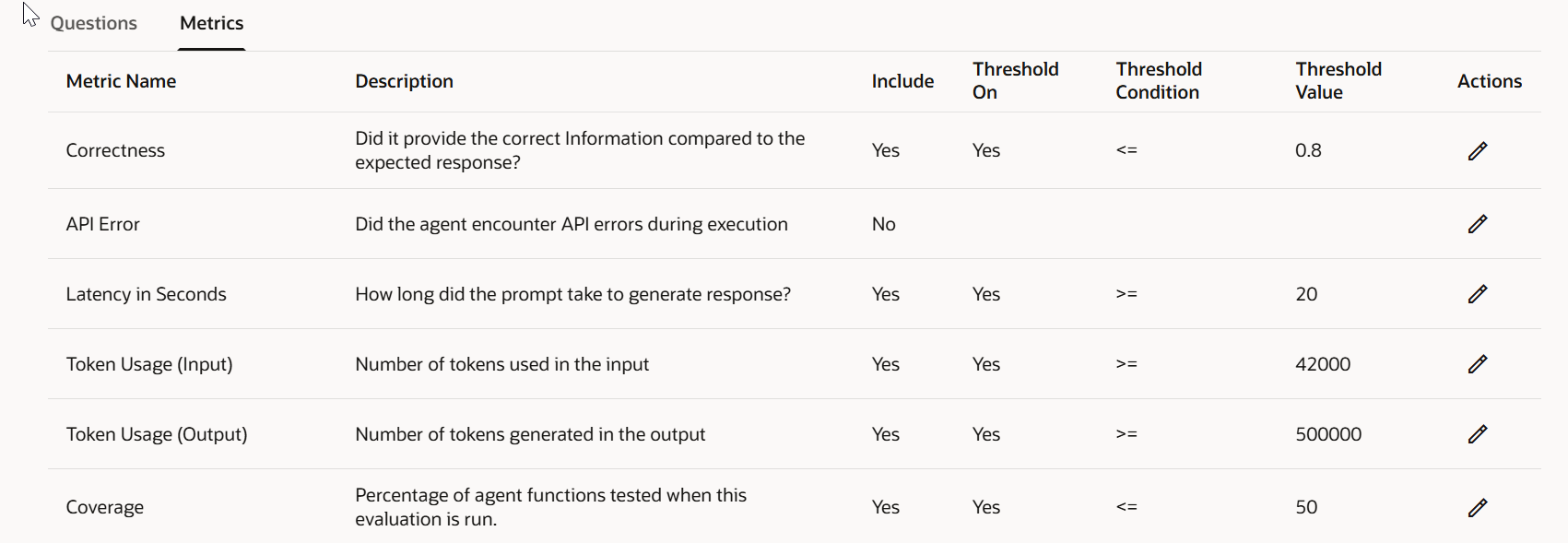
In the Metrics tab, select which metrics to include in this evaluation run. Tailor the evaluation to your agent’s specific use case and business requirements.
- If your agent doesn’t invoke any APIs, you can exclude API‑error metrics – no point cluttering results with noise.
- If accuracy is your top priority (e.g., a policy or compliance agent), set a high correctness threshold –
0.8is a reasonable baseline for enterprise use. - If token cost is a concern, configure an output‑token threshold, e.g.:
output_token_threshold: 150 # max tokens per responseMetrics without thresholds are just numbers. Thresholds are what turn numbers into pass/fail signals.
Step 5 — Initiate the Evaluation Run
Click Initiate Evaluation Run. Oracle AI Agent Studio will execute the evaluation and return results for each question, including:
- Actual response vs. expected response – side by side
- Latency per question
- Token usage (input and output)
- Quality scores for the metrics you selected
Reading Your Results
After the run completes, reviewing the results is where the real value surfaces. Here’s an example of what you might find:
- Latency: One question took over 20 seconds — exceeding the defined threshold. That’s a red flag worth investigating. It could point to an overly complex retrieval step, a large system prompt, or a knowledge base that needs optimisation. The remaining questions came in well within the threshold.
- Token Usage: Both input and output token counts were within acceptable limits. Good news for the budget.
- Correctness: With a threshold of 0.8, any question scoring below that benchmark gets flagged for review. Patterns in low‑scoring questions often reveal gaps in your knowledge base or ambiguities in your system prompt.
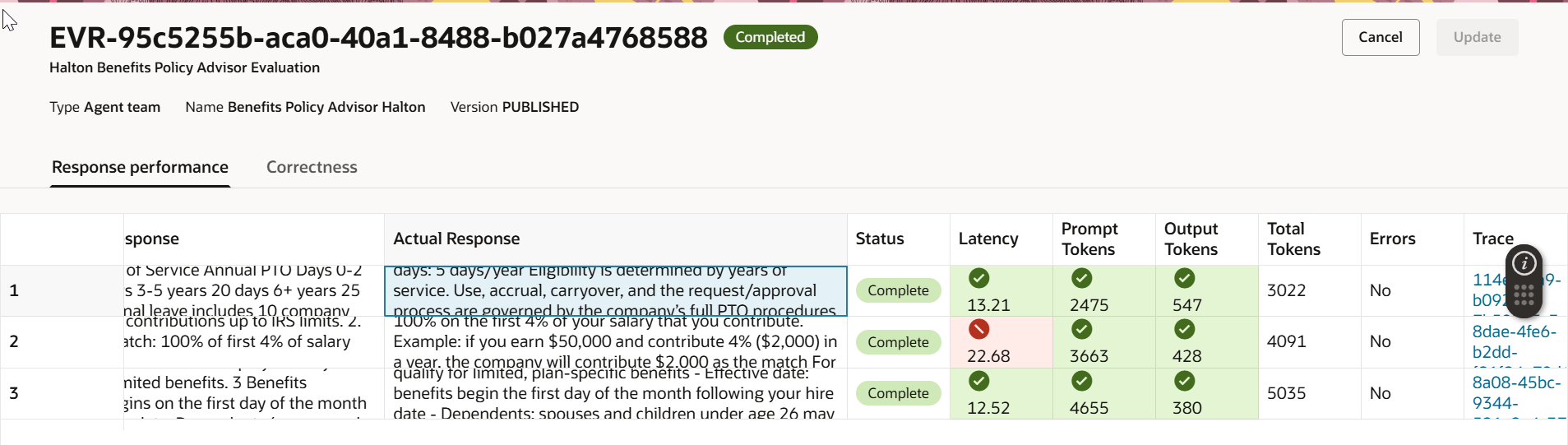
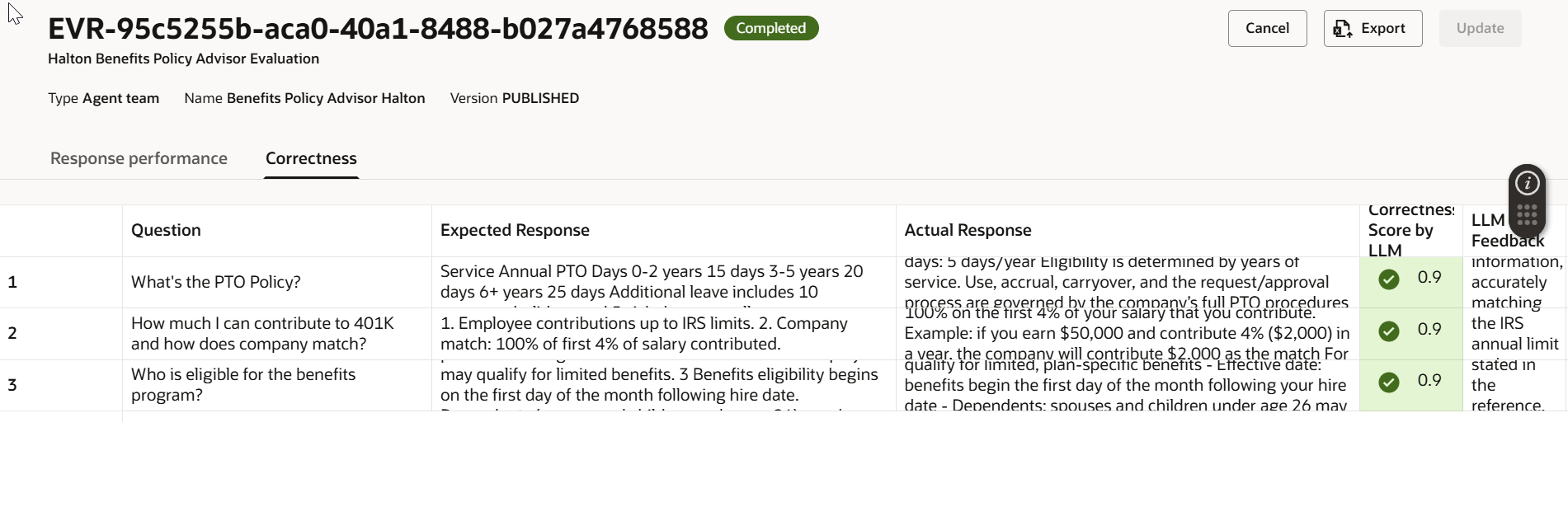
This combination of latency, cost, and quality signals gives you a complete picture — not just “did it answer?” but “did it answer well, quickly, and efficiently?”
Final Thoughts
An AI agent that passes evaluation isn’t just technically sound — it’s one you can actually stand behind when a business user asks, “How do we know this is right?”
Defining quality thresholds, building meaningful evaluation sets, and reviewing results against expected outcomes is what separates a production‑ready agent from a prototype running in a demo environment. Oracle AI Agent Studio gives you the tooling to do this properly. Use it.