
Engage, Convert, Succeed: Master JavaScript for Next-Level User Experiences
Source: Dev.to
The Advanced Level of Your Tech Stack Isn’t What Users Care About
Modern users evaluate an application by how it feels, not by the sophistication of its underlying technology.
- Does it react quickly?
- Does it guide them when something goes wrong?
- Does it stay seamless even on slow networks?
JavaScript is the web’s experience engine – the driving force behind all of this. In this post we’ll explore how JavaScript directly impacts user experience, where developers commonly slip up, and how small technical choices can dramatically boost engagement and conversion.
Why JavaScript Is the UX Backbone of Modern Web Apps
Most of the real UX happens after the page loads, when visitors interact with the UI. Those interactions are controlled by JavaScript; HTML alone can’t handle rendering, state changes, validation, animations, async data fetching, or accessibility updates.
Core JavaScript Responsibilities Today
- Controlling UI state in uncertain circumstances.
- Managing asynchronous work without freezing the interface.
- Providing instant feedback on user actions.
- Making dynamic interfaces accessible.
- Sustaining performance within real‑world constraints.
If JavaScript isn’t written with the user experience in mind, even a technically perfect app can feel broken.
Perceived Performance: The UX Metric That Matters Most
The speed of your API is irrelevant to users – the speed of the interface is what they notice. JavaScript lets you shape perceived performance, which is often more important than actual load time.
Bad UX: Blocking the UI
button.addEventListener("click", async () => {
  const data = await fetch("/api/process");
  showResult(data);
});
If the request takes three seconds, the UI appears frozen.
Better UX: Immediate Feedback
button.addEventListener("click", async () => {
  button.disabled = true;
  showLoadingState();

  try {
    const data = await fetch("/api/process");
    showResult(data);
  } finally {
    button.disabled = false;
    hideLoadingState();
  }
});
Even when the result is delayed, the user knows something is happening. A tiny change like this dramatically improves the experience.
Key Insight
Speed isn’t as important as responsiveness. Instead of making users wait for completion, JavaScript should acknowledge intent instantly.
“Why Node.js is Essential for the Future of Back‑End Development” – Explore its power, scalability, and speed in driving modern, high‑performance applications. Stay ahead in the tech world—master Node.js today!
Event Handling Is Where UX Lives—or Dies
Event handling is UX logic, not just an implementation detail. Poorly managed events lead to:
- Duplicate submissions
- Accidental clicks
- Laggy inputs
- Frustrating scroll behavior
Example: Debouncing User Input
Without debounce
input.addEventListener("input", search);With debounce
let timeout;
input.addEventListener("input", () => {
  clearTimeout(timeout);
  timeout = setTimeout(search, 300);
});
Debouncing improves both performance and user comfort. JavaScript that respects user behavior always feels better.
State Management: Where Most UX Bugs Hide
Users don’t think in “components”; they think in state transitions. JavaScript must clearly define:
- The current UI state
- What triggers a state change?
- How errors are handled
Common UI States
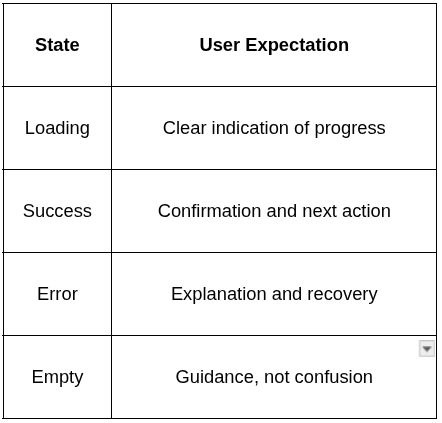
Example: Explicit UI State
const state = {
  status: "idle", // idle | loading | success | error
  data: null,
};

function render() {
  if (state.status === "loading") showSpinner();
  if (state.status === "success") showData(state.data);
  if (state.status === "error") showError();
}
Clear state logic yields predictable interfaces and fewer UX surprises.
“Seamless Java API integration starts with best practices and security!” – Implement these strategies today to build robust, efficient, and secure applications.
Forms: The Ultimate JavaScript UX Stress Test
Forms expose every JavaScript shortcoming. Users hate:
- Missing input
- Generic error messages
- Silent failures
- Unwanted page refreshes
Poor Form Handling
form.submit(); // Triggers a full page reloadUser‑Friendly Handling
form.addEventListener("submit", async (e) => {
  e.preventDefault();          // Prevent page reload
  showSubmitting();

  try {
    await submitForm();
    showSuccess();
  } catch {
    showInlineError("Something went wrong. Try again.");
  }
});
Forms are the moments when users decide to convert. JavaScript should preserve user effort, not discard it.
Animation: JavaScript Should Explain Change
Animations aren’t decorative; they’re communicative.
Good Animations
- Explain what changed
- Guide attention
- Reduce cognitive load
Bad Animations
- Distract or confuse users
- Add unnecessary motion that feels “busy”
Takeaways
- Prioritize perceived performance – make the UI feel fast, even if the backend is slower.
- Give immediate feedback – disable buttons, show spinners, or otherwise acknowledge intent right away.
- Debounce and throttle heavy event streams to keep the UI responsive.
- Model UI state explicitly – a single source of truth prevents hidden bugs.
- Handle forms gracefully – prevent reloads, validate inline, and surface clear error messages.
- Use purposeful animation – let motion tell a story, not just look pretty.
By treating JavaScript as the experience engine rather than a mere implementation detail, you’ll build web apps that feel fast, reliable, and delightful—no matter what the underlying tech stack looks like.
Delay Interaction
- Distract users
- Hide performance issues
Example: Purposeful Animation
element.classList.add("fade‑in");Enter fullscreen mode
Exit fullscreen mode
The user experience is enhanced if the animation clarifies why something happened. Otherwise, it’s just noise.
Accessibility Is a JavaScript Responsibility
JavaScript is now in charge of accessibility after it changes the DOM.
Focus Management Example
modal.open();
modalElement.focus();
Enter fullscreen mode
Exit fullscreen mode
Announcing Dynamic Content
status.setAttribute("aria-live", "polite");
status.textContent = "Profile updated successfully";
Enter fullscreen mode
Exit fullscreen mode
Accessible JavaScript leads to:
- Better keyboard navigation
- Screen‑reader clarity
…and more robust UI behavior overall. Accessibility and engineering quality often improve together.
How JavaScript Directly Impacts Conversion
Conversion isn’t driven by tricks—it’s driven by confidence.
JavaScript affects:
- How safe actions feel
- How predictable outcomes are
- How quickly users reach their goal
UX vs. Conversion Impact

When JavaScript removes friction, conversion becomes a natural by‑product.
The Real Skill: UX‑Driven JavaScript Thinking
Frameworks are dynamic. APIs change with time.
However, the attitude persists.
Outstanding JavaScript programmers ask:
- What is the user’s current expectation?
- What would happen if this didn’t work?
- On a sluggish device, how does this feel?
- Is the user interface truthful about the situation?
JavaScript is now experience design in code, not simply logic.
Conclusion
Nowadays, mastering JavaScript isn’t just about writing clever code—it’s about crafting thoughtful code.
Write code that:
- Responds before it resolves
- Fails gracefully
- Respects user effort
- Communicates clearly
Users don’t notice the technique when JavaScript is written intentionally; they notice how seamless, dependable, and trustworthy the experience feels.
That’s how you interact.
That’s how you convert.
That’s how you make it.