
Emmet for HTML - A Beginner’s Guide to Writing Faster Markup
Source: Dev.to
Why HTML can feel slow, repetitive, and boring for beginners
Have you ever felt tired just by opening and closing HTML tags again and again?
As beginners, writing HTML can feel:
- Slow
- Repetitive
- A little boring
But there’s good news 👇
There’s a tool that does all the boring work for you and helps you code faster, cleaner, and smarter.
That tool is Emmet 🚀
What You’ll Learn in This Blog
- What Emmet is (in very simple terms)
- Why Emmet is useful for HTML beginners
- How Emmet works inside code editors
- Basic Emmet syntax and abbreviations
- Creating HTML elements using Emmet
- Adding classes, IDs, and attributes
- Creating nested elements
- Repeating elements using multiplication
- Generating a full HTML boilerplate with Emmet
What Is Emmet?
Emmet is a developer tool (or plugin) that helps you write HTML and CSS much faster by using short abbreviations that expand into full code.
Instead of writing long HTML manually, you just type a shortcut, press Tab, and Emmet generates the complete code for you.
Great news: If you’re using VS Code, Emmet is already pre‑installed 🎉 – no extra installation required.

Why Emmet Is Useful for HTML Beginners
Emmet is especially helpful when you’re just starting out. It helps beginners to:
- ✨ Write faster
- ❌ Make fewer syntax errors
- 🧠 Focus on structure instead of typing
- 💪 Build confidence while coding
- 😌 Avoid frustration and burnout
Instead of worrying about missing closing tags, you can focus on learning how HTML actually works.
How Emmet Works Inside Code Editors
Emmet works by watching what you type. When you type an abbreviation and press Tab, Emmet instantly converts it into valid HTML code.
Manual way
<!-- Write the full HTML manually -->Emmet shortcut
ul>li*5Press Tab, and Emmet generates the full structure for you ✨
Basic Emmet Syntax and Abbreviations
Emmet uses a syntax that looks very similar to CSS selectors, which makes it easy to learn. You can use Emmet to:
- Create HTML elements
- Nest elements inside each other
- Add classes, IDs, and attributes
- Repeat elements multiple times
Let’s break it down step by step.
1. Nesting Elements (>)
The > operator creates elements inside other elements.
Example
div>ul>liOutput
<div>
  <ul>
    <li></li>
  </ul>
</div>
Perfect for building layouts or lists quickly.
2. Repeating Elements (*)
The * operator repeats an element multiple times.
Example
ul>li*5Output
<ul>
  <li></li>
  <li></li>
  <li></li>
  <li></li>
  <li></li>
</ul>
No more copying and pasting tags again and again 🙌
Adding Classes, IDs, and Attributes
Just like CSS, Emmet uses:
#for id.for class
1. Adding an ID
div#header<div id="header"></div>2. Adding a Class
div.page<div class="page"></div>3. Adding Multiple Classes and IDs Together
div#footer.class1.class2.class3<div id="footer" class="class1 class2 class3"></div>You can also create multiple elements at once:
div#header + div.page + div#footer.class1.class2<div id="header"></div>
<div class="page"></div>
<div id="footer" class="class1 class2"></div>Generating a Full HTML Boilerplate with Emmet
The manual way
<!DOCTYPE html>
<html>
<head>
  <title>Document</title>
</head>
<body>
</body>
</html>
Feels:
- Time‑consuming 😴
- Repetitive
- Error‑prone (easy to miss something)
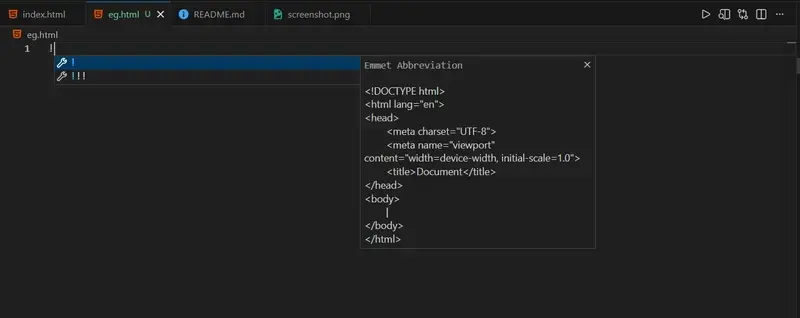
Emmet Solution 💡
Just type:
!Press Tab, and Emmet expands it into the complete HTML5 boilerplate instantly.
Screen Mode
You can toggle fullscreen mode in two ways:
html:5- Enter fullscreen mode
- Exit fullscreen mode
Press Tab, and Emmet instantly generates the full HTML boilerplate for you 🎉. This alone can save you hours over time.
Screenshots


Final Thoughts
Emmet is one of those tools that feels small at first, but once you start using it, you can’t imagine coding without it.
Don’t try to memorize every abbreviation—
👉 Just start using Emmet, and you’ll naturally learn more shortcuts over time.
The more you practice, the faster and more confident you’ll become 💪
Happy Coding 🚀💻