
Easy Work - The simple, easy-used, stupid workflow engine for Java
Source: Dev.to
What is Easy Work?
Easy Work is a workflow engine for Java. It provides concise APIs and building blocks for creating and running composable workflows.
In Easy Work, work units are represented by the Work interface, while workflows are represented by the WorkFlow interface.
Easy Work provides six implementation methods for the WorkFlow interface:
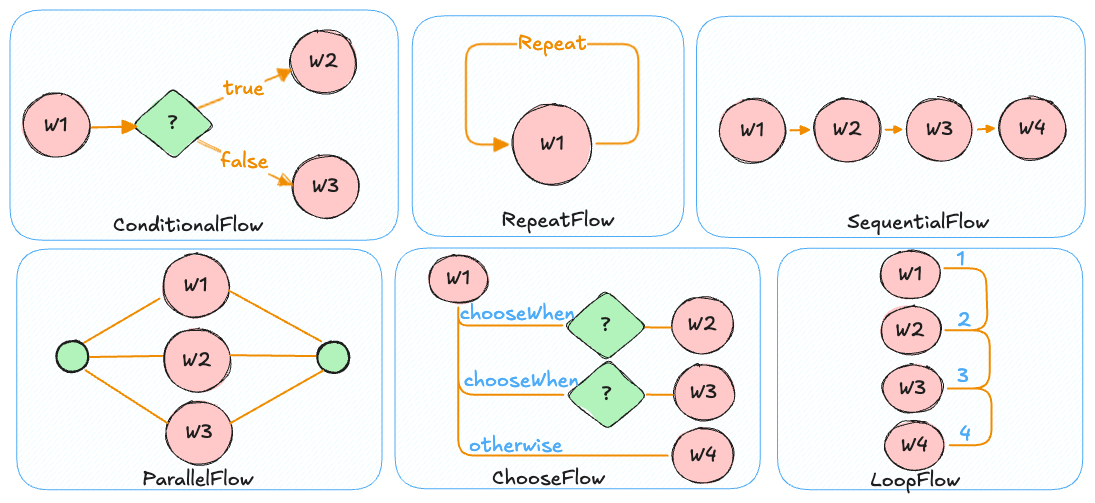
Those are the only basic flows you need to know to start creating workflows with Easy Work. You don’t need to learn a complex notation or concepts, just a few natural APIs that are easy to think about.
How does it work?
Define a work unit
public class PrintMessageWork implements Work {

    private final String message;

    public PrintMessageWork(String message) {
        this.message = message;
    }

    @Override
    public String execute(WorkContext workContext) {
        System.out.println(message);
        return message;
    }
}
This unit of work prints a given message to the standard output.
Build a workflow
We want a workflow that:
- prints
athree times - then prints
b,c,din sequence - then prints
eandfin parallel - if both
eandfsucceed, printsg; otherwise printsh - finally prints
z
The workflow can be illustrated as follows:
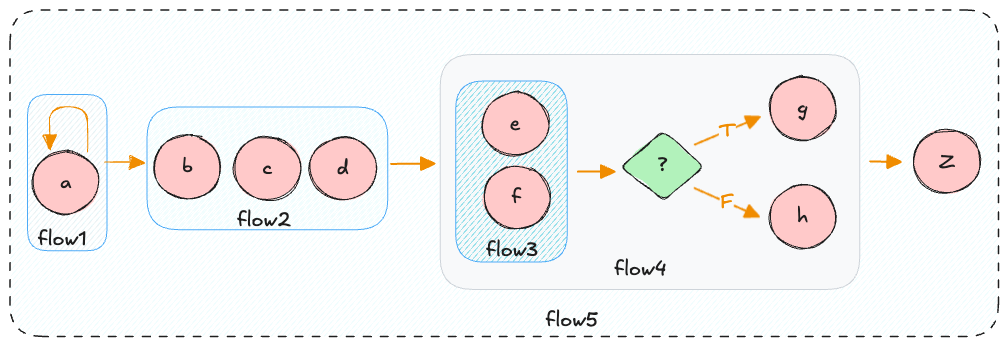
flow1→RepeatFlowthat printsathree times.flow2→SequentialFlowthat printsb,c,din order.flow3→ParallelFlowthat printseandfin parallel.flow4→ConditionalFlow; executesflow3and, if the result is successful (Complete), executesg, otherwiseh.flow5→SequentialFlowthat runsflow1,flow2,flow4, and finallyz.
Implementation
PrintMessageWork a = new PrintMessageWork("a");
PrintMessageWork b = new PrintMessageWork("b");
PrintMessageWork c = new PrintMessageWork("c");
PrintMessageWork d = new PrintMessageWork("d");
PrintMessageWork e = new PrintMessageWork("e");
PrintMessageWork f = new PrintMessageWork("f");
PrintMessageWork g = new PrintMessageWork("g");
PrintMessageWork h = new PrintMessageWork("h");
PrintMessageWork z = new PrintMessageWork("z");

WorkFlow flow = aNewSequentialFlow(
    aNewRepeatFlow(a).times(3),
    aNewSequentialFlow(b, c, d),
    aNewConditionalFlow(
        aNewParallelFlow(e, f).withAutoShutDown(true)
    ).when(
        WorkReportPredicate.COMPLETED,
        g,
        h
    ),
    z
);
aNewWorkFlowEngine().run(flow, new WorkContext());
This example is simple, but it demonstrates how to compose workflows with Easy Work.
You can view more test cases in test/java.
For additional details, see the wiki.