
Deep dive Tainted Grail [4] - MipMaps streaming
Source: Dev.to
What it is?
A texture can have mipmaps.
- Mip level 0 – the original texture.
- Mip level 1 – down‑scaled by a factor of 2.
- Mip level 2 – down‑scaled by a factor of 4.
- …and so on.
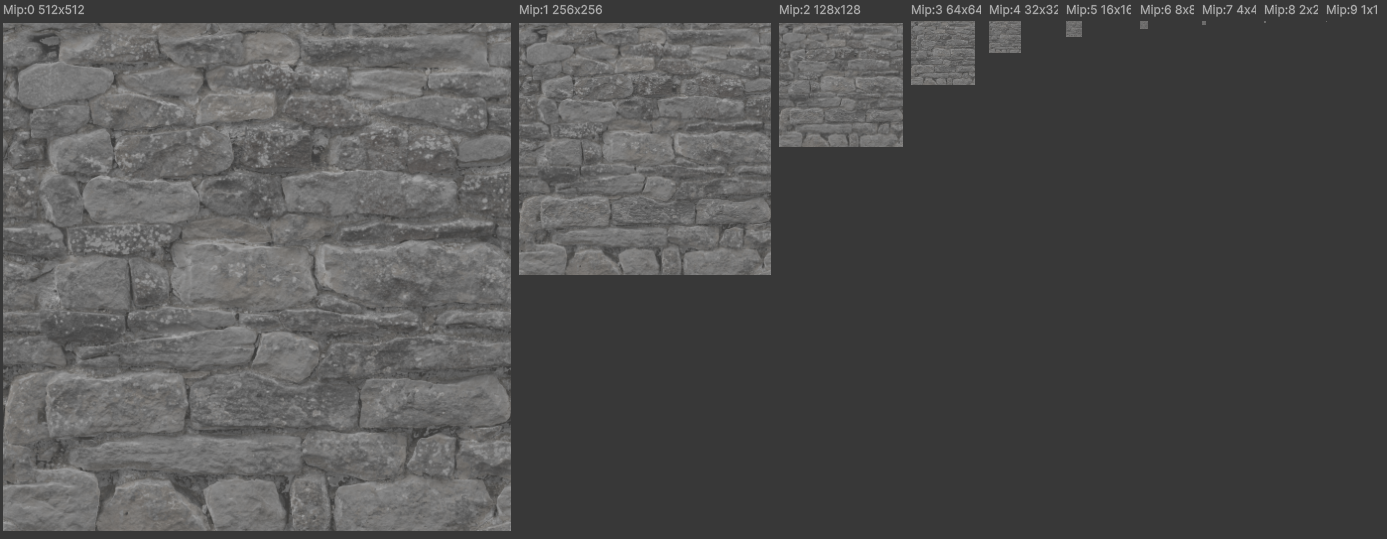
Mipmaps are generated so that distant textures can sample higher mip levels, which gives a more pleasant visual output and cheaper sampling. Wikipedia has a very nice example of that phenomenon, as does the OpenGL GitBook.
The downside is that we need to use more memory:
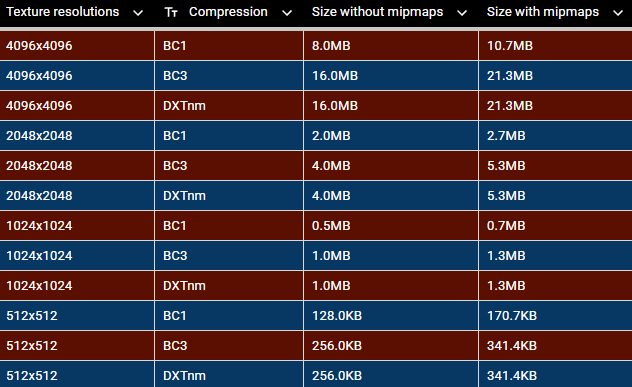
Why use it?
Most of the time we don’t render textures with mip 0, which means we don’t need it in memory. That can save almost 50 % of memory per texture. Even higher mip levels (mip 1, mip 2, …) are often unnecessary, giving even greater savings.
Note: Screenshots are from the Unity editor. The Total texture memory stat in the editor is wrong because Unity keeps track of all ever‑loaded textures.
Example statistics
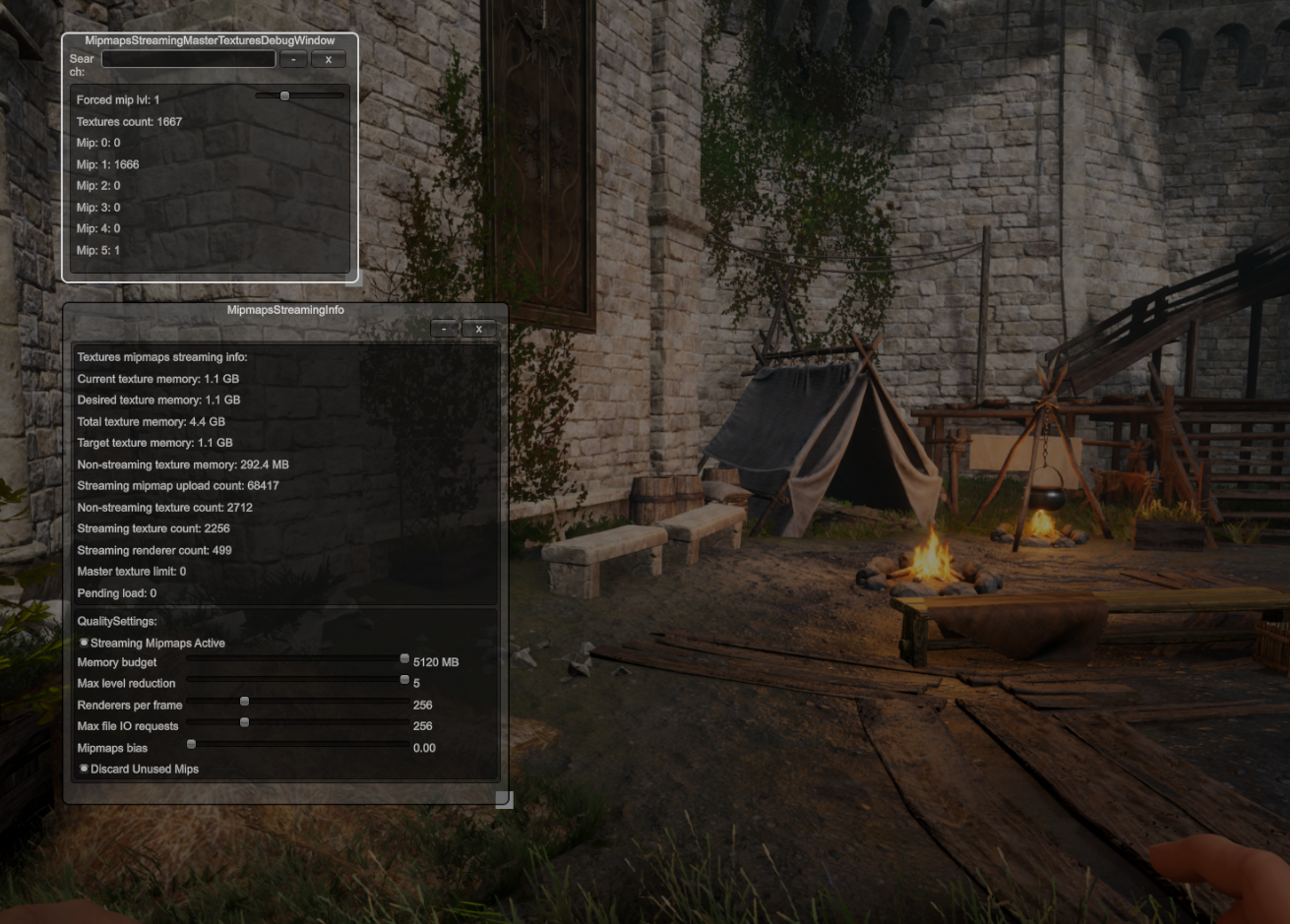
The following stats show how many textures are at each mip level.
- 292.4 MB of non‑streaming textures.
- 1.2 GB overall memory usage → ≈ 1.0 GB from streamed textures.
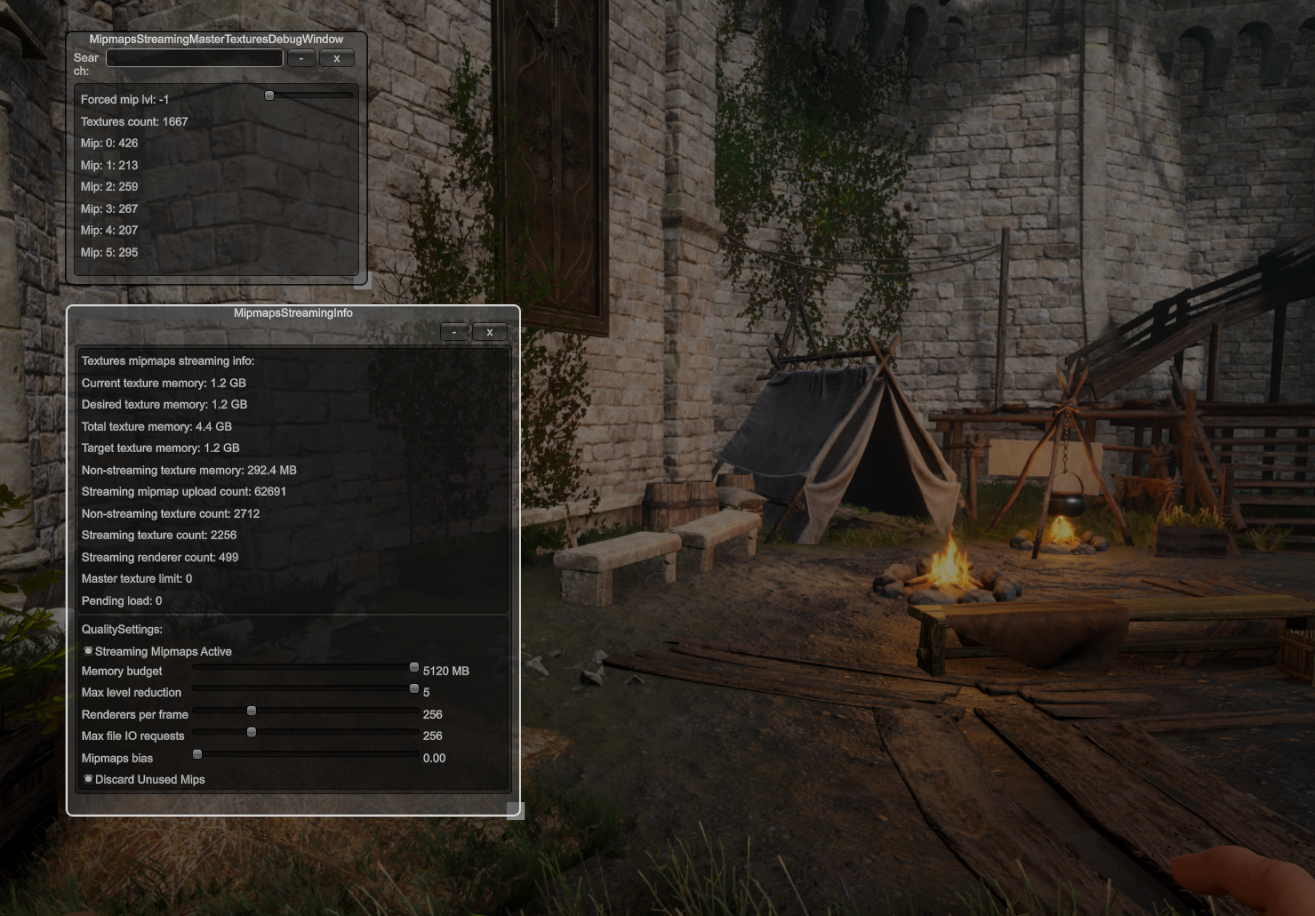
If textures are forced to stay at mip 0, memory usage jumps to 3.4 GB.
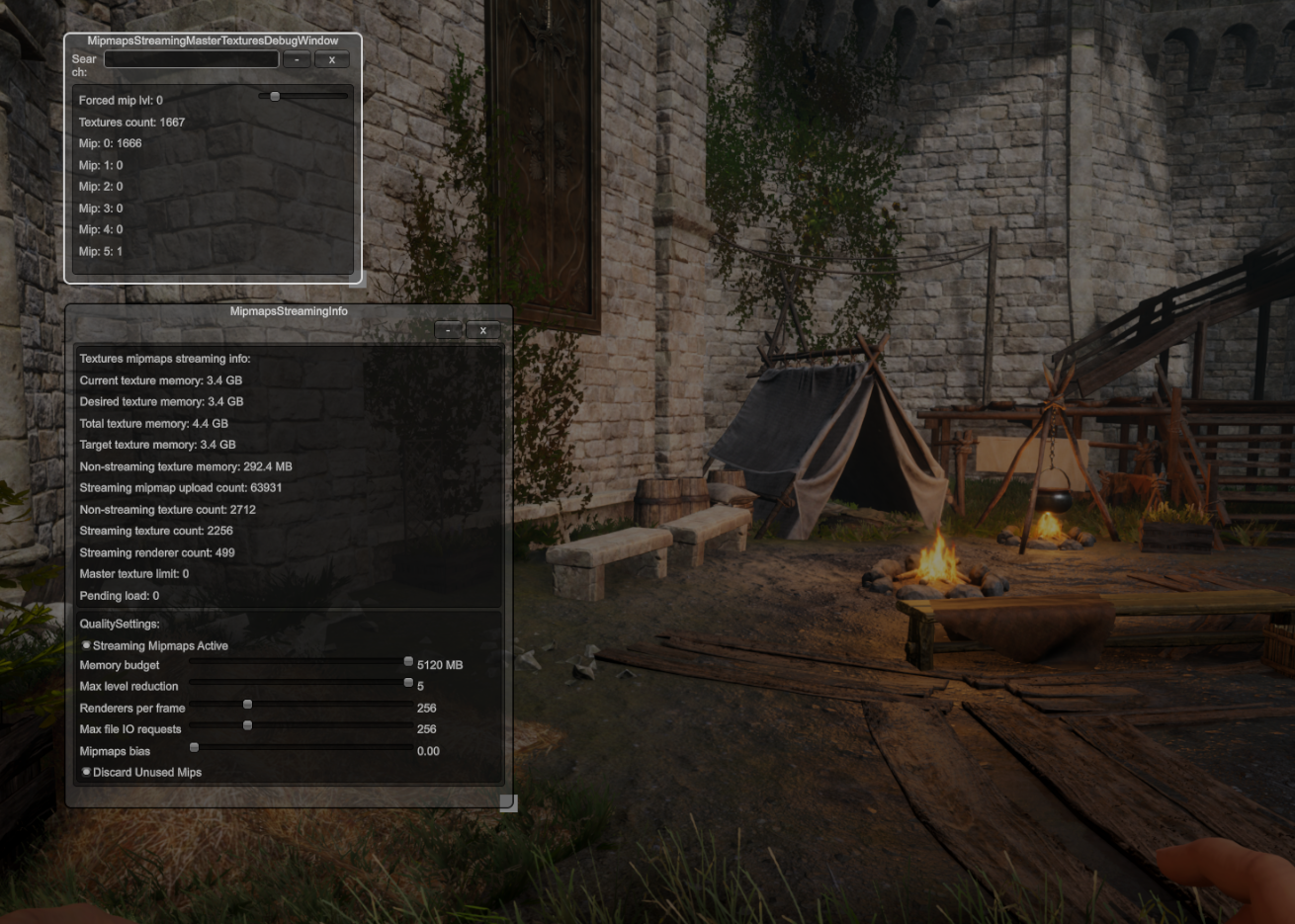
Forcing mip 1 reduces memory pressure to about 1.1 GB, but textures become noticeably blurred.
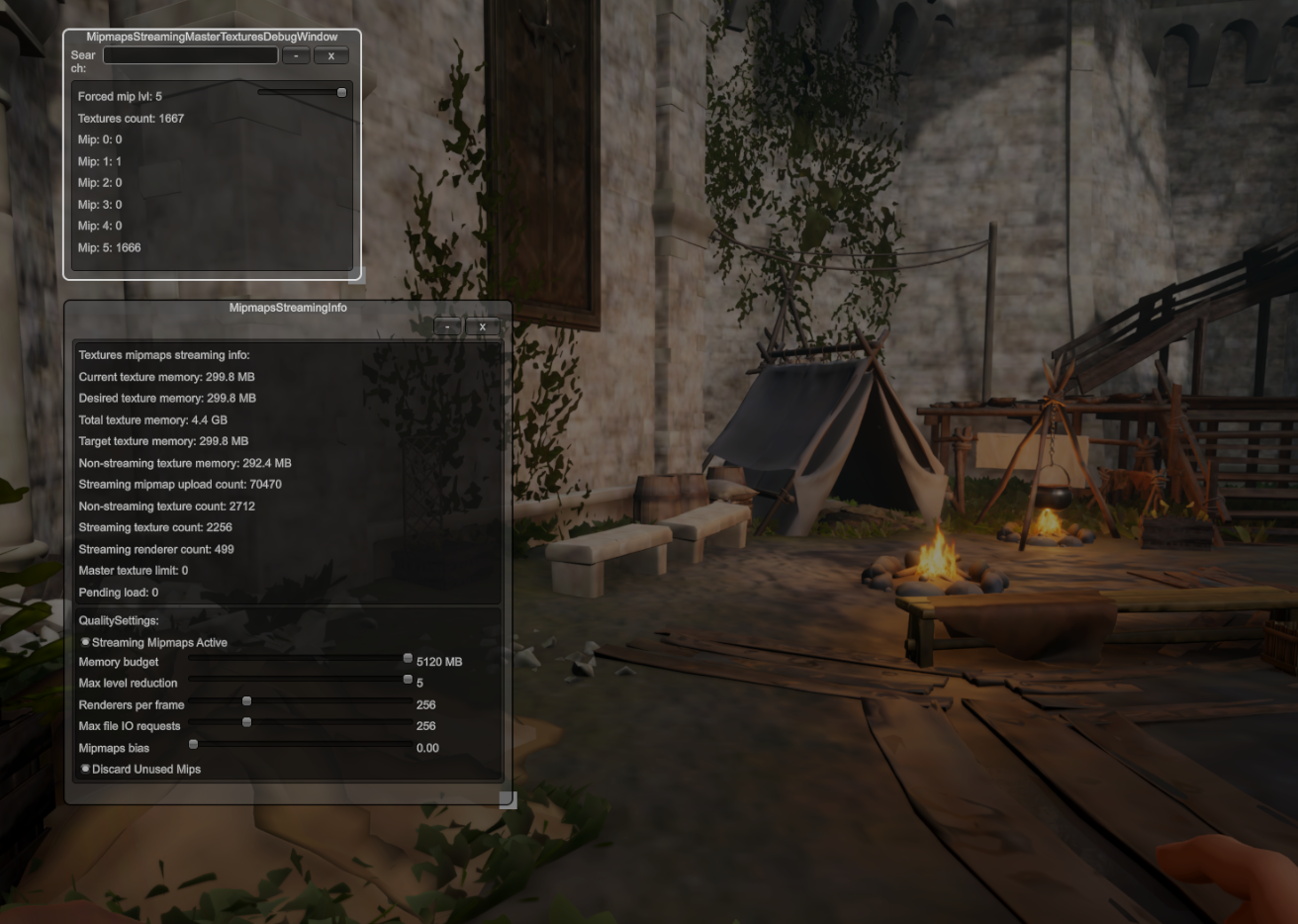
Forcing mip 5 shrinks the streamed textures to 299.8 MB. Subtracting the 292.4 MB of non‑streamed textures shows that 1 667 textures occupy only 7.4 MB.
A small summary table (measurements differ slightly because of a later move) illustrates the savings:
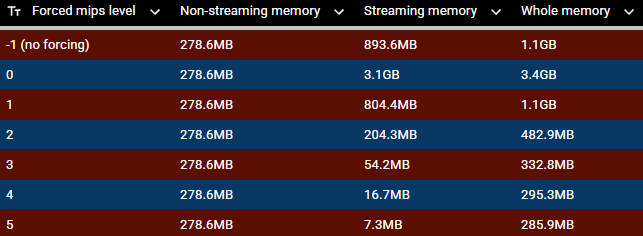
More examples can be found at the end of this article. As you can see, the potential memory savings are massive.
Other considerations
The mip level to sample is calculated by the GPU at render time, so the CPU does not know which mip level is needed. To manage streaming ourselves we must:
- Estimate the minimum required mip level for each texture (mip 0 = original resolution).
- Load that level (and all higher‑resolution levels) if it isn’t already present.
- Unload unused levels when we’re over the memory budget (optional).
This introduces CPU overhead. The mip‑level approximation is derived from UV distribution, distance to the camera, and camera settings, which can differ per renderer.
Unity’s out‑of‑box support
Unity’s engine code already contains a CPU‑side mip‑level approximation for MeshRenderer and SkinnedMeshRenderer. For unknown reasons it is very slow, so Unity processes only a limited number of renderers per frame (see QualitySettings.streamingMipmapsRenderersPerFrame).
This functionality is hidden from C#. Consequently, you can’t directly override it from managed code without using native plugins or reflection tricks.
Mipmaps Streaming Overview
Internal value: You can either use the texture as‑is with vanilla renderers, or fully re‑implement it yourself.
As you know, we have custom rendering solutions (including the ECS way where Unity does not implement mipmaps streaming – great job). This indicates we must implement mipmaps streaming ourselves (CPU‑level calculations and request handling; GPU resource handling remains Unity’s responsibility and cannot be re‑implemented).
Requirements
Initial requirements
- Must be fast
- Avoid runtime allocations
Debug capabilities
- Detect when a texture becomes blurred
- Identify textures that should be streamed but are mis‑configured
Additional requirements (after version 1)
- The system must have universal inputs, because Drake, Leshy, Medusa, and HLODs need mipmaps streaming support.
- Easily expandable, as more systems may be introduced (e.g., Kandra was added later, and the connection between both systems required only a few lines of code).
Implementations
Version 1
At that time most data lived in ECS, so it felt natural to implement the feature as a System. However, we were still using the external Entities and Entities Graphics packages, which forced us to duplicate some material‑registration code.
- Extracting textures from a material is very costly (Unity’s shader/material pipeline is sluggish).
- Slicing in an ECS system is hard and odd.
- We needed multiple caches for materials, textures, reference counts, and mappings.
Consequences
- Duplicated code → unnecessary slowdowns
- Complex caching strategy → giga‑complex code, debugging nightmare, painful extensions
- Systems act like singletons, but accessing them and storing data feels awkward.
It wasn’t impossible to maintain and plug new rendering systems into this version, but it was a long process, and debugging capabilities were nearly non‑existent.
Version 2
The first version proved rigid and error‑prone, so we added the requirement that the system be easily expandable to plug in other systems or apply fixes.
To simplify the code, a small layer of indirection was introduced:
- A system registers a Material.
Material_MipMapstracks the textures of that material.- In a background thread the system provides a Mip Factor associated with a
MaterialHandle. - For any material, factors are gathered and
Interlocked.CompareExchangestores the minimum factor. - The texture‑handling part of the system consumes this factor and applies similar logic to the extracted textures.
Adding a new system – Kandra example
[BurstCompile]
struct KandraMipmapsFactorJob : IJobFor {
    public CameraData cameraData;
    [ReadOnly] public UnsafeBitmask takenSlots;
    [ReadOnly] public UnsafeBitmask toUnregister;
    [ReadOnly] public UnsafeArray xs;
    [ReadOnly] public UnsafeArray ys;
    [ReadOnly] public UnsafeArray zs;
    [ReadOnly] public UnsafeArray radii;
    [ReadOnly] public UnsafeArray rootBoneMatrices;
    [ReadOnly] public UnsafeArray reciprocalUvDistributions;
    [ReadOnly] public UnsafeArray> materialIndices;

    public MipmapsStreamingMasterMaterials.ParallelWriter outMipmapsStreamingWriter;

    public void Execute(int index) {
        var uIndex = (uint)index;
        if (!takenSlots[uIndex] || toUnregister[uIndex]) {
            return;
        }

        var position = new float3(xs[uIndex], ys[uIndex], zs[uIndex]);
        var radius   = radii[uIndex];
        var scale    = math.square(math.cmax(rootBoneMatrices[uIndex].Scale()));

        var factorFactor = MipmapsStreamingUtils.CalculateMipmapFactorFactor(
            cameraData, position, radius, scale);
        var fullFactor   = reciprocalUvDistributions[uIndex] * factorFactor;
        var subMaterialIndices = materialIndices[uIndex];

        // ... further processing ...
    }
}
Note: You can (un‑)register a material mainly during the Update phase.
- EarlyUpdate: Extract textures from newly added materials.
- PreLateUpdate: Start jobs like the one above.
- PostLateUpdate: Complete jobs and update per‑texture requested mip levels.
Closing Thoughts
Mipmaps streaming is a crucial technique to lower memory pressure—especially in Unity, which already suffers from high memory usage. Virtual textures would be even more impactful, but Unity currently offers no solid solution, and we’re not ready to adopt a community‑maintained implementation.
By simplifying the code, I was able to make it faster as well. A modest amount of indirection (as opposed to deep abstraction) makes the system easier to understand, and clear reasoning leads to the best optimizations.
When designing architecture, keep the mental model of the tools you’ll use in mind. An ECS system may feel like a singleton, but the resulting architecture can be either a nightmare or a dream depending on how you structure it.
More Examples of Stats
Act I – Starting Beach

Graveyard

Under bridge

Act II
Wyrd‑tower

Farmlands

Inside interior (overworld is loaded in background)

Cuanacht city

Act II (continued)
Village

Capitol

